Kingston ValueRAM 4GB DDR4-2400 CL17 SODIMM

SODIMM size for laptops and mini PCs verified Nov 29
32/100 overall score
Close to the usual price of CA$77.22.
90-day low CA$75.47Usual CA$77.22High CA$108.93
90-day low CA$75.47Usual CA$77.22High CA$108.93
Price over the last 90 days: low CA$75.47 on Sep 16, high CA$108.93. Usual price CA$77.22. Today CA$78.09.
- Capacity
- 4GB
- Kit
- 1 x 4GB
- Memory
- DDR4
- Speed
- 2400 MT/s
- CAS latency
- CL17
- Form factor
- SODIMM
Compare prices at 2 stores
Cheapest first. New, refurbished and bundled offers are kept apart, so you compare like with like.
| Store | Sold by | Colour and condition | Price | vs lowest | Last checked | Link |
|---|---|---|---|---|---|---|
| New2 offersSingle unit | ||||||
| Amazon | Marketplace seller | Not listed | CA$78.09 | Lowest price | 2 days ago | Go to store |
| Out of stock when last checked | ||||||
| Newegg | Newegg | Not listed | No price | Out of stock | 5 days ago | Go to store |
 Source: PriceZen, checked Nov 27, 2026
A price counts as current when we checked it in the last 7 days. “Marketplace seller” means a third-party seller on that store, not the store itself.
Price history
The usual store price is CA$77.22, and the lowest price in the last 90 days was CA$75.47.
Checked that dayNot checked that day, still on offer
Source: PriceZen, checked Nov 27, 2026











Snapshot
The 30-Second Version
The Kingston ValueRAM KVR24S17S6/4 is a basic 4GB DDR4 laptop memory module running at 2400 MT/s CL17. It's reliable and compatible, but the capacity is tiny by modern standards and the price per gigabyte is high. Buy it to replace a dead stick in an older laptop, not to upgrade.
Pros & Cons
Pros
- Standard JEDEC spec works in virtually any DDR4 laptop 89th
- Strong affordability score at the 88th percentile
- Low 1.2V power draw
- Kingston reliability and lifetime warranty
- Good option for pairing with existing 4GB modules
Cons
- Only 4GB, capacity score sits at the 9th percentile
- 2400 MT/s is slow even by DDR4 standards
- 1Rx16 configuration slightly reduces bandwidth
- Price per gigabyte is high compared to 8GB and 16GB kits
- No heat spreader or any visual appeal
What owners think
The Word on the Street
- Buyers consistently report that the module works right out of the box in a variety of laptops, including MSI and Acer models.
- Several owners mention noticeable speed improvements after installing this stick, especially when adding it to systems that previously had limited memory.
- A few reviewers note that while the RAM performs as expected, the 4GB capacity feels limiting for anything beyond basic tasks.
How owner sentiment changed over time
ExclusiveBased on when customers actually wrote their reviews - so you can see whether early praise held up.
3 written reviews, May 2026: 3 happy
Each dot is one written review, in the month it was written. Happy = 4-5★, mixed = 3★, unhappy = 1-2★.
The proof
Performance
Let's be clear about what 2400 MT/s CL17 means in practice. This is JEDEC standard DDR4, the baseline spec that every DDR4 laptop supports. It's not fast. In our database, the speed score lands at the 29th percentile, which puts it below average even among budget laptop memory. The latency score is middle of the pack at the 43rd percentile. So you're getting exactly what the spec sheet promises and nothing more. For everyday tasks like web browsing, document editing, and video streaming, this is fine. You won't notice the difference between this and a 3200 MT/s kit in those workloads.
But if you're asking whether this is good for gaming or content creation, the answer is no, not really. Modern games want 16GB minimum, and 4GB sticks running at 2400 MT/s will bottleneck integrated graphics hard. The 1Rx16 configuration means this module uses fewer memory chips at higher density per chip, which can slightly reduce bandwidth compared to 1Rx8 modules. It's a minor difference, but it's there. For an older laptop that just needs to boot and run a browser, this does the job without complaint.
Specifications
Full Specifications
Memory
| Type | DDR4 |
| Form Factor | SODIMM |
| Total Capacity | 4096 |
| Modules | 1 |
| Per Module | 4096 |
| Pins | 260 |
| Rank | 1Rx16 |
Performance
| Speed | 2400 |
| CAS Latency | 17 |
| Voltage | 1.2 |
Class
| ECC | No |
| Registered | No |
Features
| RGB | No |
| Heat Spreader | No |
vs Competition
The Timetec 76 is the closest direct competitor here, and it's a better value in most cases. Timetec sells 4GB DDR4 SODIMMs at similar or lower prices, and their modules often use 1Rx8 configurations that squeeze out a bit more bandwidth. The Team Group Elite TED48G3200C22-S01 is an 8GB stick running at 3200 MT/s, and it typically costs only slightly more than this Kingston module while doubling capacity and adding speed. If your laptop supports 3200 MT/s, that's the smarter buy. The Crucial CT16G4DFRA32A is a 16GB module that completely outclasses this stick in capacity, though it costs more upfront. And the XPG D35 and Netac Shadow III are aimed at desktop builds, so they're not direct comparisons for laptop users, but they show how much more memory you can get per dollar when you step up to 8GB or 16GB. The Kingston's main advantage is compatibility. It's the safest bet for older laptops with picky memory controllers.
| Spec | Kingston ValueRAM | Corsair Vengeance RGB | PNY XLR8 Gaming EPIC-X RGB | G.Skill Ripjaws V | Team Group T-Force Delta RGB | Patriot Viper Venom |
|---|---|---|---|---|---|---|
| Capacity | 4GB | 32GB | 32GB | 32GB | 32GB | 16GB |
| Kit | 1 x 4GB | 2 x 16GB | 2 x 16GB | 2 x 16GB | 2 x 16GB | 1 x 16GB |
| Memory Type | DDR4 | DDR5 | DDR4 | DDR4 | DDR4 | DDR5 |
| Speed Mts | 2400 | 6200 | 3200 | 3200 | 3200 | 6000 |
| Cas Latency | CL17 | CL36 | CL16 | CL16 | CL16 | CL30 |
| Form Factor | SODIMM | UDIMM | UDIMM | UDIMM | UDIMM | UDIMM |
| Ecc | No | No | No | No | No | No |
| Compare | Compare | Compare | Compare | Compare |
| Product | Speed | Feature | Latency | Capacity | Affordability |
|---|---|---|---|---|---|
| Kingston ValueRAM | 28.3 | 18 | 42.6 | 8.6 | 88.8 |
| Corsair Vengeance RGB Compare | 92.5 | 89.6 | 76.9 | 70.4 | 16.9 |
| PNY XLR8 Gaming EPIC-X RGB Compare | 53.2 | 89.6 | 87.6 | 70.4 | 45.8 |
| G.Skill Ripjaws V Compare | 53.2 | 74.8 | 87.6 | 70.4 | 48.2 |
| Team Group T-Force Delta RGB Compare | 53.2 | 89.6 | 87.6 | 70.4 | 46.4 |
| Patriot Viper Venom Compare | 87.6 | 61.5 | 87.6 | 44.8 | 49.2 |
Price
Value & Pricing
Here's where things get tricky. The affordability percentile is high, but that's relative to other laptop memory modules, not an absolute statement that this is cheap. At $41 USD for 4GB, you're paying over $10 per gigabyte. An 8GB stick from Crucial or Team Group often runs $25 to $35, which is less than half the price per gigabyte. In Europe, the spread is EUR 58 to EUR 64 across four listings, and the best deal in our data is at the EUR 58 price point. If you're in Germany, Spain, France, or Italy, shop around before clicking buy. The CAD 78 listing in Canada is also steep. For what this is, a basic 4GB module, you're paying a premium for Kingston's name and the convenience of getting a compatible stick without hunting through used listings.
Read more
Overview
The Kingston ValueRAM KVR24S17S6/4 is a 4GB stick of DDR4 laptop memory, and it's about as basic as RAM gets. This is a single 260-pin SODIMM running at 2400 MT/s with CL17 timings and a standard 1.2V. No heat spreaders, no RGB, no fancy branding. Just a green PCB doing its job. Kingston positions this for system integrators and people who buy by spec, not by looks. And honestly, that's the right call here. If you're searching for cheap DDR4 laptop RAM to revive an older machine, this is the kind of stick that shows up in the results.
At 4GB, this is a small module by today's standards. Most modern laptops ship with 8GB or 16GB minimum, and Windows 11 will feel cramped on 4GB alone. But as a second stick to pair with existing memory, or as a drop-in replacement for a dead module in an older laptop, it makes sense. The price hovers around $41 USD in the States and EUR 58 to EUR 64 across European listings, which is more than you'd expect for 4GB, but availability for older DDR4 SODIMMs is getting spotty.
We pulled this into our database and ran it through the usual scoring. It lands at 30.3 out of 100 overall, which sounds rough, but context matters. This isn't a performance part. It's a utility part. The affordability score is strong at the 88th percentile, which tells you this stick is priced competitively for what it is. The capacity score, on the other hand, sits at the 9th percentile. That's dead last territory, and it's the main thing holding this module back.
Common Questions
Q: Is the Kingston ValueRAM KVR24S17S6/4 good for gaming?
Not really. 4GB of RAM at 2400 MT/s is below the minimum for most modern games, which typically want 8GB or 16GB. It might handle older titles or very light indie games, but you'll hit stuttering and long load times quickly.
Q: Will this Kingston 4GB DDR4 SODIMM work in my laptop?
If your laptop uses DDR4 SODIMM slots and supports 2400 MT/s, this module should work. It's a standard JEDEC spec stick with no XMP requirements, so compatibility is about as broad as it gets for DDR4 laptops.
Q: Can I mix this 4GB stick with my existing RAM?
Yes, in most cases. Mixing capacities and speeds is generally fine, though the system will run all modules at the speed of the slowest stick. If your existing RAM is also 2400 MT/s, you'll get full performance. If it's faster, everything drops to 2400 MT/s.
Q: How does the Kingston ValueRAM compare to Crucial laptop memory?
Crucial's 8GB and 16GB DDR4 SODIMMs offer much better price per gigabyte and higher capacities. The Kingston stick is fine for a basic 4GB replacement, but Crucial is the better value if you're upgrading capacity or want more headroom.
Who Should Skip This
Skip this if you're building or upgrading a laptop for anything beyond basic office work and web browsing. If you run virtual machines, edit photos or video, play games, or keep dozens of browser tabs open, 4GB will frustrate you daily. You should also skip it if your laptop already has 8GB or more and you're looking for a meaningful speed boost. In that case, an 8GB or 16GB stick from Crucial or Team Group is the better move. And if your laptop supports DDR5, this isn't compatible at all, so make sure you're actually on a DDR4 platform before ordering.
Verdict
Should you buy this? Only if you need exactly 4GB of DDR4 SODIMM and you need it to just work. This is a repair part, not an upgrade. If your laptop has a dead 4GB stick and you want to get it running again without spending much, the Kingston ValueRAM KVR24S17S6/4 is a safe, boring, reliable choice. Kingston's testing and warranty mean you're unlikely to get a dud. But if you're looking to improve performance, add capacity, or future-proof your machine, skip this and go straight to an 8GB or 16GB kit. The price per gigabyte on 4GB modules is bad enough that spending a little more gets you a lot more memory. For most people, this stick is a stopgap, not a solution.
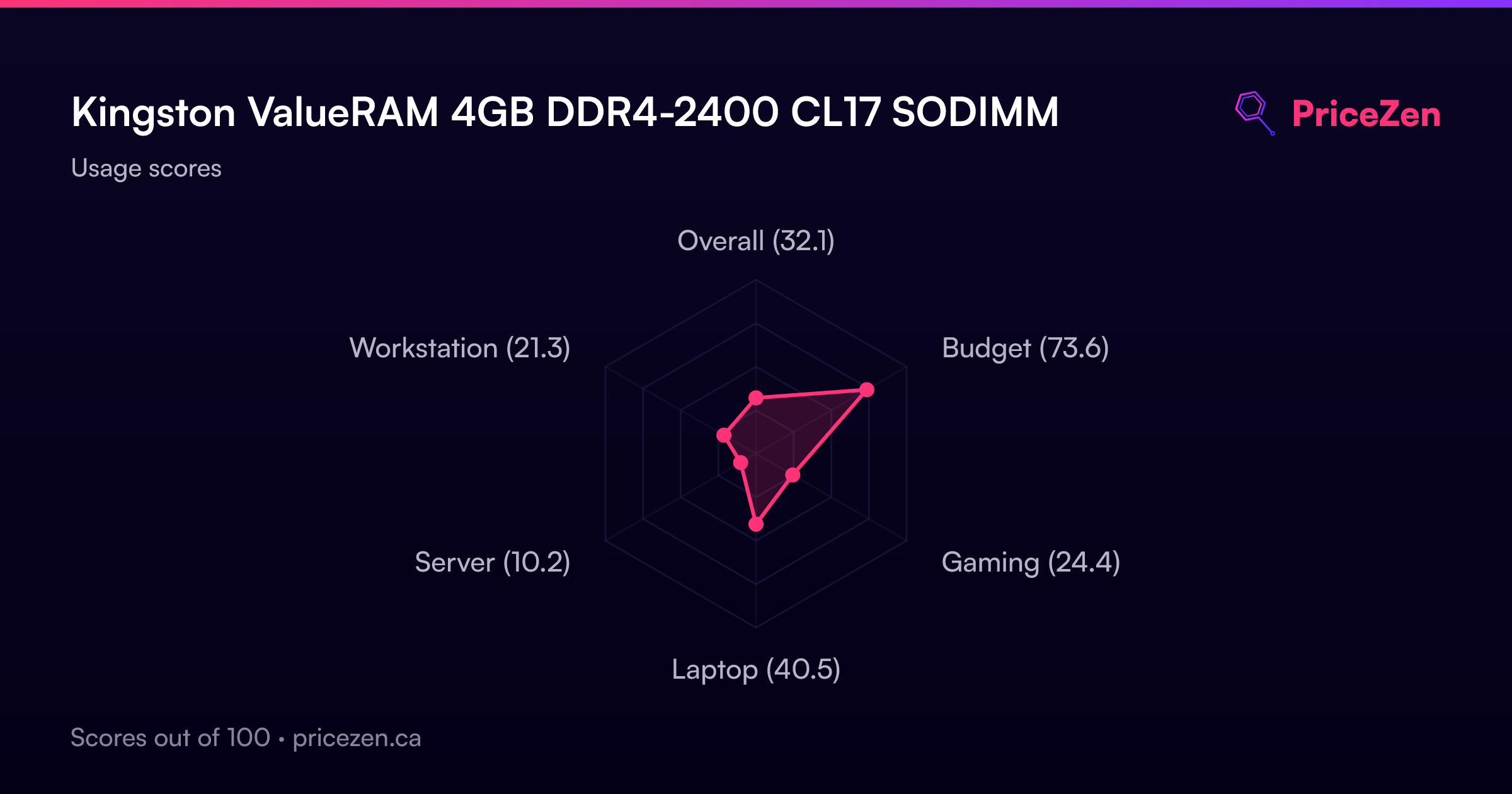
Usage Scores
- Overall32.1
- Budget73.6
- Gaming24.4
- Laptop40.5
- Server10.2
- Workstation21.3