Kingston ValueRAM 8GB DDR4-2400 CL17 SODIMM
This single 8GB DDR4 SODIMM module operates at a standard 2400 MT/s with CL17 latency, providing a reliable path to upgrade laptop memory. It is backed by a lifetime warranty and free technical support from an established industry manufacturer, ensuring long-term dependability. This module is best for budget-conscious users seeking to revive an older laptop with a simple, spec-standard memory upgrade.












Snapshot
The 30-Second Version
The Kingston ValueRAM KVR24S17S8/8 is an 8GB DDR4 SODIMM module built for simple laptop memory upgrades. It runs at a modest 2400 MT/s with CL17 timings and comes with a lifetime warranty. It's a safe, boring choice for older laptops, but faster options exist for similar money.
Pros & Cons
Pros
- Lifetime warranty from a reputable brand 87th
- JEDEC standard timings mean broad compatibility 75th
- Low 1.2V power draw is easy on laptop batteries
- Simple drop-in upgrade for older DDR4 laptops
- Strong social proof from thousands of buyers
Cons
- 2400 MT/s is slow by modern standards
- Single 8GB stick limits future expansion
- No heat spreader or any visual flair
- Pricing varies wildly between retailers
- Not a good fit for gaming or heavy multitasking
The proof
Performance
At 2400 MT/s and CL17, this module sits in the lower third of our database for speed, around the 29th percentile. That's not a knock on Kingston, it's just what DDR4-2400 is in a world where 3200 and 3600 kits are common. For everyday tasks like web browsing, email, and office apps, you won't notice the difference. The latency lands at the 43rd percentile, which is about average for this class of memory. In practice, that means snappy enough for general use but nothing that'll impress anyone running benchmarks.
Capacity is the bigger story here. A single 8GB stick puts this at the 23rd percentile for capacity, which makes sense given that 16GB and 32GB kits dominate the market now. If your laptop has two SODIMM slots, you could pair two of these for 16GB total, but buying one stick at a time is rarely the cheapest route. For a basic upgrade from 4GB, though, 8GB is a meaningful step up and will reduce the constant swapping that makes old laptops feel ancient.
Specifications
Full Specifications
Memory
| Type | DDR4 |
| Form Factor | SODIMM |
| Total Capacity | 8192 |
| Modules | 1 |
| Per Module | 8192 |
| Pins | 260 |
| Rank | 1Rx8 |
Performance
| Speed | 2400 |
| CAS Latency | 17 |
| Voltage | 1.2 |
Class
| ECC | No |
| Registered | No |
Features
| RGB | No |
| Heat Spreader | No |
vs Competition
Stacked against the Corsair Vengeance LPX CMK32GX4M2D3600C18, this Kingston stick looks positively ancient. The Corsair kit runs at 3600 MT/s and comes in 32GB total, but it's also a desktop DIMM, not a SODIMM, so it's not a direct swap for most laptops. If you're upgrading a desktop, skip the Kingston entirely and look at faster options. The G.Skill Flare X5 and Patriot Viper Venom are DDR5 parts, so they're in a completely different league and not compatible with DDR4 laptops anyway. That leaves the Timetec Pinnacle Konduit and Team Group T-FORCE VULCAN Z as the more realistic competitors for a laptop SODIMM upgrade. Both offer similar or better specs at competitive prices, and Team Group's VULCAN Z line often undercuts Kingston on price per gigabyte.
For laptop owners specifically, the real question is whether you need DDR4-2400 at all. If your laptop supports faster DDR4 like 2666 or 3200, you'll get better performance for roughly the same money elsewhere. The Kingston ValueRAM makes the most sense when your laptop's BIOS is picky and you want the safest possible compatibility, or when you're replacing a failed stick and just need something that works.
| Spec | Kingston ValueRAM | Corsair Vengeance RGB Pro SL | Crucial Pro Overclocking | G.Skill Ripjaws S5 | Patriot Viper Venom | V-Color Manta XSky |
|---|---|---|---|---|---|---|
| Capacity | 8GB | 32GB | 32GB | 32GB | 32GB | 32GB |
| Kit | 1 x 8GB | 2 x 16GB | 2 x 16GB | 2 x 16GB | 2 x 16GB | 2 x 16GB |
| Memory Type | DDR4 | DDR4 | DDR5 | DDR5 | DDR5 | DDR5 |
| Speed Mts | 2400 | 3600 | 6000 | 6000 | 6000 | 6400 |
| Cas Latency | CL17 | CL18 | CL36 | CL36 | CL30 | CL32 |
| Form Factor | SODIMM | UDIMM | UDIMM | UDIMM | UDIMM | UDIMM |
| Ecc | No | No | No | No | No | No |
| Compare | Compare | Compare | Compare | Compare |
| Product | Speed | Feature | Latency | Capacity | Social Proof | Affordability |
|---|---|---|---|---|---|---|
| Kingston ValueRAM | 28.3 | 18 | 42.5 | 22.3 | 87.3 | 74.5 |
| Corsair Vengeance RGB Pro SL Compare | 63.1 | 89.6 | 87.6 | 70.5 | 96.4 | 32.4 |
| Crucial Pro Overclocking Compare | 87.6 | 74.7 | 75.1 | 70.5 | 96.4 | 29.1 |
| G.Skill Ripjaws S5 Compare | 87.6 | 74.7 | 75.1 | 70.5 | 87.3 | 26.5 |
| Patriot Viper Venom Compare | 87.6 | 74.7 | 87.6 | 70.5 | 57.9 | 31.1 |
| V-Color Manta XSky Compare | 94.8 | 74.7 | 87.6 | 70.5 | 50.7 | 29.2 |
Price
Value & Pricing
Value is tricky here because the price depends entirely on where you live and where you shop. In Europe, you'll see this stick listed anywhere from EUR 111 to EUR 169, and that's a huge gap for the exact same product. The best deal in our data comes from the lower end of that range, so if you're paying closer to EUR 169, you're overpaying. In the US, USD 73 is more reasonable, though still not a screaming deal for 8GB of DDR4-2400 in a market where faster kits sometimes cost less. Compared to alternatives like the Timetec Pinnacle Konduit or Team Group T-FORCE VULCAN Z, you're paying a small premium for the Kingston name and lifetime warranty. Whether that's worth it depends on how much you value hassle-free support.
Amazon 1 offer From CA$156
Price history
Read more
Overview
The Kingston ValueRAM KVR24S17S8/8 is an 8GB DDR4 SODIMM module aimed squarely at laptop owners who just need a straightforward memory upgrade without paying for flashy heat spreaders or RGB. It runs at 2400 MT/s with CL17 timings at 1.2V, which is bog-standard JEDEC spec. Nothing exotic here, just a single 260-pin stick that slots into most older laptops and mini PCs that still use DDR4. Pricing is all over the place depending on where you shop, from EUR 111 to EUR 169 in Europe, USD 73 in the US, and CAD 194 in Canada. That spread alone tells you to shop around before clicking buy.
If you're searching for 'is the Kingston ValueRAM 8GB good for an older laptop,' the short answer is yes, as long as your machine takes DDR4 SODIMMs and you're not expecting gaming-grade performance. This is a budget-friendly way to breathe life into a sluggish laptop, especially if you're stuck at 4GB and constantly hitting the ceiling. Just don't expect it to transform a machine with a spinning hard drive into a speed demon. Memory helps, but it's one piece of the puzzle.
Kingston backs this with a lifetime warranty and free tech support, which is nice for a part this cheap. The ValueRAM line is their no-frills, JEDEC-compliant range, tested to work at spec rather than pushed beyond it. That's exactly what most people need when they're upgrading an office laptop or a hand-me-down machine.
Common Questions
Q: Is the Kingston ValueRAM 8GB compatible with my laptop?
It works with laptops that use DDR4 SODIMM memory and support 2400 MT/s or lower speeds. Check your laptop's manual or use Kingston's memory finder tool to confirm compatibility before buying.
Q: Can I mix this Kingston 8GB stick with my existing RAM?
You can, but the system will run all sticks at the speed of the slowest module. Mixing brands and speeds sometimes causes stability issues, so matching specs as closely as possible is the safer route.
Q: Is 8GB of RAM enough for Windows 11?
8GB is the minimum for comfortable Windows 11 use, and it's fine for browsing, email, and office work. If you multitask heavily or keep dozens of browser tabs open, 16GB would be a better target.
Q: Does the Kingston ValueRAM KVR24S17S8/8 work in a desktop PC?
No, this is a SODIMM module designed for laptops and small form factor PCs. Desktop systems use full-size DIMMs, so you'd need a different Kingston ValueRAM model for a desktop upgrade.
Who Should Skip This
Skip this if you're building or upgrading a desktop, since you need full-size DIMMs, not SODIMMs. Gamers and content creators should also look past this one, 2400 MT/s and 8GB capacity won't keep up with modern titles or heavy editing workloads. If your laptop supports faster DDR4 like 2666 or 3200, you'll get better performance for similar money from brands like Team Group or Timetec. And if you're already running 8GB and just want more headroom, buying a single 8GB stick to reach 16GB is fine, but a matched 16GB kit is usually the smarter long-term play.
Verdict
Should you buy the Kingston ValueRAM KVR24S17S8/8? If you have an older laptop with a DDR4 SODIMM slot, you're currently running 4GB or less, and you just want a reliable, no-drama upgrade, then yes, this is a solid choice. The lifetime warranty and Kingston's track record mean you're unlikely to have issues, and the JEDEC-standard timings make it about as plug-and-play as memory gets. It's not exciting, but it doesn't need to be.
But if you're building a new system, gaming, or doing anything that benefits from faster memory, look elsewhere. There are faster SODIMM kits available for similar money, and paying a premium for 2400 MT/s in 2024 feels like leaving performance on the table. This is a repair part and a basic upgrade, not an enthusiast product.
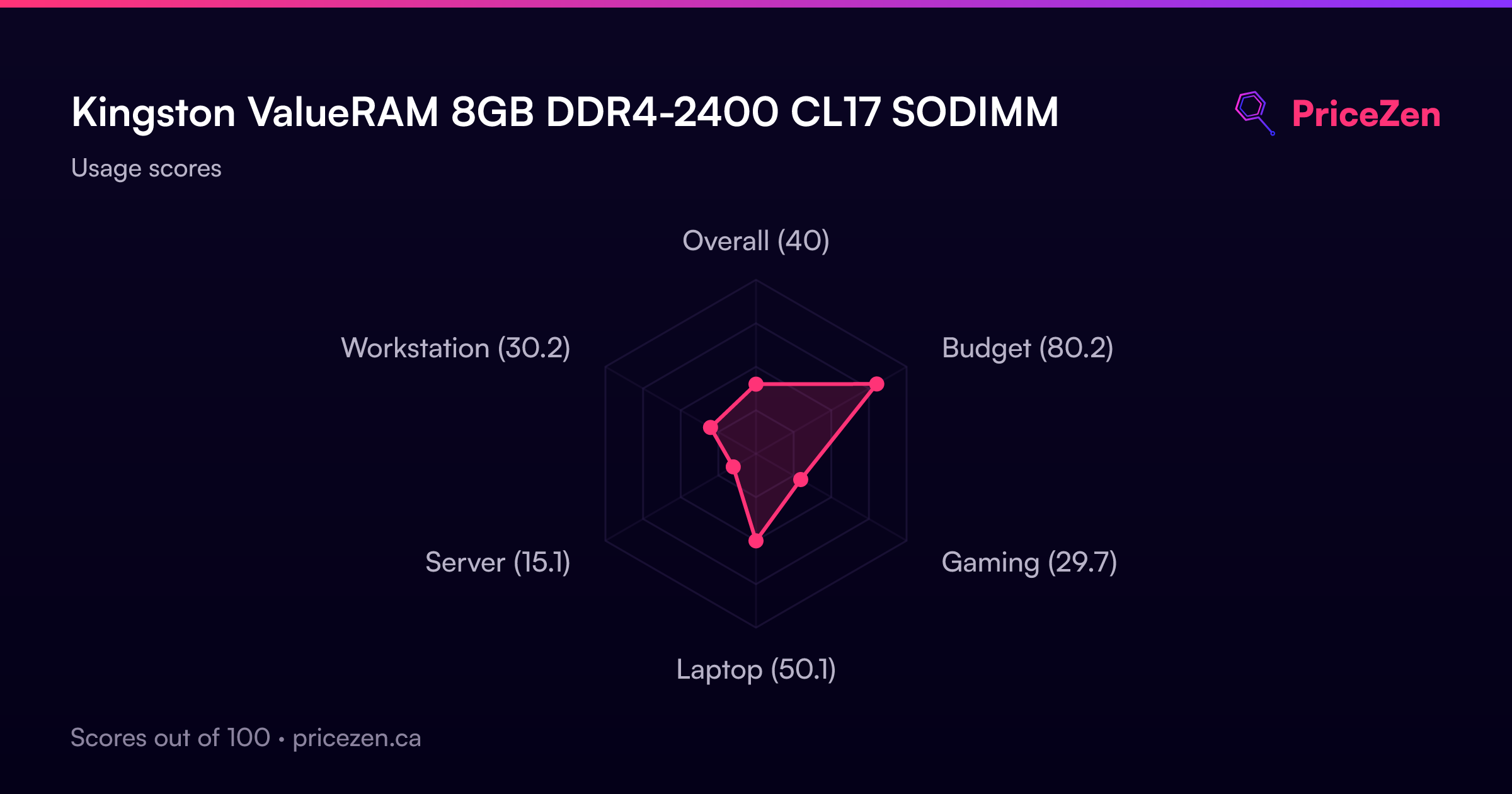
Usage Scores
- Overall40
- Budget80.2
- Gaming29.7
- Laptop50.1
- Server15.1
- Workstation30.2