Kingston ValueRAM 8GB DDR4-2666 CL19 SODIMM
Operating at a standard 2666 MT/s with CL19 latency at 1.2V, this single 8GB DDR4 SODIMM module provides a straightforward upgrade for compatible notebooks. Its 260-pin unbuffered design ensures broad compatibility with older laptops that require a simple, low-power memory boost. This module is best for users reviving aging laptops for basic office tasks and web browsing, not for high-performance gaming or server workloads.












Snapshot
The 30-Second Version
A boring, reliable 8GB SODIMM that does exactly what it says on the tin. Perfect for reviving old laptops, terrible for anything that needs actual speed.
Pros & Cons
Pros
- Dirt cheap way to revive an old laptop 87th
- Runs cool at just 1.2V 80th
- Kingston's lifetime warranty is legit
- Plug and play, no BIOS fiddling needed
Cons
- CL19 latency is slow even for DDR4
- 8GB capacity is getting tight in 2024
- No heat spreader, not that it needs one
- Useless for servers or performance desktops
The proof
Performance
The 2666 MT/s speed lands in the bottom half of our database, around the 38th percentile. Latency is similarly unremarkable at CL19. But here's the thing: for the laptops this is going into, that's fine. Most older systems cap out at 2666 anyway, so you're not leaving performance on the table. The 1.2V draw keeps heat and power consumption low, which matters in cramped laptop chassis.
Specifications
Full Specifications
Memory
| Type | DDR4 |
| Form Factor | SODIMM |
| Total Capacity | 8192 |
| Modules | 1 |
| Per Module | 8192 |
| Pins | 260 |
Performance
| Speed | 2666 |
| CAS Latency | 19 |
| Timings | 19-19-19 |
| Voltage | 1.2 |
Class
| ECC | No |
| Registered | No |
vs Competition
If you're cross-shopping, the Corsair Vengeance RGB Pro and G.Skill TridentZ RGB are in a completely different league. Those are 3200 MT/s desktop kits with heat spreaders and RGB, built for gaming rigs, not laptop upgrades. The Timetec Pinnacle Konduit is the closest real alternative in the budget SODIMM space, and it's worth a look if Kingston stock is thin. But honestly, for a basic laptop RAM swap, brand loyalty to Kingston's warranty and compatibility testing is worth a few extra bucks.
| Spec | Kingston ValueRAM | Corsair Vengeance RGB Pro SL | G.Skill TridentZ RGB | Team Group Xtreem | PNY XLR8 Gaming EPIC-X RGB | Crucial Pro Overclocking |
|---|---|---|---|---|---|---|
| Capacity | 8GB | 32GB | 32GB | 32GB | 32GB | 16GB |
| Kit | 1 x 8GB | 2 x 16GB | 2 x 16GB | 2 x 16GB | 2 x 16GB | 1 x 16GB |
| Memory Type | DDR4 | DDR4 | DDR4 | DDR5 | DDR4 | DDR5 |
| Speed Mts | 2666 | 3600 | 4000 | 7200 | 3200 | 6000 |
| Cas Latency | CL19 | CL18 | CL18 | CL34 | CL16 | CL36 |
| Form Factor | SODIMM | UDIMM | UDIMM | UDIMM | UDIMM | UDIMM |
| Ecc | false | false | false | false | false | false |
| Compare | Compare | Compare | Compare | Compare |
| Product | Speed | Feature | Latency | Capacity | Social Proof | Affordability |
|---|---|---|---|---|---|---|
| Kingston ValueRAM | 37.4 | 18 | 36 | 22.5 | 87.3 | 79.9 |
| Corsair Vengeance RGB Pro SL Compare | 63.3 | 89.5 | 87.6 | 70.6 | 96.4 | 32.2 |
| G.Skill TridentZ RGB Compare | 64.7 | 89.5 | 98.1 | 70.6 | 96.4 | 40.9 |
| Team Group Xtreem Compare | 98.3 | 74.7 | 95.8 | 70.6 | 50.3 | 27.2 |
| PNY XLR8 Gaming EPIC-X RGB Compare | 53.5 | 89.5 | 87.6 | 70.6 | 87.3 | 45.6 |
| Crucial Pro Overclocking Compare | 87.6 | 61.4 | 75.1 | 44.9 | 69.2 | 45.6 |
Price
Value & Pricing
Pricing is all over the map depending on where you shop. In the US you'll find it between USD 63 and USD 73, with Amazon typically at the lower end. European buyers should shop carefully: prices swing from EUR 74 to EUR 157 across German, Spanish, French, and Italian listings. That EUR 157 price is highway robbery. If you're paying more than EUR 80 for this stick, you're getting fleeced. At the low end, it's a solid deal for what it is.
Amazon 1 offer From CA$104
Price history
Read more
Overview
This is the memory stick you buy when your old laptop is wheezing and you just need it to stop choking on Chrome tabs. The Kingston ValueRAM KCP426SS8/8 is an 8GB DDR4 SODIMM running at 2666 MT/s with CL19 timings. It's not flashy, it's not fast by enthusiast standards, but it's dead reliable and cheap enough to be a no-brainer upgrade for older notebooks.
Common Questions
Q: Will this work in my laptop?
If your laptop takes DDR4 SODIMM and supports 2666 MT/s, yes. Check your manual or use a tool like CPU-Z to confirm before buying. Most laptops from 2016 to 2021 are compatible.
Q: Can I mix this with my existing RAM?
Usually yes, but your system will run at the speed of the slowest stick. If your current stick is 2400 MT/s, everything drops to 2400. It'll still work, just slightly slower than this stick's rated speed.
Q: Is 8GB enough in 2024?
For basic browsing, office work, and light media, yes. For gaming, video editing, or heavy multitasking, you'll want 16GB. If your laptop has two slots, buy two of these and run dual channel.
Who Should Skip This
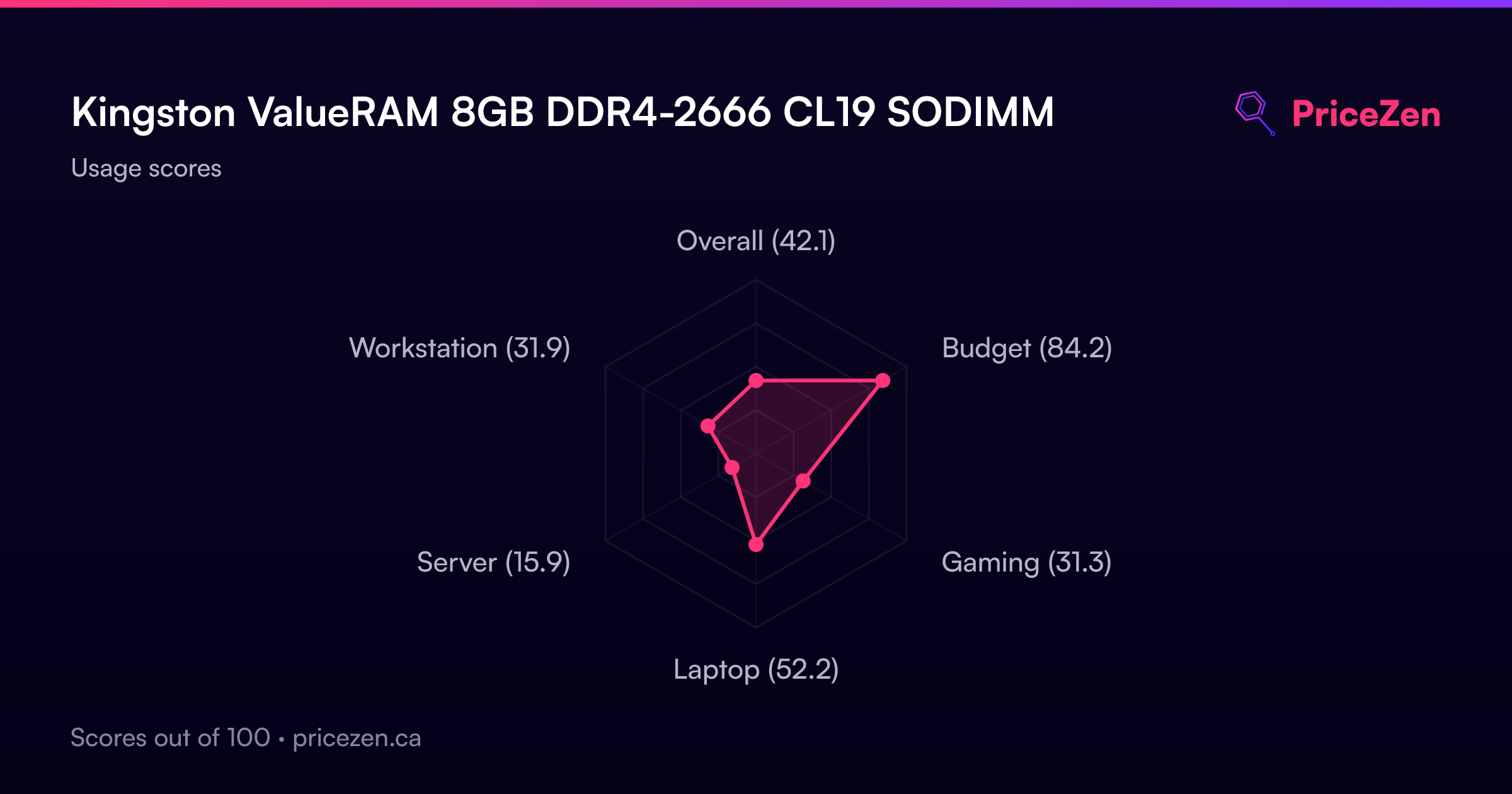
If you're building a desktop, skip this entirely. It's a SODIMM, it won't fit. If you're gaming or doing creative work, 8GB at CL19 is going to frustrate you. Go grab a 16GB kit from Corsair or G.Skill instead. And if you're speccing a server, this is absolutely not the part you want, our data puts it near the bottom for server use.
Verdict
Buy it if you need to breathe life into an older laptop and you're on a budget. This is the definition of a utility purchase. It won't win benchmarks, but it'll make a 4GB or 8GB single-channel laptop feel noticeably snappier when you drop it in. Just don't expect miracles, and don't overpay.
Usage Scores
- Overall42.1
- Budget84.2
- Gaming31.3
- Laptop52.2
- Server15.9
- Workstation31.9