Kingston ValueRAM 4GB DDR3-1333 CL9
Operating at 1333 MT/s with CL9 latency at a standard 1.5V, this single 4GB DDR3 UDIMM provides a straightforward upgrade for aging systems. Its unbuffered, 240-pin design ensures broad compatibility with older desktop platforms requiring a simple capacity boost. This module is best for users resurrecting legacy office PCs or basic home desktops where 4GB is sufficient for light web browsing and document editing.

No current retailer price
Snapshot
The 30-Second Version
The Kingston KVR1333D3N9/4G is a 4GB DDR3 stick that ranks in the 7th percentile for speed but the 96th for affordability. Owners love it, with a 4.7-star average and 90th percentile user sentiment. It's the right call for legacy systems, the wrong call for anything built in the last decade.
Pros & Cons
Pros
- 96th percentile affordability, one of the cheapest ways to max out a DDR3 board 96th
- 90th percentile user sentiment with a 4.7-star average across 102 reviews 90th
- Runs stable at 1.5V with CL9 latency, no voltage tweaking needed 87th
- Low-profile design fits under bulky CPU coolers and in tight cases 67th
- Proven overclocking headroom, owners report stable 4.0 GHz system builds
Cons
- 7th percentile speed, 1333 MT/s is slow even by DDR3 standards
- 9th percentile capacity, a single 4GB stick won't cut it for modern workloads
- 18th percentile feature set, no XMP profiles or fancy heat spreaders
- DDR3 is a dead platform, no upgrade path to newer motherboards
- Server score of 8/100, don't even think about it for anything beyond light homelab use
What owners think
The Word on the Street
How owner sentiment changed over time
ExclusiveBased on when customers actually wrote their reviews - so you can see whether early praise held up.
33 written reviews, Jul 2010 – Apr 2026: 32 happy, 1 unhappy
Across all 102 store ratings: 4.7★. Most owners rate without writing a review. The chart counts the 33 written reviews.
Each dot is one written review, in the month it was written. Happy = 4-5★, mixed = 3★, unhappy = 1-2★.
The proof
Performance
Let's be blunt: 1333 MT/s with CL9 latency is not going to win any races. In our rankings, this stick lands in the 7th percentile for speed and 67th for latency. That latency number is actually the one bright spot here. CL9 at 1333 is about average for DDR3, and the 1.5V rating means it runs cool and stable without pushing voltage limits.
Where this stick surprises people is overclocking headroom. One owner reports running 24GB of it in an ASUS P6X58D Premium with an i7 pushed to 4.0 GHz, passing Prime95 and memory stress tests without a hiccup. That's not something you expect from budget DDR3. The low-profile heat spreader, or lack thereof, helps with clearance in tight cases and crowded CPU cooler setups. It's not fast, but it's predictable, and predictability matters when you're keeping an old workhorse alive.
Specifications
Full Specifications
Memory
| Type | DDR3 |
| Form Factor | UDIMM |
| Total Capacity | 4096 |
| Modules | 1 |
| Per Module | 4096 |
| Pins | 240 |
Performance
| Speed | 1333 |
| CAS Latency | 9 |
| Voltage | 1.5 |
Class
| ECC | No |
| Registered | No |
vs Competition
Stacked against the Timetec 76, Team Group Elite, or G.Skill Aegis, this Kingston stick looks like a fossil. Those competitors are DDR4 parts with capacities starting at 8GB and speeds well past 3000 MT/s. But that's not a fair fight. The KVR1333D3N9/4G isn't competing with modern RAM. It's competing with whatever used DDR3 you can find on eBay, and against that field, it wins on warranty, consistency, and the fact that Kingston actually still makes these. The G.Skill Aegis F4-3000C16S-8GISB doubles the capacity and more than doubles the speed for not much more money, but it won't physically fit in a DDR3 slot. That's the whole story right there.
| Spec | Kingston ValueRAM | Timetec 76 | Team Group Elite | KingBank KJXS | G.Skill Aegis | ADATA Premier |
|---|---|---|---|---|---|---|
| Capacity | 4GB | 16GB | 8GB | 8GB | 8GB | 8GB |
| Kit | 1 x 4GB | 2 x 8GB | 1 x 8GB | 1 x 8GB | 1 x 8GB | 1 x 8GB |
| Memory Type | DDR3 | DDR4 | DDR4 | DDR4 | DDR4 | DDR4 |
| Speed Mts | 1333 | 3200 | 3200 | 3200 | 3000 | 3200 |
| Cas Latency | CL9 | CL22 | CL22 | CL16 | CL16 | CL22 |
| Form Factor | UDIMM | SODIMM | SODIMM | UDIMM | UDIMM | SODIMM |
| Ecc | false | false | false | - | false | false |
| Compare | Compare | Compare | Compare | Compare |
| Product | Speed | Feature | Latency | Capacity | User Sentiment | Social Proof | Affordability |
|---|---|---|---|---|---|---|---|
| Kingston ValueRAM | 7.4 | 18.1 | 66.8 | 8.9 | 90 | 87.3 | 96.2 |
| Timetec 76 Compare | 53.5 | 44.9 | 57.5 | 45 | 90 | 87.3 | 73.9 |
| Team Group Elite Compare | 53.5 | 56.5 | 57.5 | 22.5 | 97.4 | 87.3 | 84.7 |
| KingBank KJXS Compare | 53.5 | 61.5 | 87.6 | 22.5 | 61.6 | 77 | 73 |
| G.Skill Aegis Compare | 44.6 | 56.5 | 79.9 | 22.5 | 0 | 64.1 | 79.1 |
| ADATA Premier Compare | 53.5 | 56.5 | 57.5 | 22.5 | 0 | 96.4 | 70.7 |
Price
Value & Pricing
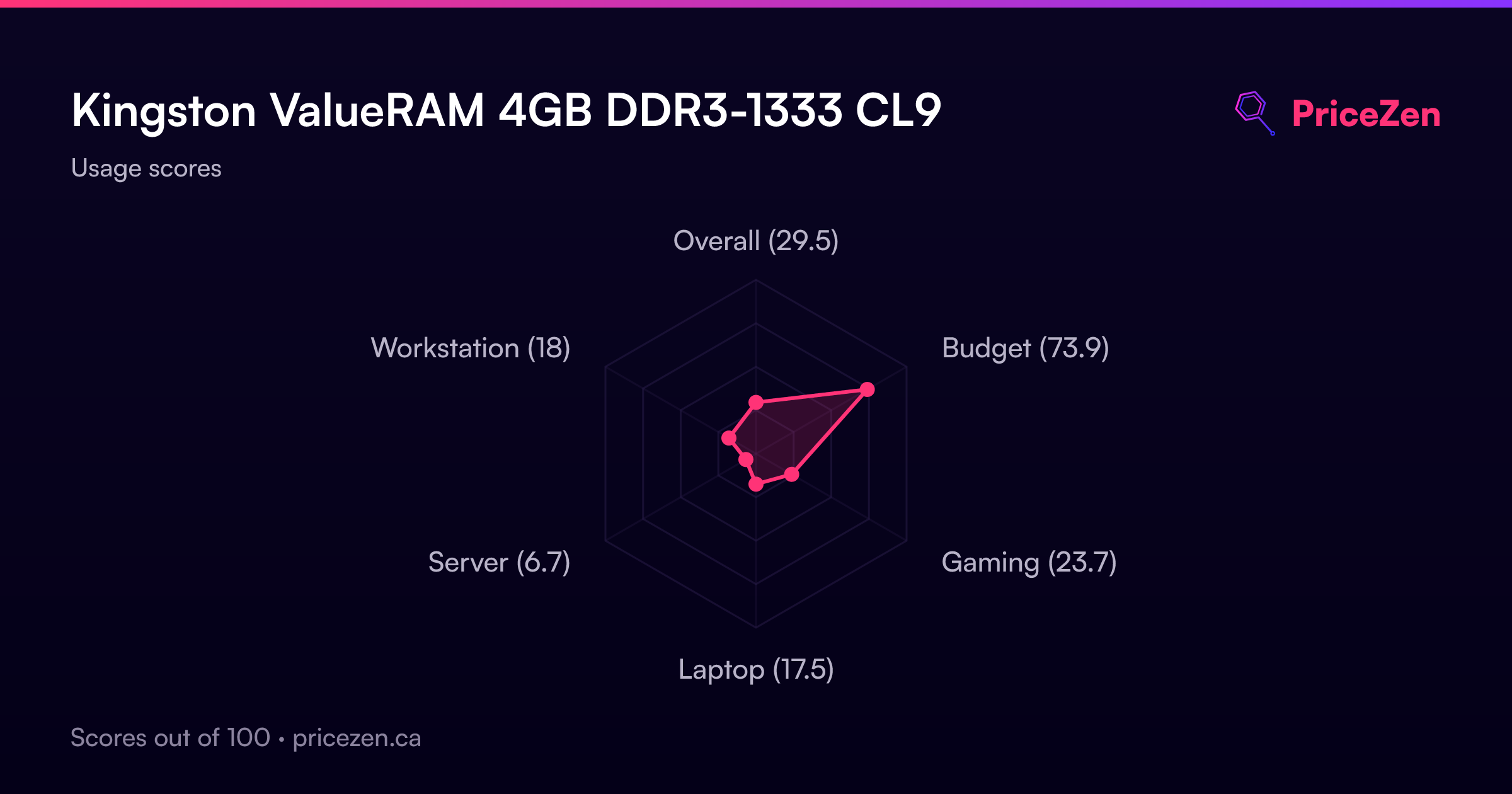
At CAD 23 for a 4GB stick, the math is simple. If you've got an old DDR3 board with empty slots, this is the cheapest way to breathe life into it. Our budget score of 73.4 out of 100 reflects that, and the affordability percentile backs it up. You're not buying performance here. You're buying compatibility and reliability at a price that's basically an impulse purchase. Just don't expect it to transform an aging system into something it isn't.
We started tracking prices for this product on Jun 18, 2026. The chart appears once we have more data.
Read more
Overview
The Kingston KVR1333D3N9/4G sits at a weird crossroads in our database. Its user sentiment lands in the 90th percentile and affordability hits the 96th, but the actual specs are ancient by modern standards. We're talking DDR3 1333 at CL9, a single 4GB stick that ranks in the 9th percentile for capacity and 7th for speed. This is a legacy part, and it knows it.
But here's the thing: for the right machine, this stick is a lifesaver. Owners running older LGA 1366 and AM3 setups swear by it, with a 4.7-star average across 102 reviews. It's cheap, it's stable, and it just works. The question isn't whether this is good RAM in 2025. It's whether your motherboard still speaks DDR3.
Common Questions
Q: Will this RAM work in my motherboard?
If your board takes DDR3 UDIMMs with a 240-pin layout, yes. This stick runs at 1333 MT/s with CL9 latency at 1.5V, which is the most common DDR3 spec out there. Owners report wide compatibility across older Intel and AMD platforms, including LGA 1366 and AM3 boards. Check your motherboard's memory QVL list to be sure.
Q: Can I mix this with other DDR3 sticks?
Generally yes, as long as the other sticks also run at 1333 MT/s and 1.5V. Mixing speeds will force everything down to the slowest stick's speed. The 67th percentile latency ranking means this stick won't hold back a mixed setup much, but for best results, match the exact model.
Q: Is 4GB enough for gaming or heavy multitasking?
No. Our gaming score for this stick is 24.8 out of 100, and capacity lands in the 9th percentile. A single 4GB stick is fine for basic desktop use, light office work, or keeping an old server running. For gaming or anything beyond a handful of browser tabs, you'd want at least 8GB, ideally 16GB, which means buying multiple sticks or looking at a newer platform.
Who Should Skip This
Anyone building a new PC should skip this without a second thought. The 7th percentile speed and 9th percentile capacity mean it's slower and smaller than even budget DDR4, and the 18th percentile feature set means no XMP, no heat spreaders, nothing. If you're running DDR4 or DDR5, this stick physically won't fit. And if you're trying to squeeze more life out of a DDR3 system for gaming or content creation, a single 4GB stick won't move the needle. The server score of 8 out of 100 should also scare off anyone thinking about a serious homelab upgrade.
Verdict
If you're building a new system, this stick should not be on your list. The 7th percentile speed and 9th percentile capacity are dealbreakers for anything modern. But if you've got an older desktop or homelab box that needs a memory bump, the KVR1333D3N9/4G is a no-brainer. The 90th percentile user sentiment tells you what you need to know: people who buy this stick for the right reason are happy with it. Just make sure your motherboard actually takes DDR3 before you click buy.
Usage Scores
- Overall29.5
- Budget73.9
- Gaming23.7
- Laptop17.5
- Server6.7
- Workstation18