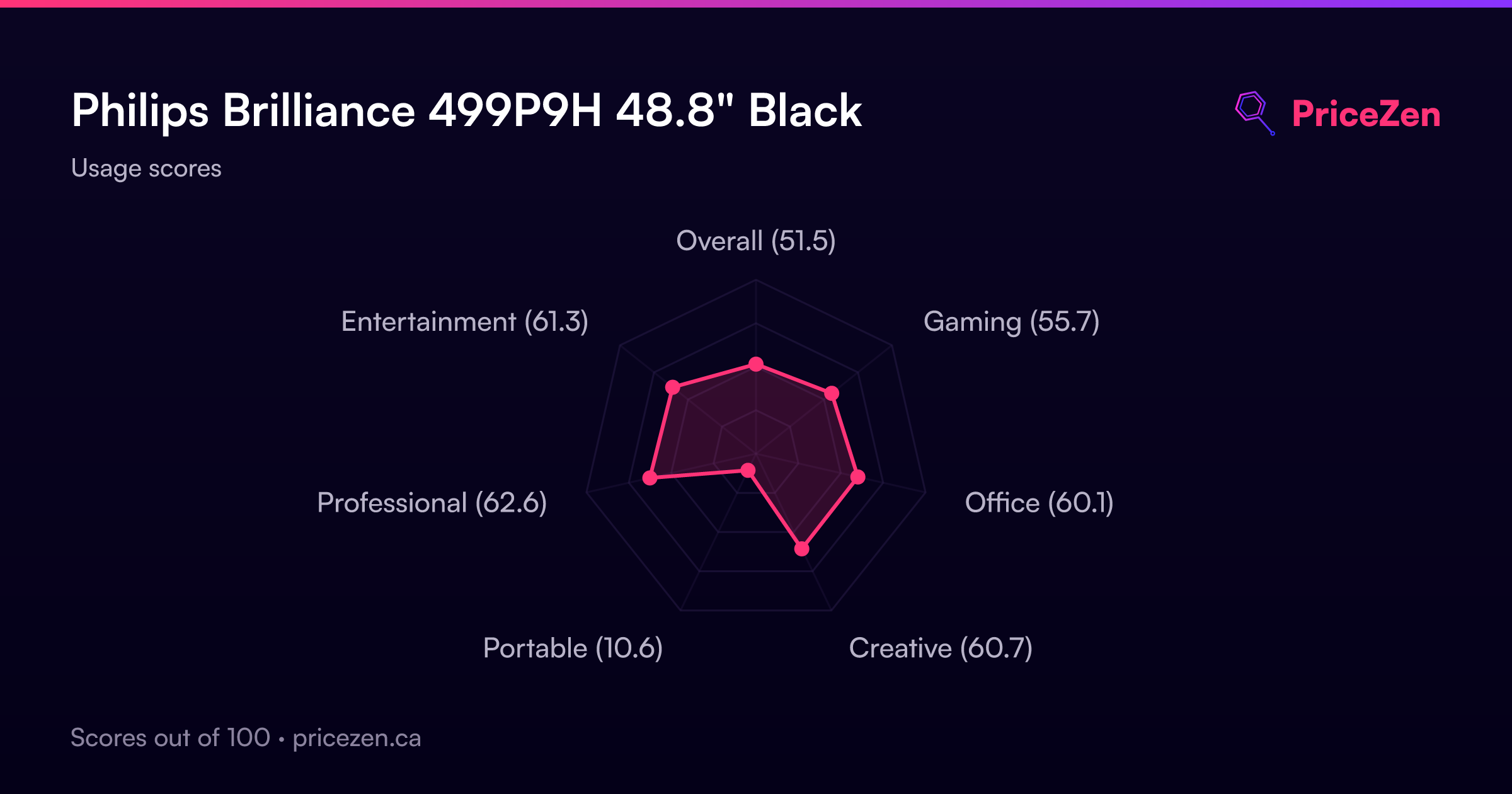
Philips Brilliance 499P9H 48.8" Black
The 48.8-inch 5120x1440 VA panel delivers a dual QHD workspace with a built-in Windows Hello webcam and USB-C docking, eliminating the need for a separate hub. Its 94.62% DCI-P3 coverage and 450-nit brightness provide solid color for SDR workflows, though the 70Hz refresh rate keeps it firmly in productivity territory. This monitor is best for financial analysts and multitasking office users who need a single expansive screen to replace a dual-monitor setup.

No current retailer price
Snapshot
The 30-Second Version
The Philips Brilliance 499P9H is a 48.8-inch 5120 x 1440 curved ultrawide monitor with USB-C docking, a KVM switch and a built-in webcam, currently USD 1,100 at Adorama. The screen and color coverage are excellent for productivity, but owners report a clunky KVM, a weak webcam and persistent MacBook compatibility issues. A fantastic panel wrapped in a frustrating package.
Pros & Cons
Pros
- Huge 5120 x 1440 workspace that genuinely replaces two monitors 100th
- Strong color coverage: 121% sRGB, 91% Adobe RGB, praised by owners 88th
- USB-C docking, KVM, PIP/PBP and webcam make it a full desk hub 83rd
- Best-in-class feature set in our rankings, connectivity in the 88th percentile 82nd
- Height, tilt, swivel and VESA 100x100 mounting
Cons
- KVM switch implementation is a recurring owner complaint
- On-screen menu system is widely described as painful to navigate
- Webcam and speakers are both subpar according to buyers
- MacBook compatibility problems, including resolution limits and no macOS drivers
- USB-C power delivery capped at 60W, and support is reported as unresponsive
What owners think
The Word on the Street
How owner sentiment changed over time
ExclusiveBased on when customers actually wrote their reviews - so you can see whether early praise held up.
22 written reviews, Mar 2019 – Nov 2022: 10 happy, 2 mixed, 8 unhappy, 2 without stars
Across all 20 store ratings: 3.2★. The chart counts the 22 written reviews.
- Oct – Dec 20222 of 2 happy · 1 without stars
Buyers praised the monitor's graphics, built-in speakers, docking station, and window snapping for work and gaming. However, one noted pixelation during video loading, and another had unresolved customer service issues about a missing remote.
- Monitor quality praised: great graphics, built-in speakers and docking station, window snapping, suitable for work, gaming, and video editing.
- Customer service unresponsive: one buyer couldn't get a response after 10+ calls/emails to purchase a missing remote.
- Video playback pixelation at loading, but self-corrects in 5 seconds; buyer finds it acceptable.
- Jul – Sep 20200 of 2 happy · 1 without stars
Buyers in this period report the LCD display itself is acceptable, but bundled accessories (webcam, USB hub) perform poorly, causing connectivity and video quality issues.
- Webcam has horizontal stripes and flicker at 720p; only works at 360p.
- USB hub intermittently disconnects, causing mouse lag and signal loss.
- USB-C single-cable connection to laptop fails; monitor doesn't charge via USB-C.
- Windows Hello not working; monitor requires re-setup after unplugging; menu system slow.
- Jan – Mar 20203 of 3 happy
Buyers praised the monitor's features, value, and usability for work-from-home and software development, but noted limitations with MacOS integration and USB-C power delivery.
- Excellent features and value, including KVM, ethernet, webcam, and strong curvature for productivity.
- MacOS compatibility issues: lack of drivers, webcam not working, and need for third-party drivers for full resolution.
- USB-C power limited to 60W, insufficient for charging MacBook Pro; speakers lack volume control from MacOS.
- Great warranty and suitability for work-at-home environments, with real estate and curvature appreciated.
- Apr – Jun 20191 of 3 happy
Buyers praised the screen quality and size but criticized the menu system, KVM switching, webcam, and Mac compatibility issues, including a defect and support problems.
- KVM switching is cumbersome, requiring multiple menu steps; no single-button toggle between computers.
- Webcam unreliable on Mac, frozen frames; not recognized as Windows Hello on PC.
- Mac compatibility issues: magenta tint on one unit, workarounds needed for resolution and brightness.
- Screen quality praised: best screen, no glare, huge size and resolution, hub features.
Each dot is one written review, in the month it was written. Happy = 4-5★, mixed = 3★, unhappy = 1-2★. Period summaries are in English.
The proof
Performance
The panel is the good news. 450 nits, 121% sRGB, 91% Adobe RGB and 103% NTSC put color coverage well above average for the category, and our color ranking backs that up at 82. Owners repeatedly single out color reproduction and the sRGB mode as genuinely good, which matters if you're doing photo work or grading video. The catch is the 8-bit panel and HDR400 certification, which is entry-level HDR: you get the brightness bump, not the deep local-dimming experience. VA contrast does the heavy lifting here.
Motion is where it settles into the middle of the pack. 70Hz with Adaptive-Sync and a 5ms response is fine for casual gaming and smooth enough for timeline scrubbing, and plenty of owners say they game on it happily. But our performance score lands at 43, so competitive shooters and anyone chasing high frame rates should look elsewhere. Power draw is a modest 41W, which is decent for a screen this size. And at 15300g, portability scores a dismal 10.6 out of 100. This thing lives on your desk forever, or on a very sturdy arm.
Specifications
Full Specifications
Display
| Size | 48.8" |
| Resolution | 5120x1440 |
| Panel Type | VA |
| Aspect Ratio | 32:9 |
| Curved | Yes |
| Curvature | 1800 |
| Screen Finish | matte |
Performance
| Refresh Rate | 70 Hz |
| Response Time | 5 |
| Adaptive Sync | Adaptive-Sync |
Color & HDR
| Brightness | 450 nits |
| Color Gamut | NTSC 103%, sRGB 121%, Adobe RGB 91% |
| Color Depth | 8-bit |
| HDR | HDR400 |
| HDR Support | HDR400 |
Connectivity
| HDMI Ports | 2 |
| DisplayPort | 1 |
| USB-C | 1 |
| Speakers | Yes |
| Headphone Jack | Yes |
Ergonomics
| Height Adjustable | Yes |
| Tilt | Yes |
| Swivel | Yes |
| Pivot | No |
| VESA Mount | 100x100 |
Features
| Webcam | Yes |
| PIP/PBP | Yes |
| Power | 41 |
| Weight | 15.3 kg / 33.7 lbs |
vs Competition
Cross-shopping this against the Dell UltraSharp U4025QW 39.7" is the most natural move, since both are productivity-first ultrawides aimed at people who want a dock built into the display. The Philips counters with its wider 32:9 canvas and a feature ranking that tops our whole category, but Dell's UltraSharp line is the one to weigh if the KVM and Mac headaches in owner reviews scare you off.
If gaming is even half your use case, the LG UltraGear 45GX950A-B 45", Alienware AW-Series AW3425DW 34", ASUS ROG Strix XG27UCDMG 27" and MSI MAG 271QPX QD-OLED E2 27" all deserve a look before you commit. The Philips only manages 70Hz and a 5ms response, and our performance ranking has it mid-pack, so any of those gaming-focused panels is worth comparing on motion handling alone. The Philips wins on sheer spreadsheet real estate and one-cable docking. It does not win on speed.
| Spec | Philips Brilliance 499P9H 48.8" | ASUS ROG Strix XG27UCDMG 27" | LG UltraGear 45GX950A-B 45" | Dell UltraSharp U4025QW 39.7" | Alienware AW-Series AW3425DW 34" | MSI MAG 271QPX QD-OLED E2 27" |
|---|---|---|---|---|---|---|
| Screen Size | 48.79999923706055 | 27 | 45 | 39.70000076293945 | 34 | 27 |
| Resolution | 5120 x 1440 | 3840 x 2160 | 5120 x 2160 | 5120 x 2160 | 3440 x 1440 | 2560 x 1440 |
| Panel Type | VA | OLED | OLED | IPS | QD-OLED | QD-OLED |
| Refresh Rate | 70 | 240 | 330 | 120 | 240 | 240 |
| Response Time Ms | 5 | 0.029999999329447746 | 0.029999999329447746 | 5 | 0.029999999329447746 | 0.029999999329447746 |
| Adaptive Sync | Adaptive-Sync | FreeSync Premium Pro | FreeSync Premium Pro | Adaptive-Sync | FreeSync Premium Pro | FreeSync Premium Pro |
| Hdr | HDR400 | DisplayHDR True Black 400 | DisplayHDR True Black 400 | HDR600 | HDR400 | DisplayHDR True Black 400 |
| Compare | Compare | Compare | Compare | Compare |
| Product | Color | Portability | Display | Feature | User Sentiment | Ergonomic | Performance | Connectivity | Social Proof |
|---|---|---|---|---|---|---|---|---|---|
| Philips Brilliance 499P9H 48.8" | 82.3 | 63 | 83.2 | 99.8 | 6.4 | 73.5 | 42.7 | 87.5 | 5.3 |
| ASUS ROG Strix XG27UCDMG 27" Compare | 96.5 | 57.5 | 97.7 | 85.1 | 99.3 | 90.8 | 97.9 | 81.2 | 98.9 |
| LG UltraGear 45GX950A-B 45" Compare | 99.4 | 76.6 | 99.7 | 96.3 | 76.3 | 90.8 | 99.4 | 96.9 | 92 |
| Dell UltraSharp U4025QW 39.7" Compare | 97.9 | 76.6 | 98.6 | 96.3 | 85.5 | 90.8 | 56.1 | 99.3 | 96.8 |
| Alienware AW-Series AW3425DW 34" Compare | 98.9 | 74 | 84.1 | 96.3 | 95.7 | 90.8 | 97.9 | 95.4 | 96.8 |
| MSI MAG 271QPX QD-OLED E2 27" Compare | 99.2 | 57.5 | 73.5 | 85.1 | 95.7 | 90.8 | 97.9 | 81.2 | 98.9 |
Price
Value & Pricing
At USD 1,100 from Adorama, you're paying for the panel size and the dock, not for polish. The screen itself earns that money: owners rave about the size, resolution and multitasking, and the color coverage is strong for creative work. What stings is paying premium money for a KVM that owners say doesn't work well, a webcam that disappoints and a menu you'll dread opening. If those hub features are the reason you're buying, the value proposition gets shaky fast. If you just want a giant, colorful canvas and can live with a separate webcam, it's more defensible.
Read more
Overview
The Philips Brilliance 499P9H is a 48.8-inch superwide curved monitor, the kind of screen people buy when they're tired of two displays with a bezel down the middle. It runs 5120 x 1440 on a VA panel at an 1800r curve, which is basically two 27-inch QHD screens fused into one. Right now we're tracking it at USD 1,100 from Adorama, so this sits firmly in premium ultrawide territory rather than impulse-buy land.
On paper it's loaded. Our feature ranking puts it at the very top of the category, and connectivity lands in the 88th percentile: two HDMI ports, DisplayPort, USB-C docking with power delivery, a built-in webcam, speakers, a headphone jack, PIP/PBP and a MultiClient KVM switch for running two PCs off one keyboard and mouse. Height, tilt and swivel adjustment plus VESA 100x100 round it out. If you searched "best 49 inch ultrawide monitor for working from home," this is exactly the shape of thing you were looking for.
But here's the part the spec sheet won't tell you. Owner sentiment sits in the 6th percentile in our data, with a 3.2/5 average across 20 reviews and a distilled sentiment score of 55/100. That's a big gap between what this monitor promises and how people actually feel once it's on their desk. We'll get into why.
Common Questions
Q: Is the Philips Brilliance 499P9H good for gaming?
For casual and single-player gaming, yes. The 70Hz refresh rate with Adaptive-Sync and 5ms response keeps things smooth, and owners enjoy gaming on the huge curved panel. Competitive players will want a faster monitor.
Q: Does the Philips 499P9H work with a MacBook?
It's hit or miss. Several MacBook owners report being stuck below the native 5120 x 1440 resolution and complain about the lack of macOS drivers, so Mac users should research their exact model before buying.
Q: Can the Philips Brilliance 499P9H replace two monitors?
That's exactly its pitch. The 48.8-inch 32:9 panel at 5120 x 1440 gives you roughly two 27-inch QHD screens side by side with no bezel, plus PIP/PBP and a KVM switch for running two computers at once.
Q: Does the USB-C port charge a laptop?
Yes, it handles video, data and charging over one cable, but owners note power delivery is limited to 60W. That's fine for most ultrabooks, though power-hungry laptops may charge slowly under load.
Who Should Skip This
MacBook owners should probably skip this one entirely unless they've confirmed their exact setup works, because resolution caps and driver gaps dominate the negative feedback. Competitive gamers should skip it too: 70Hz and a mid-pack performance ranking can't compete with the LG UltraGear 45GX950A-B or the Alienware AW3425DW for fast-paced play. And if your whole reason for buying is the KVM and webcam, look at the Dell UltraSharp U4025QW instead, since those are precisely the features Philips owners complain about most. Anyone needing to move their monitor around should also look away, because 15300g is not going anywhere.
Verdict
Should you buy the Philips Brilliance 499P9H? If you're a Windows-based multitasker who wants one enormous, color-accurate screen and a tidy single-cable desk, yes, with eyes open. The display is the star, and owners are consistently wowed by it. Just budget for a real webcam and treat the KVM as a bonus that might annoy you rather than a feature you can rely on.
If you're on a MacBook, we'd hesitate hard. Resolution problems and missing macOS drivers come up again and again in owner feedback, and with a 3.2/5 rating and sentiment near the bottom of our rankings, that's not a fringe complaint. Great panel, frustrating package. Buy it for the screen, not the promise.
Usage Scores
- Overall52
- Gaming56.4
- Office59.7
- Creative61.2
- Portable10.6
- Professional62.5
- Entertainment61.8