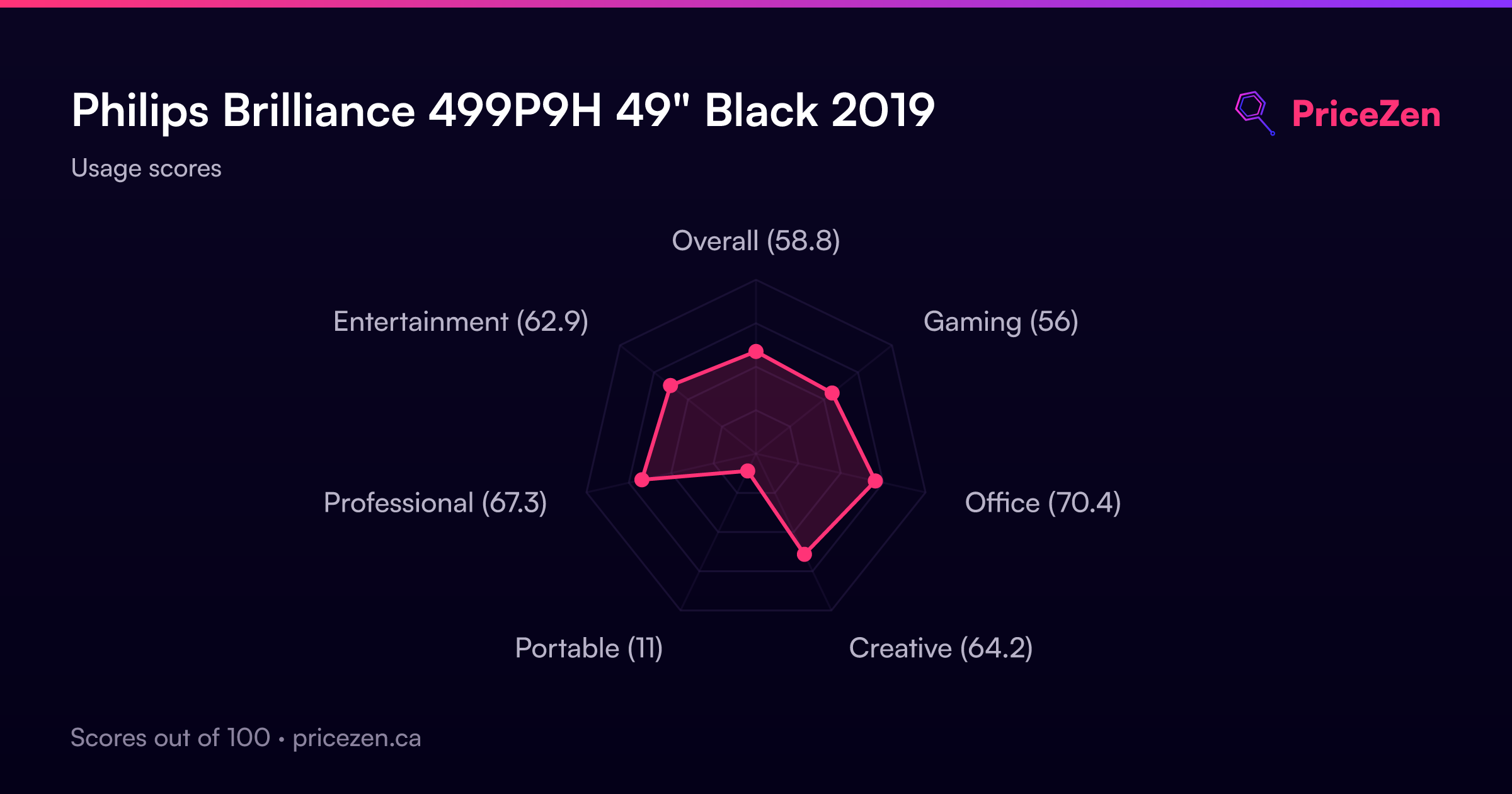
Philips Brilliance 499P9H 49" Black 2019
The 49-inch 5120x1440 VA panel with a 1800R curve and 91% Adobe RGB coverage delivers expansive, color-accurate screen real estate for multitasking. Its built-in USB-C docking with RJ45 Ethernet and a KVM switch effectively replaces a desktop hub, while the Windows Hello webcam folds away for privacy. This monitor is best for financial analysts and software developers who need to manage multiple systems and data streams from a single, seamless display.

No current retailer price



Snapshot
The 30-Second Version
The Philips Brilliance 499P9H is a 49-inch SuperWide curved monitor built for multitaskers who need to manage multiple computers from a single screen. Its built-in USB-C dock and KVM switch are huge conveniences, and the color accuracy is excellent for creative work. Just be ready for a mediocre webcam, a finicky KVM, and the awkwardness of sharing an ultra-wide screen on Zoom calls.
Pros & Cons
Pros
- Massive 32:9 screen eliminates the need for dual monitors 100th
- Excellent color coverage for creative work (91% Adobe RGB) 91st
- Built-in USB-C dock with power delivery cleans up cable clutter 88th
- Windows Hello webcam tucks away for privacy when not in use 83rd
- KVM switch lets you control two PCs with one keyboard and mouse
Cons
- 60Hz refresh rate is sluggish for any kind of gaming
- KVM functionality is finicky and unreliable per user reports
- 2MP webcam quality is disappointing for a monitor at this price
- Ultra-wide resolution makes screen sharing a headache in meetings
- Display can black out when adjusting the monitor arm
What owners think
The Word on the Street
How owner sentiment changed over time
ExclusiveBased on when customers actually wrote their reviews - so you can see whether early praise held up.
Happy owners: 67% lately, 40% in Jan 2019 – Sep 2020
Too few reviews to call that a change.
Across all 3 store ratings: 4.0★. The chart counts the 22 written reviews with stars and their own date.
3 written reviews without stars are left out of the trend.
Show the numbers
| Period | Reviews | Happy | Mixed | Unhappy | Happy share |
|---|---|---|---|---|---|
| Jan 2019 – Sep 2020 | 10 | 4 | 1 | 5 | 40% |
| Oct 2020 – May 2026 | 12 | 8 | 1 | 3 | 67% |
- Apr – Jun 20262 of 3 happy
Buyers praise the wide screen and design, but note screen blackouts when moving the monitor, a mediocre KVM, and a lower-resolution webcam. One user finds it too large for screen sharing in meetings.
- Wide screen boosts productivity; design details like hidden plugs and camera placement are appreciated.
- Screen blacks out when monitor arm is moved, even without touching the arm.
- Built-in KVM function is inferior to another Philips model.
- Large screen is great for multitasking but causes issues in screen-sharing during work meetings.
- Oct – Dec 20222 of 2 happy · 1 without stars
Buyers praised the monitor's graphics, built-in speakers, and docking station, but reported poor customer service and a brief pixelation issue on loading.
- Great graphics, built-in speakers, and docking station ideal for work and gaming.
- Customer service unresponsive; unable to get a replacement remote after many attempts.
- Pixelation on loading resolves in 5 seconds; acceptable to the buyer.
- Snap windows feature praised for multitasking across work, gaming, and video editing.
- Jul – Sep 20200 of 2 happy · 1 without stars
Buyers report severe issues with accessories: webcam has flickering/stripes at 720p, USB hub causes intermittent disconnections, and the monitor fails to retain settings or charge via USB-C.
- Webcam produces horizontal stripes and flicker at 720p; only works at 360p.
- USB hub disconnects repeatedly during video calls, causing mouse lag and signal loss.
- Monitor does not retain settings when unplugged; Windows Hello fails to work.
- USB-C does not charge the laptop; single-cable connection to laptop fails.
- Jan – Mar 20203 of 3 happy
Buyers praised the monitor's features, value, and KVM functionality for work-from-home setups, but noted USB-C power limits and OSX compatibility issues.
- Great features and value for ultrawide monitor with KVM, webcam, and ethernet.
- USB-C power limited to 60W, not ideal for charging MacBook.
- Lack of OSX drivers and webcam support; requires third-party software.
- Accentuated curvature reduces head turning, ideal for software development.
- Apr – Jun 20191 of 3 happy
Buyers praised the screen quality but criticized the KVM, menu system, webcam, and defects. Mac compatibility issues and poor support were common complaints.
- Excellent screen quality, size, and resolution; anti-glare coating praised.
- KVM switching is cumbersome, requiring multiple menu steps to switch computers.
- Webcam often fails to transmit video; microphone works but video is black or frozen.
- Screen defects like grey smudge and magenta tint on Mac; poor Philips support.
Each column joins calendar quarters until it holds at least 10 reviews with stars and their own date. Happy = 4-5★, mixed = 3★, unhappy = 1-2★. Period summaries are in English.
The proof
Performance
Let's be real: this is not a gaming monitor. With a 60Hz refresh rate and a 5ms response time, the 499P9H lands in the 36th percentile for performance. That's fine for spreadsheets and code, but if you're trying to play anything faster than a turn-based strategy game, you'll feel the limitations. Adaptive-Sync is here to prevent screen tearing, which is a nice touch, but it's not going to transform this into a high-refresh-rate panel. Think of it as a smoothness bonus for your desktop, not a gaming feature.
Where the panel does shine is in static image quality. The 1800R curve wraps around your field of view nicely, and the VA tech delivers solid contrast. Color accuracy out of the box is strong enough for most creative work, though serious colorists will want to calibrate it. The 450-nit brightness is adequate for SDR content, but HDR performance is entry-level at best. It meets the DisplayHDR 400 spec, which basically means it can accept an HDR signal and not completely embarrass itself. Don't buy this for HDR movie watching.
Specifications
Full Specifications
Display
| Size | 49" |
| Resolution | 5120x1440 |
| Panel Type | VA |
| Aspect Ratio | 32:9 |
| Curved | Yes |
| Curvature | 1800 |
| Screen Finish | matte |
Performance
| Refresh Rate | 60 Hz |
| Response Time | 5 |
| Adaptive Sync | Adaptive-Sync |
Color & HDR
| Brightness | 450 nits |
| Color Gamut | 91% Adobe RGB, 103% NTSC, 121% sRGB |
| Color Depth | 16.7 Million |
| HDR | HDR400 |
| HDR Support | HDR400 |
Connectivity
| HDMI Ports | 2 |
| DisplayPort | 1 |
| USB-C | 1 |
| Speakers | Yes |
| Headphone Jack | Yes |
Ergonomics
| Height Adjustable | Yes |
| Tilt | Yes |
| Swivel | Yes |
| Pivot | Yes |
| VESA Mount | 100x100 |
Features
| Webcam | Yes |
| Touchscreen | No |
| PIP/PBP | Yes |
| Power | 45 |
| Weight | 15.3 kg / 33.7 lbs |
vs Competition
Stacked against the Samsung Odyssey Neo G9 G95NC, the Philips looks like an office tool next to a gaming beast. The Neo G9 offers a 240Hz refresh rate and Mini LED backlighting with far superior HDR, but it costs significantly more and lacks the built-in KVM and Ethernet port that make the 499P9H a productivity hub. If your day is split between Excel and Call of Duty, the Samsung is the obvious choice. For pure work, the Philips makes a stronger case.
The Dell UltraSharp U4025QW is another interesting alternative. It's a 40-inch 5K2K panel with an IPS screen, so you get better viewing angles and a more traditional 21:9 aspect ratio that plays nicer with screen sharing. Dell's build quality and warranty support are typically better too, though you lose the sheer width of the Philips.
If you're weighing this against the ASUS ROG Strix XG27UCDMG, the MSI MPG 271QR QD-OLED X50, or the Samsung Odyssey OLED G6 G60SF, those are in a completely different category. Those are 27-inch OLED gaming monitors built for speed and contrast. They'll run circles around the Philips in response time and HDR, but they can't touch it for multitasking real estate. The Philips is for people who want one giant canvas for work, not a fast panel for play.
| Spec | Philips Brilliance 499P9H 49" | LG UltraGear 45GX950A-B 45" | ASUS ROG Strix XG27UCDMG 27" | Dell UltraSharp U4025QW 39.7" | MSI MAG 271QPX QD-OLED E2 27" | Alienware AW-Series AW3425DW 34" |
|---|---|---|---|---|---|---|
| Screen Size | 49 | 45 | 27 | 39.70000076293945 | 27 | 34 |
| Resolution | 5120 x 1440 | 5120 x 2160 | 3840 x 2160 | 5120 x 2160 | 2560 x 1440 | 3440 x 1440 |
| Panel Type | VA | OLED | OLED | IPS | QD-OLED | QD-OLED |
| Refresh Rate | 60 | 330 | 240 | 120 | 240 | 240 |
| Response Time Ms | 5 | 0.029999999329447746 | 0.029999999329447746 | 5 | 0.029999999329447746 | 0.029999999329447746 |
| Adaptive Sync | Adaptive-Sync | FreeSync Premium Pro | FreeSync Premium Pro | Adaptive-Sync | FreeSync Premium Pro | FreeSync Premium Pro |
| Hdr | HDR400 | DisplayHDR True Black 400 | DisplayHDR True Black 400 | HDR600 | DisplayHDR True Black 400 | HDR400 |
| Compare | Compare | Compare | Compare | Compare |
| Product | Color | Portability | Display | Feature | User Sentiment | Performance | Connectivity | Social Proof |
|---|---|---|---|---|---|---|---|---|
| Philips Brilliance 499P9H 49" | 82.4 | 63 | 83.2 | 99.8 | 13.7 | 35.8 | 87.6 | 8.1 |
| LG UltraGear 45GX950A-B 45" Compare | 99.4 | 76.6 | 99.7 | 96.3 | 76.5 | 99.4 | 97 | 92 |
| ASUS ROG Strix XG27UCDMG 27" Compare | 96.5 | 57.5 | 97.7 | 85.1 | 99.2 | 97.9 | 81.2 | 98.9 |
| Dell UltraSharp U4025QW 39.7" Compare | 97.9 | 76.6 | 98.6 | 96.3 | 85.6 | 56.1 | 99.3 | 96.8 |
| MSI MAG 271QPX QD-OLED E2 27" Compare | 99.2 | 57.5 | 73.6 | 85.1 | 95.7 | 97.9 | 81.2 | 98.9 |
| Alienware AW-Series AW3425DW 34" Compare | 98.9 | 74 | 84.1 | 90.8 | 95.7 | 97.9 | 95.4 | 96.8 |
Price
Value & Pricing
Pricing hovers around $1000 to $1100, which puts the 499P9H in a weird spot. You're paying a premium for the integrated docking and KVM features, not raw panel performance. If you don't need the built-in hub, you can get a similar 49-inch SuperWide panel for less. But if you're docking a laptop daily and switching between a work and personal machine, the convenience might justify the cost. Just know that alternatives like the Dell UltraSharp U4025QW offer a different aspect ratio and better build quality for a similar price, while the Samsung Odyssey Neo G9 G95NC blows past this in refresh rate and HDR if you can stretch your budget.
We started tracking prices for this product on Aug 17, 2026. The chart appears once we have more data.
Read more
Overview
If your desk feels cramped and you're juggling three different laptops, the Philips Brilliance 499P9H is basically a productivity war room in a single panel. This 48.8-inch SuperWide curved monitor gives you the equivalent of two 27-inch QHD screens stitched together without a bezel down the middle. It's a 32:9 VA panel with a 5120x1440 resolution, and Philips packed in a USB-C dock, a KVM switch, and even a pop-up Windows Hello webcam. For anyone managing multiple systems at once, the pitch is pretty clear: one cable, one keyboard, one mouse, and a whole lot of screen.
Color coverage is a standout here. You're looking at 91% Adobe RGB, 103% NTSC, and 121% sRGB, which puts it in the 87th percentile for color performance. That's genuinely useful if you're doing design work or photo editing, though the 8-bit panel and DisplayHDR 400 certification mean it's not a true HDR reference monitor. Brightness tops out at 450 nits, which is fine for a well-lit office but won't blow you away in a sun-drenched room.
But this monitor isn't for everyone, and the user feedback makes that pretty clear. While the sheer size and connectivity get a lot of love, there are some rough edges. The built-in KVM switch is mediocre at best, the 2MP webcam feels like an afterthought, and the ultra-wide aspect ratio can turn screen sharing into a comedy of tiny, unreadable text for your coworkers. At around $1000 to $1100, it's a serious investment, and whether it's worth it depends entirely on your workflow.
Common Questions
Q: Is the Philips 499P9H good for gaming?
Not really. The 60Hz refresh rate and 5ms response time put it well behind even budget gaming monitors. It has Adaptive-Sync to prevent tearing, but this is a productivity display first and foremost.
Q: Does the Philips 499P9H work with a MacBook?
Yes, but with caveats. The USB-C connection works for display and charging, but some users report resolution limitations with older MacBooks. You may need third-party software like ScreenResX to get the full 5120x1440 resolution on certain models.
Q: Can I use the built-in KVM switch with a laptop and desktop?
You can, and that's one of the main selling points. Connect both machines via USB-C and DisplayPort, then use the KVM to share your keyboard, mouse, and monitor. Just know that user reviews mention the switching can be slow and occasionally glitchy.
Q: How does the Philips 499P9H compare to two 27-inch monitors?
It gives you the same total resolution as two 1440p 27-inch screens but without a bezel in the middle. The seamless workspace is great for wide timelines and spreadsheets, but screen sharing in meetings becomes trickier since your coworkers will see a very squished version of your desktop.
Who Should Skip This
Skip the 499P9H if you do a lot of screen sharing in meetings. The 32:9 aspect ratio turns your shared content into a tiny strip on everyone else's 16:9 screens, which gets old fast. Gamers should also look elsewhere. A 60Hz panel with a 5ms response time is a non-starter when monitors like the Samsung Odyssey Neo G9 exist. And if you just want a big screen without the docking hub, save some cash and get a simpler 49-inch panel. The premium here is for the connectivity, so if you won't use the KVM and Ethernet port, you're overpaying.
Verdict
The Philips Brilliance 499P9H is a niche monitor that absolutely nails its niche, as long as you know what you're signing up for. If you're a developer, financial analyst, or anyone who lives in multiple spreadsheets and wants to ditch a dual-monitor arm, this thing is a dream. The USB-C docking and KVM switch genuinely simplify a multi-machine setup, and the color accuracy is a bonus for creative side work.
But the user sentiment score of 65 out of 100 tells the real story. People love the idea of this monitor more than the execution. The KVM is clunky, the webcam is low-res, and the ultra-wide format causes practical headaches in collaborative work. If those trade-offs make you pause, look at a high-quality 38-inch ultrawide or a dual 4K setup instead. For the right person, though, the 499P9H is a productivity multiplier that's hard to beat.
Usage Scores
- Overall58.6
- Gaming56
- Office70.5
- Creative64.2
- Portable11
- Professional67.3
- Entertainment62.3