Lenovo ThinkStation P3 Gen 2 2025, Core Ultra 5, 16GB, 512GB SSD, Black
The Intel Core Ultra 5 Series 2 10-core 3.3GHz processor and 16GB DDR5 RAM handle multiple business applications and browser tabs simultaneously, while the 512GB PCIe M.2 SSD ensures fast bootups and data transfers. Its 10 USB-A ports, two USB-C ports, DisplayPort, HDMI, and Wi-Fi 7 provide extensive connectivity for peripherals and networks. This mid-tower is best for business users and developers who need a reliable, upgradeable desktop for productivity tasks, not for gaming.

No current retailer price
Snapshot
The 30-Second Version
The Lenovo ThinkStation P3 Gen 2 is a business desktop with best-in-class port selection, a capable 10-core Core Ultra 5, and Windows 11 Pro. At $1,119 USD, you're paying for workstation build quality and connectivity, not raw performance. The integrated graphics make gaming a non-starter, and the 512GB SSD is on the small side. It's a solid office machine, but power users and gamers should look elsewhere.
Pros & Cons
Pros
- Port selection is best-in-class at the 98th percentile, with 10 USB-A, 2 USB-C, DisplayPort, HDMI, Ethernet, and Wi-Fi 7 98th
- 10-core Core Ultra 5 225 handles multitasking and business apps without breaking a sweat 70th
- DDR5 memory and PCIe M.2 SSD keep boot times and app launches snappy 68th
- Windows 11 Pro out of the box, no upgrade needed for business features
- Mid-tower chassis leaves room for future upgrades if you want to add a GPU or more storage
Cons
- Integrated graphics kill any gaming ambitions, with a 14.5 gaming score
- 512GB storage is on the small side at the 30th percentile
- 1-year seller warranty from PCOnline instead of Lenovo's manufacturer warranty
- 16GB RAM is just average, and power users may hit the ceiling
- 11.43kg means this thing is a permanent desk resident
The proof
Performance
The Core Ultra 5 225 sits at the 66th percentile for CPUs in our database. That's solid middle-of-the-pack territory. For everyday business tasks, document work, web browsing with a pile of tabs open, and even some light photo editing, this chip is more than capable. The 10 cores give you enough headroom for multitasking without the system feeling sluggish. But it's not going to blow anyone away in heavy compute workloads. If you're rendering video or running complex simulations, you'll feel the ceiling.
The integrated Intel Graphics lands at the 51st percentile, which is about average for integrated solutions but a far cry from any discrete GPU. That 14.5 gaming score isn't a typo. This machine is not built for gaming, period. The 16GB of DDR5 at the 47th percentile is fine for most office work, though power users who keep dozens of browser tabs and multiple virtual machines open might want more. The 512GB SSD at the 30th percentile is the weakest link. It's fast for booting and loading apps, but 512GB fills up quicker than you'd think once you start storing projects, media, or local databases.
Specifications
Full Specifications
Processor
| CPU | Intel Core Ultra 5 225 |
| Cores | 10 |
| Frequency | 3.3 GHz |
| L3 Cache | 20 MB |
Graphics
| GPU | Intel Graphics |
| Type | Integrated |
Memory & Storage
| RAM | 16 GB |
| RAM Generation | DDR5 |
| Storage | 512 GB |
| Storage Type | SSD |
Build
| Form Factor | mid-tower |
| Weight | 11.4 kg / 25.2 lbs |
Connectivity
| USB-C Ports | 2 |
| USB Ports | 10 |
| HDMI | 1x HDMI |
| DisplayPort | 2x DisplayPort |
| Wi-Fi | Wi-Fi 7 |
| Bluetooth | ✓ |
| Ethernet | Gigabit Ethernet |
System
| OS | Windows 11 Pro |
vs Competition
Stacked against the Apple Mac Studio M3 Ultra, this ThinkStation looks like a budget option, but the comparison isn't really fair. The Mac Studio is a performance monster aimed at creative professionals and developers who need serious GPU and CPU muscle. The ThinkStation P3 Gen 2 is a business desktop. Different leagues entirely. If you need macOS, Apple Silicon performance, or GPU-heavy workflows, the Mac Studio is the obvious choice, and it costs accordingly.
Against the HP OMEN GT16-0364, Dell Aurora Aurora Gaming, and ASUS ROG GM700, the ThinkStation loses on gaming performance but wins on professional credibility and connectivity. Those gaming desktops all ship with discrete GPUs that will run circles around Intel integrated graphics. But they're also aimed at a completely different buyer. If you want a machine that looks professional in an office, has a ton of ports for peripherals, and runs Windows 11 Pro, the ThinkStation makes more sense. If you want to game, any of those three competitors will serve you far better.
| Spec | Lenovo ThinkStation P3 Gen 2 | Apple Mac Studio M5 Max | Dell Desktop ECT1250 | HP OMEN GT16-0364 | ASUS ROG GM700 | MSI Aegis ZS2 A9NVP-1407US |
|---|---|---|---|---|---|---|
| CPU | Intel Core Ultra 5 225 | Apple M5 Max | Intel Core Ultra 7 265 | AMD Ryzen 7 8700F | AMD Ryzen 7 9800X3D | AMD Ryzen 9 9900X |
| RAM (GB) | 16 | 36 | 32 | 32 | 32 | 32 |
| Storage (GB) | 512 | 1024 | 2048 | 1024 | 2048 | 2048 |
| GPU | Intel Graphics | Apple (32-Core) | Intel UHD Graphics | NVIDIA GeForce RTX 5070 | NVIDIA GeForce RTX 5070 Ti | NVIDIA GeForce RTX 5070 |
| Form Factor | mid-tower | mini | sff | mid-tower | mid-tower | mid-tower |
| Psu W | - | 480 | 180 | 850 | 850 | 750 |
| OS | Windows 11 Pro | macOS | Windows 11 Home | Windows 11 Home | Windows 11 Home | Windows 11 Home |
| Compare | Compare | Compare | Compare | Compare |
| Product | CPU | GPU | RAM | Ports | Storage | Reliability |
|---|---|---|---|---|---|---|
| Lenovo ThinkStation P3 Gen 2 | 67.9 | 60.1 | 45.7 | 97.9 | 29.2 | 70.2 |
| Apple Mac Studio M5 Max Compare | 95.7 | 85 | 92.4 | 89.1 | 68.7 | 99.3 |
| Dell Desktop ECT1250 Compare | 88.1 | 60.1 | 81.6 | 75 | 82.6 | 70.2 |
| HP OMEN GT16-0364 Compare | 69.4 | 90.7 | 87 | 97.9 | 53.3 | 70.2 |
| ASUS ROG GM700 Compare | 80.4 | 94.6 | 81.6 | 96.1 | 90 | 37.5 |
| MSI Aegis ZS2 A9NVP-1407US Compare | 92.4 | 90.7 | 87 | 90.4 | 82.6 | 37.5 |
Price
Value & Pricing
At $1,119 USD, this is a tricky value proposition. You're paying for the ThinkStation name, the professional chassis, and that excellent port selection. But the internals are decidedly mid-range. The Core Ultra 5, integrated graphics, 16GB of RAM, and 512GB SSD are specs you'd find in machines costing several hundred less. The premium here is for the workstation build quality and connectivity, not raw performance.
The seller warranty is the other piece of the value puzzle. A 1-year warranty managed through PCOnline instead of Lenovo means you're relying on a third party for support. That's not automatically bad, but it's a different experience than Lenovo's enterprise-grade support. If you value the ThinkStation reliability reputation, just know you're not getting the full manufacturer backing with this particular unit.
Read more
Overview
The Lenovo ThinkStation P3 Gen 2 is one of those machines that sounds like it should be a workhorse, and in some ways it is. You're getting a proper mid-tower chassis, a 10-core Intel Core Ultra 5 225 running at 3.3GHz, 16GB of DDR5, and a 512GB PCIe M.2 SSD. The port selection is genuinely impressive, with 10 USB-A ports, 2 USB-C, DisplayPort, HDMI, Ethernet, and Wi-Fi 7. This is a machine built for desks, not laps, and at 11.43kg, it's not going anywhere once you set it down.
Who's this for? Business users and general productivity folks who need a reliable desktop with lots of connectivity. The Best for scores tell the story: 58.4 for business, 56.5 for developer work, and a rough 14.5 for gaming. If you're editing spreadsheets, running office apps, or doing light development work, this machine will handle it without breaking a sweat. If you're hoping to game after hours, keep looking.
The interesting wrinkle here is that this is a professionally upgraded unit sold through Best Buy with a 1-year seller warranty from PCOnline, not Lenovo's standard manufacturer warranty. That's a trade-off worth understanding before you buy. The components are new, but the warranty path is different, and that matters if something goes wrong a year from now.
Common Questions
Q: Can this machine handle gaming?
No, not really. The integrated Intel Graphics score a 14.5 out of 100 for gaming in our database, which puts it near the bottom for that use case. You might get away with very light or older titles at low settings, but anything modern or demanding will struggle. If gaming matters at all, look for a machine with a discrete GPU from NVIDIA or AMD.
Q: Is 16GB of RAM enough for this machine?
For typical business use, yes. 16GB of DDR5 handles office apps, web browsing with multiple tabs, and light multitasking without issues. But if you run virtual machines, do heavy data analysis, or keep dozens of applications open simultaneously, you may hit the ceiling. The good news is the mid-tower chassis should allow for RAM upgrades down the line.
Q: What does the 1-year seller warranty mean?
This unit was professionally upgraded and resealed by PCOnline, and the warranty is managed directly through the seller rather than Lenovo. That means if something goes wrong, you contact PCOnline for support instead of Lenovo's standard warranty service. The components are new, but the support experience may differ from what you'd get with a factory-sealed Lenovo machine.
Q: How does the Core Ultra 5 225 compare to other CPUs?
The Core Ultra 5 225 sits at the 66th percentile for CPUs in our database, which is solidly average. It's a 10-core chip running at 3.3GHz, and it handles everyday business tasks, web browsing, and office applications without breaking a sweat. It's not a high-end workstation or gaming CPU, but for the intended business use case, it's more than adequate.
Who Should Skip This
Gamers should absolutely skip this machine. The integrated Intel Graphics score a 14.5 out of 100 for gaming, which is one of the lowest scores we've seen for that use case. You'd be far better off with the HP OMEN GT16-0364, Dell Aurora Aurora Gaming, or ASUS ROG GM700, all of which ship with discrete GPUs that can actually handle modern titles.
Developers working with large codebases, containers, or GPU-accelerated workloads should also think twice. The 16GB of RAM and 512GB SSD are both on the smaller side, and the integrated graphics won't help with any CUDA or GPU-dependent tasks. If you're in this camp, look for a machine with at least 32GB of RAM, a 1TB SSD, and a discrete GPU. The Apple Mac Studio M3 Ultra is a strong alternative if macOS fits your workflow and budget allows.
Verdict
For a business user who needs a reliable desktop with excellent connectivity and doesn't care about gaming, the ThinkStation P3 Gen 2 is a reasonable choice. The port selection alone is a huge selling point. Ten USB-A ports, two USB-C, DisplayPort, HDMI, Ethernet, and Wi-Fi 7 means you'll never run out of ways to connect peripherals, monitors, and network devices. The Core Ultra 5 handles office workloads with ease, and Windows 11 Pro is ready for business environments out of the box.
But if you're a developer working with large codebases, running containers, or doing any kind of GPU-accelerated work, this machine will feel limiting. The 16GB of RAM and 512GB SSD are both on the smaller side, and the integrated graphics are a hard ceiling. You'd be better served by a machine with more RAM, a larger SSD, and at least a mid-range discrete GPU. And if gaming is even a secondary consideration, look elsewhere entirely.
Usage Scores
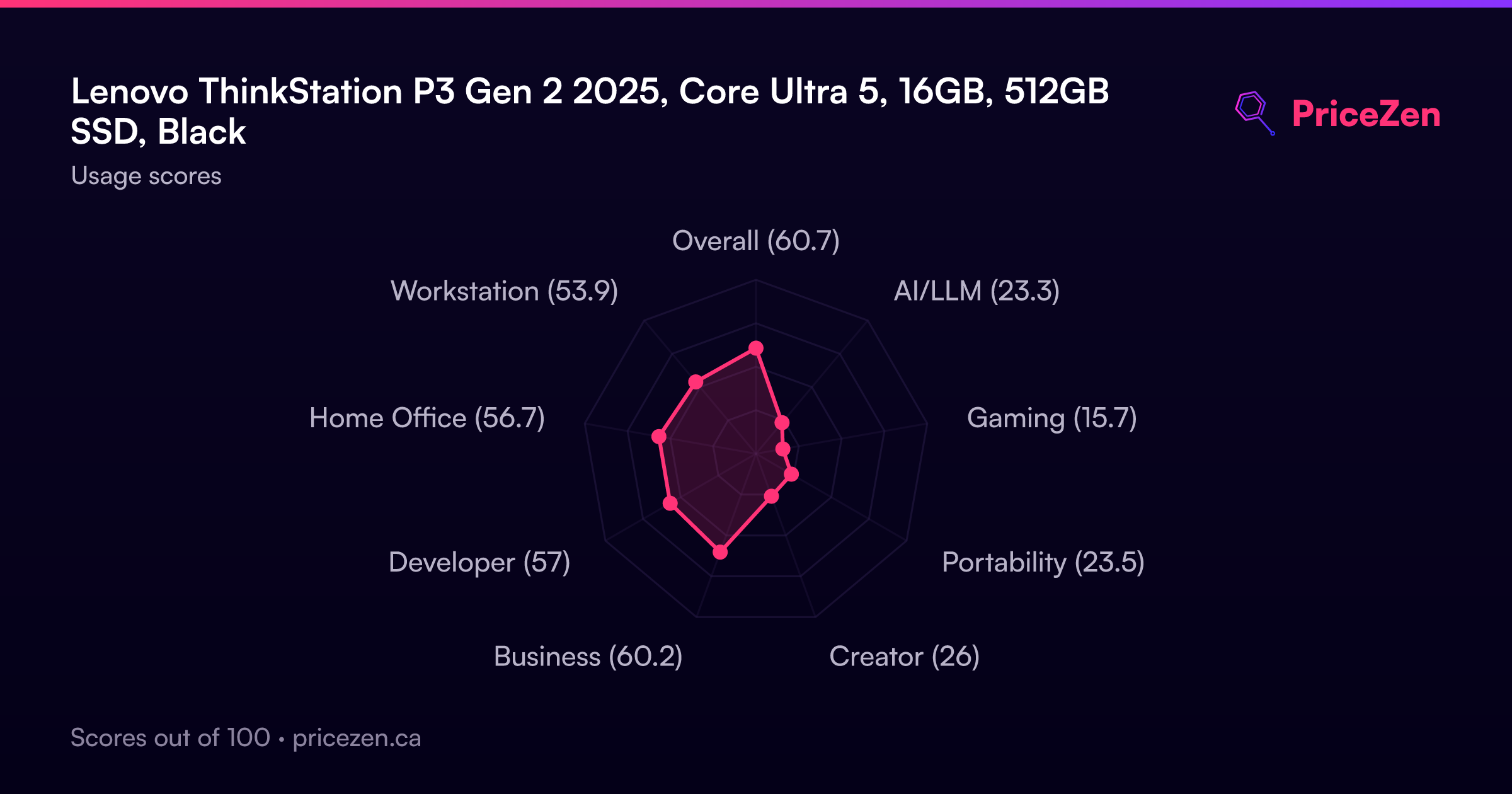
- Overall60.7
- AI/LLM23.3
- Gaming15.7
- Portability23.5
- Creator26
- Business60.2
- Developer57
- Home Office56.7
- Workstation53.9