Lenovo X250 12.5", Core i5-5300U, 8GB, 128GB SSD
Le processeur Intel Core i5-5300U à 2,3 GHz et 8 Go de RAM assurent une réactivité correcte pour les tâches bureautiques, mais les graphismes intégrés limitent fortement le jeu. Son écran non tactile de 12,5 pouces et son SSD de 128 Go en font un compagnon compact et fiable, avec Windows 10 Pro pour un usage professionnel. Ce modèle reconditionné convient aux étudiants ou aux travailleurs nomades qui privilégient la portabilité et la productivité, sans besoin de puissance graphique.

Aucun prix actuel chez les marchands
Aperçu
The 30-Second Version
A compact, reliable relic that's great for typing and terrible for everything else. Buy it for the keyboard, not the specs.
Pros & Cons
Points forts
- Incredibly compact and easy to carry 96th
- Legendary ThinkPad keyboard and build quality 82nd
- Reliability score is well above average 79th
- Dirt cheap for a Windows 10 Pro machine
Points faibles
- 128GB SSD fills up fast
- CPU and GPU are ancient by modern standards
- Only 8GB of RAM, and it's likely soldered
- Port selection is one of the worst we've seen
L'avis des propriétaires
The Word on the Street
Les preuves
Performance
The Core i5-5300U with 8GB of RAM handles web browsing, email, and Office docs without throwing a fit, but don't expect miracles. The 128GB SSD is the real bottleneck, sitting in the bottom 7 percent of all laptops we track. You'll be playing storage Jenga after installing Windows updates and a few apps. The integrated graphics are a weak spot, landing in the bottom 14 percent, so forget anything beyond solitaire or 720p video.
Specifications
Full Specifications
Processor
| CPU | Intel Core i5-5300U |
| Cores | 4 |
| Frequency | 2.3 GHz |
| L3 Cache | 4 MB |
Memory & Storage
| RAM | 8 GB |
| Storage | 128 GB |
| Storage Type | SSD |
Display
| Size | 12.5" |
Physical
| OS | Windows 10 Pro |
vs Competition
Stacked against the Apple MacBook Air M4 or ASUS Zenbook UX3405CA, the X250 looks like a museum piece. Those machines have modern ARM or Meteor Lake chips, 16GB+ of RAM, and SSDs measured in terabytes. The X250's only real advantage is its size and that classic ThinkPad keyboard. The Microsoft Surface Laptop 7th Edition is also far more capable, but costs significantly more. If you need a cheap secondary machine for travel, the X250 makes sense. As a primary laptop, it's a hard no.
| Spec | Lenovo X250 12.5" | Apple MacBook Air 15.3" M4 | ASUS ProArt PX13 | HP OmniBook X Flip | Samsung Galaxy Book5 Pro 14" NP944XHA-KG2US | MSI Creator 14" A13V |
|---|---|---|---|---|---|---|
| CPU | Intel Core i5-5300U | Apple M4 | AMD Ryzen AI Max+ 388 | AMD Ryzen AI 7 350 | Intel Core Ultra 7 256V | Intel Core i7 13620H |
| RAM (GB) | 8 | 24 | 32 | 24 | 16 | 32 |
| Storage (GB) | 128 | 1024 | 512 | 1024 | 512 | 2048 |
| Screen | 12.5" | 15.3" 2880x1864 | 13.3" 2880x1800 | 14" 1920x1200 | 14" 2880x1800 | 14" 2880x1800 |
| GPU | - | Apple (10-Core) | AMD Radeon Graphics | AMD Radeon 860M | Intel Arc Graphics | NVIDIA GeForce RTX 4060 |
| OS | Windows 10 Pro | macOS | Windows 11 Home | Windows 11 Home | Windows 11 Pro | Windows 11 Home |
| Weight (kg) | - | 1.5 | 1.4 | 1.4 | 1.2 | 1.6 |
| Battery (Wh) | - | 66 | 73 | 59 | 63 | 54 |
| Compare | Compare | Compare | Compare | Compare |
| Produit | CPU | GPU | RAM | Connectique | Écran | Portabilité | Stockage | Fiabilité | Affordability |
|---|---|---|---|---|---|---|---|---|---|
| Lenovo X250 12.5" | 5.7 | 6.5 | 13.2 | 3.4 | 19.7 | 95.6 | 7.3 | 82 | 79.3 |
| Apple MacBook Air 15.3" M4 Compare | 75.9 | 75.7 | 76.6 | 51 | 91.2 | 58.5 | 79.2 | 98.3 | 25.8 |
| ASUS ProArt PX13 Compare | 87.7 | 91.8 | 90.9 | 71 | 95.3 | 93 | 35.7 | 60.6 | 18 |
| HP OmniBook X Flip Compare | 80 | 64.6 | 82.3 | 77.2 | 74 | 79.3 | 65.2 | 33.6 | 43.5 |
| Samsung Galaxy Book5 Pro 14" NP944XHA-KG2US Compare | 68.4 | 69.7 | 49.8 | 83.1 | 91.5 | 89.5 | 50.9 | 82 | 37.5 |
| MSI Creator 14" A13V Compare | 74.9 | 91 | 83.8 | 67.6 | 89.6 | 72.8 | 93.9 | 60.6 | 28.6 |
Prix
Value & Pricing
At around 533 CAD, this is a tough sell unless you specifically need a tiny, durable laptop for writing or light admin work. You're paying for the ThinkPad name and compact form factor, not performance. If you can stretch your budget, a used MacBook Air M1 or a newer budget Chromebook will run circles around it.
Historique des prix
En savoir plus
Overview
The Lenovo X250 is a refurbished workhorse from a decade ago, and it knows it. The one thing to know is this: it's a compact, reliable typing machine for basic tasks, not a modern laptop. That 96th percentile compact score means it's one of the best tiny laptops we've seen for slipping into a bag, but the internals are firmly stuck in 2015.
Common Questions
Q: Can the Lenovo X250 run Windows 11?
Nope. The i5-5300U isn't on Microsoft's supported CPU list, so you're stuck with Windows 10 Pro. That's fine for now, but security updates end in October 2025.
Q: Is the RAM upgradeable?
The X250 has one RAM slot, and 8GB is the practical max for most configs. Don't buy this expecting to upgrade to 16GB later.
Q: How's the battery life on a refurbished unit?
Expect 3 to 5 hours of light use, depending on battery health. Refurbished units often have worn batteries, so plan on replacing it or keeping the charger handy.
Who Should Skip This
If you're looking for a laptop that can handle photo editing, gaming, or more than a dozen browser tabs, this isn't it. Go get a used M1 MacBook Air or a newer budget Windows laptop instead. The X250 is for minimalists who value portability and keyboard feel over raw power.
Verdict
Buy the Lenovo X250 only if you want a tiny, reliable typing machine for basic tasks and you're on a very tight budget. It's a niche pick for writers, students with light workloads, or anyone who misses the old ThinkPad feel. For everyone else, save up for something newer.
Usage Scores
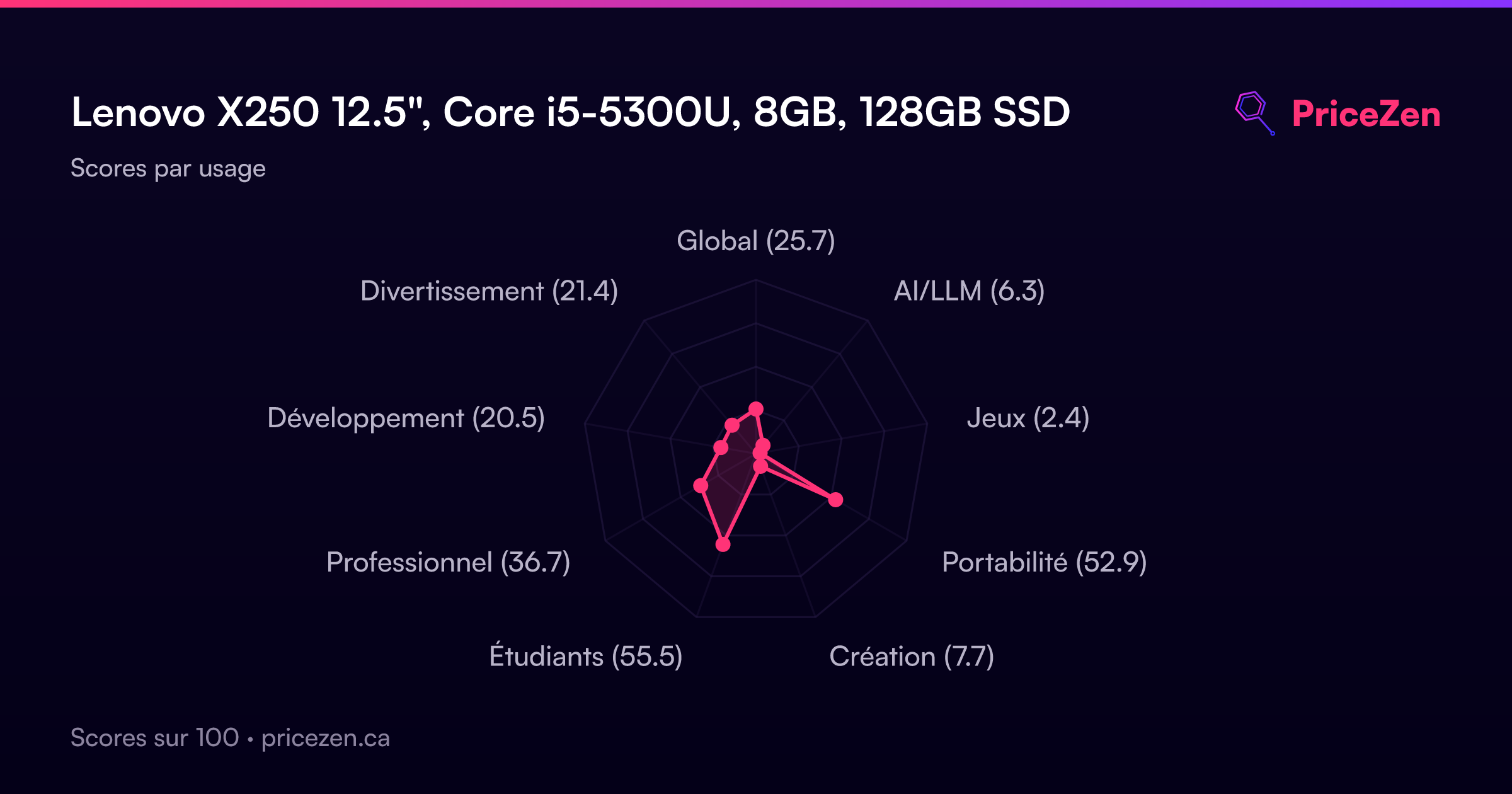
- Global25.7
- AI/LLM6.3
- Jeux2.4
- Portabilité52.9
- Création7.7
- Étudiants55.5
- Professionnel36.7
- Développement20.5
- Divertissement21.4