Acer Chromebook 15.6" NX.KV2AA.001 2024, Celeron N4500, 4GB, 64GB eMMC, Lavender
Le processeur Intel Celeron N4500 et l'écran 15,6 pouces Full HD à 165 Hz offrent une expérience fluide pour les tâches quotidiennes, mais la RAM de 4 Go et le stockage eMMC de 64 Go limitent les usages intensifs. Son poids de 1,60 kg et son clavier rétroéclairé en font un compagnon portable, avec ChromeOS et Google Play pour un accès aux applications Android. Ce Chromebook convient aux étudiants ou utilisateurs nomades qui privilégient la simplicité et la portabilité pour la navigation web, la bureautique et le streaming.

Aucun prix actuel chez les marchands











Aperçu
The 30-Second Version
It's a CAD 329 Chromebook with a painfully slow Celeron CPU and only 4GB of RAM. Fine for basic browsing, but the reliability score is terrible and the listing itself is confusing. Only buy it if you need the cheapest thing that turns on.
Pros & Cons
Points forts
- Dirt cheap at CAD 329. 84th
- Port selection is surprisingly solid for a budget machine. 77th
- Storage is generous compared to other cheap Chromebooks.
- Lightweight and easy to carry around.
Points faibles
- The Celeron N4500 is one of the slowest CPUs we've tracked.
- 4GB of RAM will choke on multitasking.
- Reliability and social proof scores are both bottom of the barrel.
- The listing is confusing and mixes up two completely different products.
Les preuves
Performance
Let's be real about the Celeron N4500. It's a dual-core chip built for basic tasks, and it sits at the 1st percentile in our database. That's dead last. The 4GB of RAM is at the 4th percentile, which is rough even for ChromeOS. You can check email, write docs, and stream video, but don't expect to keep a dozen tabs open without things getting sluggish. The 64GB of eMMC storage is also on the small side, though it's at the 90th percentile for this category, which says more about how little storage budget Chromebooks usually have than anything else.
Specifications
Full Specifications
Processor
| CPU | Intel Celeron N4500 |
| Cores | 2 |
| Frequency | 1.1 GHz |
| L3 Cache | 4 MB |
Graphics
| GPU | NVIDIA GeForce RTX 4050 |
| VRAM | 6 GB |
Memory & Storage
| RAM | 4 GB |
| RAM Generation | LPDDR4X |
| Storage | 64 GB |
| Storage Type | eMMC |
Display
| Size | 15.6" |
| Resolution | 1920x1080 (Full HD) |
| Refresh Rate | 165 Hz |
Connectivity
| USB-C Ports | 2 |
| USB Ports | 2 |
| Thunderbolt | Thunderbolt 4 |
| HDMI | HDMI 2.1 |
| Wi-Fi | Wi-Fi 6 |
| Bluetooth | Bluetooth 5.1 |
| Ethernet | Ethernet (RJ-47) port |
Physical
| Weight | 1.6 kg / 3.5 lbs |
| OS | ChromeOS |
vs Competition
Stacked against something like the Lenovo Yoga 7 or the ASUS Zenbook, this Acer gets absolutely smoked. Those are proper laptops with real processors and enough RAM to breathe. Even compared to other budget Chromebooks, the 4GB of RAM here is a red flag. The HP OmniBook and Samsung Galaxy Book6 Pro are in a completely different league, but they also cost a lot more. The only real competitor at this price point is a used ThinkPad or an older MacBook Air, and honestly, either of those would be a better buy for most people.
| Spec | Acer Chromebook 15.6" NX.KV2AA.001 | HP OmniBook X Flip | Lenovo Yoga 14" 83JR0001US | Apple MacBook Air 13.3" M1 | ASUS ExpertBook 14" P5405CSA-DH54 | Samsung Galaxy Book4 Edge 14" NP940XMA-KB1US |
|---|---|---|---|---|---|---|
| CPU | Intel Celeron N4500 | Intel Core Ultra 7 256V | AMD Ryzen AI 7 350 | Apple M1 | Intel Core Ultra 5 226V | Qualcomm Snapdragon X Elite X1E-84-100 |
| RAM (GB) | 4 | 16 | 16 | 8 | 16 | 16 |
| Storage (GB) | 64 | 1024 | 1024 | 512 | 512 | 512 |
| Screen | 15.6" 1920x1080 | 14" 1920x1200 | 14" 1920x1200 | 13.3" 2560x1600 | 14" 2560x1600 | 14" 2880x1800 |
| GPU | NVIDIA GeForce RTX 4050 | Intel Arc 140V | AMD Radeon 860M | Apple Intel Iris Plus Graphics 645 | Intel Arc 130V GPU | Qualcomm Adreno |
| OS | ChromeOS | Windows 11 Home | Windows 11 Home | macOS | Windows 11 Home | Windows 11 Home |
| Weight (kg) | 1.6 | 1.4 | 1.4 | 1.3 | 1.3 | 1.2 |
| Battery (Wh) | - | 65 | 70 | - | 63 | 35 |
| Compare | Compare | Compare | Compare | Compare |
| Produit | CPU | GPU | RAM | Connectique | Écran | Portabilité | Stockage | Fiabilité | Affordability |
|---|---|---|---|---|---|---|---|---|---|
| Acer Chromebook 15.6" NX.KV2AA.001 | 1.9 | 83.9 | 2.3 | 77.2 | 49.3 | 52.5 | 3.6 | 10.8 | 0 |
| HP OmniBook X Flip Compare | 68.4 | 65.9 | 66.5 | 77.2 | 74 | 82.1 | 79.2 | 33.6 | 51.1 |
| Lenovo Yoga 14" 83JR0001US Compare | 80 | 64.5 | 64.2 | 63.6 | 83.2 | 81.5 | 65.1 | 82.1 | 38.9 |
| Apple MacBook Air 13.3" M1 Compare | 47.4 | 61.6 | 13.2 | 57.6 | 85 | 94.4 | 35.7 | 98.3 | 66.2 |
| ASUS ExpertBook 14" P5405CSA-DH54 Compare | 62.7 | 62.6 | 65.7 | 89.2 | 89.2 | 87.3 | 50.8 | 60.6 | 44.4 |
| Samsung Galaxy Book4 Edge 14" NP940XMA-KB1US Compare | 79.3 | 13.3 | 53.7 | 57.6 | 94.6 | 89.8 | 35.7 | 82.1 | 39.2 |
Prix
Value & Pricing
At CAD 329, it's cheap. But cheap doesn't always mean good value. You're getting a very basic Chromebook that will handle light web browsing and not much else. The 64GB of storage is a nice touch, but the 4GB of RAM and weak CPU mean you'll feel the limits quickly. If you just need something for a kid's homework or a secondary machine for the couch, it's fine. If you plan to do any real work on it, save up a bit more.
Historique des prix
En savoir plus
Overview
Okay, there's a lot going on with this listing, and most of it is a mess. The title says Acer Chromebook, but the highlights are copy-pasted from a Predator Helios Neo gaming laptop. The specs at the top mention an i7-13700HX and RTX 4050, but the retailer notes and manufacturer summary describe a Celeron N4500 with 4GB of RAM and 64GB of eMMC storage. We're going to go with the retailer notes and the actual product name, because that's what you'd actually get for the listed price. This is a budget Chromebook, not a gaming rig.
Common Questions
Q: Can this run Android apps from the Google Play Store?
Yes, ChromeOS supports Android apps, but with only 4GB of RAM and a weak Celeron processor, heavier apps will run slowly or crash. Stick to lightweight apps.
Q: Is the storage upgradeable?
The 64GB is eMMC storage, which is soldered to the board and not user-upgradeable. You'll want to rely on cloud storage or a microSD card for extra space.
Q: How is the battery life?
Battery life isn't officially listed, but budget Chromebooks with low-power Celeron chips typically last 8 to 10 hours of light use. Your mileage will vary depending on screen brightness and workload.
Who Should Skip This
Skip this if you need to run anything beyond a few browser tabs. The 4GB of RAM and bottom-tier CPU will frustrate you within a week. Also skip it if you care about longevity, because the reliability score is one of the worst we've seen. And if you're confused by the listing, that's fair, because it's a mess. Look for a used business laptop instead.
Verdict
This is a machine for someone who needs the absolute cheapest new laptop possible and only plans to use it for basic web tasks. Students on a tight budget, grandparents who just want email and Facebook, or anyone who needs a disposable machine for travel. Just don't expect it to be fast, and don't expect it to last forever. The reliability score is a genuine concern.
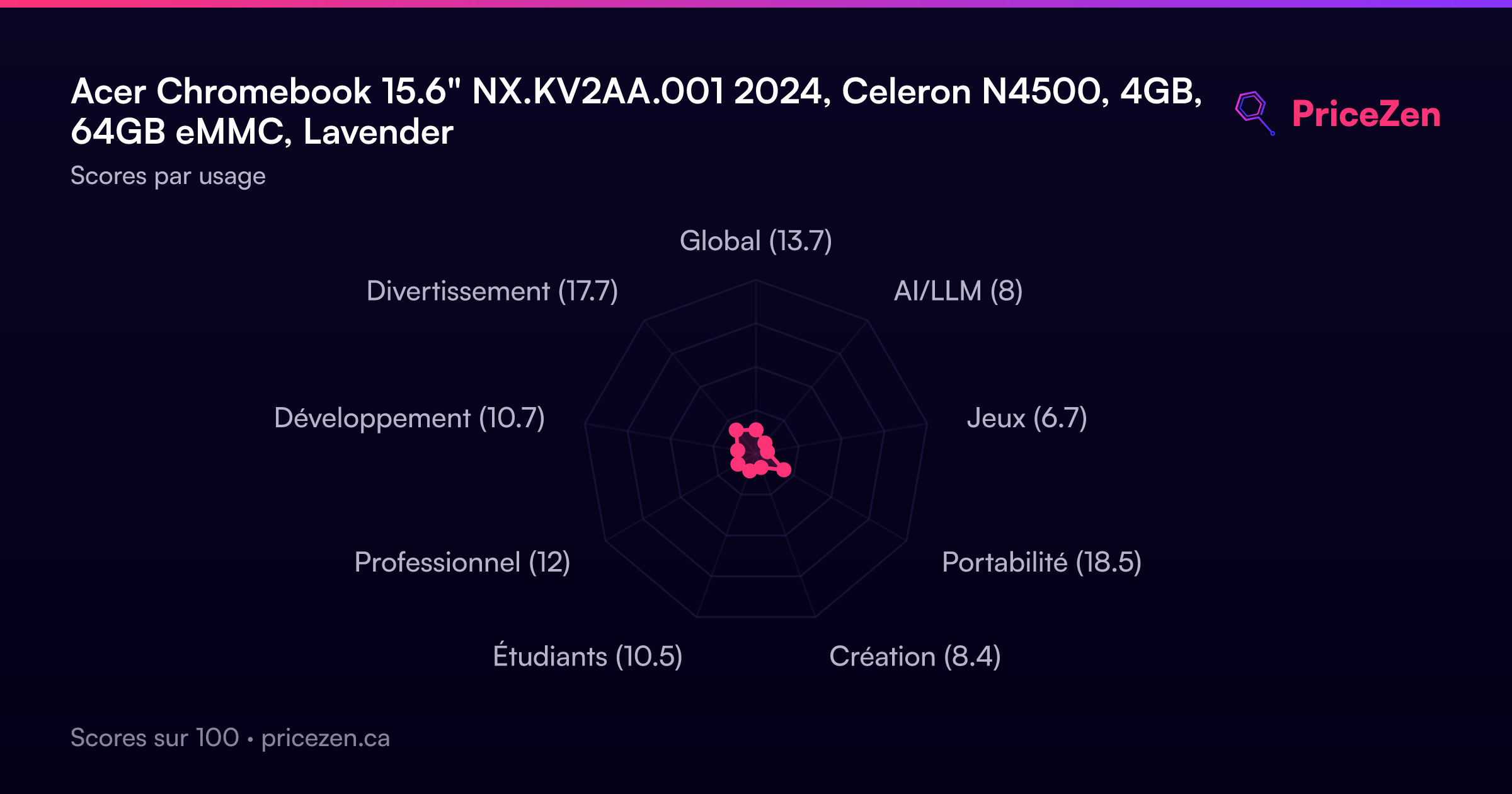
Usage Scores
- Global13.7
- AI/LLM8
- Jeux6.7
- Portabilité18.5
- Création8.4
- Étudiants10.5
- Professionnel12
- Développement10.7
- Divertissement17.7