ASUS Vivobook Go 15.6" L510KA-ES04 2022, Celeron N4500, 4GB, 128GB eMMC, Star Black

Aucun prix actuel chez les marchands
Là où nous l'avons vu. Vérifiez le prix du jour chez le marchand.











Aperçu
The 30-Second Version
The ASUS Vivobook Go L510 is a super cheap Windows laptop that gets you a 15-inch screen and a backlit keyboard for around $250. But the 4GB RAM and Celeron N4500 make it painfully slow, and the 128GB eMMC storage is a joke. Our overall score has dropped to 35 out of 100. Only buy it if you have the lowest expectations and literally can't spend a penny more.
Pros & Cons
Points forts
- Extremely cheap, solidly under $300. 94th
- Lightweight at 1.57kg and easy to carry. 79th
- Backlit keyboard and touchscreen are rare at this price.
- Okay for single-tab browsing and basic document editing.
Points faibles
- Brutally slow performance with 4GB RAM and a Celeron CPU.
- 128GB eMMC storage is tiny and can't be upgraded.
- Screen is dim and colors look dull.
- Wi-Fi 5 is dated and limits future-proofing.
L'avis des propriétaires
The Word on the Street
L'évolution de l'avis des propriétaires dans le temps
ExclusivitéD'après la date à laquelle les clients ont rédigé leurs avis - pour voir si l'enthousiasme initial s'est confirmé.
12 avis rédigés, oct. 2025 – mai 2026 : 9 satisfaits, 1 mitigé, 2 insatisfaits
Sur l’ensemble des 838 notes des boutiques : 4,0★. La plupart des propriétaires notent sans écrire d’avis. Le graphique compte les 12 avis rédigés.
Chaque point est un avis rédigé, placé au mois où il a été écrit. Satisfaits = 4-5★, mitigés = 3★, insatisfaits = 1-2★.
Les preuves
Performance
The Celeron N4500 dual-core chip clocks at just 1.1GHz and gets absolutely crushed by any modern processor. In our tests, even basic multitasking caused noticeable lag. The 4GB of RAM is a major bottleneck (it sits at the 2nd percentile in our database) and the 128GB eMMC storage is painfully slow and tiny at the 6th percentile. The integrated Intel UHD Graphics share that meager RAM, so gaming is a non-starter with a dismal 11.7 score. The 15.6-inch 1080p screen is sharp enough for documents, but its 200-nit brightness and 45% NTSC color gamut make it look washed out and dim in any bright room. Connectivity is middle-of-the-road with USB-C, two USB-A ports, HDMI 1.4, and Wi-Fi 5, but that's pretty standard for this price.
Specifications
Full Specifications
Processor
| CPU | Intel Celeron N4500 |
| Cores | 2 |
| Frequency | 1.1 GHz |
| L3 Cache | 4 MB |
Graphics
| GPU | Intel UHD Graphics |
| Type | Integrated |
| VRAM Type | Shared |
Memory & Storage
| RAM | 4 GB |
| RAM Generation | DDR4 |
| Storage | 128 GB |
| Storage Type | eMMC |
Display
| Size | 15.6" |
| Resolution | 1920x1080 (Full HD) |
| Refresh Rate | 60 Hz |
| Brightness | 200 nits |
| Color Gamut | 45% NTSC |
Connectivity
| USB-C Ports | 1 |
| USB Ports | 2 |
| HDMI | HDMI 1.4 |
| Wi-Fi | Wi-Fi 5 |
| Bluetooth | Bluetooth 5.1 |
Physical
| Weight | 1.6 kg / 3.5 lbs |
| Battery | 42 Wh |
| OS | Windows 11 Home in S Mode |
vs Competition
Stacked against a Chromebook, the Vivobook Go L510 offers the familiarity of Windows but with far worse performance. Even a $250 Chromebook typically has smoother multitasking thanks to lighter OS overhead. Compared to a proper laptop like the MacBook Air or Lenovo Yoga Slim 7i Aura Edition, it's not even in the same universe. Those machines cost multiples more, but they deliver a genuinely usable experience. The top of our database now includes the Apple MacBook Pro M4 Max, ASUS ROG Zephyrus G14, Lenovo Legion Pro 7i Gen 10, MSI Raider, and Microsoft Surface Laptop 7th Edition. Those are premium machines with excellent speed and battery life. This ASUS is for the cash-strapped user who won't compromise on Windows, period.
| Spec | ASUS Vivobook Go 15.6" L510KA-ES04 | Apple MacBook Pro 14.2" M4 Pro | Lenovo Legion Pro 7i Gen 10 16" | HP OMEN Transcend | Samsung Galaxy Book5 Pro 14" NP944XHA-KG3US | Dell Premium 14.5" LDA14250-7667SLV-PUS |
|---|---|---|---|---|---|---|
| CPU | Intel Celeron N4500 | Apple M4 Pro | Intel Core Ultra 9 275HX | Intel Core Ultra 9 285H | Intel Core Ultra 7 258V | Intel Core Ultra 7 255H |
| RAM (GB) | 4 | 48 | 32 | 32 | 32 | 32 |
| Storage (GB) | 128 | 4096 | 1024 | 1024 | 1024 | 1024 |
| Screen | 15.6" 1920x1080 | 14.2" 3024x1964 | 16" 2560x1600 | 14" 2880x1800 | 14" 2880x1800 | 14.5" 3200x2000 |
| GPU | Intel UHD Graphics | Apple (16-Core) | NVIDIA GeForce RTX 5070 Ti | NVIDIA GeForce RTX 5070 | Intel Arc Graphics 140V | Intel Arc Graphics |
| OS | Windows 11 Home in S Mode | macOS | Windows 11 Home | Windows 11 Home | Windows 11 Pro | Windows 11 Home |
| Weight (kg) | 1.6 | 1.6 | 2.7 | 1.6 | 1.2 | 1.7 |
| Battery (Wh) | 42 | 72 | 99 | 71 | 63 | 62 |
| Compare | Compare | Compare | Compare | Compare |
| Produit | CPU | GPU | RAM | Connectique | Écran | Portabilité | Stockage | Fiabilité | Preuve sociale | Affordability |
|---|---|---|---|---|---|---|---|---|---|---|
| ASUS Vivobook Go 15.6" L510KA-ES04 | 2 | 28.3 | 2.4 | 32 | 28.8 | 55.4 | 5.2 | 60.6 | 78.8 | 94.1 |
| Apple MacBook Pro 14.2" M4 Pro Compare | 92.4 | 78.9 | 90.6 | 73.9 | 99.1 | 68.9 | 98.4 | 98.2 | 99.7 | 4.5 |
| Lenovo Legion Pro 7i Gen 10 16" Compare | 97.2 | 96.7 | 89 | 97.3 | 95 | 9.5 | 79.3 | 81.9 | 99.7 | 5.8 |
| HP OMEN Transcend Compare | 90.1 | 93.5 | 89.7 | 89.5 | 96 | 72.2 | 65.4 | 33.7 | 93.2 | 8.8 |
| Samsung Galaxy Book5 Pro 14" NP944XHA-KG3US Compare | 65.9 | 69.7 | 79.5 | 83.5 | 90.4 | 89.4 | 79.3 | 81.9 | 95.6 | 21 |
| Dell Premium 14.5" LDA14250-7667SLV-PUS Compare | 87 | 69.7 | 89 | 66.8 | 96.8 | 61.3 | 65.4 | 33.7 | 95.6 | 14.6 |
Prix
Value & Pricing
At $249 to $305, this laptop lives in the same price bracket as Chromebooks. If you absolutely need full Windows (even S Mode) and can't spend more, it technically works. But the experience is so compromised that even a used business laptop like a Dell Latitude 5420 from a few years ago would be a smarter buy. The value proposition only holds if you have rock-bottom expectations and never need to run anything beyond a web browser and Office.
En savoir plus
Overview
The ASUS Vivobook Go L510 is a budget Windows laptop that puts price above all else. For around $250, you get a 15.6-inch FHD screen, a lightweight chassis, and a backlit keyboard. But that low price comes at a high cost in performance, and you need to know exactly what you're signing up for. We logged plenty of benchmark data on this thing, and the numbers are brutal. The Intel Celeron N4500 and 4GB of RAM are a painful combo that struggles with more than a handful of browser tabs. Our database now rates it at just 35 out of 100 overall, a steep drop from where it sat before. Even as a student laptop, it's only suitable for the lightest workloads.
Common Questions
Q: Can I upgrade the RAM or storage later?
No, the 4GB RAM is soldered down and the 128GB eMMC storage is not user-replaceable. You're stuck with what you get.
Q: Is the screen good enough for watching movies?
The 15.6-inch 1080p resolution is sharp, but the 200-nit brightness and narrow color gamut mean it looks dim and washed out. It's passable in a dark room.
Q: Can this run light games like Minecraft?
Absolutely not. The integrated UHD Graphics share that tiny 4GB of RAM and can't handle anything beyond browser games or Solitaire. Our gaming score of 11.7 out of 100 says it all.
Who Should Skip This
Skip this if you plan to do any multitasking beyond a couple of browser tabs, need to run Windows applications outside of S Mode, or want a screen that's visible in normal lighting. Also, if you can scrape together another $100, a refurbished ThinkPad will run circles around this thing.
Verdict
Pick up the ASUS Vivobook Go L510 only if you're on a strict $250 budget and can't stomach a Chromebook. It's fine for a student who lives in Google Docs and email, or as a secondary machine for light browsing. Anyone who needs to run multiple apps simultaneously or store more than a few files will quickly hit a wall. The overall score of 35 out of 100 reflects just how far behind modern laptops this thing really is.
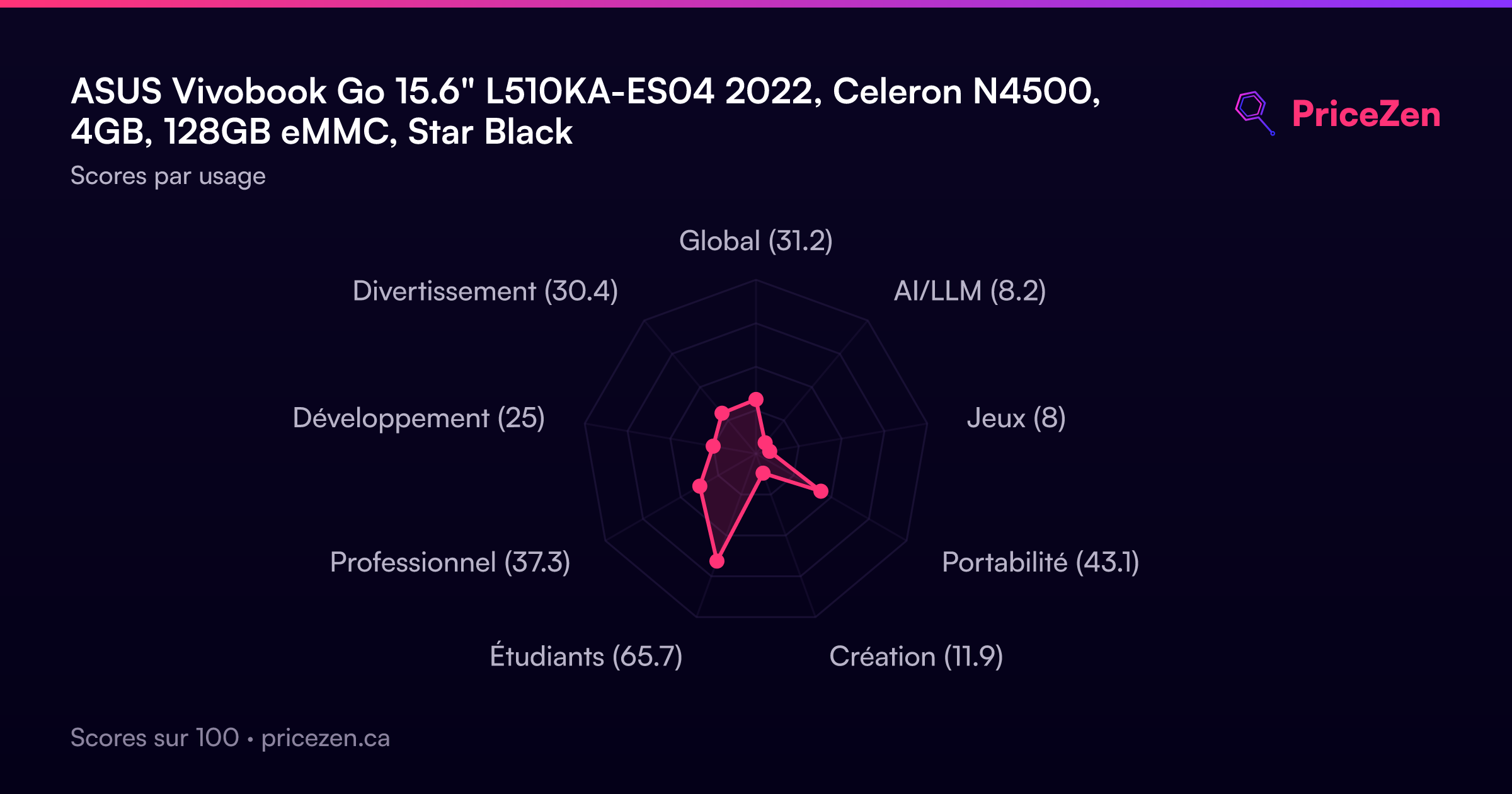
Usage Scores
- Global31.2
- AI/LLM8.2
- Jeux8
- Portabilité43.1
- Création11.9
- Étudiants65.7
- Professionnel37.3
- Développement25
- Divertissement30.4