ASUS Chromebook 14" CX1405CTA-CL464 2023, Intel N50, 4GB, 64GB eMMC, Dusk Gray
Le processeur Intel N50 et 4 Go de LPDDR5 assurent un démarrage rapide et une réactivité fluide sous ChromeOS, avec un châssis certifié MIL-STD 810H pesant 1,39 kg. L'écran IPS Full HD de 14 pouces à 300 nits, le Wi-Fi 6 et la charnière à 180 degrés renforcent son usage polyvalent, tandis que la puce Titan C garantit une sécurité intégrée. Ce Chromebook convient aux étudiants cherchant un appareil léger et durable pour la bureautique, les cours en ligne et le divertissement.

Aucun prix actuel chez les marchands
Aperçu
The 30-Second Version
A cheap, surprisingly tough Chromebook with a Full HD IPS screen and Wi-Fi 6, held back by a 2-core Intel N50 that ranks dead last in its category and just 4GB of RAM. Owners like it, with a 4.5/5 average across 133 ratings. Listings run USD 236 to USD 379, and Best Buy currently sits at the top of that range. Great as a light-use student or spare laptop near the low price, hard to justify at USD 379.
Pros & Cons
Points forts
- Near the top of the category for affordability, with listings starting at USD 236 93rd
- MIL-STD 810H build standard at a budget price, rare in this bracket 91st
- 1920x1080 IPS panel, proper Full HD rather than the usual budget compromise 82nd
- Strong owner sentiment: 4.5/5 across 133 ratings, top-tier social proof in our data
- Wi-Fi 6, Ethernet, two USB-C with display/power delivery, plus a lay-flat hinge
Points faibles
- Intel N50 (2 cores, 1.0GHz) ranks at the absolute bottom of the category for CPU
- 4GB of RAM is among the weakest configurations we track here
- 64GB eMMC storage is equally bottom-tier, and slow compared to SSD-based rivals
- 300-nit 60Hz screen falls behind most competitors in our screen ranking
- Business suitability scores just 19.8/100, and AI workloads are effectively off the table at 4/100
L'avis des propriétaires
L'évolution de l'avis des propriétaires dans le temps
ExclusivitéD'après la date à laquelle les clients ont rédigé leurs avis - pour voir si l'enthousiasme initial s'est confirmé.
5 avis rédigés, juin–juil. 2026 : 5 satisfaits
Sur l’ensemble des 133 notes des boutiques : 4,5★. La plupart des propriétaires notent sans écrire d’avis. Le graphique compte les 5 avis rédigés.
Chaque point est un avis rédigé, placé au mois où il a été écrit. Satisfaits = 4-5★, mitigés = 3★, insatisfaits = 1-2★.
Les preuves
Performance
Let's be straight about the silicon. The Intel Processor N50 is a 2-core chip running at 1.0GHz, and in our ranking against everything else in this category it sits at the very bottom for CPU. That's not a rounding error, that's dead last. Paired with 4GB of LPDDR5 and 64GB of eMMC, both of which also rank among the worst we've seen in this category, you're looking at a machine that handles a handful of tabs, a document and a video call, and then starts complaining. ChromeOS is lean and boots fast, which helps a lot, but lean software can't conjure cores that aren't there. If your habit is twenty tabs plus a spreadsheet plus Spotify, this will feel like wading through syrup.
Graphics come from integrated Intel UHD, which ranks below most of the field, so forget anything beyond casual browser games and video playback. Our AI/LLM suitability score is 4/100, which tells you everything about local AI workloads on 4GB of RAM. The display is a mixed bag: 14 inches of Full HD IPS is genuinely decent resolution for the money and IPS means proper viewing angles, but 300 nits and 60Hz put the overall screen package behind most rivals in our data. Indoors it's fine. Near a sunny window, less so. Port selection ranks about average, though the actual list is better than that sounds: two USB-C ports with display and power delivery support, one USB-A, HDMI 1.4, Ethernet and a combo audio jack. Ethernet on a budget Chromebook is a nice surprise.
Specifications
Full Specifications
Processor
| CPU | Intel Processor N50 |
| Cores | 2 |
| Frequency | 1.0 GHz |
| L3 Cache | 6 MB |
Graphics
| GPU | Intel UHD Graphics |
| Type | Integrated |
| VRAM Type | Shared |
Memory & Storage
| RAM | 4 GB |
| RAM Generation | LPDDR5 |
| Storage | 64 GB |
| Storage Type | eMMC |
Display
| Size | 14" |
| Resolution | 1920x1080 (Full HD) |
| Panel | IPS |
| Refresh Rate | 60 Hz |
| Brightness | 300 nits |
Connectivity
| USB-C Ports | 2 |
| USB Ports | 1 |
| HDMI | HDMI 1.4 |
| Wi-Fi | Wi-Fi 6 |
| Bluetooth | ✓ |
| Ethernet | 1x HDMI 1.4 |
Physical
| Weight | 1.4 kg / 3.1 lbs |
| OS | ChromeOS |
vs Competition
The competitor set in our data is frankly a different weight class: Apple MacBook Air 13.3" M1, Lenovo ThinkPad X1 Carbon 14" 21KC00A8US, HP OmniBook X Flip 14-fm0013dx, Samsung Galaxy Book4 Edge 16" NP960XMA-KB1US and MSI Summit 13.3" A1MTG-001US. Against any of them, the ASUS gives ground on raw compute, and it isn't close. Its CPU ranks last in the category, its 4GB of RAM and 64GB of eMMC sit near the floor, and its graphics fall behind most of the field. If you're cross-shopping a ThinkPad X1 Carbon or a MacBook Air because you need real multitasking headroom or heavier apps, this Chromebook isn't a cheaper substitute for those machines. It's a different tool.
Where it wins is the stuff those comparisons ignore. It's the affordability standout of the group by a wide margin in our rankings, it's well above average for compactness at 1.39kg, and it brings a MIL-STD 810H build claim plus Ethernet and a lay-flat hinge that make it a sensible beater laptop. The Samsung Galaxy Book4 Edge 16" and HP OmniBook X Flip are aimed at people who want a primary machine; the ASUS is aimed at people who want a cheap, durable second one, or a first laptop for a kid who will absolutely drop it. Cross-shop the MSI Summit or ThinkPad if your work involves real workloads. Stay here if your work involves tabs.
| Spec | ASUS Chromebook 14" CX1405CTA-CL464 | Apple MacBook Pro 14.2" M4 Max | Lenovo Legion Pro 7i Gen 10 16" | HP OMEN Transcend | Samsung Galaxy Book5 Pro 14" NP944XHA-KG3US | Dell Premium 14.5" LDA14250-7667SLV-PUS |
|---|---|---|---|---|---|---|
| CPU | Intel Processor N50 | Apple M4 Max | Intel Core Ultra 9 275HX | Intel Core Ultra 9 285H | Intel Core Ultra 7 258V | Intel Core Ultra 7 255H |
| RAM (GB) | 4 | 64 | 32 | 32 | 32 | 32 |
| Storage (GB) | 64 | 4096 | 1024 | 1024 | 1024 | 1024 |
| Screen | 14" 1920x1080 | 14.2" 3024x1964 | 16" 2560x1600 | 14" 2880x1800 | 14" 2880x1800 | 14.5" 3200x2000 |
| GPU | Intel UHD Graphics | Apple (40-Core) | NVIDIA GeForce RTX 5070 Ti | NVIDIA GeForce RTX 5070 | Intel Arc Graphics 140V | Intel Arc Graphics |
| OS | ChromeOS | macOS | Windows 11 Home | Windows 11 Home | Windows 11 Pro | Windows 11 Home |
| Weight (kg) | 1.4 | 1.6 | 2.7 | 1.6 | 1.2 | 1.7 |
| Battery (Wh) | - | 72 | 99 | 71 | 63 | 62 |
| Compare | Compare | Compare | Compare | Compare |
| Produit | CPU | GPU | RAM | Connectique | Écran | Portabilité | Stockage | Fiabilité | Preuve sociale | Affordability |
|---|---|---|---|---|---|---|---|---|---|---|
| ASUS Chromebook 14" CX1405CTA-CL464 | 0.1 | 28 | 4.1 | 44.5 | 38.9 | 82.1 | 3.6 | 60.6 | 91.3 | 93.1 |
| Apple MacBook Pro 14.2" M4 Max Compare | 93.7 | 91.6 | 95.7 | 73.2 | 99.3 | 68.8 | 98.5 | 98.3 | 73.3 | 1.7 |
| Lenovo Legion Pro 7i Gen 10 16" Compare | 97.2 | 96.6 | 89 | 97.2 | 95.6 | 9.5 | 79.2 | 82 | 99.7 | 5.5 |
| HP OMEN Transcend Compare | 90.1 | 93.6 | 89.7 | 89.3 | 96.5 | 72.2 | 65.2 | 33.6 | 94.1 | 8.4 |
| Samsung Galaxy Book5 Pro 14" NP944XHA-KG3US Compare | 65.8 | 69.7 | 79.5 | 83.1 | 91.5 | 89.5 | 79.2 | 82 | 96.5 | 20 |
| Dell Premium 14.5" LDA14250-7667SLV-PUS Compare | 87.1 | 69.7 | 89 | 65.9 | 97.2 | 61.1 | 65.2 | 33.6 | 96.5 | 14 |
Prix
Value & Pricing
Here's where it gets interesting, and slightly annoying. Across the four US listings we track, this Chromebook runs from USD 236 to USD 379, a spread of USD 143 on the same machine. That's a huge gap for a budget product, and it changes the verdict entirely depending on which end you land on. At USD 236 the value story is excellent: Full HD IPS, MIL-STD durability and Wi-Fi 6 for that money is a lot of laptop-shaped object. At USD 379 you're paying a serious premium for identical hardware, and the weak CPU and 4GB of RAM start to sting a lot more.
The only per-store price we have right now is Best Buy at USD 379, which is the top of that range. So if you're buying today from the store we can price, you're paying the expensive end. We track prices over time, partly through our community browser extension, and our advice is simple: watch it, wait for it to drift toward the lower listings, and don't pay USD 379 for a 2-core N50 unless you need it this afternoon. Affordability is this product's strongest card. Don't hand that advantage back at checkout.
En savoir plus
Overview
The ASUS Chromebook CX1405CTA-CL464 is a budget Chromebook that knows exactly what it wants to be: a cheap, tough little machine for browsing, Google Docs and YouTube. Inside you get an Intel Processor N50 with two cores at 1.0GHz, 4GB of LPDDR5 memory and 64GB of eMMC storage, wrapped in a 14-inch chassis that weighs 1.39kg (ASUS quotes 3.06 lbs). The screen is a 1920x1080 IPS panel at 60Hz and 300 nits. Nothing here is chasing a spec-sheet trophy, and honestly that's the point.
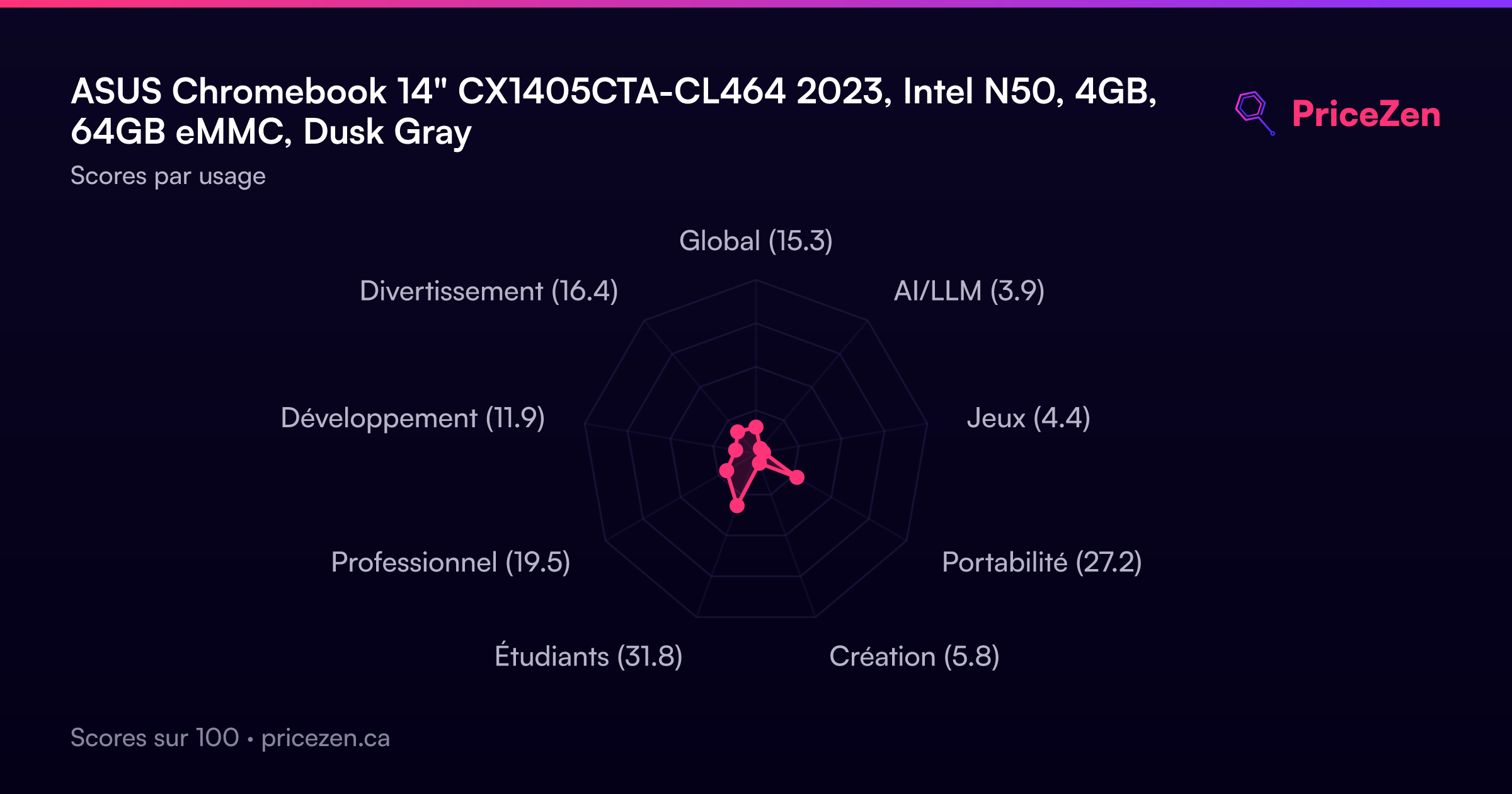
Who's it for? Students on a tight budget, anyone who needs a second laptop for the couch or the kitchen table, and people whose entire computing life happens inside a browser tab. Our category scoring backs that up: it lands at 32.9/100 for student use, 27.2/100 as a compact carry-around and just 19.8/100 for business. Those aren't insults, they're a map. This thing is built for light work, and it gets noticeably less convincing the moment you ask it to be your main work machine.
What makes it interesting is the combination of price and build. It's built to meet the US MIL-STD 810H military-grade standard, which is unusual at this end of the market, and it carries Wi-Fi 6, a 720p camera with a privacy shutter, a 180-degree lay-flat hinge and Titan C security chip. Our affordability ranking puts it near the top of the Chromebook pile, and its social proof score sits in the 96th percentile off a 4.5/5 average across 133 ratings. So plenty of people bought one and seem happy. The catch is what's under the hood, and we'll get to that.
Common Questions
Q: Is 4GB of RAM enough on a Chromebook?
For light browsing, Google Docs and streaming, ChromeOS is lean enough that 4GB of LPDDR5 gets by, and that's the use case this machine is built for. But 4GB ranks among the weakest configurations in our Chromebook data, so heavy tab habits or several apps at once will push it. If you routinely keep a dozen-plus tabs open, treat that as a dealbreaker rather than something you'll adapt to.
Q: Can I use it for school work and video calls?
Yes, within reason. Our scoring puts it at 32.9/100 for student use, and it has a 720p camera with a privacy shutter, Wi-Fi 6 and a 14-inch 1920x1080 IPS screen that's comfortable for reading and writing. The limit is the 2-core Intel N50, which ranks at the bottom of the category, so expect it to handle a call or a document well but not both plus a pile of tabs.
Q: Is 64GB of storage going to be a problem?
It's one of the smallest storage configurations we track in this category, and eMMC is slower than the SSDs in pricier laptops. ChromeOS is designed around cloud storage, so if your files live in Google Drive you'll barely notice. If you want to keep a large offline media library or lots of Android apps installed locally, 64GB will fill up faster than you'd like.
Q: Why is the price different everywhere?
We track four US listings ranging from USD 236 to USD 379, a USD 143 spread on identical hardware, and the only per-store price we have right now is Best Buy at USD 379. That's the expensive end, and at that price the weak CPU and 4GB of RAM are much harder to forgive. We'd watch the price rather than buy at the top of the range.
Who Should Skip This
Skip this if it's going to be your main work machine. The 19.8/100 business score isn't us being snobby, it's the arithmetic of a 2-core 1.0GHz N50, 4GB of RAM and 64GB of eMMC. Anyone doing heavy multitasking, big spreadsheets, development work or anything AI-related (4/100 in our scoring) will hit the wall immediately. Look at the Lenovo ThinkPad X1 Carbon 14" or the MSI Summit 13.3" instead, or the Apple MacBook Air 13.3" M1 if you want a lighter-priced primary machine from the competitor set.
Also skip it if you're picky about displays or you work outdoors a lot. The 300-nit 60Hz panel ranks behind most of the field in our screen data, and while Full HD IPS is a win at this price, brightness is the trade-off you're accepting. And if the only price you can get is USD 379, we'd honestly wait or shop the HP OmniBook X Flip 14-fm0013dx and Samsung Galaxy Book4 Edge 16" instead. This Chromebook's whole appeal is being cheap and tough. Pay a premium and you've removed half the argument.
Verdict
If you're a student writing papers in Google Docs, watching lectures and living in Gmail, this is a defensible buy at the low end of its price range. The Full HD IPS screen is easy on the eyes for reading, the 1.39kg weight won't wreck your backpack, and ChromeOS's built-in protection plus the Titan C chip means you're not babysitting antivirus. The 4.5/5 average across 133 ratings suggests owners who bought it for exactly this are getting what they expected. Just go in knowing the ceiling: a few tabs, light apps, nothing heavy.
If you want this to be your only computer for work, we'd push back. A 19.8/100 business score and a bottom-ranked CPU mean video calls plus a spreadsheet plus a browser full of research will test your patience. And at USD 379 from Best Buy, the value argument that makes this thing appealing largely evaporates. Our recommendation: buy it as a cheap, tough secondary machine or a first student laptop, ideally closer to USD 236. Anything more ambitious, look elsewhere.
Usage Scores
- Global15.3
- AI/LLM3.9
- Jeux4.4
- Portabilité27.2
- Création5.8
- Étudiants31.8
- Professionnel19.5
- Développement11.9
- Divertissement16.4