Yealink MCore 1306064 2026, Intel Ultra 5, Schwarz
Le processeur Intel Ultra 5 et la prise en charge de l'entrée HDMI 2.1 offrent une puissance de traitement et une projection 4K nette pour les salles de réunion. Son design compact avec fixation murale et verrouillage de câble simplifie l'installation et la maintenance. Idéal pour les équipes IT équipant des salles de conférence de toutes tailles avec un système de visioconférence fiable.

Aucun prix actuel chez les marchands











Aperçu
The 30-Second Version
A conference room appliance wearing a mini PC costume. Great for Yealink shops, pointless for everyone else.
Pros & Cons
Points forts
- Purpose-built for conference rooms, not a repurposed office PC
- Triple HDMI out plus 4K HDMI-in for screen sharing
- Wall mount with tool-free cable swaps is genuinely clever
- Flexible wired or wireless pairing with touch consoles
Points faibles
- Port selection is thin, 17th percentile in our database
- No RAM or storage specs published, which is annoying
- Reliability scores sit near the bottom at the 12th percentile
- Price is steep for what is essentially a meeting appliance
L'avis des propriétaires
The Word on the Street
Les preuves
Performance
The Ultra 5 125H is a solid mobile chip with a dedicated NPU for AI workloads, which matters here because Yealink leans on it for things like framing, noise suppression, and other meeting smarts. The 4K HDMI-in for auxiliary streams is a nice touch if you're running a Microsoft Teams Room or Zoom Room setup. But our database puts this thing's CPU at the 4th percentile against all desktops, and the integrated graphics land at the 8th. That's not a knock on Yealink, it's just the reality of a fanless-ish mini PC built for video calls, not benchmarks.
Specifications
Full Specifications
Processor
| CPU | Intel Ultra 5 |
Graphics
| Type | Integrated |
Build
| Form Factor | mini |
| Weight | 2.2 kg / 4.9 lbs |
Connectivity
| HDMI | 1x HDMI 2.1, 2x HDMI 2.0 |
| Ethernet | Gigabit Ethernet |
vs Competition
Stacked against something like the Apple Mac Studio M3 Ultra or a Lenovo Legion Tower, the MCore 4 looks like a toy on paper. But that's the wrong fight. The Mac Studio is a workstation, the Legion is a gaming rig, and neither one is going to mount behind a conference room display and quietly handle your Teams calls for three years. The real comparison is against other meeting room appliances, and there the MCore 4 holds its own, assuming you're already in Yealink's world. If you're not, HP and Dell both make small form factor boxes that cost less and offer more ports.
| Spec | Yealink MCore 1306064 | Apple Mac Studio M5 Max | Lenovo T Series Towers Legion Tower 5a Gen 10 | Dell Desktop ECT1250 | HP OMEN GT16-0364 | ASUS ROG GM700 |
|---|---|---|---|---|---|---|
| CPU | Intel Ultra 5 | Apple M5 Max | AMD Ryzen 7 7800X3D | Intel Core Ultra 7 265 | AMD Ryzen 7 8700F | AMD Ryzen 7 9800X3D |
| RAM (GB) | - | 36 | 32 | 32 | 32 | 32 |
| Storage (GB) | - | 1024 | 4096 | 2048 | 1024 | 2048 |
| GPU | - | Apple (32-Core) | NVIDIA GeForce RTX 5070 Ti | Intel UHD Graphics | NVIDIA GeForce RTX 5070 | NVIDIA GeForce RTX 5070 Ti |
| Form Factor | mini | mini | mid-tower | sff | mid-tower | mid-tower |
| Psu W | - | 480 | 850 | 180 | 850 | 850 |
| OS | - | macOS | Windows 11 Home | Windows 11 Home | Windows 11 Home | Windows 11 Home |
| Compare | Compare | Compare | Compare | Compare |
| Produit | CPU | GPU | RAM | Connectique | Stockage | Fiabilité |
|---|---|---|---|---|---|---|
| Yealink MCore 1306064 | 3.8 | 8.1 | 9.1 | 16.6 | 1.8 | 11.5 |
| Apple Mac Studio M5 Max Compare | 95.7 | 85.2 | 92.4 | 89 | 68.8 | 99.3 |
| Lenovo T Series Towers Legion Tower 5a Gen 10 Compare | 73.4 | 94.7 | 77.9 | 88.3 | 98.1 | 70 |
| Dell Desktop ECT1250 Compare | 88.2 | 60.3 | 81.6 | 74.5 | 82.7 | 70 |
| HP OMEN GT16-0364 Compare | 69.5 | 90.8 | 87.1 | 97.9 | 53.5 | 70 |
| ASUS ROG GM700 Compare | 80.5 | 94.7 | 81.6 | 96 | 90 | 37.3 |
Prix
Value & Pricing
At roughly $1,730 USD, this is not a value play. You're paying for the Yealink ecosystem, the wall mount engineering, and the guarantee that it'll play nice with their touch consoles and cameras. If your company already runs Yealink gear, fine. If you're just looking for a small PC to bolt behind a TV, you can do a lot better for a lot less.
Historique des prix
En savoir plus
Overview
The Yealink MCore 4 is not a desktop PC in any normal sense. It's a purpose-built conference room brain, and if you're shopping for one of those, it does exactly what it says on the tin. Intel Ultra 5 125H inside, triple HDMI out, and a wall mount that actually makes sense for a meeting space. But if you wandered here looking for a mini PC to run games or heavy creative work, turn around now.
Common Questions
Q: Can I use this as a regular desktop PC?
Technically yes, but you'd be overpaying for a machine with weak ports, no discrete GPU, and no published RAM or storage specs. Buy a normal mini PC instead.
Q: Does it work without a Yealink touch console?
It can run, but you'd be missing half the point. The whole design is built around pairing with Yealink's control screens, wired or wireless. Without one, you're left with a very expensive HDMI box.
Q: How many displays can it drive?
Three outputs total, one HDMI 2.1 and two HDMI 2.0. Plus an HDMI-in for bringing in a 4K auxiliary stream, which is handy for content sharing in a Teams or Zoom room.
Who Should Skip This
If you're looking for a compact gaming rig, a home theater PC, or a general-purpose mini desktop, this isn't it. Go grab an Intel NUC, a Minisforum box, or even a Mac Mini and save yourself several hundred bucks. The MCore 4 only makes sense when it's bolted to a wall in a room with a Yealink touch panel on the table.
Verdict
If you're outfitting a meeting room and your AV stack is Yealink, buy it. The MCore 4 does its job well, the mounting system is thoughtful, and the Ultra 5 125H is more than enough for video conferencing. If you're a home user or a gamer who saw 'mini PC' and got curious, this is not for you. Not even close.
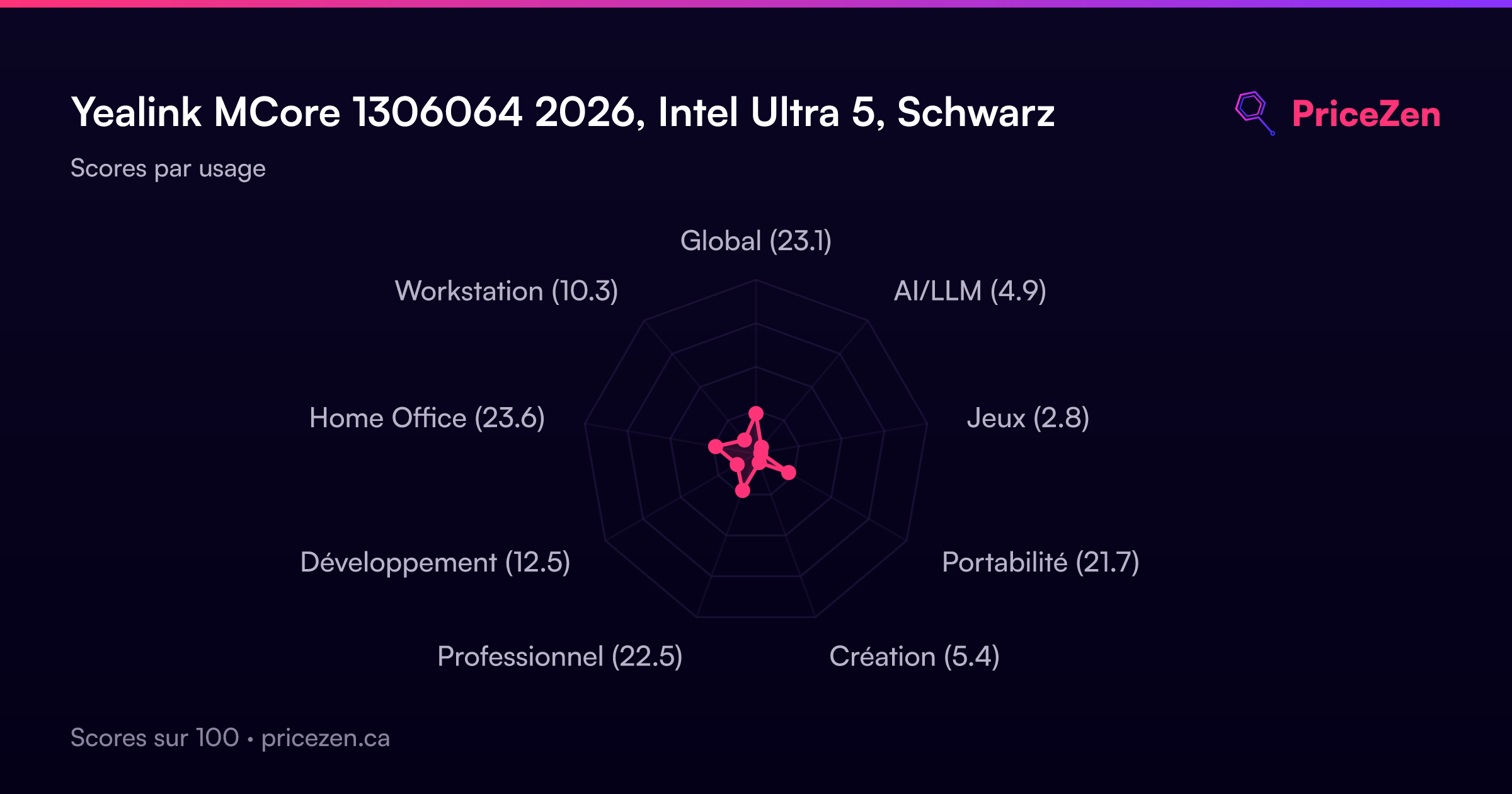
Usage Scores
- Global23.3
- AI/LLM4.9
- Jeux2.8
- Portabilité21.9
- Création5.4
- Professionnel22.8
- Développement12.6
- Home Office23.9
- Workstation10.4