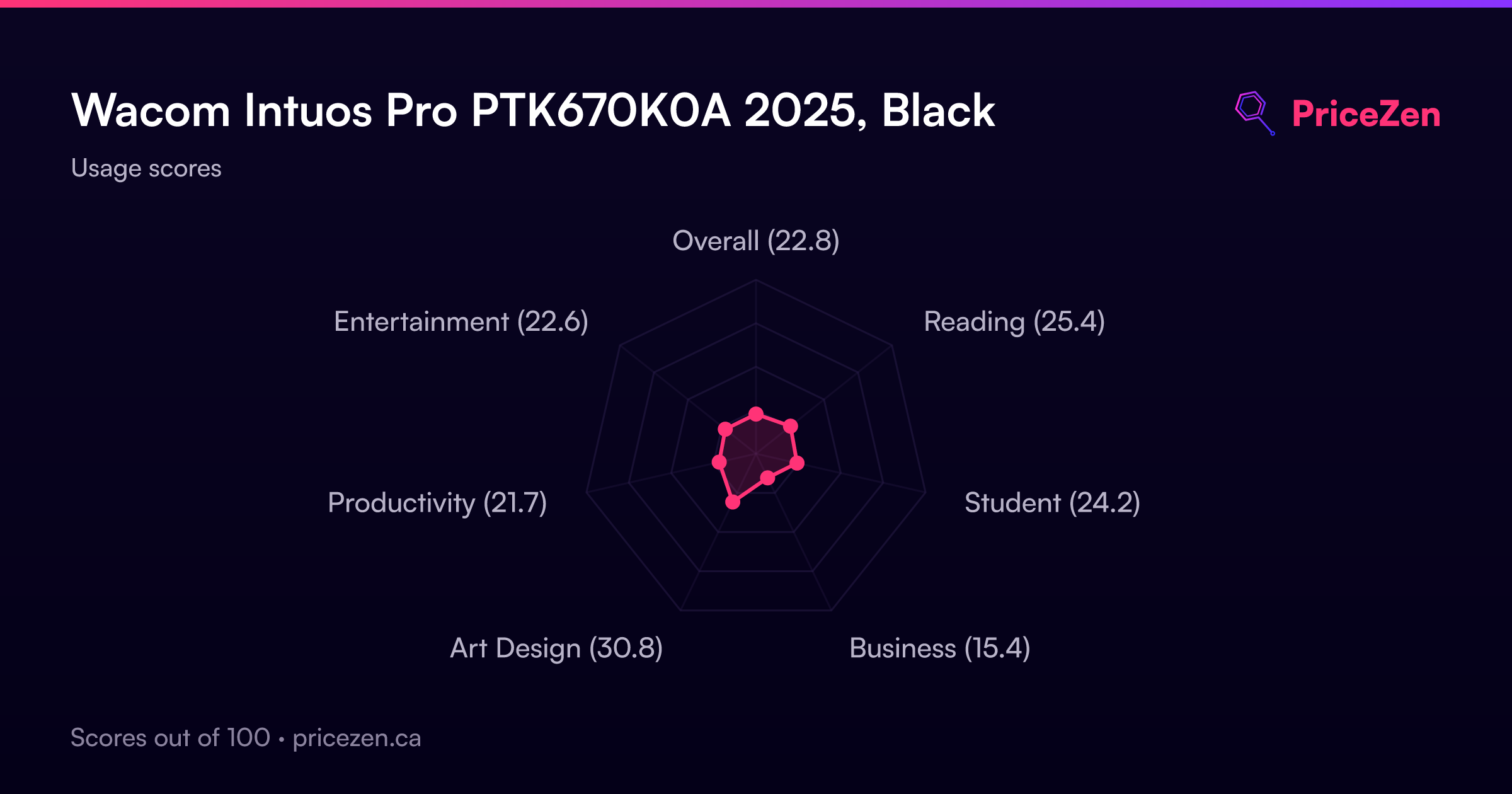
Wacom Intuos Pro PTK670K0A 2025, Black
The Wacom Pro Pen 3 with 8192 pressure levels and customizable grip options delivers precise, lag-free tracking on a textured surface that mimics pen-on-paper. Its 10 ExpressKeys and dual mechanical dials streamline workflow, while the magnesium build keeps the tablet durable yet portable at just 411g with Bluetooth 5.3 wireless freedom. This tablet is best for digital illustrators and graphic designers who need a compact, multi-monitor-ready drawing surface with deep software integration.

No current retailer price
Snapshot
The 30-Second Version
The Wacom Intuos Pro Medium (2025) is a professional drawing tablet with a best-in-class stylus, the Pro Pen 3, which offers 8192 pressure levels, tilt support, and customizable grips. US pricing has settled at $300, so there's no need to shop around anymore. The Bluetooth connection is iffy and battery life is dead last in our database, so plan on using the USB cable. If you're a working artist with a desktop setup, this is a great buy. If you want a screen to draw on, look elsewhere.
Pros & Cons
Pros
- Pro Pen 3 with 8192 pressure levels and tilt support is best-in-class for pen input 88th
- Customizable grips, balance weights, and button covers make long sessions more comfortable
- Large 11.4 x 8.1 inch active area in a relatively compact footprint
- 10 ExpressKeys and 2 mechanical dials speed up workflow
- Magnesium body is thin, light, and durable
Cons
- Battery life is essentially nonexistent, dead last in our database
- Bluetooth connection can be unreliable according to customer feedback
- No display, so you're drawing on a blank surface while looking at your monitor
- Feature set and connectivity rankings are below average compared to screen tablets
- You still need a computer attached, so it's not a grab-and-go sketching device
What owners think
The Word on the Street
How owner sentiment changed over time
ExclusiveBased on when customers actually wrote their reviews - so you can see whether early praise held up.
5 written reviews, Jun 2026: 5 happy
Across all 27 store ratings: 4.7★. Most owners rate without writing a review. The chart counts the 5 written reviews.
Each dot is one written review, in the month it was written. Happy = 4-5★, mixed = 3★, unhappy = 1-2★.
The proof
Performance
The Pro Pen 3 is the star here, and it's not close. 8192 pressure levels means the tablet can detect incredibly fine gradations in how hard you're pressing. In practice, that translates to smoother line weight transitions and more natural brush strokes in apps like Photoshop and Clip Studio Paint. The tilt support is equally important for shading and calligraphy-style work. You can angle the pen and get a completely different mark, just like a real pencil or brush.
The active drawing area measures 11.4 by 8.1 inches, which is generous for a medium tablet. That's enough room for broad arm movements without forcing you to clear half your desk. The tablet itself is only 4mm thick at its thinnest point and weighs 411 grams, so it's easy to slide into a laptop bag. The magnesium body feels sturdy without being heavy. One thing to note: the Bluetooth connection is a mixed bag. One reviewer mentioned it kept disconnecting, and while that's just one data point, it's worth knowing that the wired USB connection is rock solid. If you're doing paid client work, plug it in.
Specifications
Full Specifications
Connectivity
| Bluetooth | Bluetooth 5.3 |
Features
| Stylus Support | Yes |
| Stylus Model | Wacom Pro Pen 3 |
Physical
| Weight | 0.4 kg / 0.9 lbs |
| OS | Windows |
vs Competition
The closest rival in our top five is the Apple iPad Air 13" M4, and it's a different kind of tool rather than a better version of the same one. It's a standalone device with a screen you draw directly on, while the Intuos Pro is a peripheral that makes your existing computer better at drawing. What Wacom gives you in exchange is the Pro Pen 3: 8192 pressure levels, tilt support, and grips, balance weights and button covers you can physically swap around. Add 10 ExpressKeys and two mechanical dials, and you have a desk setup built for hours of repetitive work. Different tools for different jobs.
The Samsung Galaxy Tab S10+ 12.4" sits in the same camp. It's a self-contained tablet with its own display and pen, so you can sketch anywhere without a laptop in tow. The Intuos Pro can't do that, and it isn't trying to. Its 11.4 by 8.1 inch active area is a dedicated drawing surface that pairs with whatever monitor you already trust for color, and at 4mm thick and 411 grams it stays out of the way on a desk.
The TABWEE T60 Pro 13.4" rounds out the group, and it's another screen-first device. Our scoring model ranks all of these against each other using specs and external benchmark data, and the Intuos Pro's percentile numbers look modest next to them because it's being measured against products with displays, batteries and full operating systems. That's not a fair fight, and it doesn't tell you much about pen feel. If you want an all-in-one you can carry, buy one of the screen tablets. If you want a dedicated drawing surface for your workstation at $300, the Intuos Pro is the better call.
| Spec | Wacom Intuos Pro PTK670K0A | Apple iPad Pro 13" M5 | Microsoft Surface Pro 11 13" | Samsung Galaxy Tab 12.4" S10+ | Lenovo Yoga Tab Plus 12.7" ZAEG0096US | Xiaomi Pad 11.2" 62751 |
|---|---|---|---|---|---|---|
| CPU | - | Apple M5 | Qualcomm Snapdragon X Elite X1E-84-100 | MediaTek Dimensity 9300+ | QTI SM8650 | Snapdragon 8s Gen 3 |
| RAM (GB) | - | 16 | 16 | 12 | 16 | 12 |
| Storage (GB) | - | 1024 | 1024 | 512 | 256 | 512 |
| Screen | - | 13" 2752x2064 | 13" 2880x1920 | 12.4" 2800x1752 | 12.7" 2944x1840 | 11.2" 3200x2136 |
| OS | Windows | iPadOS | Windows 11 Home | Android 14 | Android 14 | Android 14 |
| Stylus | true | true | true | true | true | true |
| Cellular | false | true | false | false | false | false |
| Battery (Wh) | - | 39 | 53 | - | - | - |
| Compare | Compare | Compare | Compare | Compare |
| Product | CPU | GPU | RAM | Screen | Battery | Feature | Storage | Portability | Connectivity | Social Proof | Affordability | Reading Battery | Water Resistance |
|---|---|---|---|---|---|---|---|---|---|---|---|---|---|
| Wacom Intuos Pro PTK670K0A | 38.1 | 36.6 | 31.2 | 42.1 | 0.1 | 42.6 | 30.2 | 87.5 | 36.4 | 34.6 | 36.3 | 1 | 46.4 |
| Apple iPad Pro 13" M5 Compare | 99.2 | 99.4 | 92.5 | 99.7 | 97.7 | 96.4 | 97.9 | 48.5 | 99.2 | 99.2 | 1.3 | 41.3 | 46.4 |
| Microsoft Surface Pro 11 13" Compare | 98.5 | 96.7 | 92.5 | 99.1 | 99.8 | 74.1 | 97.9 | 21.8 | 92.8 | 91 | 5.2 | 87 | 97.3 |
| Samsung Galaxy Tab 12.4" S10+ Compare | 82.4 | 79.2 | 81.1 | 95.2 | 88.1 | 96.4 | 93.1 | 50 | 77 | 91 | 5.8 | 56.8 | 97.3 |
| Lenovo Yoga Tab Plus 12.7" ZAEG0096US Compare | 84.2 | 82.3 | 92.5 | 96.4 | 88.9 | 96.4 | 83.9 | 42.9 | 92.8 | 87.1 | 21.5 | 52.1 | 46.4 |
| Xiaomi Pad 11.2" 62751 Compare | 86.8 | 85.7 | 81.1 | 98 | 85.3 | 65.1 | 89.6 | 79 | 77 | 91 | 14.1 | 71.3 | 46.4 |
Price
Value & Pricing
Pricing has settled down, which is a nice change. We track this tablet across stores with our own automated system, partly through our community browser extension, and the US listings have tightened up to $300 instead of the wide spread we were seeing before. That takes the guesswork out of buying one: you no longer have to hunt around hoping you landed on the cheaper vendor. In Canada it's CAD 440, in Mexico it's MXN 7,699, and in Brazil it's BRL 2,999. Those amounts aren't directly comparable across currencies, but regional pricing still varies a lot.
At $300 the value case is straightforward. The Pro Pen 3 alone is a serious piece of hardware, and the included software trials for Capture One, Clip Studio Paint EX, and MASV add some value on top. You're paying for pen accuracy and a proper drawing surface, not for a screen or a computer, and that's exactly why it lands where it does against the screen tablets in our ranking. The Intuos Pro makes the most sense for people who already have a powerful machine and just need a better input device, not a whole new computer.
Read more
Overview
The Wacom Intuos Pro Medium (2025) is a drawing tablet for people who already know what they're doing. It's not a screen you draw on, it's a blank slate that plugs into your computer and turns your monitor into the canvas. That sounds old school in a world full of iPads and Surface Pros, but there's a reason Wacom still sells these things by the truckload to working artists. The pen tech is just that good.
This particular model sits in a weird spot in our database. The percentile rankings look rough at first glance, with battery life dead last and most other categories hovering around the 30th to 40th percentile. But those numbers compare it against tablets with screens, batteries, and full operating systems. That's not really a fair fight. The Intuos Pro isn't trying to be an iPad. It's trying to be the best damn pen input device you can strap to a workstation, and on that front, it mostly delivers.
The headline feature is the Pro Pen 3. Wacom packed 8192 pressure levels, tilt support, and what they call lag-free tracking into a stylus you can physically customize. You get interchangeable grips, adjustable balance weights, and button covers. It's the kind of thing that sounds gimmicky until you spend eight hours a day holding the thing and realize your wrist doesn't hurt anymore.
Common Questions
Q: How long does the battery last on the Intuos Pro?
The battery is a 1200mAh cell, and it's the weakest part of this product. It ranks dead last in our battery life database, which means you shouldn't expect much from wireless mode. Realistically, you'll want to keep the USB cable handy. The good news is that the tablet works perfectly when plugged in, and most professional users leave it connected anyway.
Q: Can I use the Intuos Pro without a computer?
No. The Intuos Pro is a peripheral, not a standalone device. It needs to be connected to a Windows 10 or later machine or a Mac running OS 13 or later. You can connect via USB or Bluetooth, but the tablet itself has no screen and no operating system. If you want a standalone drawing device, a screen tablet like the Apple iPad Air 13" M4 or the Samsung Galaxy Tab S10+ 12.4" is the direction to look.
Q: Does the stylus support tilt?
Yes, the Pro Pen 3 supports tilt in addition to 8192 pressure levels. That means you can angle the pen to create different marks, which is essential for shading, calligraphy, and natural brush work. The tilt sensitivity is one of the reasons this pen feels so much better than cheaper alternatives.
Q: What's included in the box?
You get the Intuos Pro tablet, a USB C-to-A cable, the Wacom Pro Pen 3, flare and straight grips, a balance weight, button covers, a pen stand, replacement nibs (5 standard, 3 felt, 2 rubber), a nib removal tool, a quick start guide, and a USB A-to-C adapter. It's a generous package, especially the nib variety, which lets you tune the drawing feel to your preference.
Who Should Skip This
If you're new to digital art and want something that feels like drawing on paper, the Intuos Pro might frustrate you. There's a real adjustment period when you're drawing on a blank tablet while looking at a screen. Some people never get comfortable with it. In that case, the Apple iPad Air 13" M4 or the Samsung Galaxy Tab S10+ 12.4", both of which put a screen and a pen in the same device, will feel much more natural, even if the pen tech isn't quite as advanced.
Also skip this if you need true portability. The Intuos Pro is light and thin, but it's useless without a computer attached. If you want to sketch on a plane or in a coffee shop, this isn't the tool. A standalone tablet is the better choice. And if $300 is more than you want to spend on an input device, hold off rather than compromise: the whole reason to buy this one is the Pro Pen 3 and the build, and those are exactly what you'd be giving up.
Verdict
If you're a professional illustrator, comic artist, or designer who spends hours a day in Photoshop, Clip Studio, or similar software, the Intuos Pro Medium is an easy recommendation. The Pro Pen 3 is genuinely excellent, the customizable grips and balance weights are a real quality-of-life upgrade, and the ExpressKeys and dials will save you time once you build the muscle memory. At a steady $300 in the US, the price argument is simpler than it used to be. Just use the USB cable and don't rely on Bluetooth for critical work.
If you're a hobbyist or someone who wants to draw on the couch, skip this. The lack of a screen means there's a learning curve, and the battery situation is frankly embarrassing for a device that advertises wireless freedom. Something like the Apple iPad Air 13" M4 or the Samsung Galaxy Tab S10+ 12.4" will suit you better, since you can draw straight on the display without a computer in the loop. The Intuos Pro is a tool for people who already have a workflow and want to make it faster and more precise.
Usage Scores
- Overall22.8
- Reading25.4
- Student24.2
- Business15.4
- Art Design30.8
- Productivity21.7
- Entertainment22.6