Maxsignage 14" EP1495T 2026, 8GB, 128GB
The 14-inch IPS FHD display at 1920x1200 resolution makes this tablet a solid choice for large-screen viewing, powered by an AMD 1200 4-core CPU with 8GB RAM and 128GB storage expandable to 1TB. Its 10000mAh battery with 18W charging supports long reading sessions, while Wi-Fi 6 and Bluetooth 5.4 ensure fast connectivity, and stylus support adds note-taking flexibility. Best for students who need a big screen for reading textbooks and watching lectures, though business use is its weakest area.












Snapshot
The 30-Second Version
The Maxsignage EP1495T is a big-screen budget tablet with a standout 10,000mAh battery and a 14-inch 1920 x 1200 display for around $230 USD. The AMD 1200 CPU and weak GPU are the trade-offs, sitting near the bottom of our performance charts. It's great for reading and streaming, but not for gaming or heavy productivity. If you want a giant screen and multi-day battery life on a budget, this is worth a look. If you need speed, spend more elsewhere.
Pros & Cons
Pros
- Huge 10,000mAh battery, 87th percentile, easily lasts multiple days of light use 89th
- Big 14-inch 1920 x 1200 IPS display is great for reading and video 87th
- 8GB of RAM is solid for the price, better than many budget tablets 86th
- Android 16 out of the box with stylus support and expandable storage up to 1TB 66th
- Wi-Fi 6 and Bluetooth 5.4 are modern connectivity options you don't always see at this price
Cons
- AMD 1200 4-core CPU is at the 10th percentile, one of the slowest we've seen
- GPU performance is at the 11th percentile, so gaming is basically off the table
- Business score of 35.6 out of 100 means it's not built for productivity
- 18W charging on a 10,000mAh battery means long recharge times
- Social proof is below average at the 48th percentile, so long-term reliability is still a question mark
The proof
Performance
Let's talk about that AMD 1200 4-core processor. It's the weakest link here by a wide margin. At the 10th percentile for CPU performance, this thing is slower than the vast majority of tablets we've tracked. You'll be fine swiping through home screens, reading articles, and watching YouTube. But open a handful of apps at once or try to do anything demanding, and you'll feel it. The 8GB of RAM helps a bit, sitting at the 66th percentile, which is solid for this price range. It means basic multitasking won't fall apart immediately.
The GPU situation is even rougher, at the 11th percentile. Forget about 3D gaming. Even some 2D games with heavy effects might chug. The 1920 x 1200 IPS display is nice to look at, but pushing those pixels with this graphics chip means animations can feel less smooth than you'd hope. For reading and video, the screen resolution is fine. For anything interactive beyond basic scrolling, temper your expectations. The 128GB of storage is about average for this class, and the microSD expansion up to 1TB is a nice touch if you want to load up on movies and books.
Specifications
Full Specifications
Processor
| Cores | 8 |
Memory & Storage
| RAM | 8 GB |
| Storage | 128 GB |
| Expandable | Yes |
Display
| Size | 14" |
| Resolution | 1920x1200 (Full HD) |
| Panel | IPS |
Connectivity
| Wi-Fi | Wi-Fi 6 |
| Bluetooth | Bluetooth 5.4 |
| Cellular | No |
Features
| Stylus Support | Yes |
Physical
| OS | Android 16 |
vs Competition
The Apple iPad Air 13" M2 is the closest match on screen size, and it's the one people will cross-shop most. It sits well above the Maxsignage in our performance rankings, so if you plan to push a tablet hard, that gap is the whole story. What the EP1495T brings to that matchup is its own size and stamina: a 14-inch 1920 x 1200 IPS panel and a 10,000mAh battery that ranks in the top 13% of every tablet we track, at $230 USD. If your day is mostly PDFs, comics and video, that's a lot of screen and a lot of runtime for very little money. If your day involves demanding apps, the iPad Air is the safer buy.
The Samsung Galaxy Tab S9 FE 10.9" comes at this from the other direction. Its screen is smaller than the Maxsignage's 14 inches, which matters more than it sounds if you're reading full pages or keeping sheet music open. Our ranking puts it ahead on performance, though, and that's exactly where the EP1495T gives ground, with its CPU among the weakest and GPU near the bottom. So the trade is simple: bigger canvas and longer battery here, more responsiveness there.
The Microsoft Surface Pro 8 13" is really a different kind of device, a full Windows machine rather than an Android tablet, so it belongs in a different conversation. If you need desktop software and a laptop replacement, that's the direction to head. If you want a big Android slab for reading and streaming, the Maxsignage is the budget option, and the compromises it makes to hit $230 USD are real ones.
| Spec | Maxsignage 14" EP1495T | Apple iPad Pro 11" M5 | Microsoft Surface Pro 11 13" | Samsung Galaxy Tab 12.4" S10+ | Lenovo Yoga Tab Plus 12.7" ZAEG0096US | Xiaomi Pad 11.2" 62751 |
|---|---|---|---|---|---|---|
| CPU | - | Apple M5 | Qualcomm Snapdragon X Elite X1E-84-100 | MediaTek Dimensity 9300+ | QTI SM8650 | Snapdragon 8s Gen 3 |
| RAM (GB) | 8 | 12 | 16 | 12 | 16 | 12 |
| Storage (GB) | 128 | 256 | 1024 | 512 | 256 | 512 |
| Screen | 14" 1920x1200 | 11" 2420x1668 | 13" 2880x1920 | 12.4" 2800x1752 | 12.7" 2944x1840 | 11.2" 3200x2136 |
| OS | Android 16 | iPadOS | Windows 11 Home | Android 14 | Android 14 | Android 14 |
| Stylus | true | true | true | true | true | true |
| Cellular | false | true | false | false | false | false |
| Battery (Wh) | - | 31 | 53 | - | - | - |
| Compare | Compare | Compare | Compare | Compare |
| Product | CPU | GPU | RAM | Screen | Battery | Feature | Storage | Sharpness | Connectivity | Social Proof | Affordability | Reading Battery | Water Resistance |
|---|---|---|---|---|---|---|---|---|---|---|---|---|---|
| Maxsignage 14" EP1495T | 89.1 | 85.9 | 66 | 56.7 | 86.8 | 57.5 | 54.8 | 26.9 | 51.7 | 29 | 48.6 | 14.9 | 46.4 |
| Apple iPad Pro 11" M5 Compare | 99.2 | 99.4 | 84.1 | 98.8 | 95.2 | 96.4 | 83.9 | 87.6 | 98 | 99.2 | 8.6 | 64.1 | 46.4 |
| Microsoft Surface Pro 11 13" Compare | 98.5 | 96.7 | 92.5 | 99.1 | 99.8 | 74.1 | 97.9 | 82.7 | 92.8 | 91 | 5.2 | 87 | 97.3 |
| Samsung Galaxy Tab 12.4" S10+ Compare | 82.4 | 79.2 | 81.1 | 95.2 | 88.1 | 96.4 | 93.1 | 82.7 | 77 | 91 | 5.8 | 56.8 | 97.3 |
| Lenovo Yoga Tab Plus 12.7" ZAEG0096US Compare | 84.2 | 82.3 | 92.5 | 96.4 | 88.9 | 96.4 | 83.9 | 90 | 92.8 | 87.1 | 21.5 | 52.1 | 46.4 |
| Xiaomi Pad 11.2" 62751 Compare | 86.8 | 85.7 | 81.1 | 98 | 85.3 | 65.1 | 89.6 | 99.3 | 77 | 91 | 14.1 | 71.3 | 46.4 |
Price
Value & Pricing
At $230 USD, the Maxsignage EP1495T is aggressively priced for what you get on paper. A 14-inch screen and a 10,000mAh battery at this price is almost unheard of from bigger brands. The closest competitors from Apple, Samsung, and Lenovo all cost several times more. In Brazil it's listed at R$1,298 and in Mexico at MXN$4,400, which are also budget-friendly prices for a tablet this size.
But value isn't just about the spec sheet. The weak CPU and GPU mean you're paying for a big screen and a big battery, not a fast tablet. If your use case is reading, streaming, and light note-taking, this is a genuinely good deal. If you need anything more, you'll outgrow it fast. The 4.4 out of 5 rating from 23 reviews suggests early buyers are mostly happy, but that's a small sample size. For the money, it's hard to find a bigger screen with this much battery life. Just know what you're signing up for.
Amazon 1 offer From CA$336
Price history
Read more
Overview
The Maxsignage EP1495T is one of those tablets that makes you do a double take when you see the price. A 14-inch screen, 8GB of RAM, a 10,000mAh battery, and Android 16 for around $230 USD. That's a lot of real estate and a big battery for not a lot of money. It's clearly aimed at people who want a giant screen for reading, watching stuff, or taking notes without dropping iPad money.
But here's the thing. The spec sheet tells two very different stories. The battery is a genuine standout, sitting in the 87th percentile of all tablets in our database. The CPU and GPU, though? They're down near the bottom, at the 10th and 11th percentile respectively. That AMD 1200 4-core chip is not going to win any races. So this is a tablet with a big, comfortable body and a small, modest engine.
Who's this for? Someone who reads a lot, streams video, maybe uses it as a secondary screen for recipes or sheet music. A student on a tight budget who needs a big display for PDFs and e-textbooks. It's not for gamers, not for heavy multitaskers, and definitely not for anyone who needs serious productivity horsepower. The business score of 35.6 out of 100 tells you that pretty clearly.
Common Questions
Q: Can the Maxsignage EP1495T handle gaming?
Not really. The GPU is near the bottom of our database, which means it's one of the weakest graphics performers we've tracked. Light 2D games and puzzle games will run fine, but anything with 3D graphics or heavy effects will struggle. If gaming is a priority, the Samsung Galaxy Tab S9 FE 10.9" and the Apple iPad Air 13" M2 both rank higher in our performance charts, and either is a better place to start.
Q: How long does the battery actually last?
The 10,000mAh battery is the best part of this tablet, ranking in the top 13%. For reading and light web browsing, you can realistically expect multiple days of use on a single charge. Video streaming will drain it faster, but you should still get a full day of heavy use. The downside is the 18W charging, which means a full recharge takes several hours.
Q: Is the 14-inch screen good for reading?
Yes, this is where the Maxsignage shines. The 1920 x 1200 IPS panel is sharp enough for text and comics, and the 14-inch size means you can see a full page without squinting. It's not the brightest or most color-accurate display on the market, but for reading, it's very comfortable. The reading score of 51.6 out of 100 reflects that it's the best use case for this tablet.
Q: Can I use this for work or school?
For school, it's workable if your needs are basic. Reading textbooks, taking notes with the stylus, and light web research are all fine. For work, it's a different story. The business score of 35.6 out of 100 is one of the lowest we've seen. The weak CPU will struggle with spreadsheets, video conferencing, and multitasking. If you need a productivity machine, a Microsoft Surface Pro 8 13" or an Apple iPad Air 13" M2 is the better direction.
Who Should Skip This
If you need a tablet for gaming, skip this. The GPU is near the bottom of our rankings, which means even moderately demanding games will be a slideshow. An Apple iPad Air 13" M2 or a Samsung Galaxy Tab S9 FE 10.9" sits higher in our performance rankings, and either is a better starting point if you want to play anything beyond casual puzzle games. Business users should also steer clear. The 35.6 business score isn't just a number, it's a warning. Spreadsheets, video calls, and multitasking will all feel sluggish on that AMD 1200 chip. A Microsoft Surface Pro 8 13" is the more sensible pick if you need to get real work done.
If you're someone who notices lag and gets annoyed by it, this tablet will frustrate you. The CPU is among the weakest we've tested, and you'll feel that every time you switch apps or scroll through a heavy webpage. It's not broken, it's just slow. For the same money, you could get a smaller tablet with a much faster processor. You'd lose the big screen, but you'd gain a lot of responsiveness.
Verdict
For readers and media consumers, the Maxsignage EP1495T is a genuinely compelling option. The 14-inch display is big enough to comfortably read PDFs, comics, and e-books without constant zooming. The 10,000mAh battery means you can leave the charger at home for days. And the stylus support is a nice bonus for annotating documents or jotting notes. At $230 USD, it's hard to complain about what you get.
For students, it's a mixed bag. The big screen is great for textbooks and research, and the battery will get you through a full day of classes. But the weak CPU means you'll feel the lag if you're switching between a browser, a note-taking app, and a PDF reader. It works, but it's not snappy. For business users, look elsewhere. The 35.6 business score isn't a fluke. This tablet will frustrate you if you try to use it for spreadsheets, video calls, and multitasking. For that, put your money toward a Microsoft Surface Pro 8 13" or an Apple iPad Air 13" M2 instead.
Usage Scores
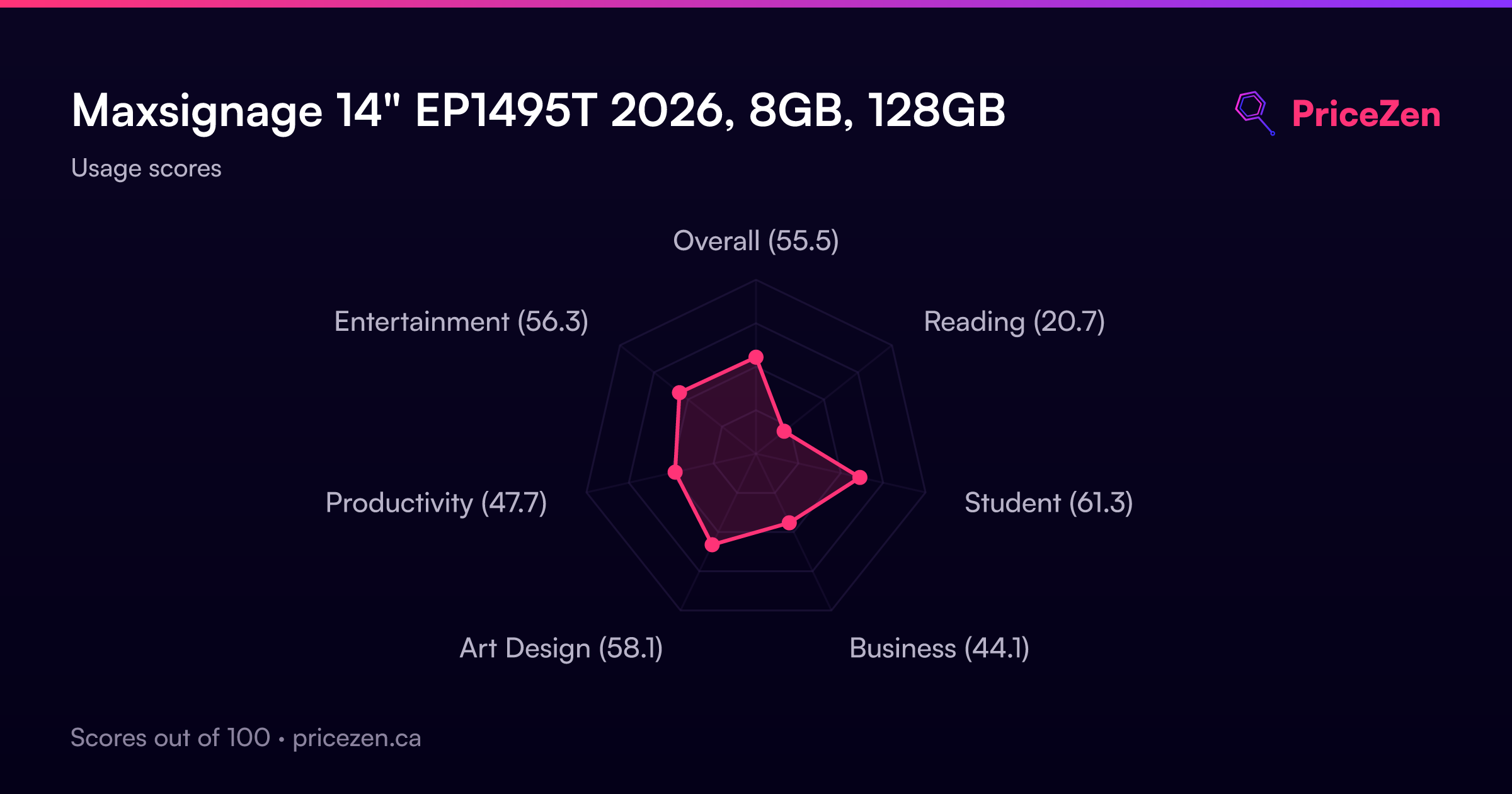
- Overall55.5
- Reading20.7
- Student61.3
- Business44.1
- Art Design58.1
- Productivity47.7
- Entertainment56.3