Apple iPad Pro 12.9" TI-GSRF MNXY3LL/A 2022, M2, 16GB, 2TB, Space Gray
The M2 chip with 8-core CPU, 10-core GPU, and 16GB RAM powers a 12.9-inch Liquid Retina XDR display with ProMotion and 2732x2048 resolution, while 2TB storage and Thunderbolt/USB 4 deliver desktop-class handling of large creative files. Geek Squad Certified Refurbished units undergo thorough testing to offer full functionality at a lower cost, and the 682g design pairs seamlessly with Apple Pencil 2 and the Magic Keyboard connector. This iPad Pro is best for digital illustrators and designers who need a color-accurate 12.9-inch canvas and fluid stylus input for demanding art and design workflows.

No current retailer price
Snapshot
The 30-Second Version
This is the maxed-out M2 iPad Pro: 16GB RAM, 2TB storage and a 12.9-inch Liquid Retina XDR panel, with storage and features at the top of the category. It's genuinely one of the fastest tablets you can buy, and our model rates it best for art and design at 84.4/100. But at USD 1,555 it sits in the 5th percentile for affordability, and battery and portability (39/100) are real weak spots. Buy it if you create for a living, skip it if you mostly read and watch.
Pros & Cons
Pros
- 2TB storage is essentially the most room you can get in a tablet 99th
- M2 CPU and 10-core GPU are among the fastest in the category 98th
- 16GB RAM keeps heavy creative apps and multitasking comfortable 93rd
- 12.9-inch Liquid Retina XDR with ProMotion and P3, screen quality is one of the better panels 91st
- Wi-Fi 6E plus Thunderbolt/USB 4 over USB-C put connectivity in the top tier
Cons
- Affordability ranks at the 5th percentile, USD 1,555 is near the bottom of the category
- Battery scores below average, well behind most rivals despite the all-day claim
- 682g and a 12.9-inch body give it a portability score of just 39 out of 100
- Reading is its weakest use case at 42.9/100, so it's a poor ebook companion
- Sharpness and eye comfort are only solid, not class-leading
The proof
Performance
Let's talk about what the numbers actually buy you. The M2's CPU ranks among the best in this category and the GPU is one of the top performers, which puts both among the best you can get in a tablet right now. Paired with 16GB of RAM (well above most rivals), that means large multi-layer canvases, timeline scrubbing on video projects, and a dozen browser tabs next to a reference document without the system constantly reloading things behind your back. The 2TB drive is the quiet hero here: it's essentially top of the charts, so you can keep RAW libraries, project files and offline media on-device instead of juggling cloud storage or external drives. And with Thunderbolt over USB-C, when you do need to move a big project off the tablet, you're not stuck waiting on a slow link.
The display and connectivity hold up their end too. Screen quality scores as one of the better panels in the category, and the XDR backlight plus P3 coverage is exactly what you want for color-sensitive work. Sharpness at 2732x2048 across 12.9 inches is strong but not the sharpest thing on the market, so pixel-peepers chasing the highest density will notice. Wi-Fi 6E and Bluetooth push connectivity to the top tier, meaning fast transfers to a NAS or a local server if your network supports it. Where the sheet gets less flattering: battery ranks below average despite the all-day claim in the marketing, eye comfort sits at about average, and water resistance is middling. This is a powerhouse that wants to live near an outlet and away from the pool.
Specifications
Full Specifications
Processor
| CPU | Apple M2 |
| Cores | 8 |
Memory & Storage
| RAM | 16 GB |
| Storage | 2 TB |
Display
| Size | 12.9" |
| Resolution | 2732x2048 |
| Panel | Liquid Retina XDR |
Connectivity
| Wi-Fi | Wi-Fi 6E |
| Bluetooth | ✓ |
| USB-C | 1 |
| Cellular | No |
Features
| Stylus Support | Yes |
| Stylus Model | Apple Pencil (2nd generation) |
| Fingerprint Reader | Yes |
| Face Unlock | Yes |
Physical
| Weight | 0.7 kg / 1.5 lbs |
| OS | iOS |
vs Competition
The obvious cross-shop is the Microsoft Surface Pro 11 13". Both chase the same laptop-replacement crowd, and this iPad's argument is the combination of a top-of-the-charts 2TB drive, 16GB of RAM and a GPU ranking among the best, plus Pencil support that our model rewards heavily in the 84.4 art and design score. If your work is pen-first, illustration, retouching, annotation, the iPad's feature ranking is the strongest card in this hand. If your work is desktop-software-first, that's the conversation to have with the Surface before you commit.
The Samsung Galaxy Tab S 12.4" S10+ is the closest philosophical rival, another big-screen Android tablet aimed at creators, and the Lenovo Yoga Tab Plus 12.7" ZAEG0096US plays in the same large-format space. Against both, this iPad's wins are concrete: top-of-the-charts storage, leading CPU and GPU rankings, and Thunderbolt over USB-C. Where it gives ground is endurance and comfort. A below-average battery score and a 39 portability rating mean the smaller, lighter options will beat it on the sofa and on a plane. And if price is the deciding factor, the Xiaomi Pad 11.2" 62751 and TABWEE T60 Pro 13.4" exist precisely because not everyone needs 2TB and an M2. This iPad's 5th-percentile affordability is the flip side of every strength listed above.
| Spec | Apple iPad Pro 12.9" TI-GSRF MNXY3LL/A | Microsoft Surface Pro 11 13" | Samsung Galaxy Tab S 12.4" S10+ | Lenovo Yoga Tab Plus 12.7" ZAEG0096US | Xiaomi Pad 11.2" 62751 | TABWEE T60 Pro 13.4" |
|---|---|---|---|---|---|---|
| CPU | Apple M2 | Qualcomm Snapdragon X Elite X1E-84-100 | MediaTek Dimensity 9300+ | QTI SM8650 | Snapdragon 8s Gen 3 | Unisoc |
| RAM (GB) | 16 | 16 | 12 | 16 | 12 | 8 |
| Storage (GB) | 2048 | 1024 | 512 | 256 | 512 | 256 |
| Screen | 12.9" 2732x2048 | 13" 2880x1920 | 12.4" 2800x1752 | 12.7" 2944x1840 | 11.2" 3200x2136 | 13.4" 1920x1200 |
| OS | iOS | Windows 11 Home | Android 14 | Android 14 | Android 14 | Android 15 |
| Stylus | Yes | Yes | Yes | Yes | Yes | Yes |
| Cellular | No | No | No | No | No | No |
| Battery (Wh) | - | 53 | - | - | - | - |
| Compare | Compare | Compare | Compare | Compare |
| Product | CPU | GPU | RAM | Screen | Battery | Feature | Storage | Sharpness | Portability | Connectivity | Affordability | Water Resistance |
|---|---|---|---|---|---|---|---|---|---|---|---|---|
| Apple iPad Pro 12.9" TI-GSRF MNXY3LL/A | 91.1 | 92.5 | 87.8 | 86.5 | 31.9 | 98 | 99.4 | 73.8 | 38.7 | 89.5 | 4.8 | 46.4 |
| Microsoft Surface Pro 11 13" Compare | 98.3 | 96.5 | 92.7 | 99 | 99.8 | 74.1 | 97.9 | 82.7 | 21.6 | 92.9 | 4.1 | 97.3 |
| Samsung Galaxy Tab S 12.4" S10+ Compare | 82.4 | 79.2 | 81.3 | 95.2 | 87.9 | 96.5 | 93.1 | 82.7 | 49.9 | 76.7 | 5.9 | 97.3 |
| Lenovo Yoga Tab Plus 12.7" ZAEG0096US Compare | 84.2 | 82.4 | 92.7 | 96.2 | 88.7 | 96.5 | 83.9 | 90 | 42.7 | 92.9 | 21 | 46.4 |
| Xiaomi Pad 11.2" 62751 Compare | 86.8 | 85.7 | 81.3 | 97.8 | 85.1 | 64.9 | 89.6 | 99.3 | 78.9 | 76.7 | 14.1 | 46.4 |
| TABWEE T60 Pro 13.4" Compare | 95.4 | 88.9 | 66.1 | 55 | 86.7 | 88.4 | 75.1 | 27.8 | 32.7 | 76.7 | 37.2 | 46.4 |
Price
Value & Pricing
Here's the honest math. USD 1,555 buys you a spec sheet that leads the category in storage, features, connectivity and raw compute, and our affordability ranking of the 5th percentile says you're paying dearly for every bit of it. The question isn't whether it's expensive, it's whether you'll actually use the headroom. If you're filling 2TB with project files and pushing the M2 through daily renders, the price per unit of capability is defensible. If you're buying it to browse, watch and sketch occasionally, you're paying flagship money for capacity that'll sit empty.
We track pricing across stores with our automated system and community extension, and right now our data shows a single US listing at USD 1,555. That's thin coverage, so there's no meaningful cross-store spread to shop yet. Our advice: watch it rather than impulse-buy. With only one listing in the mix, patience costs you nothing and a second seller showing up could change the picture.
Read more
Overview
This is the fully loaded iPad Pro, and we mean fully. The MNXY3LL/A configuration pairs Apple's M2 chip (8-core CPU, 10-core GPU) with 16GB of RAM and a 2TB SSD, wrapped around a 12.9-inch Liquid Retina XDR panel running 2732x2048 with ProMotion, True Tone and P3 wide color. In our data, storage is essentially top of the charts and the feature set is one of the best. Translation: almost nothing else in the tablet category gives you this much room to work or this many tools baked in.
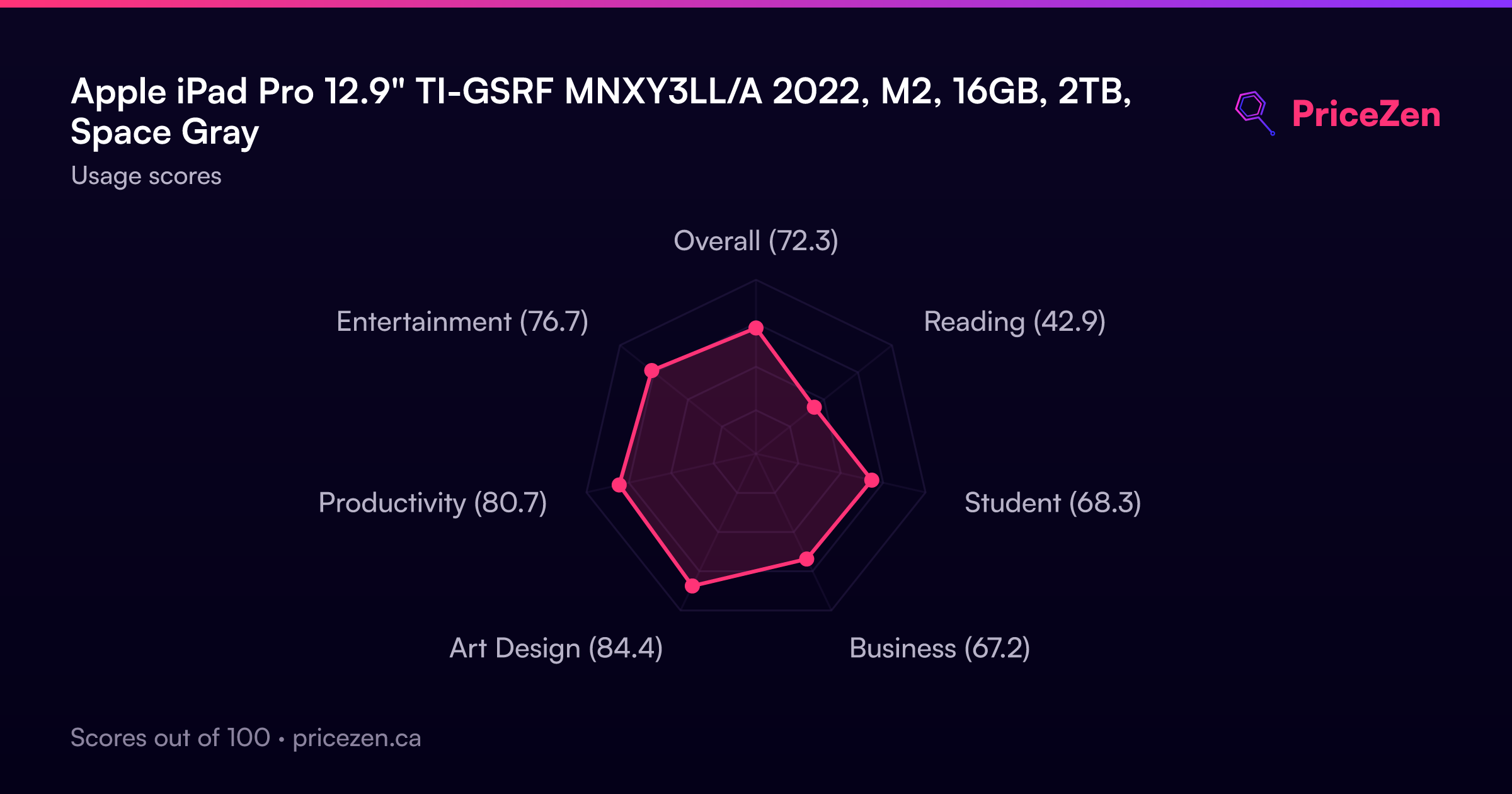
Who's it for? Our scoring model puts art and design at 84.4 out of 100, productivity at 80.7 and entertainment at 76.7. That ordering tells you everything. This is a machine for people who draw, edit photos and video, mark up documents, or want a laptop-adjacent workspace they can carry into a meeting. The Apple Pencil (2nd generation) support and the keyboard connector are the two features that turn it from a big screen into an actual work surface, and both are first-class here rather than afterthoughts.
The interesting part is the gap between what this thing can do and what it costs to own. At USD 1,555 it lands in the bottom handful of the category for affordability, and the trade-offs are physical: 682g and a 12.9-inch footprint make it a desk-and-bag device, not a couch-and-commute one. Our reading score of 42.9 is the weakest area on the whole sheet. So before you fall for the spec list, be honest about whether you're buying a studio tool or a very expensive book.
Common Questions
Q: Is 2TB of storage overkill, or does it actually matter?
It depends entirely on your workflow, but the spec is genuinely category-leading: storage ranks at the top of our data, so almost nothing else gives you this much local space. If you shoot RAW, edit video or keep large layered artwork, having project files on-device instead of in the cloud removes a real bottleneck. If you stream everything and store documents online, you're paying a premium for capacity you'll never fill.
Q: Can this replace a laptop for everyday work?
For a lot of workflows, yes. Our productivity score is 80.7/100, backed by an M2 CPU that ranks among the best, 16GB of RAM and a keyboard connector, plus Thunderbolt over USB-C for fast external storage and displays. The caveat is software, not hardware: it runs iPadOS, so if your job depends on specific desktop applications, check those before you switch. As a writing, email, spreadsheet and meetings machine with a keyboard attached, the hardware is more than ready.
Q: How good is it for drawing with the Apple Pencil?
This is its strongest use case, scoring 84.4/100 for art and design in our model. You get Apple Pencil (2nd generation) support on a 12.9-inch 2732x2048 XDR panel with ProMotion, P3 wide color and True Tone, and the 10-core GPU ranks among the best so big canvases stay smooth. The trade-off is size and weight: 682g and a 12.9-inch footprint are great on a desk, less great held in one hand for long sketch sessions.
Q: Does the battery really last all day?
The marketing says all-day, but our battery ranking puts it below the middle of the pack against the rest of the category. That's the honest signal here: with an M2 chip and a large high-brightness XDR display, heavy creative work is going to pull serious power. Plan on keeping a charger in your bag if you're working away from a desk for long stretches.
Who Should Skip This
Skip this if your tablet life is mostly reading, browsing and video. Our reading score of 42.9 is the lowest on the sheet, the 682g body and 12.9-inch screen make one-handed use a chore, and eye comfort sits at about average. Add a below-average battery ranking and you've got a device that's neither comfortable nor enduring for casual use. The Xiaomi Pad 11.2" 62751 is worth a look if a smaller, easier-to-hold screen is what you actually want, and the Lenovo Yoga Tab Plus 12.7" ZAEG0096US if you want big-screen entertainment without paying for 2TB and an M2.
Also skip it if budget is the constraint or if your work lives in desktop software. Affordability at the 5th percentile means USD 1,555 is close to the worst value-per-dollar in the category, and the TABWEE T60 Pro 13.4" exists for people who want screen size without the flagship tax. If you need a full desktop OS more than you need a pen-first canvas, cross-shop the Microsoft Surface Pro 11 13" before you spend this kind of money.
Verdict
If you're a working illustrator, photographer or video editor who wants one device for capture, edit and delivery, this configuration makes a strong case. The 2TB drive means your library travels with you, the M2 and 16GB of RAM keep demanding apps responsive, and the XDR panel with P3 gives you something you can trust for color decisions. Our 84.4 art and design score is the highest of its three use-case ratings for a reason. Buy it as a studio tool and it earns its keep.
If you want a general-purpose tablet for reading, streaming and light productivity, we'd point you elsewhere. The 42.9 reading score, 682g weight and below-average battery ranking all argue against it, and USD 1,555 is a lot to spend on a device whose best traits you won't touch. Entertainment at 76.7 is good, not exceptional, and there are cheaper ways to get a great screen. Match the purchase to the workload, not to the spec sheet.
Usage Scores
- Overall72.3
- Reading42.9
- Student68.3
- Business67.2
- Art Design84.4
- Productivity80.7
- Entertainment76.7