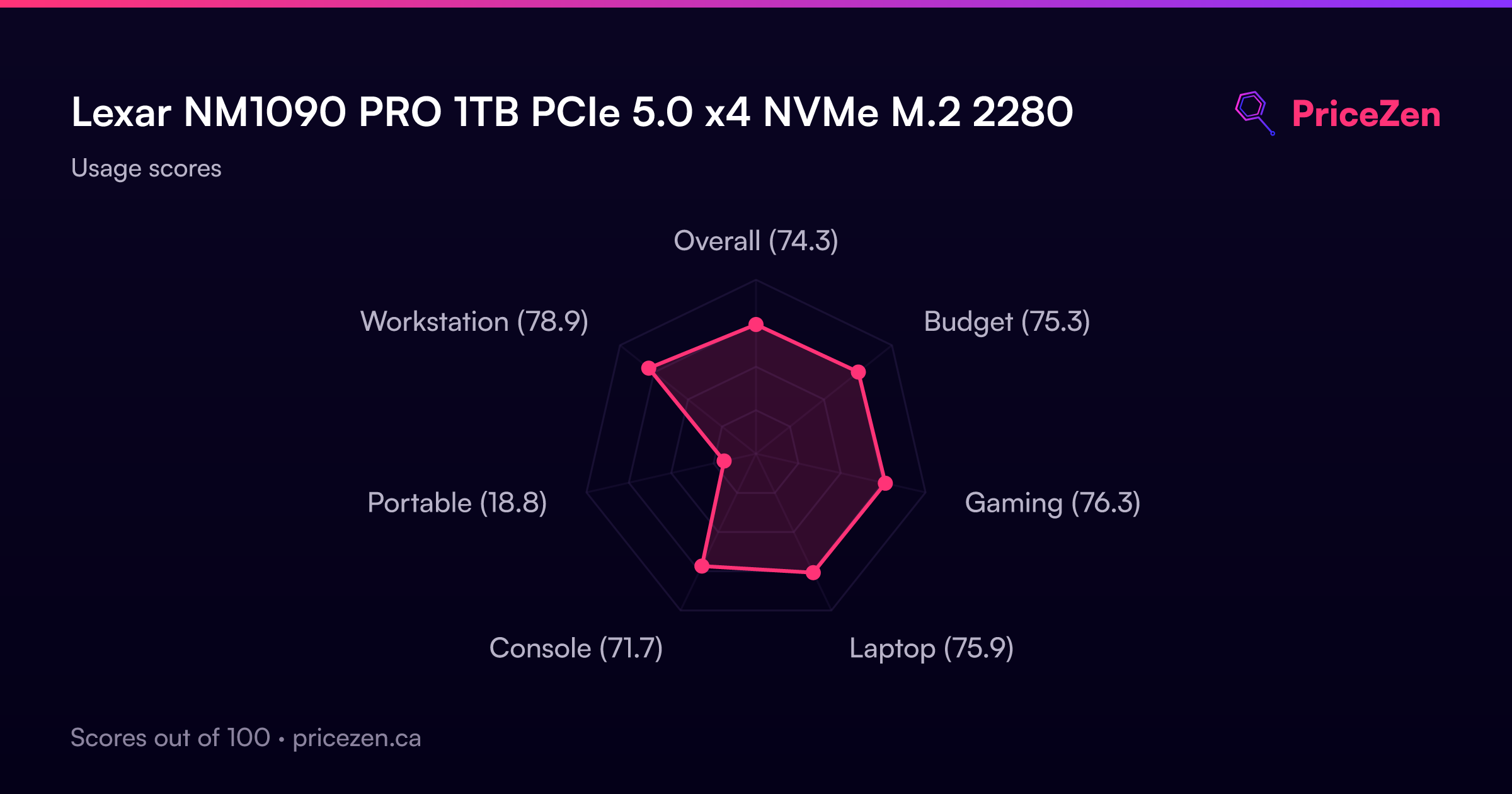
Lexar NM1090 PRO 1TB PCIe 5.0 x4 NVMe M.2 2280
The PCIe 5.0 interface delivers 14000 MB/s reads and 10000 MB/s writes, with 1650K random read IOPS, making it a top-tier performer for demanding workloads. Its SLC NAND and DRAM cache, plus a 6nm controller for heat dissipation, keep sustained speeds stable during heavy use. Best for workstation users training AI models or rendering, where its 700 TBW endurance and 1.5 million hour MTBF provide long-term reliability.



Snapshot
The 30-Second Version
The Lexar NM1090 PRO is a PCIe 5.0 speed demon with 14,000 MB/s reads and top-tier random performance. At $230 USD for 1TB, it's a premium option that makes sense for workstation users who move massive files constantly. Gamers and casual users probably won't notice the jump from PCIe 4.0 in daily use. If your workload can use the speed, this is one of the best drives available right now.
Pros & Cons
Pros
- Blistering 14,000 MB/s sequential reads, top-tier speed in our database 98th
- Excellent random performance, 98th percentile for IOPS 98th
- DRAM cache and SLC NAND keep performance consistent under load 97th
- 700 TBW endurance rating is above average for a 1TB drive 75th
- 6nm controller helps manage heat during sustained transfers
Cons
- 1TB capacity is middle of the pack, fills up fast with large projects
- Pricing is on the higher side, affordability sits at 44th percentile
- PCIe 5.0 benefits are workload-dependent, many users won't notice the jump
- Requires a PCIe 5.0 motherboard slot to hit peak speeds
- Runs hot under sustained load, needs decent airflow
The proof
Performance
The headline numbers are wild. 14,000 MB/s sequential read and 10,000 MB/s sequential write put this drive in the 97th percentile for speed in our database. To put that in perspective, a typical PCIe 4.0 drive tops out around 7,000 MB/s, so you're looking at roughly double the throughput. The random performance is even more impressive relative to the field, landing in the 98th percentile with 1,650K random read IOPS and 1,800K random write IOPS. That's the kind of responsiveness that makes a difference when you're hammering the drive with lots of small operations, like compiling code or loading a heavily modded game.
But those peak numbers only matter if your workload can actually use them. Copying huge video files or working with massive datasets? You'll feel the difference. Booting Windows or launching most games? The gap between this and a good PCIe 4.0 drive shrinks to fractions of a second. The 6nm controller is supposed to help with thermals, and that's genuinely important here. PCIe 5.0 drives run hot, and sustained performance depends on keeping temperatures in check. Lexar's thermal design is a real selling point, not just marketing fluff.
Specifications
Full Specifications
Drive
| Capacity | 1000 |
| Form Factor | M.2 2280 |
| Interface | PCIe 5.0 x4 |
| Protocol | NVMe |
| PCIe Generation | 5 |
| External | No |
Performance
| Sequential Read (MB/s) | 14000 |
| Sequential Write (MB/s) | 10000 |
| Random Read (IOPS) | 1650000 |
| Random Write (IOPS) | 1800000 |
Hardware
| NAND | SLC |
| DRAM Cache | Yes |
Reliability
| Endurance (TBW) | 700 |
| MTBF (hours) | 1500000 |
Features
| Heatsink | No |
vs Competition
The PCIe 5.0 space is getting crowded, and the NM1090 PRO has some serious competition. The Crucial T710 is probably the most direct rival, offering similar PCIe 5.0 speeds with a well-established brand behind it. Crucial tends to be aggressive on pricing, so if you can find the T710 cheaper, it's worth a hard look. The Samsung 990 EVO Plus is another option, though it's more of a value play in the PCIe 5.0 space and doesn't quite match the Lexar's peak numbers.
On the PCIe 4.0 side, the Western Digital WD_BLACK SN850P and Kingston Fury Renegade are both excellent drives that cost less and still deliver around 7,000 MB/s. The Team Group MP44 is another budget-friendly alternative. If you're gaming or doing general productivity work, these PCIe 4.0 options will feel nearly identical in day-to-day use. The Lexar only pulls ahead when you're doing sustained, heavy file operations that can actually saturate that 14,000 MB/s pipeline.
| Spec | Lexar NM1090 PRO | Western Digital WD_BLACK SN8100 | Samsung 9100 PRO | Kingston FURY Renegade | Crucial T700 | Seagate FireCuda 530R |
|---|---|---|---|---|---|---|
| Capacity | 1TB | 4TB | 4TB | 4TB | 2TB | 4TB |
| Form Factor | M.2 2280 | M.2 2280 | M.2 2280 | M.2 2280 | M.2 2280 | M.2 2280 |
| Interface | PCIe 5.0 x4 | PCIe 5.0 x4 | PCIe 5.0 x4 | PCIe 4.0 x4 | PCIe 5.0 x4 | PCIe 4.0 x4 |
| Seq Read | 14,000 MB/s | 14,900 MB/s | 14,800 MB/s | 7,300 MB/s | 12,400 MB/s | 7,400 MB/s |
| Nand Type | SLC | TLC | TLC | TLC | TLC | TLC |
| Dram Cache | true | false | true | true | true | false |
| Endurance | 700 TBW | 2400 TBW | 2400 TBW | 4000 TBW | 1200 TBW | 5050 TBW |
| Compare | Compare | Compare | Compare | Compare |
| Product | Speed | Random | Feature | Capacity | Endurance | Affordability |
|---|---|---|---|---|---|---|
| Lexar NM1090 PRO | 97.1 | 98.2 | 97.5 | 55.4 | 74.5 | 43.2 |
| Western Digital WD_BLACK SN8100 Compare | 99.7 | 99.6 | 85.9 | 92.5 | 80.4 | 8.5 |
| Samsung 9100 PRO Compare | 99.2 | 99.8 | 99.7 | 92.5 | 85.7 | 5.1 |
| Kingston FURY Renegade Compare | 93.4 | 94.4 | 93.9 | 92.5 | 94 | 10.9 |
| Crucial T700 Compare | 96.7 | 97.7 | 97.5 | 78.6 | 82.5 | 22.2 |
| Seagate FireCuda 530R Compare | 92.9 | 96.8 | 52.8 | 92.5 | 95.6 | 7.6 |
Price
Value & Pricing
Value is where this drive gets a little tricky. At $230 USD for 1TB, you're paying a premium for that PCIe 5.0 speed. Our database puts affordability at the 44th percentile, which means it's pricier than most drives in its class. For comparison, you can get a solid PCIe 4.0 drive with similar capacity for noticeably less money. The question is whether your workload justifies the extra cost, and for most people, the honest answer is probably not yet.
That said, if you're building a workstation for AI training, professional video editing, or any task that involves moving massive files around constantly, the math changes. Time saved on every transfer adds up, and the NM1090 PRO delivers that speed without the thermal throttling issues that plague some early PCIe 5.0 drives. The Canadian pricing at $340-348 CAD is consistent with the premium positioning, though you'll want to watch for sales if you're north of the border.
Amazon 1 offer From CA$317
Price history
Read more
Overview
The Lexar NM1090 PRO is one of those drives that makes you realize just how far storage has come. We're talking 14,000 MB/s sequential reads on a 1TB stick that slots into a standard M.2 2280 slot. That's the kind of number that would have sounded like science fiction five years ago, and now you can just buy it and slap it into a desktop. This is a PCIe 5.0 drive aimed squarely at people who push their machines hard, whether that's training AI models, rendering video, or just wanting the fastest game loads possible.
Lexar has positioned this as a professional-grade drive, and the spec sheet backs that up. You get SLC NAND, a DRAM cache, and a 6nm controller that's supposed to help with heat dissipation. The endurance rating sits at 700 TBW, which is solid for a 1TB drive, and the MTBF is 1.5 million hours. It's not the cheapest option out there, but it's not pretending to be. This is a drive for people who want top-tier performance and are willing to pay for it.
Our database puts this thing in rarefied air for speed and features, both landing in the 98th percentile. Random performance is also near the top of the charts. Endurance is above average but not class-leading, and capacity is middle of the pack at 1TB. The real question is whether the jump from PCIe 4.0 to 5.0 is worth it for your specific workload, because that's where the value conversation gets interesting.
Common Questions
Q: Do I need a PCIe 5.0 motherboard to use this drive?
To hit the full 14,000 MB/s read speeds, yes, you need a motherboard with a PCIe 5.0 M.2 slot. The drive is backward compatible with PCIe 4.0 and 3.0 slots, but it will be limited to those interfaces' maximum speeds. On a PCIe 4.0 slot, you'd see roughly half the rated performance, which kind of defeats the purpose of paying for this drive.
Q: Will this drive overheat in my system?
PCIe 5.0 drives do run hotter than their Gen 4 counterparts, and the NM1090 PRO is no exception. Lexar uses a 6nm controller specifically to help with heat dissipation, and the drive is designed to maintain performance under sustained load. That said, you'll want decent airflow in your case, and if your motherboard has a built-in M.2 heatsink, use it. The thermal design is good, but it's not magic.
Q: Is 1TB enough for gaming and content creation?
For gaming, 1TB is workable but fills up fast with modern titles regularly hitting 100GB or more. For content creation, especially video work, 1TB can feel cramped quickly. The 700 TBW endurance rating means the drive will last a long time, but you might find yourself wanting more capacity sooner than expected. If you work with large files regularly, consider whether a 2TB option would serve you better.
Q: How does this compare to a fast PCIe 4.0 drive for everyday use?
In everyday tasks like booting Windows, launching apps, and loading most games, the difference is minimal. A good PCIe 4.0 drive at 7,000 MB/s already loads things in a blink. The NM1090 PRO's advantage shows up in sustained heavy workloads like copying hundreds of gigabytes, working with 4K or 8K video, or running AI training jobs. If that's not your use case, a quality Gen 4 drive will feel nearly identical for less money.
Who Should Skip This
If you're a gamer or general user on a PCIe 4.0 system, this drive is probably overkill. The real-world difference in game load times between this and a good Gen 4 drive like the WD_BLACK SN850P is tiny, and you'd be paying a premium for speed you can't fully use. Save the money and grab a solid PCIe 4.0 drive instead. Same goes for laptop users, since most laptops don't have PCIe 5.0 M.2 slots yet, and the heat output could be a problem in tight enclosures.
Also skip this if you need lots of storage on a budget. At $230 USD for 1TB, you're paying for speed, not capacity. If you need 2TB or 4TB for a media library or backup drive, you can get much more space for the same money with a PCIe 4.0 or even SATA drive. The NM1090 PRO is a specialist tool for speed-hungry workloads, not a general-purpose storage solution.
Verdict
For workstation users who regularly move large files, train models, or render video, the NM1090 PRO is one of the best options on the market right now. The combination of top-tier sequential speed, excellent random performance, and a thermal design that keeps things stable under load makes it a genuinely compelling choice. The 700 TBW endurance rating means you won't have to baby it either.
For gamers and general users, the recommendation is more measured. You'll see faster load times in some titles, but the difference between this and a good PCIe 4.0 drive is often measured in milliseconds. If you're building a new system with a PCIe 5.0 slot and want to future-proof, this is a great pick. But if you're upgrading an existing PCIe 4.0 system, save your money and grab a quality Gen 4 drive instead.
Usage Scores
- Overall74.3
- Budget75.3
- Gaming76.3
- Laptop75.9
- Console71.7
- Portable18.8
- Workstation78.9