Crucial BX500 500GB SATA III 2.5"

SATA speeds that revive an old laptop verified Nov 29
43/100 overall score 4.7 average from 10,176 owner ratings
Close to the usual price of CA$184.00.
90-day low CA$180.64Usual CA$184.00High CA$184.60
90-day low CA$180.64Usual CA$184.00High CA$184.60
Price over the last 90 days: low CA$180.64 on Sep 15, high CA$184.60. Usual price CA$184.00. Today CA$183.50.
- Capacity
- 500GB
- Form factor
- 2.5"
- Interface
- SATA III
- Read speed
- 540 MB/s
- NAND
- TLC
- Endurance
- 80 TBW
Compare prices at 1 store
Cheapest first. New, refurbished and bundled offers are kept apart, so you compare like with like.
| Store | Sold by | Colour and condition | Price | vs lowest | Last checked | Link |
|---|---|---|---|---|---|---|
| New1 offerSingle unit | ||||||
| Amazon | Marketplace seller | Not listed | CA$183.50 | Lowest price | 2 days ago | Go to store |
 Source: PriceZen, checked Nov 27, 2026
A price counts as current when we checked it in the last 7 days. “Marketplace seller” means a third-party seller on that store, not the store itself.
Price history
CA$183.50 is CA$0.50 under the usual store price, and only CA$2.86 above its 90-day low.
Checked that dayNot checked that day, still on offer
Source: PriceZen, checked Nov 27, 2026











Snapshot
The 30-Second Version
The Crucial BX500 is a budget 500GB SATA SSD that makes old computers feel fast again. It's a massive upgrade over any hard drive, with 540 MB/s reads and easy installation. But the DRAM-less design and low endurance mean it's best for light, read-heavy use, not heavy file transfers.
Pros & Cons
Pros
- Huge speed jump over any mechanical hard drive 86th
- Easy drop-in upgrade for older laptops and desktops 72nd
- Low price per gigabyte for a name-brand SSD
- Runs cooler and quieter than an HDD
- 3-year warranty from a major memory manufacturer
Cons
- DRAM-less design hurts sustained write speeds
- 80 TBW endurance is below average
- Runs hotter than many competing SATA SSDs
- No included cloning software or mounting bracket
- Manufacturer support gets consistent complaints
What owners think
The Word on the Street
- Buyers consistently praise the value for money and the night-and-day difference in boot times and program launches compared to their old hard drives.
- A recurring complaint is that the drive runs noticeably hot, with some owners reporting temperatures around 45 degrees Celsius, higher than other SSDs they own.
- Several owners mention slower write speeds and lower write endurance as trade-offs they accepted for the low price, while a few report dead-on-arrival units and frustrating warranty support.
How owner sentiment changed over time
ExclusiveBased on when customers actually wrote their reviews - so you can see whether early praise held up.
18 written reviews, Jun 2019 – Apr 2026: 15 happy, 2 mixed, 1 unhappy
Across all 10,176 store ratings: 4.7★. Most owners rate without writing a review. The chart counts the 18 written reviews.
Each dot is one written review, in the month it was written. Happy = 4-5★, mixed = 3★, unhappy = 1-2★.
The proof
Performance
Sequential reads top out at 540 MB/s and writes at 500 MB/s, which is about as fast as SATA III allows. In our database, that puts the BX500 in the bottom third for speed, but context matters. Compared to a typical 7200 RPM hard drive, Crucial claims it's 300% faster, and that tracks with real-world experience. Boot times drop from over a minute to under 15 seconds. Programs snap open instead of grinding. The catch is the DRAM-less design. Without a DRAM buffer, sustained writes can dip noticeably once the SLC cache fills. For copying a 50GB game library, you'll see speeds fall off a cliff partway through. Random performance also lands in the bottom quarter of our database, so this isn't a drive for database work or heavy multitasking. It's a boot drive and a game library holder, nothing more.
Specifications
Full Specifications
Drive
| Capacity | 500 |
| Form Factor | 2.5" |
| Interface | SATA III |
| Protocol | SATA |
| External | No |
Performance
| Sequential Read (MB/s) | 540 |
| Sequential Write (MB/s) | 500 |
Hardware
| NAND | TLC |
| DRAM Cache | No |
Reliability
| Endurance (TBW) | 80 |
| Warranty (years) | 3 |
vs Competition
The BX500's biggest competition isn't other SATA SSDs, it's the temptation to jump to NVMe. The Western Digital Black SN850X and MSI SPATIUM M480 PRO are in a completely different performance class, with read speeds measured in thousands of MB/s. If your motherboard has an M.2 slot, spending a bit more on an NVMe drive is almost always the better call. The BX500 only makes sense when SATA is your only option. Against other SATA drives, the Samsung 870 EVO and Crucial's own MX500 both include DRAM caches and better endurance ratings. The MX500 in particular is the smarter buy if you can stretch your budget, since it handles sustained writes far better. The BX500 wins on price alone, and that's about it. The Corsair MP700 Elite and XPG GAMMIX S70 Blade are PCIe 4.0 drives that make the BX500 look like it's from another decade, because in storage terms, it kind of is.
| Spec | Crucial BX500 | Samsung 9100 PRO | Kingston KC3000 | Western Digital WD_BLACK SN8100 | MSI SPATIUM M480 PRO | Team Group MP44 |
|---|---|---|---|---|---|---|
| Capacity | 500GB | 2TB | 2TB | 1TB | 1TB | 4TB |
| Form Factor | 2.5" | M.2 2280 | M.2 2280 | M.2 2280 | M.2 2280 | M.2 2280 |
| Interface | SATA III | PCIe 5.0 x4 | PCIe 4.0 x4 | PCIe 5.0 x4 | PCIe 4.0 x4 | PCIe 4.0 x4 |
| Seq Read | 540 MB/s | 14,700 MB/s | 7,000 MB/s | 14,900 MB/s | 7,400 MB/s | 7,400 MB/s |
| Nand Type | TLC | TLC | TLC | TLC | TLC | TLC |
| Dram Cache | No | Yes | Yes | Yes | Yes | No |
| Endurance | 80 TBW | 1200 TBW | 1600 TBW | 600 TBW | 3000 TBW | 2000 TBW |
| Compare | Compare | Compare | Compare | Compare |
| Product | Speed | Random | Feature | Capacity | User Sentiment | Endurance | Social Proof | Affordability |
|---|---|---|---|---|---|---|---|---|
| Crucial BX500 | 28.3 | 24.3 | 54.7 | 29.4 | 28 | 59 | 85.9 | 71.8 |
| Samsung 9100 PRO Compare | 99 | 99.8 | 99.8 | 78 | 58.8 | 86.1 | 95.1 | 24.6 |
| Kingston KC3000 Compare | 89.2 | 94.8 | 94.4 | 78 | 95.3 | 93.1 | 85.9 | 27.9 |
| Western Digital WD_BLACK SN8100 Compare | 97.9 | 98.7 | 99.8 | 56.6 | 95.3 | 81 | 95.1 | 39.7 |
| MSI SPATIUM M480 PRO Compare | 94.2 | 82 | 94.4 | 56.6 | 95.3 | 98.5 | 95.1 | 40.7 |
| Team Group MP44 Compare | 93.9 | 89.4 | 54.7 | 91.3 | 80.6 | 77.4 | 85.9 | 18 |
Price
Value & Pricing
At USD 107 to USD 140, the BX500 sits in a weird spot. The 500GB capacity is small by today's standards, and you can often find 1TB NVMe drives for not much more. But if you're upgrading an older machine with only SATA ports, this is one of the cheapest ways to get a real speed boost. The price spread across vendors is worth paying attention to. Amazon currently has the best deal at USD 107, while other listings push up to USD 140. That's a 30% difference for the exact same drive, so shop around before you click buy. For the money, you're getting a reliable enough budget SSD that will make an old computer feel new again. Just don't expect it to compete with NVMe drives or even higher-end SATA SSDs with DRAM caches.
Read more
Overview
The Crucial BX500 is a budget 500GB SATA SSD that costs between USD 107 and USD 140 depending on where you shop. It's aimed at one thing: breathing life into older laptops and desktops still spinning a mechanical hard drive. If your machine takes two minutes to boot and apps crawl open, this is the cheapest meaningful upgrade you can make. The BX500 uses Micron 3D TLC NAND and skips the DRAM cache, which keeps the price down but has real consequences for sustained writes. For everyday use like booting Windows, launching Chrome, and loading games, it's a massive step up from an HDD. For heavy file transfers or video editing, it's not the right tool. Crucial backs it with a 3-year warranty and rates it for 80 TBW, which is modest but fine for a budget drive.
Common Questions
Q: Is the Crucial BX500 good for gaming?
For loading games, yes. The BX500 will cut load times dramatically compared to a hard drive. But it's not ideal for games with huge open worlds that stream lots of data, since the DRAM-less design can cause stutters during heavy reads.
Q: How much faster is the Crucial BX500 than a hard drive?
Crucial claims it's about 300% faster than a typical hard drive, and real-world boot times drop from over a minute to under 15 seconds. Program launches feel instant by comparison.
Q: Does the Crucial BX500 work in a laptop?
Yes, as long as your laptop has a 2.5-inch SATA bay. It's a drop-in replacement for any 2.5-inch hard drive and uses less power, which can slightly improve battery life.
Q: Is the Crucial BX500 reliable?
It's rated for 80 TBW and carries a 3-year warranty, which is modest but adequate for typical home use. Some owners report dead-on-arrival units and poor support from Crucial, so buy from a retailer with easy returns.
Who Should Skip This
Skip the BX500 if your machine has an M.2 slot. NVMe drives like the Western Digital SN850X or even budget PCIe 3.0 drives offer dramatically better performance for a small price premium. Also skip it if you regularly move large files, edit video, or run virtual machines. The DRAM-less design and 80 TBW endurance will become bottlenecks quickly. If you need a SATA drive for heavier workloads, spend a bit more on the Crucial MX500 or Samsung 870 EVO, both of which include DRAM caches and better endurance ratings. And if you're building a new system from scratch, don't put a SATA SSD in it at all. NVMe is the standard now, and the BX500 is a rescue drive for old hardware, not a foundation for new builds.
Verdict
Should you buy the Crucial BX500? If you have an older laptop or desktop with a spinning hard drive and no M.2 slot, yes. This is the cheapest way to make that machine usable again. Boot times, app launches, and general responsiveness all improve dramatically. The 500GB capacity is enough for an OS, core programs, and a handful of games. But if you have an M.2 slot available, skip this entirely and get an NVMe drive. The price difference is small and the performance gap is enormous. And if you need to move large files regularly or run write-heavy workloads, the DRAM-less design will frustrate you. This is a budget boot drive, and it's good at that one job.
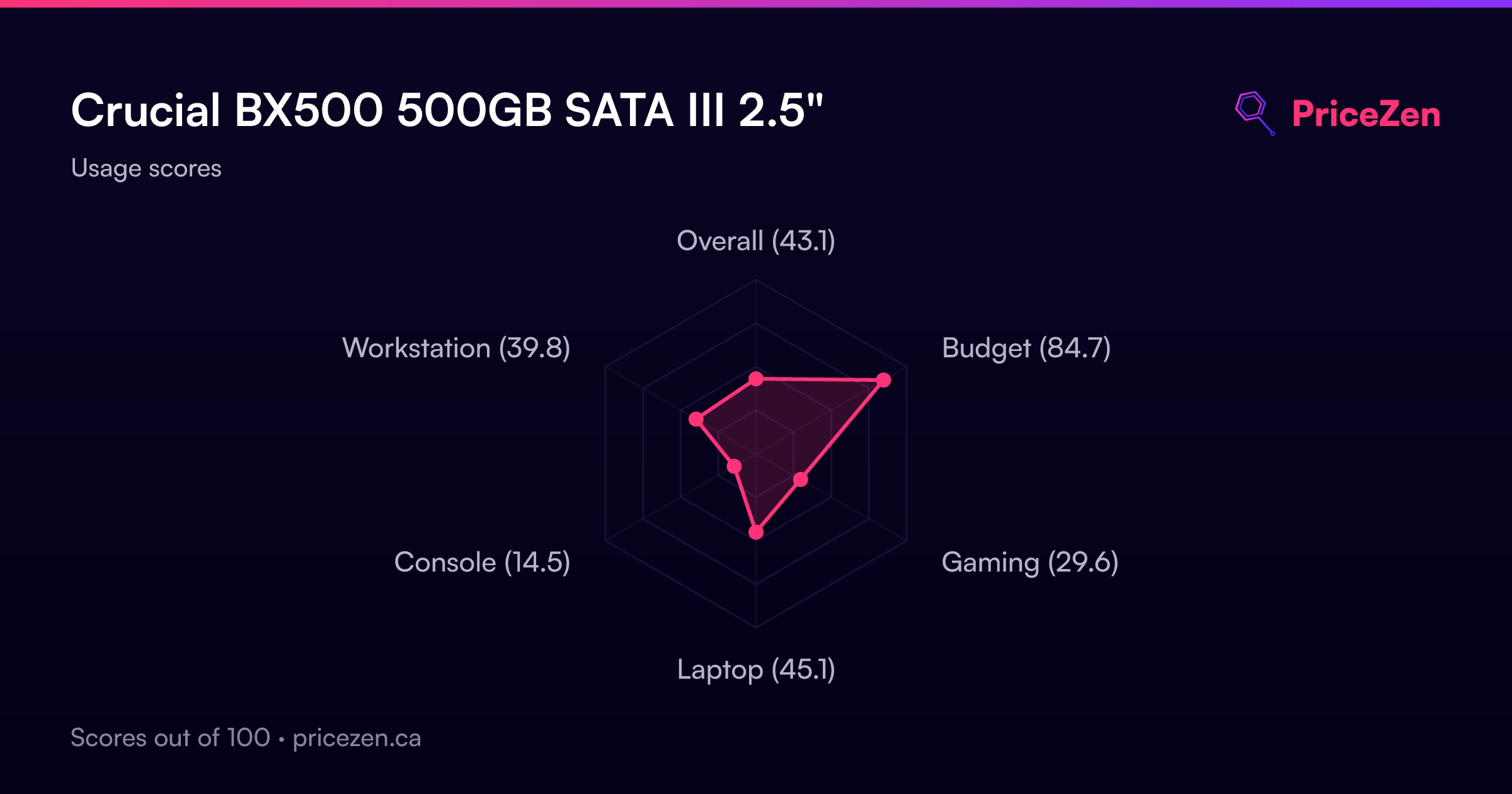
Usage Scores
- Overall43.1
- Budget84.7
- Gaming29.6
- Laptop45.1
- Console14.5
- Workstation39.8