Intel 670p Series 2TB PCIe 3.0 x4 NVMe M.2 2280
The 2TB Intel 670p delivers 3500 MB/s reads and 2700 MB/s writes over PCIe 3.0 x4, using QLC NAND with a DRAM cache to handle multitasking and gaming. Its 740 TBW endurance and 5-year warranty provide solid long-term reliability, while hardware encryption adds security. Best for budget-conscious laptop or desktop users upgrading from SATA SSDs who need large capacity for everyday workloads.












Snapshot
The 30-Second Version
The Intel 670p 2TB is a solid Gen3 NVMe drive with strong random performance and a 5-year warranty. It maxes out PCIe 3.0 speeds at 3500 MB/s read and 2700 MB/s write, and the DRAM cache keeps things snappy. Compatibility is the big caveat, some enclosures and laptops won't recognize it. At $229 in the US or the lower end of the EUR 461-661 European range, it's a good value for everyday use and gaming, but Gen4 options are worth considering if you need more speed.
Pros & Cons
Pros
- 2TB capacity with DRAM cache at a reasonable price 85th
- Strong random performance, top tier for responsiveness 84th
- 5-year warranty and 740 TBW endurance 79th
- Hardware encryption support built in 77th
- Maxes out PCIe 3.0 sequential speeds
Cons
- QLC NAND means slower sustained writes after cache fills
- Compatibility issues with some external enclosures
- Not recognized by certain laptops, including some Lenovo and MacBook models
- PCIe 3.0 only, no Gen4 support
- Social proof and affordability rankings are weak compared to competitors
What owners think
The Word on the Street
How owner sentiment changed over time
ExclusiveBased on when customers actually wrote their reviews - so you can see whether early praise held up.
25 written reviews, Mar 2026: 23 happy, 1 unhappy, 1 without stars
Each dot is one written review, in the month it was written. Happy = 4-5★, mixed = 3★, unhappy = 1-2★.
The proof
Performance
The headline numbers are 3500 MB/s sequential read and 2700 MB/s write. For a PCIe 3.0 drive, that's about as good as it gets. You're basically maxing out what the Gen3 interface can handle. In our database, that puts it right around the middle of the pack for speed, which sounds underwhelming until you remember that the pack includes Gen4 and Gen5 drives that cost way more. For real-world tasks like booting Windows, loading games, or scrubbing through video timelines, you'd be hard pressed to tell the difference between this and a drive that costs twice as much.
The random performance is where this drive actually shines. 310K random read IOPS and 340K random write IOPS put it in the top tier of our rankings for responsiveness. That's the metric that matters for everyday snappiness, opening apps, multitasking, that kind of thing. The DRAM cache helps a lot here. QLC drives without DRAM tend to choke under sustained random workloads, but the 670p keeps its composure. The one caveat is sustained writes. Once you blow past the SLC cache, which is pretty generous on the 2TB model, write speeds drop off. For most people that never happens in normal use, but if you're copying hundreds of gigabytes at once, you'll notice it.
Specifications
Full Specifications
Drive
| Capacity | 2000 |
| Form Factor | M.2 2280 |
| Interface | PCIe 3.0 x4 |
| Protocol | NVMe |
| PCIe Generation | 3 |
| External | No |
Performance
| Sequential Read (MB/s) | 3500 |
| Sequential Write (MB/s) | 2700 |
| Random Read (IOPS) | 310000 |
| Random Write (IOPS) | 340000 |
Hardware
| NAND | QLC |
| DRAM Cache | Yes |
Reliability
| Endurance (TBW) | 740 |
| MTBF (hours) | 1600000 |
| Warranty (years) | 5 |
Features
| Hardware Encryption | Yes |
vs Competition
Against the competition, the 670p is in a weird spot. The Western Digital WD_BLACK SN850P and Samsung 990 EVO Plus are Gen4 drives that blow past it on sequential speeds, but they also cost more. The Crucial T710 and Lexar NM1090 PRO are even faster Gen4 options. If you have a Gen4-capable system and you're moving large files regularly, those are better picks. But if you're on a Gen3 platform or just want capacity on a budget, the 670p holds its own.
The Kingston Fury Renegade is probably the closest competitor in spirit. It's also a 2TB drive aimed at gamers and everyday users, but it uses TLC NAND and has higher endurance. The trade-off is price. The 670p undercuts it in most markets, and for most people, the real-world difference is negligible. The 670p's random performance actually beats a lot of Gen4 drives in our rankings, which is what you'll notice day to day.
| Spec | Intel 670p Series | Western Digital WD_BLACK SN8100 | Samsung 9100 PRO | Kingston FURY Renegade | Crucial T700 | SanDisk WD_BLACK |
|---|---|---|---|---|---|---|
| Capacity | 2TB | 4TB | 8TB | 4TB | 2TB | 8TB |
| Form Factor | M.2 2280 | M.2 2280 | M.2 2280 | M.2 2280 | M.2 2280 | M.2 2280 |
| Interface | PCIe 3.0 x4 | PCIe 5.0 x4 | PCIe 5.0 x4 | PCIe 4.0 x4 | PCIe 5.0 x4 | PCIe 5.0 x4 |
| Seq Read | 3,500 MB/s | 14,900 MB/s | 14,800 MB/s | 7,300 MB/s | 12,400 MB/s | 14,900 MB/s |
| Nand Type | QLC | TLC | TLC | TLC | TLC | TLC |
| Dram Cache | true | false | true | true | true | true |
| Endurance | 740 TBW | 2400 TBW | 4800 TBW | 4000 TBW | 1200 TBW | 4800 TBW |
| Compare | Compare | Compare | Compare | Compare |
| Product | Speed | Random | Feature | Capacity | User Sentiment | Endurance | Affordability |
|---|---|---|---|---|---|---|---|
| Intel 670p Series | 62.1 | 83.6 | 84.9 | 78.8 | 10.5 | 77.3 | 24.4 |
| Western Digital WD_BLACK SN8100 Compare | 99.7 | 99.6 | 85.9 | 92.6 | 95.2 | 80.3 | 8.4 |
| Samsung 9100 PRO Compare | 99.2 | 99.8 | 99.8 | 98.1 | 57.7 | 85.6 | 1.9 |
| Kingston FURY Renegade Compare | 93.5 | 94.4 | 94.1 | 92.6 | 79.7 | 93.9 | 11.2 |
| Crucial T700 Compare | 96.7 | 97.6 | 97.6 | 78.8 | 79.7 | 82.5 | 21.7 |
| SanDisk WD_BLACK Compare | 99.1 | 99.3 | 97.6 | 98.1 | 95.2 | 80.3 | 3.1 |
Price
Value & Pricing
Pricing on this drive is all over the map depending on where you shop. In the US, you're looking at $229, which is reasonable for a 2TB NVMe drive with DRAM. But in Europe, the spread is wild. We're seeing EUR 461 to EUR 661 across four listings in Germany, Spain, France, and Italy. That's a EUR 200 gap for the exact same drive. If you're in Europe, shop around. The lower end of that range is competitive, the upper end is frankly too much for a Gen3 QLC drive when Gen4 options are available for similar money.
The value proposition really depends on what you need. If you're just looking for a big, fast-enough drive for games and everyday use, the 670p at its best price is a solid deal. The 740 TBW endurance rating means you can write about 400GB per day for 5 years before hitting the warranty limit, which is more than enough for typical use. But if you're doing heavy content creation or running databases, you might want to look at TLC drives with higher endurance.
Amazon 1 offer From CA$865
We started tracking prices for this product on Nov 8, 2026. The chart appears once we have more data.
Read more
Overview
The Intel 670p is one of those drives that makes you realize how far budget storage has come. You're getting 2TB of NVMe storage with a DRAM cache and a 5-year warranty, which is a combo that would have cost a small fortune a few years ago. It's built on Intel's 144-layer QLC NAND, and while QLC gets a bad rap sometimes, Intel's implementation here is actually pretty solid for everyday use.
This drive sits in an interesting spot. It's not trying to compete with Gen4 or Gen5 speed demons, and it's not pretending to be a workstation drive. It's aimed at people who want a big, reliable boot drive or game library without spending enthusiast money. The 2TB capacity means you can load up a serious Steam library or keep years of photos and video projects on hand without juggling external drives.
But here's the thing that jumps out from our data: the compatibility story is messy. Some folks drop this into an external enclosure and it works flawlessly, others can't get their laptop to recognize it at all. That's not entirely Intel's fault, enclosures and older systems have their own quirks, but it's something you need to know before you buy.
Common Questions
Q: Will this drive work in an external enclosure?
It depends on the enclosure. The 670p is a standard M.2 2280 NVMe drive, so any enclosure that supports NVMe should work in theory. But we've seen multiple reports of enclosures not recognizing the drive, likely because some cheaper enclosures only support SATA M.2 drives or have firmware issues with certain NVMe controllers. Check that your enclosure explicitly lists NVMe support before buying.
Q: Is this compatible with my laptop?
Most laptops with an M.2 2280 NVMe slot should work, but there are exceptions. Some Lenovo models, including the Slim 7, have been reported to not recognize the drive. Older MacBook Pro models are also hit or miss. The 660p is reported to work better with Macs. Check your laptop's specs and any manufacturer compatibility lists before purchasing.
Q: How does QLC NAND affect real-world performance?
For everyday tasks like booting, gaming, and general multitasking, you probably won't notice the difference between QLC and TLC. The 670p has a DRAM cache and a generous SLC cache that keeps writes fast for typical workloads. The slowdown happens with sustained writes, like copying hundreds of gigabytes at once. Once the cache fills, write speeds drop significantly. If you do that kind of work regularly, a TLC drive might be a better fit.
Q: Is the 740 TBW endurance rating enough?
For most people, yes. 740 TBW means you can write about 400GB per day for 5 years before hitting the warranty limit. That's a lot of data. Unless you're doing heavy video editing, running databases, or using the drive as a scratch disk for rendering, you're unlikely to hit that limit. The 5-year warranty also covers you regardless of TBW as long as you're within the warranty period.
Who Should Skip This
If you're running a Gen4 or Gen5 system and you regularly move large files, this isn't your drive. The PCIe 3.0 interface caps sequential speeds at 3500 MB/s, and the QLC NAND means sustained writes slow down after the cache fills. Look at the WD_BLACK SN850P or Samsung 990 EVO Plus instead. They cost more, but the speed difference is real for heavy workloads.
Also skip this if you're planning to use it in an external enclosure or an older laptop without verifying compatibility first. The reports of unrecognized drives are too common to ignore. If you need something that just works everywhere, the Intel 660p has a better track record with Macs and older systems, or consider a SATA SSD if compatibility is your top priority.
Verdict
For most people, the Intel 670p 2TB is a perfectly good drive. If you're building a gaming PC, upgrading an older laptop, or just need a big, fast boot drive, it'll serve you well. The random performance is genuinely impressive, and the 5-year warranty gives you peace of mind. Just make sure your system actually supports it before you buy. Check your motherboard or laptop specs, and if you're planning to use an external enclosure, do your homework on NVMe support.
If you're a content creator who regularly moves massive files, or you're running a Gen4 system and want to future-proof, look elsewhere. The sustained write performance after the cache fills is the weak point, and there are faster options for not much more money. But for the average user who wants 2TB of snappy storage without breaking the bank, the 670p is a solid choice. Just don't pay the high end of that European price range.
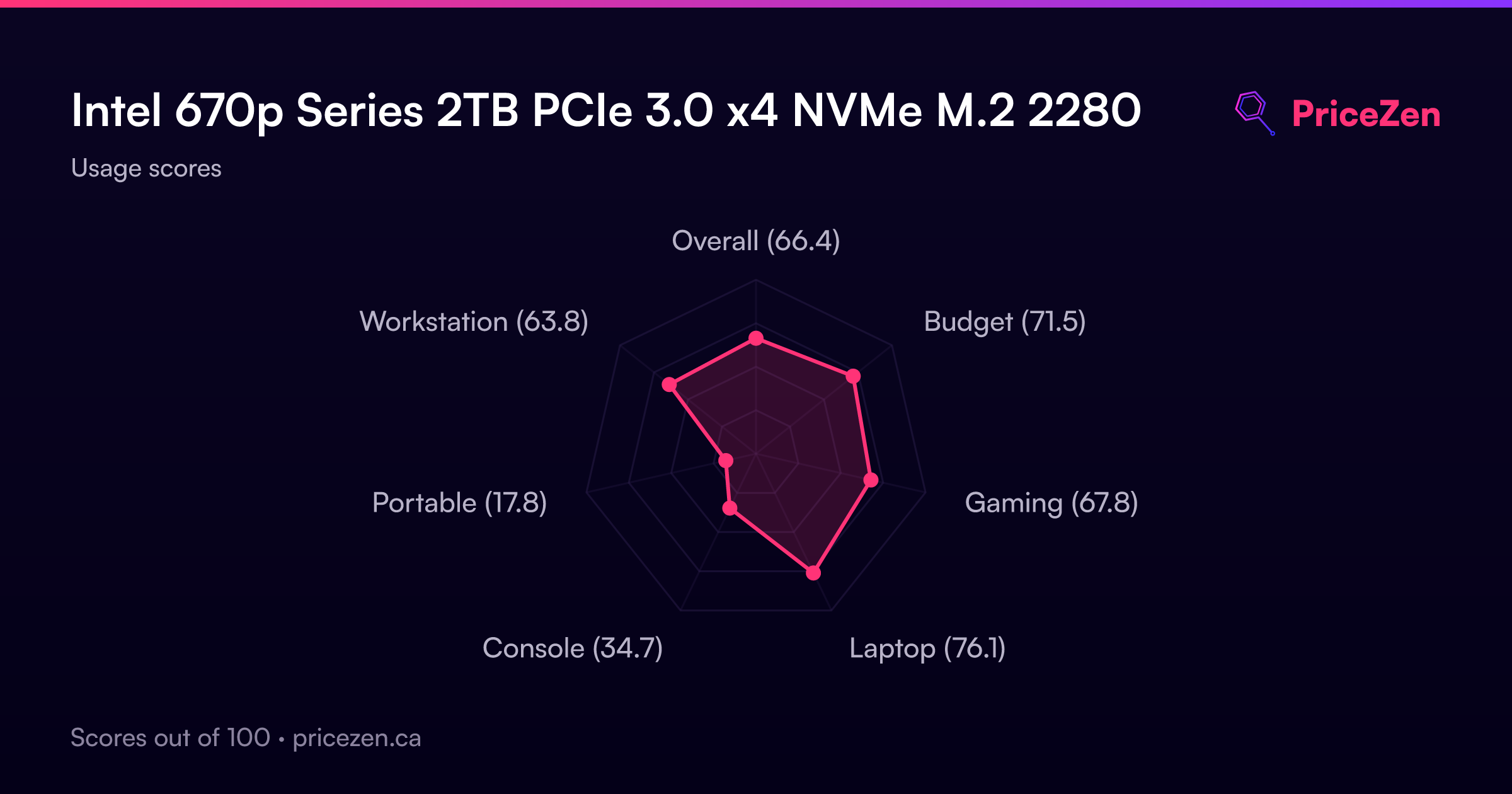
Usage Scores
- Overall66.4
- Budget71.5
- Gaming67.8
- Laptop76.1
- Console34.7
- Portable17.8
- Workstation63.8