Ediloca EN1400 Max 1TB PCIe 5.0 x4 NVMe M.2 2280
The PCIe 5.0 x4 interface delivers 14000 MB/s reads and 10000 MB/s writes, paired with a TSMC 6nm controller and 1GB LPDDR4 cache for heavy workloads. The graphene-copper thermal pad keeps it below 70°C under sustained load, while AES-256 encryption and a 700TBW endurance rating add durability. Best for AI developers loading large models like 720GB DeepSeek, 8K video editors, and AAA gamers who need sustained high-speed storage.

No current retailer price











Snapshot
The 30-Second Version
The Ediloca EN1400 Max delivers PCIe 5.0 speeds of 14,000 MB/s read and 10,000 MB/s write at a price that undercuts most Gen4 competitors. The 1TB capacity and 3-year warranty are the main compromises, along with middle-of-the-pack endurance. For gamers and enthusiasts who want Gen5 performance without the early-adopter price, this is one of the best values we've seen. Just don't expect Samsung-level brand polish or warranty coverage.
Pros & Cons
Pros
- Blistering 14,000 MB/s read and 10,000 MB/s write speeds 98th
- DRAM cache and TLC NAND, not a DRAM-less budget design 97th
- Hardware AES-256 encryption included 81st
- 6nm controller promises 45-50% lower power draw than 12nm designs 81st
- 700TBW endurance rating for the 1TB model
Cons
- 1TB capacity is on the smaller side for a Gen5 drive
- 3-year warranty is shorter than some competitors offer
- Endurance rating sits at the 42nd percentile, below average for the class
- Portable use case scores just 19.1 out of 100
- Brand recognition is limited compared to Samsung or Crucial
The proof
Performance
Let's talk numbers. The 14,000 MB/s sequential read and 10,000 MB/s write are the headline specs, and they put this drive in the 97th percentile for speed in our database. That's not just fast, that's 'top of the charts' fast. For context, a typical PCIe 4.0 drive tops out around 7,000-7,500 MB/s, so you're looking at roughly double the throughput. In practice, that means a 100GB video project moves in seconds, not minutes, and game load times get as close to instant as current hardware allows.
Random performance is a bit more nuanced. The 81st percentile ranking for random operations is solid, well above average, but it's not the absolute best we've seen. The 1GB LPDDR4 cache and dynamic SLC technology help here, and for most real-world workloads, you won't notice the difference between this and a drive that scores a few points higher. The endurance rating of 700TBW is middle of the pack for a 1TB drive, which is fine for typical use but worth noting if you're planning to hammer this thing with constant writes. The thermal design claims to keep things under 70°C under sustained load, which is reassuring for a Gen5 drive.
Specifications
Full Specifications
Drive
| Capacity | 1000 |
| Form Factor | M.2 2280 |
| Interface | PCIe 5.0 x4 |
| Protocol | NVMe |
| PCIe Generation | 5 |
| External | No |
Performance
| Sequential Read (MB/s) | 14000 |
| Sequential Write (MB/s) | 10000 |
Hardware
| NAND | TLC |
| DRAM Cache | Yes |
Reliability
| Endurance (TBW) | 700 |
| Warranty (years) | 3 |
Features
| Hardware Encryption | Yes |
vs Competition
The Samsung 990 PRO is the obvious comparison point, and it's a tale of two generations. The 990 PRO is a PCIe 4.0 drive that maxes out around 7,450 MB/s, so the Ediloca doubles it on paper. But Samsung brings a 5-year warranty, better brand trust, and more mature firmware. If you're building a system that can't actually use Gen5 speeds, the 990 PRO is still a great choice, but you're leaving performance on the table for the same money.
The Crucial T500 and Kingston Fury Renegade are also PCIe 4.0 drives in a similar price bracket, and they're both excellent. The Micron T710 is the closest Gen5 competitor, and it's a beast, but it tends to command a premium. The Lexar NM1090 PRO is another Gen5 option worth watching. What the Ediloca does is undercut all of them on price while matching or beating their headline speeds. The trade-off is warranty length and the uncertainty that comes with a smaller brand. If you're comfortable with a 3-year warranty and don't need the absolute best random performance, the Ediloca is hard to argue against on value.
| Spec | Ediloca EN1400 Max | Western Digital WD_BLACK SN8100 | Samsung 9100 PRO | Kingston FURY Renegade | Crucial T700 | Seagate FireCuda 530R |
|---|---|---|---|---|---|---|
| Capacity | 1TB | 4TB | 4TB | 4TB | 2TB | 4TB |
| Form Factor | M.2 2280 | M.2 2280 | M.2 2280 | M.2 2280 | M.2 2280 | M.2 2280 |
| Interface | PCIe 5.0 x4 | PCIe 5.0 x4 | PCIe 5.0 x4 | PCIe 4.0 x4 | PCIe 5.0 x4 | PCIe 4.0 x4 |
| Seq Read | 14,000 MB/s | 14,900 MB/s | 14,800 MB/s | 7,300 MB/s | 12,400 MB/s | 7,400 MB/s |
| Nand Type | TLC | TLC | TLC | TLC | TLC | TLC |
| Dram Cache | true | false | true | true | true | false |
| Endurance | 700 TBW | 2400 TBW | 2400 TBW | 4000 TBW | 1200 TBW | 5050 TBW |
| Compare | Compare | Compare | Compare | Compare |
| Product | Speed | Random | Feature | Capacity | Endurance | Social Proof | Affordability |
|---|---|---|---|---|---|---|---|
| Ediloca EN1400 Max | 97.1 | 80.8 | 97.6 | 56 | 80.8 | 75 | 47.5 |
| Western Digital WD_BLACK SN8100 Compare | 99.7 | 99.6 | 85.9 | 92.6 | 80.3 | 94.9 | 8.4 |
| Samsung 9100 PRO Compare | 99.2 | 99.8 | 99.8 | 92.6 | 85.6 | 99.6 | 5 |
| Kingston FURY Renegade Compare | 93.4 | 94.4 | 94.1 | 92.6 | 93.9 | 94.9 | 11.2 |
| Crucial T700 Compare | 96.7 | 97.6 | 97.6 | 78.8 | 82.5 | 75 | 21.7 |
| Seagate FireCuda 530R Compare | 92.9 | 96.8 | 53.2 | 92.6 | 95.6 | 85.7 | 7.5 |
Price
Value & Pricing
Pricing is where this gets interesting. At $200 USD for the 1TB model, you're paying about $0.20 per GB for Gen5 performance. That's aggressive. Most PCIe 5.0 drives launched at $250-300 for 1TB, and even now, the big names tend to sit higher. The CAD 308 and MXN 4,845 listings track similarly in their respective markets, though currency conversions are always a moving target.
Against the competition, the value proposition is strong. The Samsung 990 PRO, a PCIe 4.0 drive, often sells for around the same price or more, and it tops out at 7,450 MB/s. You're getting nearly double the sequential speed for similar money. The catch is that you're buying from a lesser-known brand, and the 3-year warranty is shorter than the 5-year coverage Samsung and Crucial typically offer. For a boot drive or gaming rig, that's probably fine. For mission-critical work, the warranty gap might matter more than the speed advantage.
We started tracking prices for this product on Nov 8, 2026. The chart appears once we have more data.
Read more
Overview
The Ediloca EN1400 Max is one of those drives that makes you do a double take. You're getting PCIe 5.0 speeds, a DRAM cache, and hardware encryption in a 1TB package that sits at a price point where most brands are still selling you last-gen PCIe 4.0 hardware. On paper, it's a monster. 14,000 MB/s reads and 10,000 MB/s writes put it in the top tier of what we've tested, and the feature set reads like a checklist of everything enthusiasts ask for.
Who is this for? Honestly, it's for the person who wants Gen5 bragging rights without paying the early-adopter tax that usually comes with them. The marketing leans hard into AI model loading, 8K video rendering, and AAA gaming, but the real-world sweet spot is simpler: anyone moving huge files around on a regular basis, or anyone who just wants their system to feel instant. The 1TB capacity is the entry point here, which makes sense for a boot drive or a dedicated scratch disk.
The interesting bit is the controller. Ediloca is using a TSMC 6nm chip, which they claim cuts power draw by 45-50% compared to older 12nm designs. That's a big deal for PCIe 5.0 drives, which have a reputation for running hot and throttling under sustained load. If the cooling story holds up, this could be one of the more practical Gen5 drives we've seen.
Common Questions
Q: Does this drive need a heatsink?
The EN1400 Max includes a graphene-copper composite thermal pad with aluminum foil reinforcement, and Ediloca claims it stays below 70°C under sustained load. For most builds, that should be sufficient without an aftermarket heatsink. However, if your motherboard has a built-in M.2 heatsink, using it won't hurt and may help in poorly ventilated cases.
Q: Is this drive compatible with PS5?
The PS5 requires a PCIe 4.0 x4 M.2 drive with at least 5,500 MB/s read speed. The EN1400 Max is a PCIe 5.0 drive, which is backwards compatible with PCIe 4.0 slots, so it should work in a PS5. However, you'll be limited to PCIe 4.0 speeds, which means you're paying for Gen5 performance you can't use. A cheaper PCIe 4.0 drive would make more sense for console use.
Q: How does the 700TBW endurance rating compare to other drives?
The 700TBW rating for the 1TB model puts it at the 42nd percentile in our database, which is below average for the class. For context, many 1TB drives offer 600-1,200TBW, with some premium models going higher. For typical consumer use, 700TBW is still a lot of writes, roughly 640GB per day for 3 years. But if you're doing heavy video editing or constant large file transfers, you may want a drive with a higher endurance rating.
Q: Is the Ediloca brand reliable?
Ediloca is a smaller brand compared to Samsung, Crucial, or Kingston, which means less track record and fewer long-term reliability studies. The drive does use quality components, TLC NAND, DRAM cache, and a 6nm TSMC controller, which are all good signs. The 3-year warranty is shorter than the 5-year coverage offered by Samsung and Crucial, so that's something to factor into your decision if long-term reliability is a priority.
Who Should Skip This
If you're building a portable setup or external enclosure, look elsewhere. The portable use case score of 19.1 out of 100 is one of the worst we've seen, and Gen5 drives in general are power-hungry and hot, which makes them a poor fit for bus-powered enclosures. A PCIe 4.0 drive like the Crucial T500 or Samsung 990 PRO will serve you much better in that scenario.
Also skip this if you need maximum capacity. The 1TB size is fine for a boot drive, but if you're building a media library or doing heavy video work, you'll fill it fast. The 55th percentile capacity ranking reflects that this is an entry-level size for Gen5. Look at 2TB or 4TB options if you need room to breathe, even if it means stepping down to PCIe 4.0 speeds.
Verdict
For gamers and general enthusiasts, this is an easy recommendation. You're getting Gen5 speeds at PCIe 4.0 prices, and the 1TB capacity is plenty for a boot drive with room for a few big games. The thermal design means you probably won't need an aftermarket heatsink, which is a nice bonus for a drive in this class. The 700TBW endurance rating is adequate for gaming and everyday use, and you'd have to write over 600GB per day to hit the limit within the warranty period.
For content creators and professionals, it's a bit more of a judgment call. The sequential speeds are fantastic for video editing and large file transfers, but the random performance, while solid, isn't class-leading. If your workflow involves lots of small file operations, a drive with stronger random performance might serve you better. The 3-year warranty is also something to weigh if this drive is going into a workstation that earns you money. For AI model loading and 8K rendering, the speed is there, but I'd want a longer warranty for that kind of duty cycle.
Usage Scores
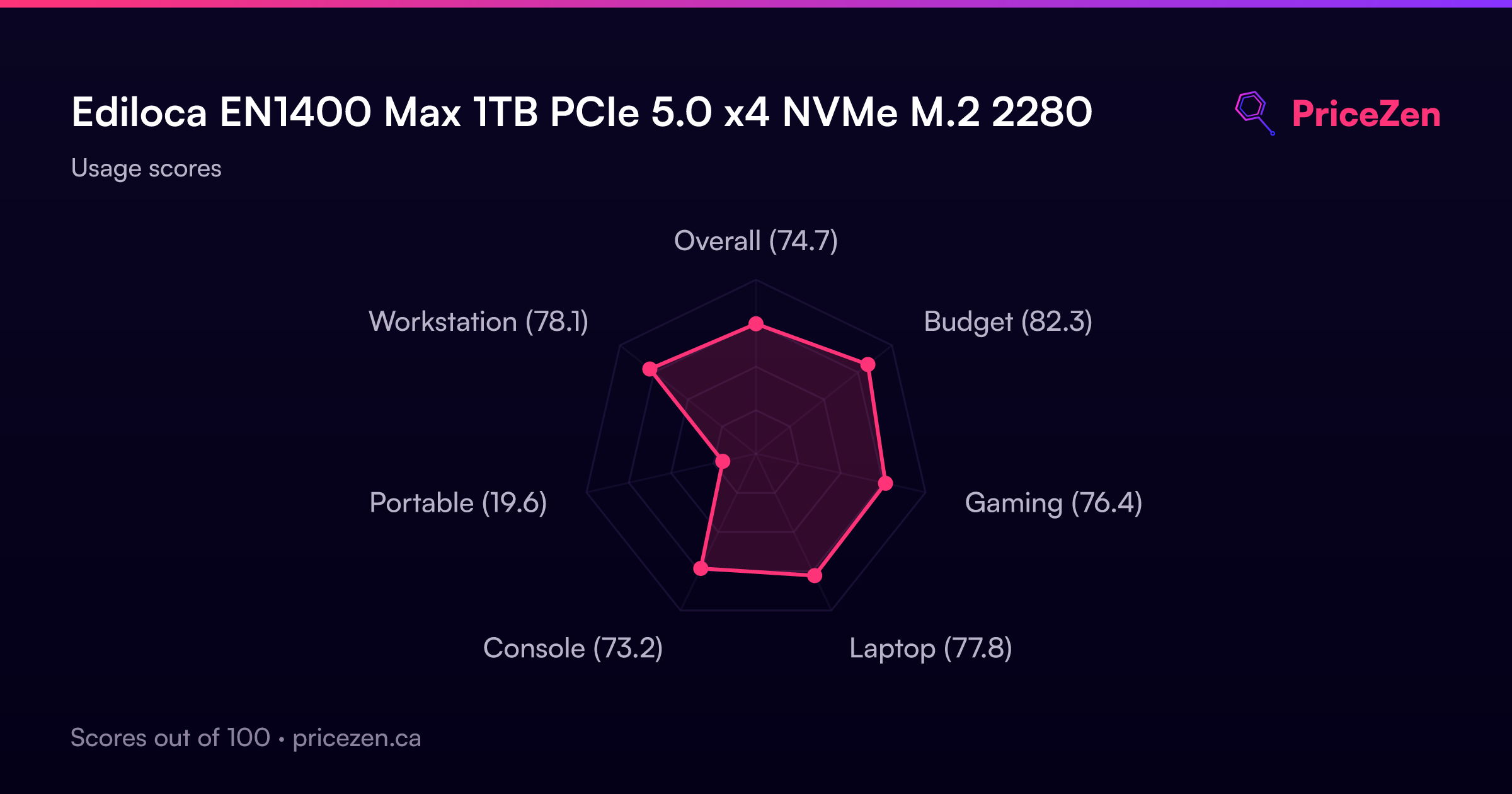
- Overall74.7
- Budget82.3
- Gaming76.4
- Laptop77.8
- Console73.2
- Portable19.6
- Workstation78.1