RAOYI 256GB SSD SATA III 2.5"
The 256GB SATA III drive delivers 550 MB/s read and 500 MB/s write speeds, using TLC NAND to accelerate boot times and game responsiveness. Its 2.5-inch form factor with an ABS casing offers heat dissipation and shock resistance, while backward compatibility with SATA 2.0 and 1.0 ensures broad system support. Best for budget-conscious users upgrading older desktops or laptops for everyday tasks, light gaming, and data storage.











Snapshot
The 30-Second Version
The RAOYI 256GB internal SSD is a budget 2.5" SATA III drive at USD 38 that maxes out SATA's sequential speeds but ranks below average on random performance, capacity and endurance. It's a cheap fix for an old SATA-only laptop or desktop, not a drive for modern builds or heavy workloads.
Pros & Cons
Pros
- Very cheap at USD 38, one of the best prices in the category 91st
- Sequential speeds hit the SATA III ceiling (550/500 MB/s)
- TLC NAND rather than cheaper QLC
- Standard 2.5" SATA fits most older laptops and desktops
- Backward compatible with SATA 2.0 and 1.0, works with Windows, Linux and Mac OS
Cons
- Only 256GB, fills up fast with an OS plus games
- Random performance lags behind most drives in the category
- Endurance ranks near the bottom, not ideal for heavy write workloads
- Overall score of 25.3/100 outside of budget considerations
- Product listing contradicts itself on the case material (ABS vs metal)
The proof
Performance
The headline numbers, 550 MB/s read and 500 MB/s write, are basically the ceiling of what SATA III can do, so on paper this thing keeps up with any SATA drive. But sequential speed is only half the picture. In our data, the RAOYI's overall speed ranking sits at the 29th percentile and random performance at the 23rd, which means it falls behind most of the category where it matters day to day: boot times, app launches, and lots of small file operations. Big file copies will feel fine. Everything else will feel merely okay rather than snappy.
Endurance is the other weak spot, ranking at the 15th percentile, so we wouldn't make this the daily scratch disk for video editing despite the marketing suggesting exactly that. As a boot drive for a web-browsing, office-work machine, though, the specs are adequate. And compared to any spinning hard drive, even a mediocre SSD is a night-and-day upgrade.
Specifications
Full Specifications
Drive
| Capacity | 256 |
| Form Factor | 2.5" |
| Interface | SATA III |
| Protocol | SATA |
| External | No |
Performance
| Sequential Read (MB/s) | 550 |
| Sequential Write (MB/s) | 500 |
Hardware
| NAND | TLC |
vs Competition
Here's the awkward part: most of the top competitors in our rankings, the Crucial P5 Plus, SanDisk Optimus GX 7100, Team Group MP44L, MSI SPATIUM M560 and fanxiang S880 S880E, are NVMe drives, a different class entirely. If your machine has an M.2 NVMe slot, any of those will leave this RAOYI in the dust, because SATA III caps out around 550 MB/s while NVMe plays in a completely different speed bracket. Our overall ranking reflects that: 25.3/100 total against a field that includes those drives.
But that comparison only matters if your hardware supports it. Plenty of older laptops and budget desktops have nothing but a 2.5" SATA bay, and in that world the RAOYI's job is simply to be cheap and functional. It does that. If you're choosing between this and the Crucial P5 Plus or Team Group MP44L for a modern build, pick one of those. If you're patching up a machine that physically can't take them, the RAOYI is a legitimate low-cost option.
| Spec | RAOYI 256GB SSD | Samsung 990 PRO | Western Digital WD_BLACK SN8100 | Crucial T500 | Corsair MP700 Elite | MSI SPATIUM M480 PRO |
|---|---|---|---|---|---|---|
| Capacity | 256GB | 2TB | 1TB | 1TB | 1TB | 1TB |
| Form Factor | 2.5" | M.2 2280 | M.2 2280 | M.2 2280 | M.2 2280 | M.2 2280 |
| Interface | SATA III | PCIe 4.0 x4 | PCIe 5.0 x4 | PCIe 4.0 x4 | PCIe 5.0 x4 | PCIe 4.0 x4 |
| Seq Read | 550 MB/s | 7,450 MB/s | 14,900 MB/s | 7,300 MB/s | 10,000 MB/s | 7,400 MB/s |
| Nand Type | TLC | TLC | TLC | TLC | TLC | TLC |
| Dram Cache | - | Yes | Yes | Yes | No | Yes |
| Endurance | - | 1200 TBW | 600 TBW | 600 TBW | 600 TBW | 3000 TBW |
| Compare | Compare | Compare | Compare | Compare |
| Product | Speed | Random | Feature | Capacity | Endurance | Affordability |
|---|---|---|---|---|---|---|
| RAOYI 256GB SSD | 30.2 | 23.8 | 54 | 19.5 | 15.7 | 91.1 |
| Samsung 990 PRO Compare | 93.9 | 97.5 | 99 | 78.4 | 85.9 | 20.7 |
| Western Digital WD_BLACK SN8100 Compare | 97.9 | 98.7 | 99.8 | 56.4 | 80.7 | 38.6 |
| Crucial T500 Compare | 91.6 | 96.8 | 99 | 56.4 | 82.9 | 50.8 |
| Corsair MP700 Elite Compare | 95.2 | 97.2 | 86.3 | 56.4 | 87.3 | 45.1 |
| MSI SPATIUM M480 PRO Compare | 94.1 | 81.5 | 94.2 | 56.4 | 98.5 | 39.5 |
Price
Value & Pricing
At USD 38, this is one of the cheapest ways into SSD territory, and affordability is genuinely its standout trait, ranking at the 93rd percentile in our data. We track its price over time, partly through our community browser extension, and right now Amazon has it at USD 38 (the Canadian listing runs CAD 100). If your goal is spending the absolute minimum to make an old PC usable again, the value argument is real. Just know that stepping up in capacity usually costs less per gigabyte, so if your budget can stretch at all, cross-shop before you commit.
Amazon 1 offer From CA$109
Price history
Read more
Overview
The RAOYI 256GB internal SSD is a budget SATA drive, the kind you buy to drag an old laptop or desktop out of hard-drive misery without spending much. It's a standard 2.5" SATA III unit with TLC NAND, rated for up to 550 MB/s reads and 500 MB/s writes, and it currently sits at USD 38 on Amazon (CAD 100 in Canada). That puts it firmly in impulse-upgrade territory.
So is a cheap 256GB SATA SSD still worth buying? For reviving an aging machine, yes, with caveats. This drive is backward compatible with SATA 2.0 and 1.0 and works with Windows, Linux and Mac OS, so it'll slot into most older laptops and desktops without drama. The catch is size: 256GB fills up fast once Windows and a couple of games move in, and our capacity ranking puts this one near the bottom of the category.
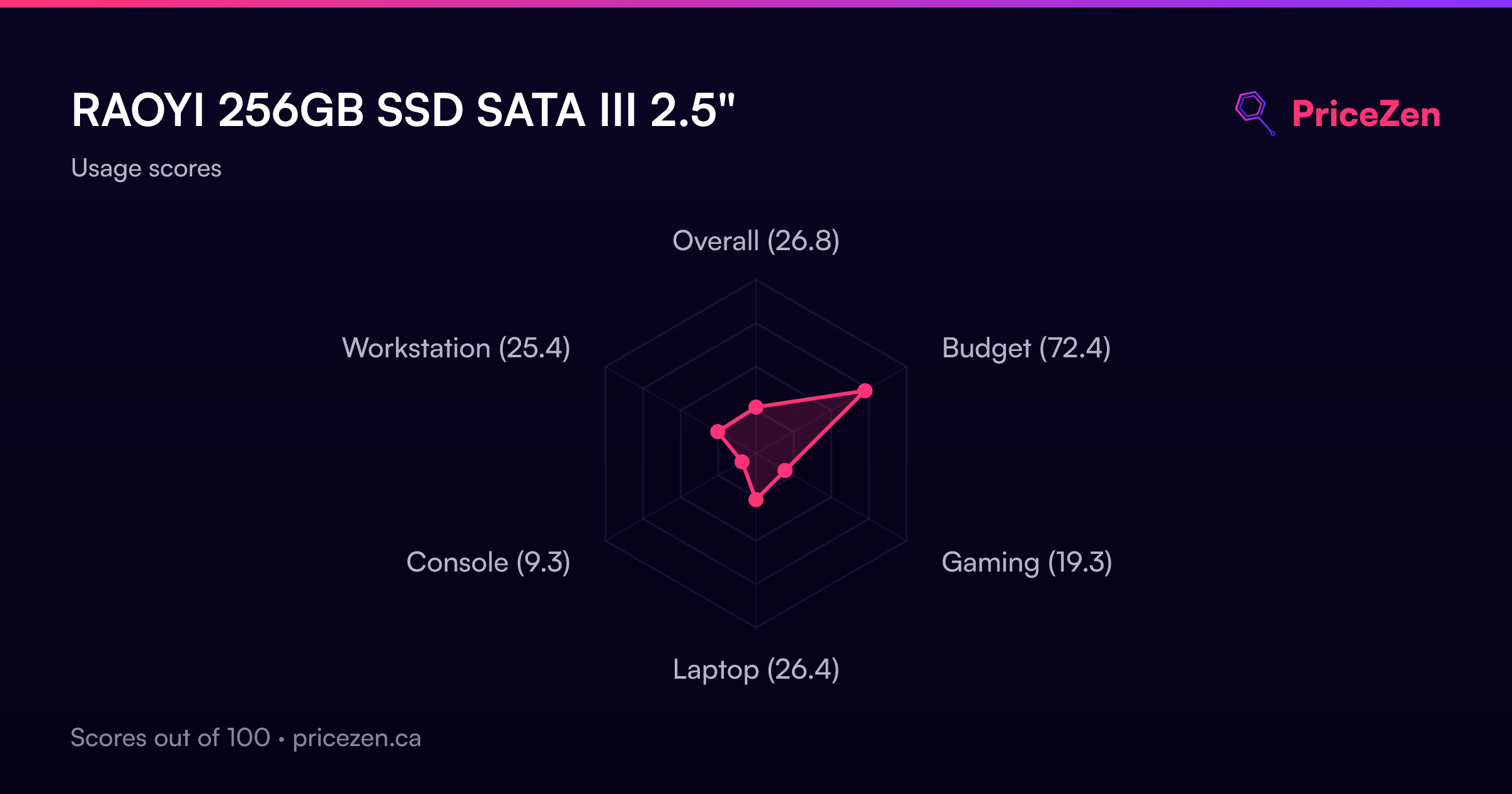
We collect specs, prices and rankings from multiple stores with our own automated system, and we score every drive against the rest of its category. On that scale, the RAOYI lands at 25.3/100 overall but 71.8/100 for budget buyers. That gap tells the whole story: this is a price-first product, not a performance-first one.
Common Questions
Q: Is the RAOYI 256GB SSD good for gaming?
It'll load games faster than a hard drive thanks to 550 MB/s sequential reads, but 256GB only fits the OS plus a small handful of modern games, and its random performance ranks below most of the category. Fine for light gaming on an old PC, not for a main gaming rig.
Q: Will the RAOYI SSD work in my old laptop?
If your laptop has a 2.5" SATA drive bay, almost certainly yes. It's a standard SATA III drive that's backward compatible with SATA 2.0 and 1.0, and it supports Windows, Linux and Mac OS.
Q: Is 256GB enough for Windows and everyday use?
For Windows plus office apps, browsing and modest files, yes. Add games, video projects or a big photo library and you'll run out quickly, which is why capacity is one of this drive's weakest rankings in our data.
Q: How does the RAOYI compare to the Crucial P5 Plus?
They're different classes: the RAOYI is a SATA III drive capped around 550 MB/s, while the Crucial P5 Plus is an NVMe drive that ranks far higher overall. Only choose the RAOYI if your machine lacks an NVMe M.2 slot or your budget is extremely tight.
Who Should Skip This
Skip this if your PC has an M.2 NVMe slot, since drives like the Team Group MP44L, MSI SPATIUM M560 or Crucial P5 Plus are the better match for modern hardware. Skip it too if you edit video, run VMs or write large amounts of data daily, because the endurance ranking is a real weak spot. And if you game seriously or keep a big media library, 256GB will frustrate you within weeks. Look at higher-capacity options like the fanxiang S880 S880E instead.
Verdict
Should you buy the RAOYI 256GB SSD? If you're resurrecting an old SATA-only laptop or desktop on a shoestring budget, sure. At USD 38 it does the one job that matters most: replacing a hard drive with solid state storage, and even a mid-pack SSD makes an old machine feel dramatically more responsive.
For anything beyond that, we'd pass. The 256GB capacity is cramped, random performance and endurance both rank poorly, and if your system supports NVMe, drives like the Crucial P5 Plus or fanxiang S880 S880E are the smarter buy. This is a band-aid for aging hardware, priced like one. Sometimes that's exactly what you need.
Usage Scores
- Overall26.8
- Budget72.4
- Gaming19.3
- Laptop26.4
- Console9.3
- Workstation25.4