Denash 1GB DDR4-2133 SODIMM (Denashm72gisdu16)
The 260-pin DDR4 SO-DIMM to 288-pin DIMM adapter converts laptop memory for desktop use, supporting 2133 MT/s speeds with a 4-layer PCB and over-current protection. Its lightweight, compact design and durable build make it a practical alternative to RAM adapters. Best for DIY builders repurposing spare laptop DDR4 modules in desktop builds on a budget.



Snapshot
The 30-Second Version
The Denash Denashm72gisdu16 is a DDR4 SO-DIMM to DIMM adapter that lets you use laptop RAM in a desktop motherboard. It's cheap at around $12 USD and works fine for basic builds, but speed and latency are weak compared to native desktop memory. Only worth it if you already have laptop DDR4 sticks lying around.
Pros & Cons
Pros
- Dirt cheap at around $12 USD 100th
- Lets you reuse old laptop DDR4 RAM
- Over-current protection built in
- Simple plug-and-play design
- Lightweight and easy to store
Cons
- Latency is among the worst we've tracked
- Speed capped at 2133 MT/s
- Only 1GB capacity if bundled memory is included
- No real performance benefit over native desktop RAM
- New and old versions ship randomly
The proof
Performance
The adapter itself is rated for 2133 MT/s DDR4, which is fine for older systems but pretty slow by today's standards. Our speed percentile puts it at 22nd, which means it lags behind most dedicated desktop memory. That's expected, since laptop SO-DIMMs are generally slower than their desktop counterparts. The latency score is even worse at 7th percentile, one of the weakest we've seen. Again, this is a pass-through device, so it inherits the limitations of whatever laptop stick you're using.
In practice, you're not going to win any benchmark contests with this setup. It's fine for basic desktop use, office work, or a home server that doesn't need blazing speeds. But if you're planning to run memory-hungry games or video editing software, you'll feel the bottleneck. The 1GB capacity listed in the specs is confusing, since the adapter doesn't actually include memory. That's likely a placeholder or a bundled stick in some listings. Either way, 1GB is basically unusable for modern computing.
Specifications
Full Specifications
Memory
| Type | DDR4 |
| Form Factor | SODIMM |
| Total Capacity | 1024 |
| Modules | 1 |
| Per Module | 1024 |
| Pins | 260 |
Performance
| Speed | 2133 |
Class
| Registered | No |
vs Competition
Compared to actual desktop memory like the Patriot Signature Line PSD44G266681S or the Kingston KCP3L16NS8/4, this adapter is in a completely different league. Those are real DIMMs with proper heat spreaders, better latency, and faster speeds. The Patriot stick runs at 2666 MT/s, which is a solid step up from the 2133 MT/s ceiling on this adapter. The Kingston is a DDR3L part, so it's older tech, but it's still a native desktop module with better latency characteristics.
The Micron Crucial DDR3L 1600 MT/s UDIMM is another competitor worth mentioning. It's slower on paper, but it's a genuine desktop stick with Crucial's reliability behind it. The Timetec 4GB DDR3L is in a similar boat. None of these are direct competitors in the traditional sense, because they're actual memory modules and this is an adapter. But if you're shopping for a way to get memory into a desktop, these are the alternatives you'd actually buy. The adapter only makes sense when you already have laptop RAM on hand.
| Spec | Denash 1GB DDR4 SODIMM | Micron Crucial DDR3L 1600 MT/s UDIMM Memory | HP 8GB DDR4 SODIMM | Kingston 4GB DDR3L | Samsung 1GB DDR3 | Timetec 4GB Compatible for Synology NAS DiskStation/RackStation |
|---|---|---|---|---|---|---|
| Capacity | 1GB | 4GB | 8GB | 4GB | 1GB | 4GB |
| Kit | 1 x 1GB | 1 x 4GB | 1 x 8GB | 1 x 4GB | 1 x 1GB | 1 x 4GB |
| Memory Type | DDR4 | DDR3 | DDR4 | DDR3L | DDR3 | DDR3L |
| Speed Mts | 2133 | 1600 | 2666 | 1600 | 1333 | 1600 |
| Cas Latency | - | CL11 | - | CL11 | CL9 | CL11 |
| Form Factor | SODIMM | UDIMM | SODIMM | UDIMM | UDIMM | SODIMM |
| Ecc | - | No | - | No | No | No |
| Compare | Compare | Compare | Compare | Compare |
| Product | Speed | Latency | Capacity | Social Proof | Affordability |
|---|---|---|---|---|---|
| Denash 1GB DDR4 SODIMM | 22.1 | 6.5 | 2.4 | 29 | 100 |
| Micron Crucial DDR3L 1600 MT/s UDIMM Memory Compare | 13.4 | 57.5 | 8.6 | 87.3 | 99.5 |
| HP 8GB DDR4 SODIMM Compare | 37.2 | 9.3 | 22.3 | 0 | 99.8 |
| Kingston 4GB DDR3L Compare | 13.4 | 57.5 | 8.6 | 0 | 97.2 |
| Samsung 1GB DDR3 Compare | 7.1 | 66.8 | 2.4 | 0 | 99.7 |
| Timetec 4GB Compatible for Synology NAS DiskStation/RackStation Compare | 13.4 | 57.5 | 8.6 | 26.4 | 99.8 |
Price
Value & Pricing
At $12 USD, this adapter is basically an impulse buy. If you have a pile of old laptop DDR4 sticks collecting dust, it's a no-brainer way to squeeze some extra life out of them. The CAD listing at $5 is even cheaper, though that's a different market and not directly comparable. But here's the thing: if you don't already own laptop RAM, you're better off buying proper desktop memory. A decent 8GB DDR4 desktop stick costs around $20 to $30 these days, and it'll outperform this adapter setup in every way. The value proposition only works when the laptop RAM is free.
Amazon 1 offer From CA$5
Price history
Read more
Overview
The Denash Denashm72gisdu16 is one of those odd little gadgets that solves a very specific problem. It's a DDR4 SO-DIMM to DIMM adapter, which means you can take a laptop memory stick and plug it into a desktop motherboard. At around $12 USD, it's a cheap way to repurpose old laptop RAM instead of buying new desktop sticks. The adapter converts the 260-pin laptop format to the 288-pin desktop standard, and it's built on a 4-layer PCB with over-current protection.
We see a lot of memory products in our database, and this one sits in a strange spot. It's not actually memory itself, it's a bridge between two memory formats. The affordability ranking is off the charts, literally the best we've tracked. But the speed, capacity, and latency scores are rough because the adapter itself doesn't add performance, it just passes through whatever your SO-DIMM can do. If you're wondering whether this adapter is good for gaming or heavy workloads, the answer depends entirely on the laptop RAM you're plugging into it.
For tinkerers and budget builders, this thing is interesting. You can grab an old 8GB or 16GB laptop stick from a dead machine and drop it into a desktop build. That's a real money saver if you already have the RAM lying around. But if you're buying laptop RAM specifically to use with this adapter, the math gets weird fast.
Common Questions
Q: Can I use laptop DDR4 RAM in a desktop with this adapter?
Yes, this adapter converts a 260-pin DDR4 SO-DIMM to a 288-pin desktop DIMM slot. Just make sure your motherboard supports the speed and capacity of the laptop stick you're using.
Q: Is the Denash Denashm72gisdu16 good for gaming?
Not really. The adapter is capped at 2133 MT/s and inherits the slower latency of laptop memory. It'll work for casual gaming, but you'll get better performance from native desktop RAM.
Q: Does this adapter include memory?
No, it's just an adapter card. Some listings may bundle a small stick, but the adapter itself doesn't come with RAM. You need to supply your own DDR4 SO-DIMM.
Q: Will this work with DDR3 laptop RAM?
No, this adapter is specifically for DDR4 SO-DIMMs. DDR3 uses a different pin layout and voltage, so it won't fit or function.
Who Should Skip This
Skip this if you don't already own laptop DDR4 RAM. Buying a SO-DIMM just to use with this adapter makes no sense when desktop DIMMs are cheap and faster. Also skip it if you're building a gaming rig or a workstation where memory speed and latency matter. The 2133 MT/s ceiling and poor latency scores will hold you back. If you need reliable performance, grab a Patriot Signature Line or Kingston desktop stick instead. This adapter is for repurposing old parts, not for new builds.
Verdict
Should you buy the Denash Denashm72gisdu16? If you have old laptop DDR4 sticks sitting in a drawer and a desktop that needs memory, sure. It's twelve bucks and it works. The over-current protection is a nice touch for peace of mind, and the build quality seems decent enough for what it is. But if you're starting from scratch, skip it. Buy real desktop RAM and save yourself the hassle.
This is a niche product for a niche audience. Tinkerers, budget builders, and people who hate e-waste will appreciate it. Everyone else should just buy a proper DIMM. The adapter doesn't make laptop RAM faster or better, it just makes it fit. And sometimes that's enough.
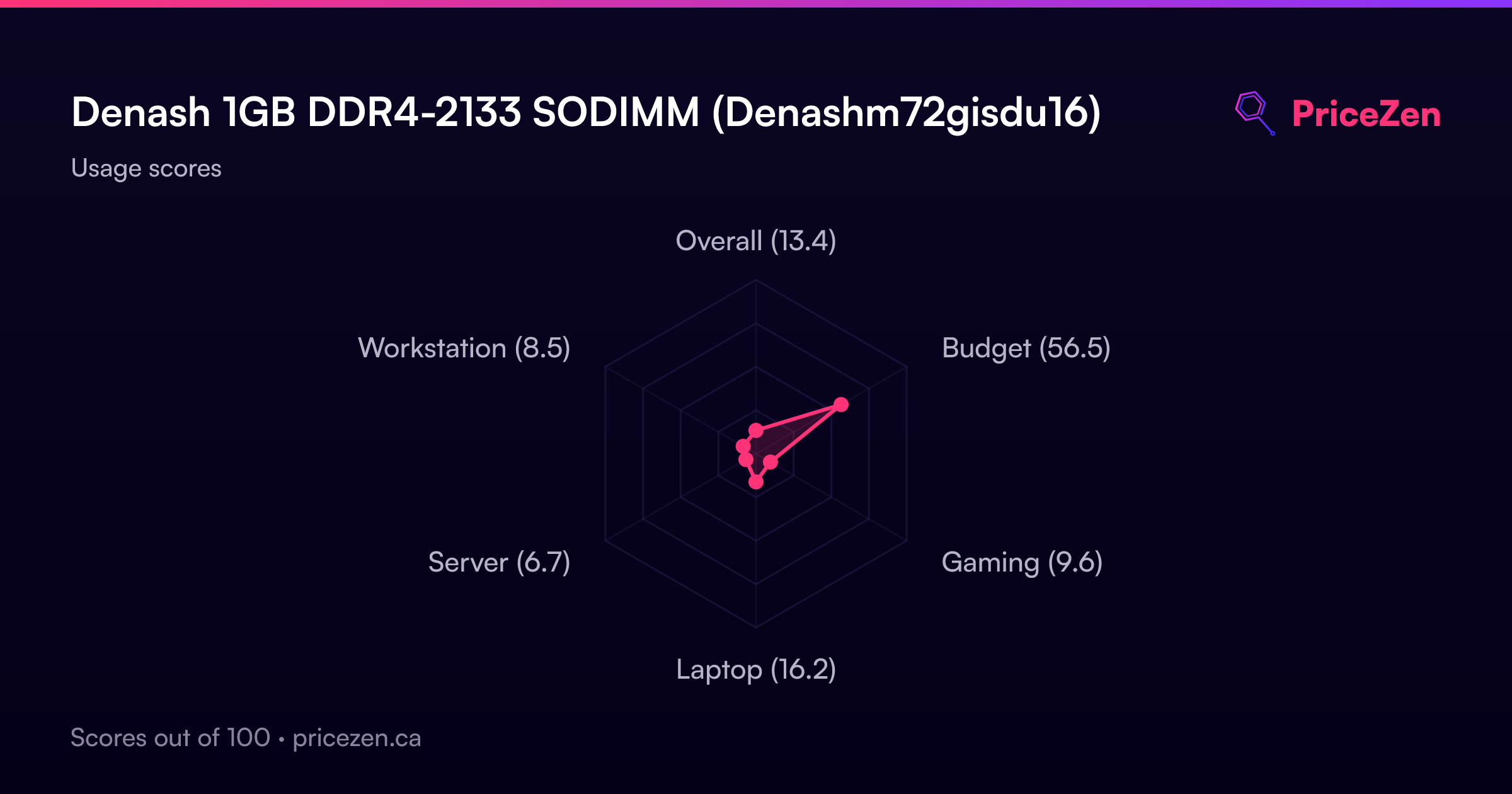
Usage Scores
- Overall13.4
- Budget56.5
- Gaming9.6
- Laptop16.2
- Server6.7
- Workstation8.5