Transcend JetRam 48GB DDR5-5600 CL46 SODIMM
The 48GB DDR5 SO-DIMM kit runs at 5600 MT/s with CL46 latency and a 1.1V operating voltage, pairing on-die ECC with a PMIC for stable power delivery in laptops. Its 2Rx8 configuration and JEDEC compliance ensure broad compatibility, backed by a limited lifetime warranty from Transcend. Best for laptop users who need a high-capacity, reliable memory upgrade for memory-intensive tasks like virtualization or large-scale data analysis.

No current retailer price











Snapshot
The 30-Second Version
48GB on one stick at 5600 MT/s is the draw here, and it's an 84th percentile capacity in our database. But CL46 latency lands in the 22nd percentile, and the 8th percentile affordability score means you're paying a steep premium for that density. If you need max RAM in a two-slot laptop, this works. If you don't, there are better values out there.
Pros & Cons
Pros
- 48GB on a single stick, 84th percentile capacity 84th
- 5600 MT/s speed, 78th percentile in our database 78th
- 1.1V low voltage with PMIC for better power control
- On-die ECC for error correction and stability
- Limited lifetime warranty from Transcend
Cons
- CL46 latency, 22nd percentile, well below average
- Only 4 customer reviews, 20th percentile social proof
- No XMP or overclocking profiles, bare JEDEC spec
- 8th percentile affordability, this stick is expensive
- No heat spreader or any kind of visual flair
The proof
Performance
5600 MT/s is the number that matters here. That's a 78th percentile speed in our database, which means this stick is faster than roughly three quarters of the DDR5 SODIMMs we've tested. For a laptop memory module, that's genuinely good. You're getting the full JEDEC DDR5-5600 spec, not some downclocked variant. The 48GB capacity is the other headline, 84th percentile, and it's the reason this stick exists. Most SODIMMs top out at 32GB per stick, so 48GB is a meaningful step up for machines that need more headroom without filling both slots.
The catch is latency. CL46 at 5600 MT/s works out to a 22nd percentile result, which is mediocre by any measure. The math is simple: 46 clock cycles divided by 5600 MT/s gives you a first-word latency of about 16.4 nanoseconds. Compare that to something like the Kingston FURY Beast at CL32, and you're leaving real responsiveness on the table. For everyday tasks and most productivity work, you won't feel it. But if you're doing latency-sensitive work like audio production or certain database operations, this stick is going to feel a step behind the enthusiast kits. The 1.1V operating voltage is a plus though. Lower voltage means less heat and less battery drain in a laptop, which is exactly where this stick is going to live.
Specifications
Full Specifications
Memory
| Type | DDR5 |
| Form Factor | SODIMM |
| Total Capacity | 49152 |
| Modules | 1 |
| Per Module | 49152 |
| Pins | 262 |
| Rank | 2Rx8 |
Performance
| Speed | 5600 |
| CAS Latency | 46 |
| Voltage | 1.1 |
Class
| ECC | Yes |
| Registered | No |
Features
| RGB | No |
| Heat Spreader | No |
vs Competition
Against the Kingston FURY Beast KF564C32BWEAK2-64, this Transcend stick looks slow. The Kingston kit runs CL32 at 5600 MT/s, which is a dramatically better latency story, and it's a 64GB kit for what's often a similar price. The G.Skill Trident Z5 Royal and Corsair VENGEANCE RGB kits are in a completely different league for enthusiasts, with higher clocks and much tighter timings, though they're desktop DIMMs rather than SODIMMs. The Crucial Pro Overclocking kit is the closest philosophical match, JEDEC-focused with an emphasis on compatibility, but Crucial's pricing tends to be more aggressive. The KLEVV CRAS V RGB is another desktop option that outclasses this stick on both speed and latency. The Transcend's only real advantage is that 48GB single-stick capacity. If you need that specific density in a laptop, your options are limited. If you don't, almost any of these competitors is a better value.
| Spec | Transcend JetRam | Kingston FURY Beast | Corsair VENGEANCE RGB | G.Skill Trident Z5 Royal | XPG Lancer Blade RGB | Crucial Pro OC Gaming |
|---|---|---|---|---|---|---|
| Capacity | 48GB | 64GB | 64GB | 64GB | 32GB | 64GB |
| Kit | 1 x 48GB | 2 x 32GB | 2 x 32GB | 2 x 32GB | 2 x 16GB | 2 x 32GB |
| Memory Type | DDR5 | DDR5 | DDR5 | DDR5 | DDR5 | DDR5 |
| Speed Mts | 5600 | 6400 | 6400 | 6000 | 6000 | 6000 |
| Cas Latency | CL46 | CL32 | CL32 | CL26 | CL30 | CL40 |
| Form Factor | SODIMM | UDIMM | UDIMM | UDIMM | UDIMM | UDIMM |
| Ecc | true | false | false | false | false | false |
| Compare | Compare | Compare | Compare | Compare |
| Product | Speed | Feature | Latency | Capacity | Affordability |
|---|---|---|---|---|---|
| Transcend JetRam | 77.6 | 18.1 | 22.4 | 84.1 | 9 |
| Kingston FURY Beast Compare | 94.8 | 89.6 | 87.6 | 89.5 | 8.2 |
| Corsair VENGEANCE RGB Compare | 94.8 | 89.6 | 87.6 | 89.5 | 6.5 |
| G.Skill Trident Z5 Royal Compare | 87.6 | 89.6 | 99 | 89.5 | 3.9 |
| XPG Lancer Blade RGB Compare | 87.6 | 89.6 | 87.6 | 70.5 | 15.7 |
| Crucial Pro OC Gaming Compare | 87.6 | 74.8 | 68.9 | 89.5 | 13 |
Price
Value & Pricing
Here's where things get uncomfortable. The affordability score is an 8th percentile, which means this stick is more expensive than 92% of comparable memory in our database. The US listing is $1,261. The Canadian listing is CAD 1,881. The Japanese listing is JPY 269,506. And in Europe, you'll find it anywhere from EUR 1,208 to EUR 1,348 depending on the store. That's a EUR 140 spread across just two listings, so if you're in France or Spain, it pays to shop around. The best deal in our data is the EUR 1,208 listing. But even at that price, you're paying a serious premium for the 48GB capacity. A 32GB DDR5 SODIMM typically costs a fraction of this. You're not paying for speed here, you're paying for density, and that's a niche tax.
We started tracking prices for this product on Jun 15, 2026. The chart appears once we have more data.
Read more
Overview
The headline number here is 48GB on a single stick. That's an 84th percentile capacity in our database, which is a big deal for laptops with only two SODIMM slots. You can drop this in one slot and still have room to double up later, or pair it with an existing 16GB stick for 64GB total. The speed is solid too, 5600 MT/s puts it in the top quarter of DDR5 SODIMMs we've tracked. But the latency story is rough. CL46 at 5600 MT/s lands in the 22nd percentile, which means this is JEDEC-standard timing, not enthusiast-grade stuff. That's fine for a workstation or a laptop that just needs lots of RAM, but it's not going to win any benchmark races.
Transcend is positioning this as a stability-first module. It runs at 1.1V with a power management IC on board, and it has on-die ECC for error correction. That's the kind of thing that matters when you're running a 48GB stick in a machine that's going to be on for days at a time. The warranty is limited lifetime, which is nice. But the social proof is thin, only 4 reviews in our database, and the feature set is bare bones. No RGB, no heat spreader to speak of, no XMP profiles. This is a workhorse stick, not a show pony.
Common Questions
Q: Will this work in my laptop?
This is a 262-pin DDR5 SODIMM, so it needs a laptop with DDR5 memory support and a free SODIMM slot. It runs at the JEDEC standard 5600 MT/s with no XMP profile, so it should work in any DDR5 laptop that supports 48GB sticks. The 1.1V operating voltage and PMIC are standard for DDR5, so compatibility is generally good. Just check your laptop's maximum supported capacity per slot before buying.
Q: Is CL46 latency going to hurt performance?
CL46 at 5600 MT/s works out to about 16.4 nanoseconds of first-word latency, which puts this stick in the 22nd percentile in our database. For everyday tasks, web browsing, office work, and most creative applications, you won't notice the difference. Where it shows up is in latency-sensitive workloads like audio production, certain database operations, and some games. If you're doing that kind of work, a CL32 or CL36 kit would be noticeably snappier.
Q: Can I pair this with another stick for dual-channel?
Yes, and that's actually the smart play here. With 48GB on one stick, you can add a second 48GB stick later for 96GB total, or pair it with an existing stick for more capacity. Just be aware that mixing sticks with different timings will run both at the slower stick's spec. Since this is CL46, pairing it with a faster stick will pull the faster stick down to CL46. For best results, match it with another JM5600ASE-48G.
Who Should Skip This
If you don't specifically need 48GB in a single SODIMM slot, skip this. The 8th percentile affordability score means you're paying a serious premium for density, and the CL46 latency at the 22nd percentile is a real step down from enthusiast kits. Gamers and overclockers should look at the Kingston FURY Beast or G.Skill Trident Z5 instead, both of which offer much tighter timings for similar or less money. Desktop users have no reason to buy this at all, it's a SODIMM, and the desktop competition from Corsair, G.Skill, and KLEVV is dramatically better on both speed and latency. Even laptop users who just need 32GB should buy a cheaper 32GB stick and save the money. This is a specialty product for people who know exactly why they need 48GB per stick.
Verdict
The Transcend JetRam JM5600ASE-48G is a niche product that nails its niche. If you need 48GB in a single SODIMM slot, this is one of very few options, and it delivers solid 5600 MT/s speed with the stability features that matter for a machine that runs all day. The on-die ECC and 1.1V power management are genuinely useful in a laptop. But the CL46 latency is a real weakness, and the price is hard to justify unless you specifically need that 48GB density. For most people, a 32GB stick or a 64GB two-stick kit from Kingston or Crucial will deliver better performance per dollar. This is a buy for a specific use case, not a general recommendation.
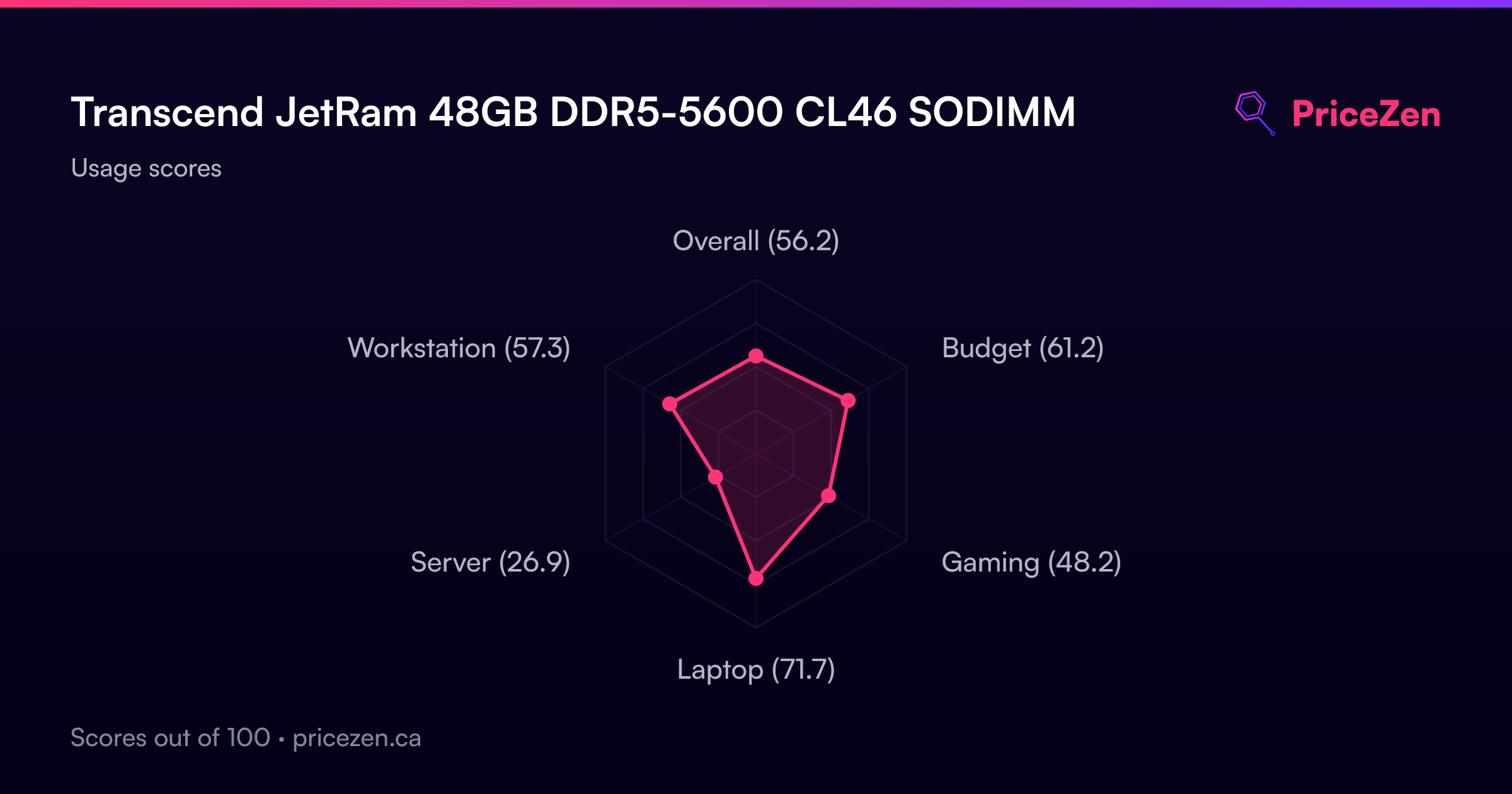
Usage Scores
- Overall56.2
- Budget61.2
- Gaming48.2
- Laptop71.7
- Server26.9
- Workstation57.3