A-Tech 4GB DDR4-2666 CL19 SODIMM
A single 4GB DDR4 2666MHz SODIMM module provides a direct, validated replacement for Synology NAS systems like the DS920+ and RS820RP+. Its unbuffered, non-ECC design and standard 1.2V operation ensure drop-in compatibility without configuration, backed by a lifetime warranty. This module is best for Synology NAS owners needing an exact, low-cost memory swap to restore a failed unit or maintain a basic 4GB configuration.

No current retailer price










Snapshot
The 30-Second Version
The A-Tech 4GB is a cheap, basic DDR4 SODIMM stick for replacing dead RAM in old laptops and NAS boxes. It's slow and tiny by modern standards, but it's affordable and backed by a lifetime warranty. Worth it only if you need exactly this spec, and don't pay more than $45.
Pros & Cons
Pros
- Dirt cheap way to revive an old laptop or NAS 95th
- Lifetime warranty and US-based support are rare at this price
- Drop-in compatible with a long list of Samsung and Kingston part numbers
- Standard 1.2V means no BIOS tweaking needed
Cons
- 4GB is barely enough for modern Windows or macOS
- 1Rx16 layout is slower than x8 alternatives
- CL19 latency is nothing to write home about
- Single stick means no dual-channel benefit
What owners think
How owner sentiment changed over time
ExclusiveBased on when customers actually wrote their reviews - so you can see whether early praise held up.
1 written review, May 2026: 1 happy
Across all 46 store ratings: 4.7★. Most owners rate without writing a review. The chart counts the 1 written review.
Each dot is one written review, in the month it was written. Happy = 4-5★, mixed = 3★, unhappy = 1-2★.
The proof
Performance
Let's be real: 2666 MT/s and CL19 puts this stick in the bottom third of our database for speed and latency. The 1Rx16 configuration doesn't help either, since x16 chips tend to leave a little performance on the table compared to x8. But for a 4GB module, you're not chasing benchmark glory. You're keeping a system alive. In a laptop that shipped with this exact spec, it'll run exactly as the OEM intended. In a Synology NAS, it'll do its job quietly. Just don't expect it to make anything feel fast.
Specifications
Full Specifications
Memory
| Type | DDR4 |
| Form Factor | SODIMM |
| Total Capacity | 4096 |
| Modules | 1 |
| Per Module | 4096 |
| Pins | 260 |
| Rank | 1Rx16 |
Performance
| Speed | 2666 |
| CAS Latency | 19 |
| Voltage | 1.2 |
Class
| ECC | No |
| Registered | No |
Features
| Heat Spreader | No |
vs Competition
Stacked against the Team Group T-FORCE VULCAN Z or Corsair Vengeance LPX, this A-Tech stick looks ancient. Those are 16GB and 32GB kits running at 3200 MT/s or faster with tighter timings, built for desktops that actually do work. The G.Skill Ripjaws V and Patriot Viper Steel are in the same boat. But those aren't SODIMM modules, and they're not meant to replace a Samsung OEM stick in a laptop. The A-Tech's real competition is other 4GB SODIMM replacements, and in that narrow lane, it's fine. Just don't cross-shop it with desktop performance RAM.
| Spec | A-Tech 4GB DDR4 SODIMM | Kingston FURY Beast | Corsair VENGEANCE RGB | G.Skill Trident Z5 Royal | Team Group T-CREATE EXPERT | XPG Lancer Blade RGB |
|---|---|---|---|---|---|---|
| Capacity | 4GB | 64GB | 64GB | 64GB | 32GB | 32GB |
| Kit | 1 x 4GB | 2 x 32GB | 2 x 32GB | 2 x 32GB | 2 x 16GB | 2 x 16GB |
| Memory Type | DDR4 | DDR5 | DDR5 | DDR5 | DDR5 | DDR5 |
| Speed Mts | 2666 | 6400 | 6400 | 6000 | 6400 | 6000 |
| Cas Latency | CL19 | CL32 | CL32 | CL26 | CL32 | CL30 |
| Form Factor | SODIMM | UDIMM | UDIMM | UDIMM | UDIMM | UDIMM |
| Ecc | false | false | false | false | false | false |
| Compare | Compare | Compare | Compare | Compare |
| Product | Speed | Feature | Latency | Capacity | Social Proof | Affordability |
|---|---|---|---|---|---|---|
| A-Tech 4GB DDR4 SODIMM | 37.3 | 18.1 | 36.1 | 8.8 | 52.4 | 95.2 |
| Kingston FURY Beast Compare | 94.8 | 89.6 | 87.6 | 89.6 | 96.4 | 8.2 |
| Corsair VENGEANCE RGB Compare | 94.8 | 89.6 | 87.6 | 89.6 | 96.4 | 6.3 |
| G.Skill Trident Z5 Royal Compare | 87.6 | 89.6 | 99 | 89.6 | 58.4 | 3.8 |
| Team Group T-CREATE EXPERT Compare | 94.8 | 74.8 | 87.6 | 70.5 | 87.3 | 24.1 |
| XPG Lancer Blade RGB Compare | 87.6 | 89.6 | 87.6 | 70.5 | 96.4 | 15.7 |
Price
Value & Pricing
Pricing is all over the place. US listings range from $45 to $71 for the same stick, which is a $26 spread for identical hardware. That's wild. If you're buying in the US, shop around and grab the $45 listing, because paying $71 for a 4GB module in 2025 is a bad deal no matter how you slice it. The lifetime warranty adds some peace of mind, but this is a commodity part. Don't overpay for it.
Read more
Overview
The A-Tech 4GB is a no-frills DDR4 SODIMM stick aimed at one thing: getting an older laptop or NAS back on its feet without spending real money. It runs at 2666 MT/s with CL19 timings and sips the standard 1.2V, so it's a drop-in replacement for a bunch of Samsung and Kingston part numbers. Nothing fancy here, just a basic single-rank module with a lifetime warranty and US-based support.
And honestly, that's fine. This isn't a performance part. It's a rescue part. If you've got a machine with a dead stick or a NAS that just needs a little more breathing room, this does the job. The 4GB capacity is tiny by today's standards, but for the right use case, it's exactly what you need.
Common Questions
Q: Will this work in my laptop?
Check your laptop's spec sheet first. This is a 260-pin DDR4 SODIMM running at 2666 MT/s and 1.2V, so it needs a system that accepts unbuffered non-ECC DDR4 SODIMMs. It's a direct replacement for Samsung M471A5244BB0-CTD and M471A5244CB0-CTD, plus several Kingston part numbers.
Q: Can I use this in a Synology NAS?
Yes, A-Tech lists compatibility with several Synology models including the DS920+, DS720+, and DS220+. Just verify your specific NAS model accepts 4GB DDR4 SODIMM modules before ordering.
Q: Is 4GB enough for everyday use?
For basic tasks like web browsing and document editing on a lightweight OS, it's workable but tight. For Windows 11, multitasking, or anything beyond the basics, 4GB will feel cramped. This is best as a replacement to keep an old system running, not as an upgrade.
Who Should Skip This
Skip this if you're trying to upgrade a laptop or NAS to handle more work. 4GB is the bare minimum these days, and the 1Rx16 layout plus CL19 latency won't do you any favors. If you need more capacity, look at 8GB or 16GB SODIMM kits instead. Also skip it if you're building a desktop, since this is a SODIMM module and won't fit standard DIMM slots.
Verdict
Buy this if you have a specific machine that needs a 4GB DDR4 SODIMM replacement and you want to spend as little as possible. It's a utility purchase, not an upgrade. The lifetime warranty and US support make it a safe bet for fixing an old laptop or topping off a Synology NAS. If you're hoping to make a computer faster, this isn't the stick for you.
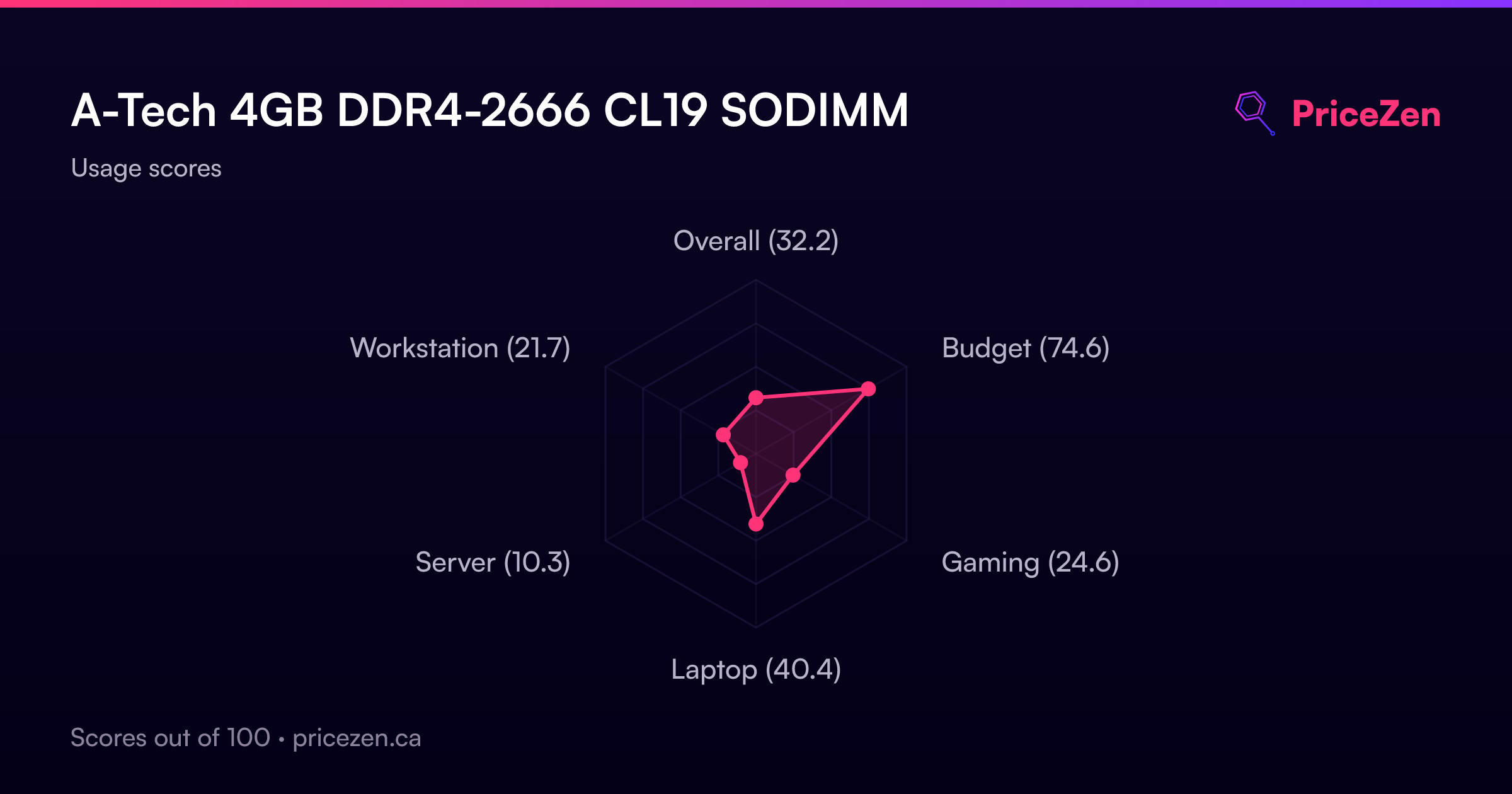
Usage Scores
- Overall32.2
- Budget74.6
- Gaming24.6
- Laptop40.4
- Server10.3
- Workstation21.7