Corsair VENGEANCE 48GB (2x24GB) DDR5-6000 CL36 Black

Room for big timelines with 48GB on board verified Nov 29
80/100 overall score
- Capacity
- 48GB
- Kit
- 2 x 24GB
- Memory
- DDR5
- Speed
- 6000 MT/s
- CAS latency
- CL36
- Form factor
- UDIMM
Compare prices at 2 stores
Cheapest first. New, refurbished and bundled offers are kept apart, so you compare like with like.
| Store | Sold by | Colour and condition | Price | vs lowest | Last checked | Link |
|---|---|---|---|---|---|---|
| New2 offersSingle unit | ||||||
| Out of stock when last checked | ||||||
| Canada Computers | Canada Computers | Black | No price | Out of stock | 6 days ago | Go to store |
| Amazon | Not known | Not listed | No price | Out of stock | 4 days ago | Go to store |
 Source: PriceZen, checked Nov 25, 2026
A price counts as current when we checked it in the last 7 days. “Marketplace seller” means a third-party seller on that store, not the store itself.
Price history
Checked that dayNot checked that day, still on offer
Source: PriceZen, checked Oct 23, 2026











Snapshot
The 30-Second Version
Corsair's 48GB VENGEANCE DDR5 kit runs at 6000 MT/s with CL36 timings, landing in the 88th percentile for speed and 85th for capacity. It's built for Intel 700 Series boards and brings iCUE voltage control and custom XMP 3.0 profiles to the table. The price has climbed roughly 19%, with listings now running from USD 989 to USD 1,173, so shop around before you buy. Best for workstation users and heavy multitaskers who need more than 32GB without jumping to 64GB.
Pros & Cons
Pros
- 6000 MT/s speed is in the 88th percentile, excellent for Intel 700 Series boards 88th
- 48GB capacity hits the 85th percentile, a nice middle ground between 32GB and 64GB 84th
- Onboard voltage regulation and iCUE software give real overclocking control 75th
- Custom XMP 3.0 profiles let you save different settings for different tasks 75th
- Aluminum heat spreader keeps things cool without being obnoxiously tall
Cons
- CL36 latency is only 75th percentile, not the tightest timings out there
- Server score of 38.3 means this is absolutely not for server duty
- No RGB, which might disappoint people who want their RAM to glow
- Price has climbed roughly 19%, and listings now run from USD 989 to USD 1,173 depending on the vendor
- Only officially compatible with Intel 700 Series, AMD users should look elsewhere
The proof
Performance
At 6000 MT/s, this kit lands in the 88th percentile for speed across all memory we track. That's genuinely fast. For Intel 700 Series boards, 6000 MT/s is often considered the practical sweet spot before you start fighting the memory controller for stability. The CL36 latency puts it at the 75th percentile, which is solid but not spectacular. The full timings are 36-44-44-96 at 1.4V, so there's some room to tighten things up if you're patient and your CPU's memory controller cooperates.
The 48GB capacity sits at the 85th percentile. For most people, 32GB is plenty, but if you're running virtual machines, editing 4K video, or working with large datasets, that extra 16GB over a standard 32GB kit is meaningful. You're not quite at 64GB territory, but you're also not paying 64GB prices. The onboard voltage regulation means you can push a bit more voltage through iCUE without relying on motherboard control, which Corsair claims leads to more stable overclocking. In practice, that's a nice-to-have for enthusiasts, but most people will just enable XMP and call it a day.
Specifications
Full Specifications
Memory
| Type | DDR5 |
| Form Factor | UDIMM |
| Total Capacity | 49152 |
| Modules | 2 |
| Per Module | 24576 |
| Pins | 288 |
Performance
| Speed | 6000 |
| CAS Latency | 36 |
| Timings | 36-44-44-96 |
| Voltage | 1.4 |
Class
| ECC | No |
| Registered | No |
| OC Profile | Intel XMP 3.0 |
Features
| RGB | No |
| Heat Spreader | Yes |
vs Competition
The Kingston FURY Beast KF564C32BWEAK2-64 is a natural competitor here. It's a 64GB kit, so you're getting more capacity, but you're also paying for it. The Kingston kit runs at 6400 MT/s with CL32, which is faster and tighter than this Corsair kit. If raw speed and capacity are your priorities and budget isn't a concern, the Kingston is the stronger pick. But the Corsair's 48GB configuration might actually be the smarter buy if you don't need 64GB and want to save some cash.
The G.Skill Trident Z5 Royal F5-6000J2636H32GX2-TR5NG is another interesting comparison. It's also a 6000 MT/s kit, but with CL36 timings that match this Corsair kit almost exactly. The G.Skill has the flashy Royal aesthetic with RGB, while the Corsair is more understated. If you want your RAM to be a centerpiece of your build, G.Skill wins. If you want the iCUE voltage control and a cleaner look, Corsair takes it. The Crucial Pro Overclocking CP2K16G64C32U5B is a 32GB kit with tighter CL32 timings, so it's faster in latency-sensitive tasks but gives up 16GB of capacity. For pure gaming, the Crucial might actually be the better value. For mixed workloads, the Corsair's extra capacity pulls ahead.
| Spec | Corsair VENGEANCE | Kingston FURY Beast | G.Skill Trident Z5 Royal | Team Group T-CREATE EXPERT | Crucial Pro Overclocking | XPG Lancer Blade RGB |
|---|---|---|---|---|---|---|
| Capacity | 48GB | 64GB | 64GB | 32GB | 32GB | 32GB |
| Kit | 2 x 24GB | 2 x 32GB | 2 x 32GB | 2 x 16GB | 2 x 16GB | 2 x 16GB |
| Memory Type | DDR5 | DDR5 | DDR5 | DDR5 | DDR5 | DDR5 |
| Speed Mts | 6000 | 6400 | 6000 | 6400 | 6400 | 6000 |
| Cas Latency | CL36 | CL32 | CL26 | CL32 | CL32 | CL30 |
| Form Factor | UDIMM | UDIMM | UDIMM | UDIMM | UDIMM | UDIMM |
| Ecc | No | No | No | No | No | No |
| Compare | Compare | Compare | Compare | Compare |
| Product | Speed | Feature | Latency | Capacity | Affordability |
|---|---|---|---|---|---|
| Corsair VENGEANCE | 87.6 | 74.8 | 75.1 | 84 | 16.5 |
| Kingston FURY Beast Compare | 94.8 | 89.6 | 87.6 | 89.4 | 7.7 |
| G.Skill Trident Z5 Royal Compare | 87.6 | 89.6 | 99 | 89.4 | 3.9 |
| Team Group T-CREATE EXPERT Compare | 94.8 | 74.8 | 87.6 | 70.4 | 24 |
| Crucial Pro Overclocking Compare | 94.8 | 74.8 | 87.6 | 70.4 | 27 |
| XPG Lancer Blade RGB Compare | 87.6 | 89.6 | 87.6 | 70.4 | 16.5 |
Price
Value & Pricing
Here's where things get a little uncomfortable. We track this kit's price over time, partly through our community browser extension, and it has climbed rather than settled: the range we're seeing now runs from USD 989 to USD 1,173 depending on which store you hit. That's roughly a fifth more than where it started, for the exact same sticks. If you're in the market for this kit, shop around before you commit. The cheapest listing we found is the one to chase, because there's no reason to pay USD 1,173 when USD 989 gets you the identical product.
The budget score of 81.5 reflects that this was never a cheap kit, and the climb makes that harder to shrug off. 48GB of DDR5 at 6000 MT/s is a niche configuration, and niche usually means a price premium, but a premium that keeps growing is a different proposition than a stable one. Compared to a standard 32GB kit, you're paying more for that extra 16GB, and you're also getting the iCUE integration and voltage regulation that budget kits don't offer. If you just need RAM that works, there are cheaper options. If you want the tweaking features and the capacity sweet spot, the case still holds at the bottom of that range. At the top of it, you should be very sure you need 48GB specifically.
Read more
Overview
Corsair's VENGEANCE line has been a staple in the DIY PC world for ages, and this 48GB kit (2 x 24GB) is a bit of an odd duck in the best way. You're getting DDR5 at 6000 MT/s with CL36 timings, which puts it in a sweet spot for Intel 700 Series boards. The 24GB sticks are still relatively uncommon, so this kit sits in a nice middle ground between the usual 32GB and 64GB setups. It's aimed squarely at people who want more headroom than 32GB for heavy multitasking, content creation, or simulation work, but don't want to shell out for a full 64GB kit.
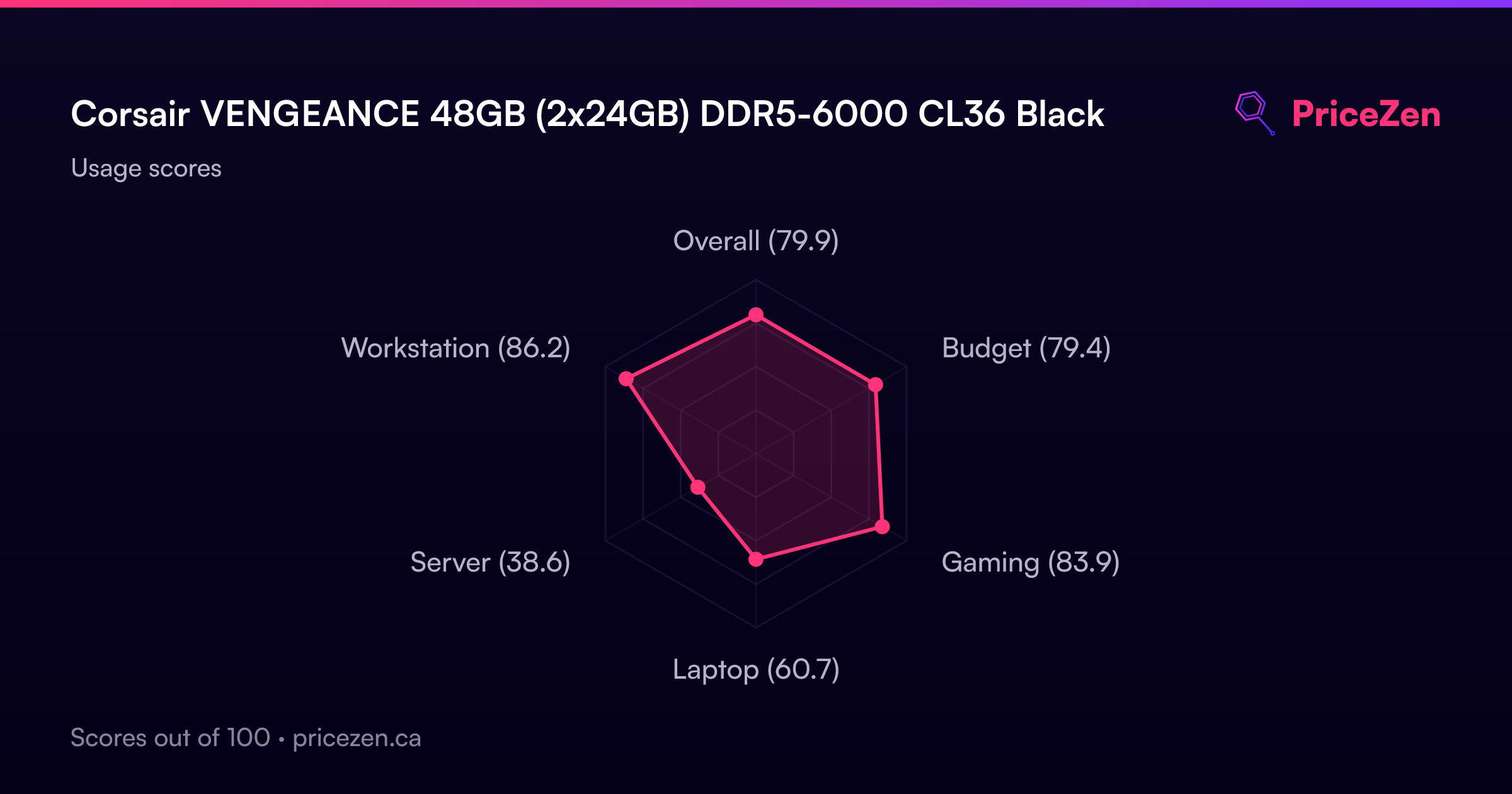
Who's this actually for? Workstation users, mostly. Our scoring puts it at 86.9 for workstation tasks, which is the strongest use case here. Gaming comes in at 84.7, so it's no slouch there either. The budget score of 81.5 is interesting given the price, but we'll get into that later. The weakest area is server use at 38.3, which makes sense. This is unbuffered memory with XMP 3.0 profiles, not ECC registered stuff you'd want in a rack.
What makes this kit interesting is the onboard voltage regulation and iCUE integration. Most RAM kits just sit there and run at their XMP profile. This one lets you tweak voltage and save custom profiles through Corsair's software. That's a feature you don't see on every kit, and it gives tinkerers something to play with beyond just enabling XMP and forgetting about it.
Common Questions
Q: Will this RAM work with AMD Ryzen systems?
Corsair lists compatibility specifically for Intel 700 Series boards, so that's the officially supported target. DDR5 is a standard, so it may physically work in an AMD board, but the XMP 3.0 profiles are tuned for Intel memory controllers. AMD systems use EXPO profiles for optimal performance, and this kit doesn't advertise EXPO support. If you're on AMD, look for a kit with EXPO certification instead.
Q: Is 48GB of RAM overkill for gaming?
For most games, yes. The vast majority of titles run perfectly fine on 32GB, and many still run well on 16GB. Where 48GB helps is when you're gaming while also streaming, running Discord, keeping browser tabs open, or doing background tasks like video encoding. Our gaming score of 84.7 reflects that this kit performs well in games, but the capacity is really aimed at mixed workloads rather than pure gaming.
Q: What's the deal with the onboard voltage regulation?
Most RAM kits rely on the motherboard to control voltage. This Corsair kit has voltage regulation built into the modules themselves, which means you can adjust voltage through Corsair's iCUE software instead of digging through BIOS settings. Corsair claims this gives you finer control and more stable overclocking. In practice, it's a convenience feature for enthusiasts who like to tweak settings from within Windows rather than rebooting into BIOS.
Q: Why is there such a big price difference between vendors?
We track prices across stores with our own automated system, and right now this exact kit shows up anywhere from USD 989 to USD 1,173. On top of that spread, the price has moved up roughly 19% from where we first tracked it. This kind of variance happens with niche products where different retailers have different stock levels and pricing strategies. There's no performance difference between the USD 989 kit and the USD 1,173 kit. Always check multiple vendors before buying.
Who Should Skip This
If you're building a server or any kind of system that needs ECC memory, this kit is absolutely not for you. The server score of 38.3 is one of the weakest we've seen for this category, and unbuffered non-ECC memory has no business in a machine where data integrity is critical. Look at registered ECC DDR5 kits instead, which are built specifically for that workload.
AMD users should also think twice. The XMP 3.0 profiles are tuned for Intel 700 Series boards, and while the sticks might work in an AMD system, you won't get the optimized experience that EXPO-certified kits provide. If you're on Ryzen 7000 or 9000 series, grab a kit with EXPO support. And if you're a pure gamer on a budget, a 32GB kit with tighter timings will save you money and deliver nearly identical frame rates in most titles.
Verdict
If you're building an Intel 700 Series system and you know you need more than 32GB but can't justify 64GB, this Corsair kit is still a smart choice on the hardware side. The 48GB capacity is a practical sweet spot, and the 6000 MT/s speed means you're not leaving performance on the table. The iCUE integration is a real differentiator if you like to tinker with voltages and profiles. The catch is the money. We've watched the price move up about 19%, so make sure you're buying from the vendor asking USD 989, not the one at USD 1,173.
For pure gamers, this kit is now more of a luxury than it was. A 32GB kit with tighter timings will serve you just as well in most titles, and you'll spend less. But if you're also streaming, editing, or running background workloads while you game, the extra capacity earns its keep, provided you catch the low end of that price range. The lack of RGB will be a plus for some and a dealbreaker for others. That's a personal call, but the performance is there either way.
Usage Scores
- Overall79.9
- Budget79.4
- Gaming83.9
- Laptop60.7
- Server38.6
- Workstation86.2