G.Skill Ripjaws 32GB DDR4-3200 CL22 SODIMM

One stick, 32GB of laptop RAM verified Nov 23
57/100 overall score 4.7 average from 261 owner ratings
- Capacity
- 32GB
- Kit
- 1 x 32GB
- Memory
- DDR4
- Speed
- 3200 MT/s
- CAS latency
- CL22
- Form factor
- SODIMM
Compare prices at 2 stores
Cheapest first. New, refurbished and bundled offers are kept apart, so you compare like with like.
| Store | Sold by | Colour and condition | Price | vs lowest | Last checked | Link |
|---|---|---|---|---|---|---|
| New2 offersSingle unit | ||||||
| Out of stock when last checked | ||||||
| Memory Express | Memory Express | Not listed | No price | Out of stock | Today | Go to store |
| Amazon | Not known | Not listed | No price | Out of stock | Yesterday | Go to store |
 Source: PriceZen, checked Nov 28, 2026
A price counts as current when we checked it in the last 7 days. “Marketplace seller” means a third-party seller on that store, not the store itself.
Price history
Checked that dayNot checked that day, still on offer
Source: PriceZen, checked Nov 5, 2026











Snapshot
The 30-Second Version
A boring but reliable 32GB DDR4 SODIMM stick that gets the job done. Buy it if you need max capacity in a laptop, but shop around because the price is all over the place.
Pros & Cons
Pros
- 32GB in a single stick means easy capacity upgrades 87th
- Low 1.2V draw keeps thermals in check 71st
- JEDEC standard means it'll boot in basically anything
- Strong budget score at 86.2/100
Cons
- CL22 timings are nothing to write home about
- Single stick means no dual-channel unless you buy two
- No XMP or overclocking headroom
- Price varies wildly by region
What owners think
The Word on the Street
- Buyers consistently report this stick just works, no fuss, no stability issues.
- A lot of people are using it to upgrade older laptops and NUCs with great results.
- Some owners wish they'd bought two sticks for dual-channel, but that's on them, not the RAM.
The proof
Performance
At 3200 MT/s with CL22 timings, this is JEDEC-standard DDR4, not some exotic overclocking kit. That's fine for most laptops and NUCs, but don't expect it to set any speed records. The 1.2V operating voltage is nice and low, which helps with thermals in cramped small form factor builds. What surprised us is how well it scores for budget builds (86.2/100), because a single 32GB stick at this speed is a genuinely smart way to max out capacity without paying a premium for faster timings your laptop probably can't use anyway.
Specifications
Full Specifications
Memory
| Type | DDR4 |
| Form Factor | SODIMM |
| Total Capacity | 32768 |
| Modules | 1 |
| Per Module | 32768 |
| Pins | 260 |
Performance
| Speed | 3200 |
| CAS Latency | 22 |
| Timings | 22-22-22-52 |
| Voltage | 1.2 |
Class
| ECC | No |
| Registered | No |
| OC Profile | JEDEC |
Features
| RGB | No |
| Heat Spreader | No |
vs Competition
The competitors listed here are mostly DDR5 desktop kits, which tells you how weird the market is right now. The Kingston Fury Renegade and Corsair Vengeance RGB are faster DDR5 options, but they won't fit in a DDR4 laptop. The Crucial Pro Overclocking kit is also DDR5. So if you're shopping for DDR4 SODIMM specifically, this G.Skill stick is competing against other DDR4 SODIMM options, not these desktop kits. The real question is whether you need 32GB in a single stick or if a 2x16GB kit would serve you better for dual-channel performance.
| Spec | G.Skill Ripjaws | Kingston Fury Renegade | Corsair Vengeance | Team Group T-CREATE EXPERT | XPG Lancer Blade RGB | Crucial Pro Overclocking |
|---|---|---|---|---|---|---|
| Capacity | 32GB | 32GB | 32GB | 32GB | 32GB | 32GB |
| Kit | 1 x 32GB | 2 x 16GB | 2 x 16GB | 2 x 16GB | 2 x 16GB | 2 x 16GB |
| Memory Type | DDR4 | DDR5 | DDR5 | DDR5 | DDR5 | DDR5 |
| Speed Mts | 3200 | 6400 | 6400 | 6400 | 6000 | 6400 |
| Cas Latency | CL22 | CL32 | CL36 | CL32 | CL30 | CL32 |
| Form Factor | SODIMM | UDIMM | UDIMM | UDIMM | UDIMM | UDIMM |
| Ecc | No | No | No | No | No | No |
| Compare | Compare | Compare | Compare | Compare |
| Product | Speed | Feature | Latency | Social Proof | Affordability |
|---|---|---|---|---|---|
| G.Skill Ripjaws | 53.3 | 56.4 | 57.5 | 87.3 | 53.2 |
| Kingston Fury Renegade Compare | 94.8 | 89.5 | 87.6 | 76.9 | 17.1 |
| Corsair Vengeance Compare | 94.8 | 74.8 | 78 | 96.4 | 25.2 |
| Team Group T-CREATE EXPERT Compare | 94.8 | 74.8 | 87.6 | 87.3 | 23.8 |
| XPG Lancer Blade RGB Compare | 87.6 | 89.5 | 87.6 | 96.4 | 16.5 |
| Crucial Pro Overclocking Compare | 94.8 | 74.8 | 87.6 | 76.9 | 26.8 |
Price
Value & Pricing
Here's where it gets tricky. At $425 USD, this stick is a tough sell when you can often find 32GB DDR4 SODIMM kits for less. But at 234 EUR or 312 CAD, it's a much more reasonable proposition. The value really depends on where you're shopping. If you can snag it at the lower end of that range, it's a solid buy for maxing out a laptop that's stuck on DDR4.
Read more
Overview
The G.Skill Ripjaws F4-3200C22S-32GRS is a straightforward 32GB DDR4 SODIMM stick that does exactly what it says on the tin. No RGB, no overclocking theatrics, just a solid chunk of laptop memory that'll breathe new life into an aging notebook or NUC. The one thing to know? It's a single stick, so you're leaving dual-channel performance on the table unless you buy two.
Common Questions
Q: Will this work in my laptop?
If your laptop takes DDR4 SODIMM and supports 32GB sticks, yes. Check your machine's max supported capacity first. Most modern DDR4 laptops will handle it fine.
Q: Should I buy one 32GB stick or two 16GB sticks?
Two 16GB sticks will give you dual-channel performance, which is noticeably faster in many workloads. But if you only have one slot or want to leave room to upgrade to 64GB later, a single 32GB stick makes sense.
Q: Is CL22 latency bad?
It's standard for JEDEC DDR4 at 3200 MT/s. Not great, not terrible. For a laptop or NUC, you're unlikely to notice the difference between CL22 and slightly tighter timings in everyday use.
Who Should Skip This
If you're building a desktop or have a laptop that supports DDR5, this isn't for you. Go grab a DDR5 kit instead. And if you're chasing maximum performance in a dual-slot laptop, get a 2x16GB kit for dual-channel instead of a single stick.
Verdict
If you need to max out a DDR4 laptop or NUC with a single 32GB stick, this G.Skill Ripjaws module is a dependable choice. It's not exciting, but it's reliable, runs cool, and does the job. Just make sure you're not overpaying for it, and seriously consider buying two if your machine has two slots and you want the best performance.
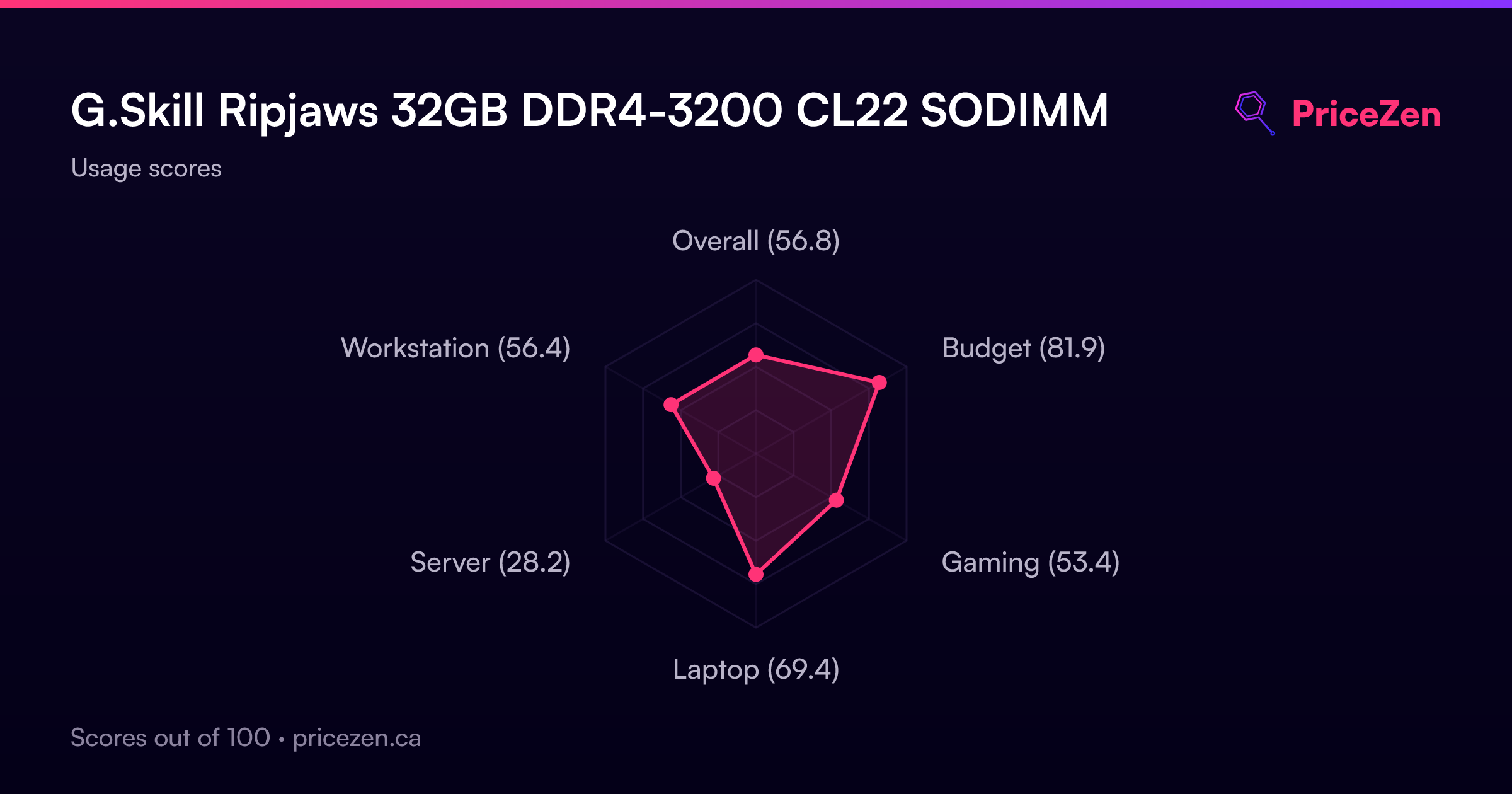
Usage Scores
- Overall56.8
- Budget81.9
- Gaming53.4
- Laptop69.4
- Server28.2
- Workstation56.4