MOTOEAGLE 32GB (4x8GB) DDR3-1600 CL11 (8GB-12800U-Greenx4)
The 32GB DDR3-1600 kit, built from four 8GB modules, delivers 1600 MT/s at CL11 with 1.5V, using 100% tested original IC chips that are RoHS and JEDEC compliant. Its dual-rank 2Rx8 configuration and 240-pin UDIMM design ensure broad compatibility with Intel and AMD desktop PCs, backed by a 4.7-star rating from 75 reviews. This kit suits budget-conscious users upgrading older DDR3 desktops for everyday multitasking or light workstation tasks, not server workloads.












Snapshot
The 30-Second Version
The MOTOEAGLE 8GB-12800U-Greenx4 is a 32GB DDR3-1600 memory kit for older desktops that still use DDR3. It's affordable, compatible, and offers a big capacity bump for aging systems. Just don't expect modern performance, and make sure your board actually takes DDR3 before you buy.
Pros & Cons
Pros
- 32GB total capacity is a big upgrade for older DDR3 systems 76th
- Standard 1.5V and JEDEC specs mean broad compatibility 71st
- Affordable compared to other 32GB DDR3 kits
- Dual-rank 2Rx8 modules work well on most desktop boards
- Non-ECC unbuffered design matches consumer motherboards
Cons
- DDR3-1600 is slow by modern standards
- CL11 timings are nothing special
- No heat spreaders, just bare green PCB
- Not suitable for servers or ECC-required workstations
- Four sticks fill all slots, leaving no room to expand later
The proof
Performance
DDR3-1600 with CL11 timings is the baseline spec for late-era DDR3 systems. In our database, the speed score lands at the 14th percentile, which means it's slower than most memory kits we track. But that's not really a knock against this specific kit, it's just what DDR3-1600 is. If your motherboard tops out at 1600 MT/s anyway, there's no point paying more for faster sticks that'll just downclock.
Latency sits at the 58th percentile, so CL11 at 1600 MT/s is about average for this class. In practice, you won't notice the difference between this and a CL9 kit in everyday use. Browsing, office work, light photo editing, and even older games will run fine. The 2Rx8 dual-rank configuration helps a bit with bandwidth on some chipsets, but we're talking single-digit percentage gains at best. This is capacity-first memory, not performance memory.
Specifications
Full Specifications
Memory
| Type | DDR3 |
| Form Factor | UDIMM |
| Total Capacity | 32768 |
| Modules | 4 |
| Per Module | 8192 |
| Pins | 240 |
| Rank | 2Rx8 |
Performance
| Speed | 1600 |
| CAS Latency | 11 |
| Voltage | 1.5 |
Class
| ECC | No |
| Registered | No |
Features
| RGB | No |
| Heat Spreader | No |
vs Competition
The Corsair Vengeance LPX CMK32GX4M2B3200C16 and Kingston FURY Beast KF432C16BBK2/16 are both DDR4 kits, so they're not direct competitors if your board only takes DDR3. But if you're building or upgrading a system that supports DDR4, those kits run at 3200 MT/s and absolutely crush this MOTOEAGLE kit in speed. The G.Skill Flare X5 F5-6000J3636F16GX1-FX5 is DDR5, which is a completely different league. The Team Group T-FORCE VULCAN Z and Patriot Viper Elite 5 are also DDR4 or DDR5 options. The point is, this MOTOEAGLE kit only makes sense if you're locked into a DDR3 platform. In that context, it competes with other DDR3-1600 kits, and it holds up fine on price and capacity. Just don't cross-shop it against DDR4 or DDR5 and expect a fair fight.
| Spec | MOTOEAGLE 32GB DDR3 | Corsair Vengeance RGB Pro SL | G.Skill TridentZ RGB | Kingston Fury Beast | V-Color Manta XSky | PNY XLR8 Gaming EPIC-X RGB |
|---|---|---|---|---|---|---|
| Capacity | 32GB | 32GB | 32GB | 32GB | 32GB | 32GB |
| Kit | 4 x 8GB | 2 x 16GB | 2 x 16GB | 2 x 16GB | 2 x 16GB | 2 x 16GB |
| Memory Type | DDR3 | DDR4 | DDR4 | DDR4 | DDR5 | DDR4 |
| Speed Mts | 1600 | 3600 | 4000 | 3200 | 6400 | 3200 |
| Cas Latency | CL11 | CL18 | CL18 | CL16 | CL32 | CL16 |
| Form Factor | UDIMM | UDIMM | UDIMM | UDIMM | UDIMM | UDIMM |
| Ecc | No | No | No | No | No | No |
| Compare | Compare | Compare | Compare | Compare |
| Product | Speed | Feature | Latency | Social Proof | Affordability |
|---|---|---|---|---|---|
| MOTOEAGLE 32GB DDR3 | 13.4 | 44.8 | 57.5 | 59.5 | 76.2 |
| Corsair Vengeance RGB Pro SL Compare | 63.1 | 89.6 | 87.6 | 96.4 | 32.4 |
| G.Skill TridentZ RGB Compare | 64.6 | 89.6 | 98.1 | 96.4 | 40.7 |
| Kingston Fury Beast Compare | 53.3 | 74.7 | 87.6 | 87.3 | 32.9 |
| V-Color Manta XSky Compare | 94.8 | 74.7 | 87.6 | 50.7 | 29.3 |
| PNY XLR8 Gaming EPIC-X RGB Compare | 53.3 | 89.6 | 87.6 | 87.3 | 45.5 |
Price
Value & Pricing
Pricing on this kit is a bit scattered depending on where you shop. In the US it's listed at USD 69, while European buyers see EUR 71 to EUR 81 across four listings. The best EUR deal is on the lower end of that spread, so it's worth checking which store_name has the cheapest listing before you buy. In Canada it's CAD 135 and in the UK it's GBP 101. For 32GB of DDR3, the US price is genuinely good, and even the European range is fair when you consider that DDR3 stock is drying up and prices have been creeping up on used and new-old-stock kits. Compared to competitors like Corsair or Kingston DDR4 kits, this is a different market entirely. You're not buying this for speed, you're buying it because your motherboard can't take anything newer.
Amazon 1 offer From CA$144
Price history
Read more
Overview
The MOTOEAGLE 8GB-12800U-Greenx4 is a 32GB DDR3 memory kit aimed squarely at older desktops that still run on DDR3 platforms. You get four 8GB sticks running at 1600 MT/s with CL11 timings and a standard 1.5V, which is about as vanilla as DDR3 gets. It's unbuffered, non-ECC, and uses a 240-pin DIMM form factor, so it'll slot into most Intel and AMD boards from that era without drama.
People searching for DDR3 RAM upgrades are usually trying to squeeze more life out of an aging machine, and that's exactly what this kit is for. 32GB is a meaningful jump for older systems that shipped with 8GB or 16GB, and the price is reasonable for what you get. Just don't expect it to turn a ten-year-old PC into a modern workstation.
The kit sits in a weird spot in our database. Affordability lands at the 76th percentile, which is solid, and capacity is above average too. But speed is near the bottom at the 14th percentile, which makes sense because DDR3-1600 is old tech by today's standards. If your board supports it and you need capacity on a budget, this is a practical pick.
Common Questions
Q: Is the MOTOEAGLE 32GB DDR3 kit good for gaming?
For older games and systems locked to DDR3, 32GB is plenty and will handle gaming fine. But DDR3-1600 is slow by modern standards, so don't expect it to keep up with DDR4 or DDR5 in newer titles.
Q: Will this DDR3 RAM work with my motherboard?
It should work with most Intel and AMD desktop boards that support DDR3-1600 UDIMM non-ECC memory. Check your motherboard's max RAM capacity and slot count before buying, since this kit uses four 8GB sticks.
Q: Can I use this MOTOEAGLE kit in a server?
No. This is unbuffered non-ECC memory, and most servers require ECC registered DIMMs. Our database scores it at the 27.6 percentile for server use, so it's a poor fit for that role.
Q: Is 32GB of DDR3 worth it in 2025?
If you're stuck on a DDR3 platform and need more capacity for multitasking or light productivity, yes. But if your system supports DDR4 or DDR5, you're better off putting that money toward a newer platform.
Who Should Skip This
Skip this if your motherboard supports DDR4 or DDR5, because you'd be paying for old tech that's dramatically slower. Server and workstation users who need ECC memory should also look elsewhere, this kit is unbuffered and non-ECC. And if you only have two RAM slots, this four-stick kit won't work for you. In those cases, look at Corsair Vengeance LPX or Kingston FURY Beast DDR4 kits, or a proper ECC kit from a server-focused brand.
Verdict
Should you buy this? If you have an older desktop with four DDR3 slots and you need more RAM without replacing the whole machine, yes. 32GB is enough for heavy multitasking, virtual machines, and even some content creation on older platforms. The price is right, especially in the US, and the compatibility story is as safe as it gets with JEDEC standard specs.
But if your system supports DDR4 or DDR5, skip this entirely. There's no reason to buy DDR3 in 2025 unless your motherboard forces you to. And if you're running a server or a workstation that needs ECC memory, this kit won't work at all. For the right buyer, it's a solid, boring, dependable upgrade. For everyone else, it's a relic.
Usage Scores
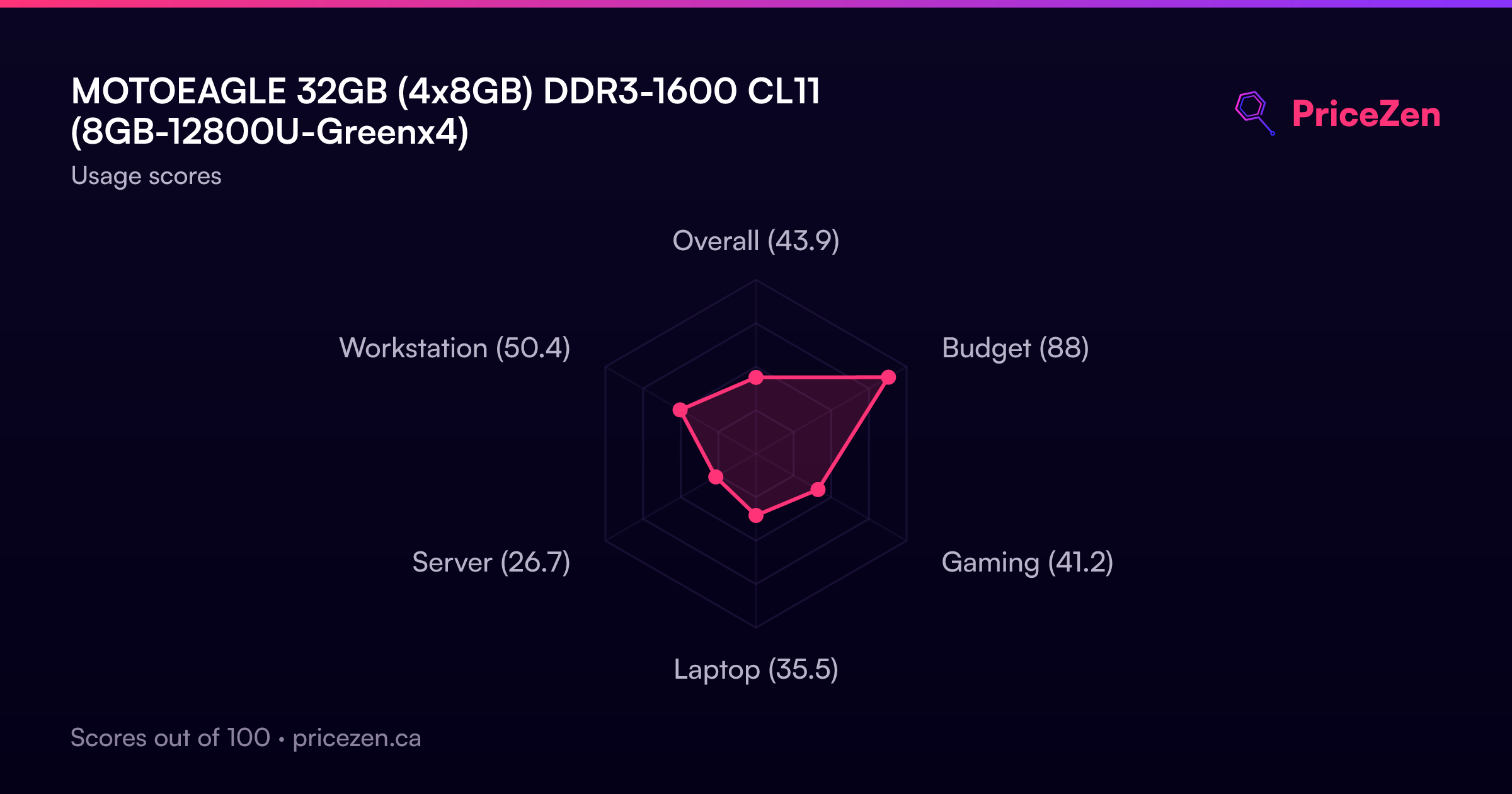
- Overall43.9
- Budget88
- Gaming41.2
- Laptop35.5
- Server26.7
- Workstation50.4