Lexar 8GB DDR4-3200 CL22 (LD4AU008G-B3200GSST)
Delivering 3200 MT/s speeds in a single 8GB unbuffered DIMM, this module provides a straightforward path to DDR4 performance for basic systems. Its standard 288-pin design ensures broad compatibility with consumer desktop motherboards. This memory is best for users assembling or upgrading budget office PCs where 8GB capacity is sufficient for web browsing and document editing.












Snapshot
The 30-Second Version
The Lexar LD4AU008G-B3200GSST is a basic 8GB DDR4 stick running at 3200 MT/s with loose CL22 timings. It's fine for office PCs and light use, but single-channel 8GB is a bottleneck for gaming or anything demanding. Only worth buying if you find it at the low end of its price range, around EUR 70.
Pros & Cons
Pros
- Cheap entry point for basic DDR4 builds 77th
- 3200 MT/s is decent for older platforms
- No heat spreader means it fits under any cooler
- Widely available across multiple regions
- Fine for office PCs and light use
Cons
- Only 8GB, single stick means single-channel
- CL22 latency is loose for 3200 MT/s
- No heat spreader or any aesthetic appeal
- Price varies wildly, up to EUR 95 in some shops
- Social proof is nearly nonexistent
The proof
Performance
At 3200 MT/s with CL22 timings, this Lexar stick is fine for basic tasks but nothing to write home about. The speed lands in the 54th percentile and latency in the 58th, so it's about average for DDR4. You'll be able to browse, stream, and run office apps without issue. But CL22 is loose for 3200 MT/s. Most decent DDR4 kits at this speed run CL16 or CL18, so you're leaving a little responsiveness on the table.
The bigger problem is capacity and configuration. 8GB on a single stick means single-channel operation, which cuts memory bandwidth in half compared to running two sticks. For gaming, our scoring puts this at 33.9 out of 100, and that's being generous. Modern titles want 16GB minimum, and many are happier with 32GB. If you're building a budget gaming rig, this stick will hold you back more than a cheap CPU will.
Specifications
Full Specifications
Memory
| Type | DDR4 |
| Form Factor | UDIMM |
| Total Capacity | 8192 |
| Modules | 1 |
| Per Module | 8192 |
| Pins | 288 |
Performance
| Speed | 3200 |
| CAS Latency | 22 |
Class
| ECC | No |
| Registered | No |
Features
| Heat Spreader | No |
vs Competition
Stacked against the competition, this Lexar stick struggles. The Corsair Vengeance LPX CMK32GX4M2D3600C18 is a 32GB kit with faster 3600 MT/s speeds and tighter CL18 timings. It costs more, but you get four times the capacity and better performance. The Kingston FURY Beast KF432C16BBK2/16 is a 16GB kit at 3200 MT/s with CL16, which is noticeably snappier than this Lexar's CL22. Even the Team Group T-FORCE VULCAN Z offers better value in most regions.
The G.Skill Flare X5 and Patriot Viper Elite 5 are DDR5 sticks, so they're not direct competitors for DDR4 platforms. But they highlight how dated this Lexar stick is. If you're on a newer platform, you shouldn't be looking at DDR4 at all. And if you're on an older platform, there are better DDR4 options for not much more money.
| Spec | Lexar 8GB DDR4 | Corsair Vengeance RGB Pro SL | Crucial Pro Overclocking | G.Skill TridentZ RGB | Patriot Viper Venom | Kingston FURY Beast |
|---|---|---|---|---|---|---|
| Capacity | 8GB | 32GB | 32GB | 32GB | 32GB | 64GB |
| Kit | 1 x 8GB | 2 x 16GB | 2 x 16GB | 2 x 16GB | 2 x 16GB | 2 x 32GB |
| Memory Type | DDR4 | DDR4 | DDR5 | DDR4 | DDR5 | DDR5 |
| Speed Mts | 3200 | 3600 | 6000 | 4000 | 6000 | 5600 |
| Cas Latency | CL22 | CL18 | CL36 | CL18 | CL30 | CL36 |
| Form Factor | UDIMM | UDIMM | UDIMM | UDIMM | UDIMM | UDIMM |
| Ecc | No | No | No | No | No | No |
| Compare | Compare | Compare | Compare | Compare |
| Product | Speed | Feature | Latency | Capacity | Affordability |
|---|---|---|---|---|---|
| Lexar 8GB DDR4 | 53.2 | 18 | 57.5 | 22.3 | 76.7 |
| Corsair Vengeance RGB Pro SL Compare | 63 | 89.6 | 87.6 | 70.5 | 32.2 |
| Crucial Pro Overclocking Compare | 87.6 | 74.8 | 75.1 | 70.5 | 29.9 |
| G.Skill TridentZ RGB Compare | 64.5 | 89.6 | 98.1 | 70.5 | 40.4 |
| Patriot Viper Venom Compare | 87.6 | 74.8 | 87.6 | 70.5 | 32 |
| Kingston FURY Beast Compare | 77.5 | 89.6 | 70.9 | 89.5 | 13.1 |
Price
Value & Pricing
Value is tricky here because the price swings so much. In Europe, you'll find this stick anywhere from EUR 70 to EUR 95 depending on the store. At EUR 70, it's an okay deal if you just need a basic 8GB stick to get a system running. At EUR 95, it's a bad deal, full stop. For that money you can often find 16GB kits or faster CL16 memory. The US listing at USD 92 is also on the expensive side for what you get. If you're shopping in Europe, check the DE, ES, FR, and IT listings carefully and grab the EUR 70 option if you must. Otherwise, save up a little more and get a 2x8GB kit instead.
Amazon 1 offer From CA$157
Price history
Read more
Overview
The Lexar LD4AU008G-B3200GSST is a single 8GB stick of DDR4 desktop memory running at 3200 MT/s. It's a budget-oriented UDIMM aimed at basic builds, office PCs, or anyone just trying to get a system up and running without spending much. Lexar is better known for storage, but they've been pushing into memory, and this stick is about as no-frills as it gets. No heat spreader, no RGB, just a green PCB doing its job.
If you're searching for cheap DDR4 RAM for an older Intel or AMD platform, this will technically work. But the specs tell a story. CL22 latency at 3200 MT/s is loose, and a single 8GB stick means you're running in single-channel mode, which hurts performance on anything that likes memory bandwidth. Our database puts this stick's capacity in the 23rd percentile, which is rough in 2025 when 16GB is the practical minimum for most people.
Pricing is all over the place depending on where you shop. European listings range from EUR 70 to EUR 95, which is a surprisingly wide spread for a single 8GB stick. At the low end it's tolerable. At the high end, you're paying way too much for what you get.
Common Questions
Q: Is the Lexar LD4AU008G-B3200GSST good for gaming?
Not really. 8GB in single-channel mode is below the 16GB minimum most modern games expect, and the CL22 latency is loose for 3200 MT/s. You'll see stuttering and frame drops in demanding titles.
Q: Can I use this Lexar 8GB DDR4 stick in a laptop?
No. This is a 288-pin UDIMM, which is designed for desktop motherboards. Laptops use SO-DIMM modules, which are physically smaller and not compatible.
Q: What is the CAS latency of the Lexar LD4AU008G-B3200GSST?
The stick runs at CL22, which is on the loose side for 3200 MT/s DDR4. Most performance-oriented DDR4 kits at this speed use CL16 or CL18 timings.
Q: Is 8GB of RAM enough for Windows 11?
Technically yes, but it's tight. Windows 11 runs better with 16GB, especially if you have multiple browser tabs open or run any background apps. This single 8GB stick will work, but you'll likely feel the limits quickly.
Who Should Skip This
Skip this if you're building a gaming PC, doing video editing, or running anything that needs real memory bandwidth. Single-channel 8GB is a bottleneck, and the CL22 timings make it worse. You should also skip it if you're on a newer platform that supports DDR5, since this is DDR4 and won't fit. If you need cheap memory for a basic office build, look for a 2x8GB kit at CL16 or CL18 instead. The Kingston FURY Beast KF432C16BBK2/16 or similar kits will serve you much better for not much more money.
Verdict
Should you buy the Lexar LD4AU008G-B3200GSST? Only if you need a single 8GB stick for a basic office PC or a repair job and you find it at the low end of its price range. At EUR 70, it's a functional, no-frills stick that will get the job done. At anything higher, you're overpaying.
For gaming or any kind of content creation, skip it. 8GB in single-channel mode is a bottleneck, and the loose CL22 timings don't help. You'd be much better off with a 2x8GB kit at CL16 or CL18, even if it costs a bit more upfront. The performance difference is real, and you'll avoid having to upgrade again in six months.
Usage Scores
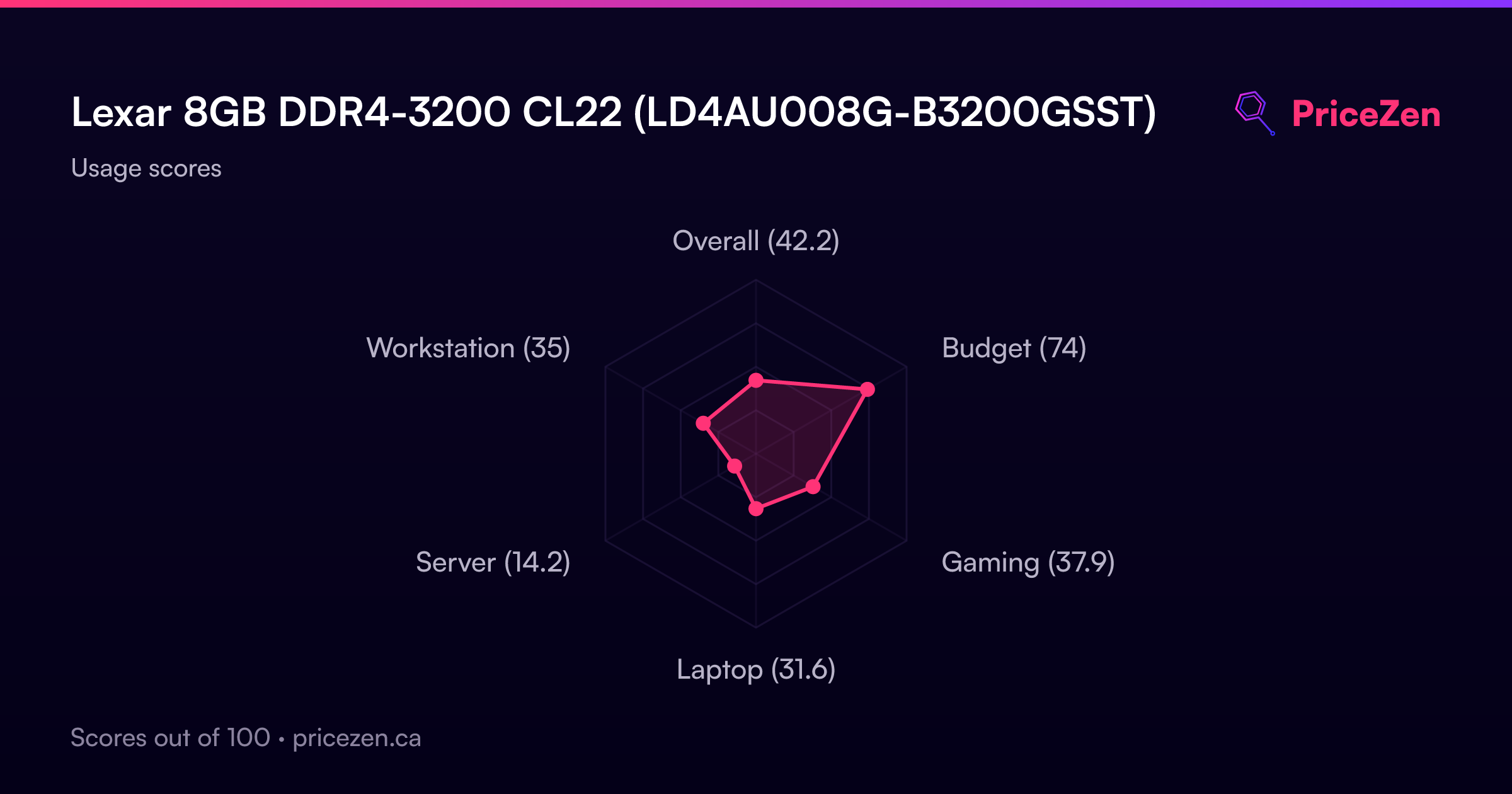
- Overall42.2
- Budget74
- Gaming37.9
- Laptop31.6
- Server14.2
- Workstation35