Timetec Premium 16GB DDR4-2666 CL19 SODIMM
The 16GB DDR4 SODIMM module runs at 2666 MT/s with CL19 latency and 1.2V power, offering a dual-rank (2Rx8) configuration on a black PCB for stable performance in compatible laptops and mini PCs. Its plug-and-play installation requires no technical expertise, and the limited lifetime warranty adds long-term value for a budget-friendly upgrade. This RAM suits users with DDR4 260-pin laptops or mini PCs who need a straightforward capacity boost without overclocking or server-grade features.












Snapshot
The 30-Second Version
The Timetec Premium 7 is a 16GB DDR4 SODIMM laptop memory module running at 2666 MT/s with CL19 timings. It's an affordable, plug-and-play upgrade that's ideal for older laptops stuck at 8GB. Don't expect blazing speed or fancy features, but for everyday multitasking, it gets the job done.
Pros & Cons
Pros
- Easy plug-and-play installation in most laptops 75th
- 16GB capacity is a meaningful upgrade from 8GB
- Lifetime warranty from Timetec
- Runs at standard 1.2V, so no heat or power concerns
- Affordable compared to big-name brands
Cons
- 2666 MT/s is on the slower side for DDR4
- CL19 latency is nothing special
- Single-rank design limits some performance scenarios
- No heat spreader or aesthetic flair
- Not compatible with desktop DIMM slots
The proof
Performance
At 2666 MT/s with CL19 latency, the Timetec Premium 7 sits in the lower-middle of the DDR4 speed spectrum. Our database puts its speed at the 38th percentile and latency at the 36th percentile, which means it's not embarrassing but it's not going to impress anyone either. For a laptop that originally shipped with 2400 MT/s or 2133 MT/s memory, this is actually a mild step up. For a machine that supports 3200 MT/s or faster, you're leaving some performance on the table.
In practice, the difference between 2666 MT/s and 3200 MT/s in a laptop is usually small for everyday tasks. You might see a few percent better frame rates in games or slightly faster file compression, but nothing that'll make you spill your coffee. The bigger win here is capacity. Going from 8GB to 16GB eliminates the constant disk swapping that makes older laptops feel sluggish. That's where this module earns its keep, not in raw bandwidth.
Specifications
Full Specifications
Memory
| Type | DDR4 |
| Form Factor | SODIMM |
| Total Capacity | 16384 |
| Modules | 1 |
| Per Module | 16384 |
| Pins | 260 |
| Rank | 1Rx8 |
Performance
| Speed | 2666 |
| CAS Latency | 19 |
| Voltage | 1.2 |
Class
| ECC | No |
| Registered | No |
vs Competition
Stacked against something like the Corsair Vengeance RGB Pro SL or G.Skill TridentZ RGB, the Timetec Premium 7 looks pretty plain. Those are desktop-oriented kits with 3600 MT/s speeds, RGB lighting, and aggressive heat spreaders. They're also in a completely different price bracket and won't fit in a laptop anyway. The more relevant comparison is against other SODIMM modules like Crucial's laptop memory lineup. Crucial's 16GB DDR4 2666 SODIMM typically costs a bit more, but you're paying for brand recognition and slightly better availability.
Where the Timetec falls behind is in the feature department. Our database ranks it at the 18th percentile for features, which makes sense. There's no XMP profile to speak of, no fancy PCB design beyond the black color, and no overclocking support. The PNY XLR8 and Patriot Viper Venom kits in our comparison list are aimed at desktop gamers who want speed and style. The Timetec is aimed at someone who just wants their laptop to stop freezing when they open 20 Chrome tabs. Different tools for different jobs.
| Spec | Timetec Premium | Corsair Vengeance RGB Pro SL | G.Skill Trident Z Royal | V-Color Manta XSky | Patriot Viper Venom | Kingston FURY Beast |
|---|---|---|---|---|---|---|
| Capacity | 16GB | 32GB | 32GB | 32GB | 32GB | 64GB |
| Kit | 1 x 16GB | 2 x 16GB | 2 x 16GB | 2 x 16GB | 2 x 16GB | 2 x 32GB |
| Memory Type | DDR4 | DDR4 | DDR4 | DDR5 | DDR5 | DDR5 |
| Speed Mts | 2666 | 3600 | 4000 | 6000 | 6400 | 5600 |
| Cas Latency | CL19 | CL18 | CL18 | CL30 | CL32 | CL36 |
| Form Factor | SODIMM | UDIMM | UDIMM | UDIMM | UDIMM | UDIMM |
| Ecc | No | No | No | No | No | No |
| Compare | Compare | Compare | Compare | Compare |
| Product | Speed | Feature | Latency | Capacity | Social Proof | Affordability |
|---|---|---|---|---|---|---|
| Timetec Premium | 37.2 | 18 | 36.1 | 44.8 | 52.9 | 74.9 |
| Corsair Vengeance RGB Pro SL Compare | 63.1 | 89.6 | 87.6 | 70.5 | 96.4 | 32.1 |
| G.Skill Trident Z Royal Compare | 64.5 | 89.6 | 98.1 | 70.5 | 96.4 | 29.1 |
| V-Color Manta XSky Compare | 87.6 | 89.6 | 87.6 | 70.5 | 59.7 | 29 |
| Patriot Viper Venom Compare | 94.8 | 89.6 | 87.6 | 70.5 | 57.9 | 23.7 |
| Kingston FURY Beast Compare | 77.5 | 89.6 | 70.9 | 89.5 | 0 | 13 |
Price
Value & Pricing
For a 16GB DDR4 SODIMM stick, the Timetec Premium 7 is priced competitively. At around $95 USD, it undercuts many name-brand options while delivering the same core specs. You're not paying for RGB lighting, fancy heat spreaders, or aggressive overclocking headroom, and for a laptop upgrade, you probably don't need any of that. The lifetime warranty adds some peace of mind too. If you're comparing against Crucial or Kingston sticks with similar specs, the Timetec often comes in a few bucks cheaper. That said, if you find a 3200 MT/s module from a reputable brand for only a little more, it's worth considering for the extra headroom.
Amazon 1 offer From CA$139
Price history
Read more
Overview
The Timetec Premium 7 is a 16GB DDR4 SODIMM stick aimed squarely at laptop owners who need a cheap, no-fuss memory upgrade. It runs at 2666 MT/s with CL19 timings and the standard 1.2V, so it's not trying to win any speed contests. What it does offer is a straightforward way to breathe life into an older notebook, mini PC, or all-in-one that's still stuck on 8GB. Pricing floats around $95 USD in the US, with European listings hovering near 103 to 109 EUR and Canadian buyers looking at roughly 139 CAD.
Is the Timetec Premium 7 good for everyday laptop use? For web browsing, office apps, and general multitasking, yes. This is the kind of upgrade that makes a five-year-old laptop feel less like it's constantly gasping for air. It's a single 16GB module, which means you can drop it into a free SODIMM slot and keep your existing stick, or run it solo if your machine only has one slot. Just don't expect it to transform a budget laptop into a gaming rig.
One thing to be clear about: this is laptop memory, not desktop memory. It uses the 260-pin SODIMM form factor, so it won't fit in a standard desktop DIMM slot. If you're shopping for a tower PC, look elsewhere. But if you've got a notebook that supports DDR4 SODIMMs, installation is genuinely plug-and-play. Pop the bottom panel, click it in, and you're done.
Common Questions
Q: Is the Timetec Premium 7 good for gaming?
It's fine for casual gaming on a laptop with integrated graphics, but the 2666 MT/s speed and CL19 latency won't maximize frame rates on systems that support faster DDR4. For serious gaming, look for a 3200 MT/s SODIMM module instead.
Q: Will this RAM work in my laptop?
It will work in any laptop, notebook, mini PC, or all-in-one that supports 260-pin DDR4 SODIMM memory. It will not fit in a desktop PC with standard DIMM slots, so check your system's manual before buying.
Q: Can I mix this 16GB stick with my existing 8GB RAM?
Yes, you can typically mix capacities as long as both sticks are DDR4 SODIMMs and your laptop supports the total amount. The system will run at the speed of the slower module, so if your existing stick is 2400 MT/s, both will run at 2400 MT/s.
Q: Is the Timetec Premium 7 easy to install?
Installation is straightforward for most laptops. You remove the bottom panel, locate the SODIMM slot, and click the module in at a slight angle before pressing it flat. No software or driver installation is required.
Who Should Skip This
Skip this if you're building or upgrading a desktop PC, since SODIMM modules won't fit in standard DIMM slots. Gamers and content creators with laptops that support 3200 MT/s or faster memory should also look elsewhere, as the 2666 MT/s speed and CL19 latency will hold back performance in memory-sensitive workloads. If you already have 16GB and you're just chasing a speed bump, this isn't a meaningful upgrade. And if you want RGB lighting or aggressive heat spreaders, well, this is a plain black stick that hides inside your laptop where nobody can see it anyway.
Verdict
Should you buy the Timetec Premium 7? If you've got a laptop with a free SODIMM slot and you're still running 8GB, this is a solid, affordable upgrade that'll make a real difference in daily use. The 16GB capacity is the star here, not the speed. For office work, browsing, and light photo editing, 2666 MT/s is perfectly adequate. The lifetime warranty and plug-and-play installation make it a low-risk purchase.
But if your laptop supports faster memory or you do heavier work like video editing or gaming, you might want to spend a little more on a 3200 MT/s module. And if you're building a desktop, this isn't the product for you at all. For the right use case, though, the Timetec Premium 7 is a straightforward, honest upgrade that does exactly what it says on the tin.
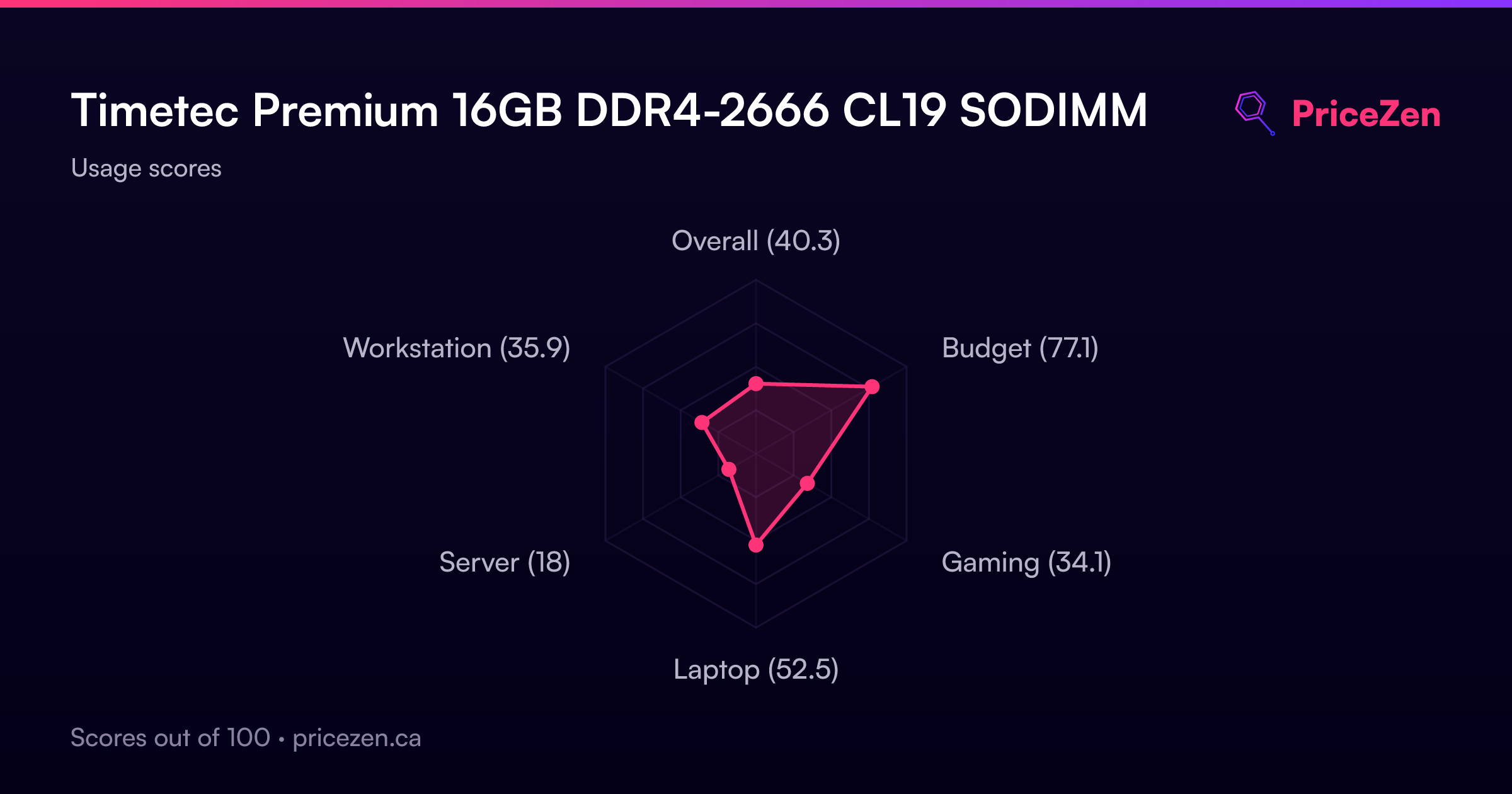
Usage Scores
- Overall40.3
- Budget77.1
- Gaming34.1
- Laptop52.5
- Server18
- Workstation35.9