ASUS ProArt PA32QCV 31.5" Black 2025
The 6016 x 3384 IPS panel delivers 6K resolution with 600 nits brightness and DisplayHDR 600, offering sharp, color-accurate visuals for professional work. Its 98% DCI-P3 coverage and built-in KVM switch simplify multi-PC workflows, while height, tilt, swivel, and pivot adjustments enhance comfort. Best for photo editors, graphic designers, and content creators who need precise color and high detail in a desktop monitor.












Snapshot
The 30-Second Version
A stunning 6K panel trapped in a cheap-feeling body. Buy it on sale, calibrate it, and pray you don't get a unit with ghosting.
Pros & Cons
Pros
- Gorgeous 6K resolution with incredible text clarity 100th
- Excellent color coverage: 100% sRGB and 98% DCI-P3 98th
- Thunderbolt 4 with 96W power delivery is a Mac user's dream 96th
- Built-in KVM switch for controlling multiple machines 91st
Cons
- Image retention and ghosting issues reported by multiple owners
- Build quality feels cheap for the price
- Color accuracy out of the box is inconsistent
- Menu system is archaic and frustrating
What owners think
The Word on the Street
How owner sentiment changed over time
ExclusiveBased on when customers actually wrote their reviews - so you can see whether early praise held up.
32 written reviews, Feb 2025 – Oct 2026: 18 happy, 1 unhappy, 13 without stars
Across all 97 store ratings: 4.4★. Most owners rate without writing a review. The chart counts the 32 written reviews.
- Jul – Sep 20265 of 6 happy
Buyers praise the 6K resolution, sharpness, and color accuracy, especially for professional and creative work. However, one reviewer reports serious connectivity issues with Macs and HDMI, plus difficult controls.
- Excellent 6K resolution and color accuracy, ideal for professional work and astrophotography.
- Connectivity problems with Macs (Thunderbolt no signal) and HDMI not working for one user.
- Controls are awkward: input switching requires many clicks and menu disappears quickly.
- Build quality and picture quality praised; DisplayWidgetCenter app is Windows-oriented and disappointing.
- Apr – Jun 20262 of 2 happy · 3 without stars
Buyers praise the 6K panel's sharpness and Mac integration, but several report serious issues: inaccurate color, HDMI defects, and KVM switching problems. One reviewer calls the pre-calibrated color accuracy a lie.
- Color accuracy is not as stated; shadows too dark, banding after calibration, and uneven color temperature.
- HDMI defect causes screen to go dark every minute; DisplayPort works fine.
- KVM switching is broken; requires unplugging Thunderbolt cable to restore USB link.
- Sharp 6K display with smooth text, good Mac integration, and useful USB hub/daisy chaining.
- Jan – Mar 20262 of 2 happy · 8 without stars
Buyers praise image quality, Mac compatibility, and color accuracy, but report ghosting/burn-in, cheap build quality, and laggy software, making sentiment mixed.
- Excellent image quality, color accuracy, and 6K resolution praised for creative work.
- Mac-friendly with Thunderbolt power delivery, KVM, and scaling; ideal for Mac setups.
- Ghosting and burn-in reported after short use, considered unacceptable for the price.
- Cheap build quality, archaic buttons, and laggy software/app detract from experience.
Each dot is one written review, in the month it was written. Happy = 4-5★, mixed = 3★, unhappy = 1-2★. Period summaries are in English.
The proof
Performance
The 6K resolution is the headline act, and it delivers. Text is razor sharp, and the 98% DCI-P3 coverage means colors pop without looking cartoonish. The 600 nits of brightness is solid for HDR content, though it's not going to blow you away. What surprised us is the ghosting and image retention reports. For a monitor aimed at professionals who leave static toolbars on screen for hours, that's a real concern. The 60Hz refresh rate and 5ms response time are fine for creative work, but this is not a gaming panel, and the 36th percentile performance ranking confirms it.
Specifications
Full Specifications
Display
| Size | 31.5" |
| Resolution | 6016x3384 |
| Panel Type | IPS |
| Aspect Ratio | 16:9 |
| Curved | No |
| Screen Finish | matte |
Performance
| Refresh Rate | 60 Hz |
| Response Time | 5 |
| Adaptive Sync | Adaptive-Sync |
Color & HDR
| Brightness | 400 nits |
| Color Gamut | 100% sRGB, 98% DCI-P3 |
| Color Depth | 10-bit |
| HDR | HDR10 |
| HDR Support | HDR10 |
Connectivity
| HDMI Ports | 1 |
| DisplayPort | 1 |
| USB-C | 2 |
| Thunderbolt | Thunderbolt 4 |
| Speakers | Yes |
| Headphone Jack | Yes |
Ergonomics
| Height Adjustable | Yes |
| Tilt | Yes |
| Swivel | Yes |
| Pivot | Yes |
| VESA Mount | 100x100 |
Features
| Webcam | No |
| Touchscreen | No |
| PIP/PBP | Yes |
| Power | 49 |
| Weight | 9.3 kg / 20.5 lbs |
vs Competition
The most direct competitor is the Dell UltraSharp U4025QW, which gives you a 40-inch ultrawide 5K2K panel with better build quality and a more polished overall experience. If you want high refresh rates and true HDR, the MSI MAG 271QPX QD-OLED E2 or the Alienware AW3425DW are better choices, though you'll sacrifice resolution. The LG UltraGear 45GX950A-B is another ultrawide option with a faster panel. For pure pixel density and Mac integration, the PA32QCV holds its own, but the Dell feels more premium in hand.
| Spec | ASUS ProArt PA32QCV 31.5" | LG UltraGear 45GX950A-B 45" | Dell UltraSharp U4025QW 39.7" | MSI MAG 271QPX QD-OLED E2 27" | Alienware AW-Series AW3425DW 34" | Samsung Odyssey G60SD 27" |
|---|---|---|---|---|---|---|
| Screen Size | 31.5 | 45 | 39.70000076293945 | 27 | 34 | 27 |
| Resolution | 6016 x 3384 | 5120 x 2160 | 5120 x 2160 | 2560 x 1440 | 3440 x 1440 | 2560 x 1440 |
| Panel Type | IPS | OLED | IPS | QD-OLED | QD-OLED | OLED |
| Refresh Rate | 60 | 330 | 120 | 240 | 240 | 360 |
| Response Time Ms | 5 | 0.029999999329447746 | 5 | 0.029999999329447746 | 0.029999999329447746 | 0.029999999329447746 |
| Adaptive Sync | Adaptive-Sync | FreeSync Premium Pro | Adaptive-Sync | FreeSync Premium Pro | FreeSync Premium Pro | FreeSync Premium Pro |
| Hdr | HDR10 | DisplayHDR True Black 400 | DisplayHDR 600 | DisplayHDR True Black 400 | DisplayHDR 400 True Black | HDR10+ |
| Compare | Compare | Compare | Compare | Compare |
| Product | Color | Portability | Display | Feature | User Sentiment | Performance | Connectivity | Social Proof |
|---|---|---|---|---|---|---|---|---|
| ASUS ProArt PA32QCV 31.5" | 95.5 | 76.5 | 99.8 | 83.8 | 29.2 | 35.9 | 98.2 | 70.3 |
| LG UltraGear 45GX950A-B 45" Compare | 99.4 | 76.5 | 99.7 | 95.7 | 76.4 | 99.4 | 97 | 92.1 |
| Dell UltraSharp U4025QW 39.7" Compare | 98.2 | 76.5 | 98.7 | 95.7 | 85.6 | 56.1 | 99.3 | 96.9 |
| MSI MAG 271QPX QD-OLED E2 27" Compare | 99.1 | 57.5 | 77.3 | 83.8 | 95.7 | 98 | 81.3 | 98.9 |
| Alienware AW-Series AW3425DW 34" Compare | 99 | 73.9 | 85.7 | 89.8 | 95.7 | 98 | 95.4 | 96.9 |
| Samsung Odyssey G60SD 27" Compare | 90.3 | 39.6 | 77.3 | 67 | 95.7 | 99.5 | 87.6 | 92.1 |
Price
Value & Pricing
Pricing is all over the map. In the US, you'll find this monitor anywhere from USD 880 to USD 1,448 across 14 listings. That's a massive spread, and the best deal we're seeing is at the lower end of that range. In Canada, the gap is even wider at CAD 1,210 to CAD 1,900. If you're paying full retail, you're getting fleeced. Shop around and wait for a sale. At the lower end, this is a compelling 6K option. At the high end, you're paying Apple Studio Display money for a monitor with worse build quality.
Amazon 1 offer From CA$1,600
London Drugs 1 offer From CA$1,900
Price history
Read more
Overview
The ASUS ProArt PA32QCV is a 32-inch 6K monitor that puts pixel density and color accuracy front and center. If you're a creative pro who stares at text, photos, or timelines all day, the 6016 x 3384 resolution is a genuine step up from 4K. But this monitor has a split personality. The panel itself is top-tier, while the build quality and some real-world quirks leave us scratching our heads.
Common Questions
Q: Is this monitor good for Mac users?
Yes, it's one of the best Mac-friendly monitors out there. Thunderbolt 4 with 96W power delivery means a single cable charges your MacBook and drives the display. The 6K resolution also plays nicely with macOS scaling.
Q: Does the KVM switch work well with both PC and Mac?
It's hit or miss. Some users report it works fine with one machine at a time, but switching between a PC and Mac simultaneously can be glitchy. If you need seamless dual-machine control, test it thoroughly during the return window.
Q: Is this monitor good for gaming?
No. The 60Hz refresh rate and 5ms response time are fine for creative work, but this is not a gaming panel. If you want to game, look at the MSI MAG 271QPX QD-OLED E2 or the Alienware AW3425DW instead.
Who Should Skip This
If you're a gamer or someone who needs high refresh rates, this isn't it. Go get the MSI MAG 271QPX QD-OLED E2 or the Alienware AW3425DW instead. If you're a creative pro who needs flawless out-of-box color accuracy and premium build quality, the Dell UltraSharp U4025QW is the better choice, even if it costs more.
Verdict
The ASUS ProArt PA32QCV is a frustrating product. The panel is genuinely excellent, with 6K resolution and color coverage that creative pros will love. But the ghosting reports, cheap-feeling build, and inconsistent out-of-box calibration are hard to ignore at this price. If you can find it at the low end of the price range and you're willing to calibrate it yourself, it's a solid buy. If you're paying full price, get the Dell U4025QW instead.
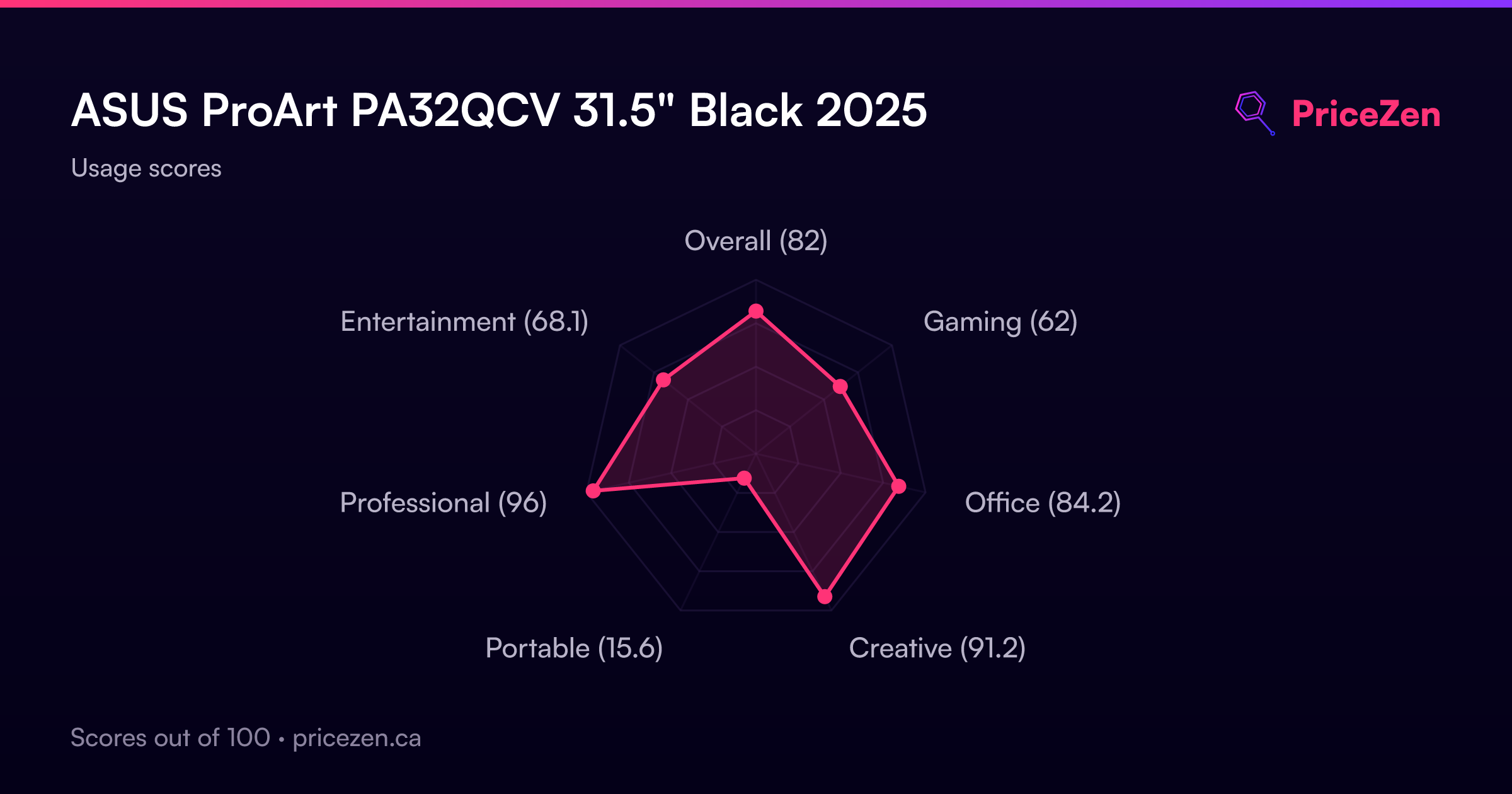
Usage Scores
- Overall81.4
- Gaming61.7
- Office84
- Creative94.4
- Portable15.4
- Professional93.8
- Entertainment67.8