MSI PRO MP272 E14C 27" Black

Smooth 144 Hz gaming verified Nov 29
55/100 overall score 4.8 average from 1 owner ratings
- Screen
- 27"
- Resolution
- 1920 x 1080
- Panel
- IPS
- Refresh
- 144 Hz
- Response time
- 1 ms
- Adaptive sync
- FreeSync
- HDR
- HDR
Compare prices at 2 stores
Cheapest first. New, refurbished and bundled offers are kept apart, so you compare like with like.
| Store | Sold by | Colour and condition | Price | vs lowest | Last checked | Link |
|---|---|---|---|---|---|---|
| New2 offersSingle unit | ||||||
| Not checked in the last 7 days, so these prices may have changed | ||||||
| B&H Photo | B&H Photo | Not listed | Price not confirmed | Not known | Go to store | |
| Out of stock when last checked | ||||||
| Amazon | Not known | Not listed | No price | Out of stock | Oct 14 | Go to store |
 Source: PriceZen, checked Oct 14, 2026
A price counts as current when we checked it in the last 7 days. “Marketplace seller” means a third-party seller on that store, not the store itself.
Price history
No offers of this kind in this period.
Checked that dayNot checked that day, still on offer
Source: PriceZen, checked Apr 30, 2026


Snapshot
The 30-Second Version
The MSI PRO MP272 E14C is a budget 27-inch 1080p monitor with a 144Hz refresh rate and USB-C. Performance is solid for the price, landing in the 73rd percentile. It's worth buying if you find it near $110, but skip it at $140 when better 1440p options aren't far off.
Pros & Cons
Pros
- 144Hz refresh rate at this price is a genuine win 73rd
- USB-C with DP Alt Mode makes laptop docking simple 71st
- FreeSync support keeps gameplay smooth 70th
- Thin bezels work well for multi-monitor setups 70th
Cons
- 1080p on 27 inches looks soft up close
- 6-bit+FRC panel means color banding is possible
- Only tilt adjustment, no height or swivel
- Built-in speakers are likely weak
The proof
Performance
The 144Hz refresh rate and 1ms MPRT response time are the headline features here, and they land this monitor in the 73rd percentile for performance. That's solid for a budget display. FreeSync helps keep things smooth if you're running an AMD GPU. The 1080p resolution on a 27-inch panel means pixel density is on the lower side, so text can look a bit soft if you sit close. The 300 nits brightness is fine for a typical office but won't wow anyone in a bright room. HDR Ready is marketing speak, don't expect real HDR performance from this panel.
Specifications
Full Specifications
Display
| Size | 27" |
| Resolution | 1920x1080 (Full HD) |
| Panel Type | IPS |
| Aspect Ratio | 16:9 |
| Curved | No |
| Screen Finish | matte |
Performance
| Refresh Rate | 144 Hz |
| Response Time | 1 |
| Adaptive Sync | FreeSync |
Color & HDR
| Brightness | 300 nits |
| Color Gamut | 83% Adobe RGB / 87% DCI-P3 / 116% sRGB (CIE 1976) |
| Color Depth | 6-bit+FRC |
| HDR | ✓ |
| HDR Support | HDR |
Connectivity
| HDMI Ports | 1 |
| DisplayPort | 1 |
| USB-C | 1 |
| Speakers | Yes |
| Headphone Jack | Yes |
Ergonomics
| Height Adjustable | No |
| Tilt | Yes |
| Swivel | No |
| Pivot | No |
| VESA Mount | 100x100 |
Features
| Webcam | No |
| Touchscreen | No |
| PIP/PBP | No |
| Power | 65 |
| Weight | 3.7 kg / 8.2 lbs |
vs Competition
Against the competition, the MP272 E14C is a budget player in a field of heavy hitters. The ASUS TUF Gaming VG34VQL1B and Dell Alienware AW2724DM both offer higher resolutions and better color performance, but they cost significantly more. The Acer Nitro XV272U W2bmiiprx and HP OMEN 27qs G2 are 1440p panels that outclass this MSI in sharpness and color accuracy. The Gigabyte M27UP SA goes even further with 4K. If you're comparing specs alone, the MSI loses most of these matchups. But if your budget is tight and you want 144Hz with USB-C, none of those competitors touch this price point.
| Spec | MSI PRO MP272 E14C 27" | LG UltraGear 27G810A-B 27" | ASUS ROG Strix XG27JCG 27" | Samsung ViewFinity LS34C650UANXGO 34" | Dell S2725QC 27" | HP OMEN 27qs G2 27" |
|---|---|---|---|---|---|---|
| Screen Size | 27 | 27 | 27 | 34 | 27 | 27 |
| Resolution | 1920 x 1080 | 3840 x 2160 | 5120 x 2880 | 3440 x 1440 | 3840 x 2160 | 2560 x 1440 |
| Panel Type | IPS | IPS | IPS | VA | IPS | IPS |
| Refresh Rate | 144 | 180 | 330 | 100 | 120 | 280 |
| Response Time Ms | 1 | 1 | 0.3 | 5 | 8 | 1 |
| Adaptive Sync | FreeSync | FreeSync Premium | FreeSync Premium Pro | FreeSync | FreeSync Premium | G-Sync Compatible |
| Hdr | HDR | HDR400 | HDR600 | HDR10 | HDR | HDR400 |
| Compare | Compare | Compare | Compare | Compare |
| Product | Color | Portability | Display | Feature | Ergonomic | Performance | Connectivity | Social Proof |
|---|---|---|---|---|---|---|---|---|
| MSI PRO MP272 E14C 27" | 52 | 71.2 | 50.5 | 70.1 | 47.1 | 72.6 | 70.1 | 20.4 |
| LG UltraGear 27G810A-B 27" Compare | 93.7 | 67.9 | 87 | 70.1 | 90.7 | 81.7 | 98.2 | 62.6 |
| ASUS ROG Strix XG27JCG 27" Compare | 89.9 | 67.9 | 99.5 | 70.1 | 90.7 | 95.6 | 81 | 84.3 |
| Samsung ViewFinity LS34C650UANXGO 34" Compare | 87.1 | 76.5 | 75.9 | 96.3 | 73.4 | 52.6 | 96.9 | 96.9 |
| Dell S2725QC 27" Compare | 71.7 | 76.5 | 87 | 70.1 | 90.7 | 44.2 | 87.4 | 92.2 |
| HP OMEN 27qs G2 27" Compare | 71.2 | 81.3 | 66.9 | 70.1 | 90.7 | 89.4 | 96.9 | 98.9 |
Price
Value & Pricing
Pricing is all over the place depending on where you look. US listings range from $110 to $140, which is a $30 spread for the exact same monitor. At the low end, this is a reasonable deal for a 144Hz IPS panel with USB-C. At $140, it starts bumping into territory where you can find 1440p options on sale. Shop around before you buy, the cheapest US listing is the one to grab if you're set on this model.
Read more
Overview
The MSI PRO MP272 E14C is a 27-inch 1080p IPS panel that tries to split the difference between office work and gaming. You get a 144Hz refresh rate, 1ms response time, and FreeSync, which is a solid combo for a budget monitor. The USB-C port with DP Alt Mode is a nice touch for laptop users who want a single-cable setup.
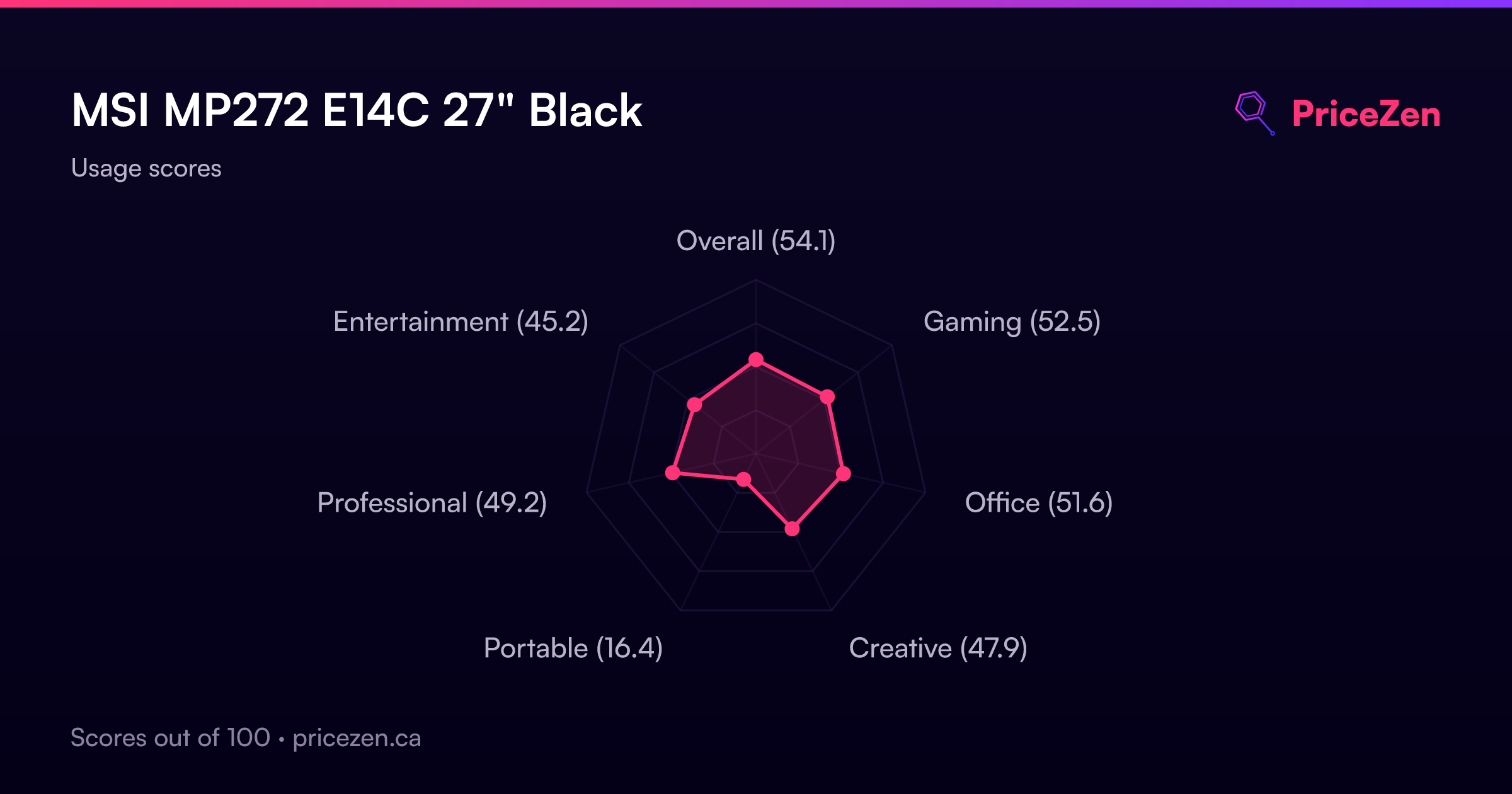
But the specs tell a mixed story. Color coverage is decent on paper with 87% DCI-P3, but the 6-bit+FRC panel and 300 nits brightness keep it firmly in budget territory. Our database puts it at 53.3 out of 100 overall, which is middle of the pack. It's not bad, it's just not exciting.
Common Questions
Q: Does the USB-C port charge my laptop?
The USB-C port supports DP Alt Mode for video, but power delivery is limited to 15W based on retailer specs. That's enough for a phone or tablet, but it won't charge most laptops while in use.
Q: Is this monitor good for gaming?
For casual gaming, yes. The 144Hz refresh rate and FreeSync support make it smooth for fast-paced titles. But the 1080p resolution on a 27-inch screen means it's not the sharpest option for detail-heavy games.
Q: Can I mount this on a monitor arm?
Yes, it has a standard VESA 100x100 mount. The included stand only tilts, so a monitor arm is a good upgrade if you want height adjustment.
Who Should Skip This
Skip this if you do color-critical work. The 6-bit+FRC panel and 83% Adobe RGB coverage won't cut it for photo or video editing. Also skip it if you want a sharp text experience for long reading sessions, 1080p at 27 inches just isn't crisp enough. And if you need a monitor that travels, the 16.3 out of 100 portable score tells you everything, this thing is meant to stay on a desk.
Verdict
This monitor is for someone who wants a fast refresh rate and USB-C connectivity without spending much. It's a decent budget pick for casual gaming and everyday office work. If you're a competitive gamer or someone who stares at spreadsheets all day, the 1080p resolution on a 27-inch screen will probably bug you. But for a secondary monitor or a first upgrade from 60Hz, it gets the job done.
Usage Scores
- Overall55.1
- Gaming53.4
- Office52.2
- Creative48.7
- Portable16.6
- Professional49.5
- Entertainment47.1