HP Series 5 Pro 24" Black/Silver 2026

Webcam built into the screen for calls verified Nov 29
63/100 overall score
- Screen
- 24"
- Resolution
- 1920 x 1080
- Panel
- IPS
- Refresh
- 100 Hz
- Response time
- 5 ms


Snapshot
The 30-Second Version
Connectivity in the 97th percentile is the standout: two USB-C ports, Thunderbolt, HDMI, DisplayPort and four USB Type-A on a 24" 1080p IPS panel. Ergonomics rank 91 too, but the display itself sits at 37/100 and performance at 48/100. Great office hub, average screen, with listings from USD 130 to USD 1,125 depending on the bundle.
Pros & Cons
Pros
- Connectivity in the 97th percentile: two USB-C ports, Thunderbolt, HDMI, DisplayPort and four USB Type-A 97th
- Ergonomic score of 91, one of the best around, with height, tilt, swivel, pivot and VESA 100x100 91st
- 100% sRGB coverage at 350 nits with an anti-glare, flicker-free panel 83rd
- Only 22W power draw, and a built-in webcam 69th
- Office score of 69.1/100, its best use case in our model
Cons
- Display ranks 37/100: 1920 x 1080 on 24" falls behind most monitors we track
- Performance sits at 48/100 with 100Hz and 5ms, about average
- Color is 6-bit plus FRC rather than native 8-bit, so color score is only 69
- Portable score of 22.8/100 at 6600g, this is a desk fixture
- Feature score of 51/100, dead middle of the pack
The proof
Performance
Start with the numbers that decide how this thing feels: 100Hz, 5ms, 350 nits, 100% sRGB, 8-bit color built from a 6-bit panel plus FRC. Performance scores 48/100 in our ranking, so basically average for the category. 100Hz is smoother than a standard office panel for scrolling and cursor movement, but 5ms isn't a gaming-grade response time, and our data doesn't put it anywhere near the top for speed. The display metric lands at 37/100, which is the honest summary of 1920 x 1080 on a 24" IPS panel: fine for spreadsheets and email, underwhelming if you want detail or screen real estate.
Where it pulls ahead is everything bolted onto that panel. Connectivity at 97 is among the best we track, thanks to two USB-C ports plus Thunderbolt alongside HDMI, DisplayPort and four USB Type-A ports. Ergonomics score 91, also one of the best on the market: height adjust, tilt from -5 to +23 degrees, swivel, pivot and a VESA 100x100 mount. Color sits at 69, solid rather than special, since 100% sRGB is good coverage but the 6-bit-plus-FRC panel isn't a true 8-bit. Add flicker-free backlighting, an anti-glare coating, always-on low blue light and just 22W of draw, and you've got a comfortable all-day work screen. There's a webcam built in too, which saves you a separate purchase.
Specifications
Full Specifications
Display
| Size | 24" |
| Resolution | 1920x1080 (Full HD) |
| Panel Type | IPS |
| Aspect Ratio | 16:9 |
| Curved | No |
| Screen Finish | matte |
Performance
| Refresh Rate | 100 Hz |
| Response Time | 5 |
Color & HDR
| Brightness | 350 nits |
| Color Gamut | 100% sRGB |
| Color Depth | 8 bit (6 bit + FRC) |
Connectivity
| HDMI Ports | 1 |
| DisplayPort | 1 |
| USB-C | 2 |
| Thunderbolt | N/A |
| Speakers | No |
| Headphone Jack | Yes |
Ergonomics
| Height Adjustable | Yes |
| Tilt | Yes |
| Swivel | Yes |
| Pivot | Yes |
| VESA Mount | 100x100 |
Features
| Webcam | Yes |
| Touchscreen | No |
| PIP/PBP | No |
| Power | 22 |
| Weight | 6.6 kg / 14.6 lbs |
vs Competition
Against the ASUS ROG Strix XG27JCG 27", LG UltraGear 27G810A-B 27" and Alienware AW2523HF 24.5", this HP isn't playing the same game. Its performance score of 48/100 and 5ms response time make it a poor pick if you're cross-shopping those for gaming. The Dell S2725QC 27" and MSI MAG 274QP QD-OLED X24 26.5" are the ones to look at if picture quality is your priority, because our display metric here is just 37/100 and color is 69. Where the HP wins is the boring stuff that matters at a desk: connectivity at 97 and ergonomics at 91 are near the top of our rankings, and 22W draw plus a built-in webcam suit an office setup. If your day is documents, calls and cable management, this is the smarter buy. If it's frames per second or color grading, cross-shop the others.
| Spec | HP Series 5 Pro 24" | ASUS ROG Strix XG27UCDMG 27" | LG UltraGear 45GX950A-B 45" | Dell UltraSharp U4025QW 39.7" | Alienware AW-Series AW3425DW 34" | MSI MAG 271QPX QD-OLED E2 27" |
|---|---|---|---|---|---|---|
| Screen Size | 24 | 27 | 45 | 39.7 | 34 | 27 |
| Resolution | 1920 x 1080 | 3840 x 2160 | 5120 x 2160 | 5120 x 2160 | 3440 x 1440 | 2560 x 1440 |
| Panel Type | IPS | QD-OLED | OLED | IPS | QD-OLED | QD-OLED |
| Refresh Rate | 100 | 240 | 330 | 120 | 240 | 240 |
| Response Time Ms | 5 | 0.03 | 0.03 | 5 | 0.03 | 0.03 |
| Adaptive Sync | - | FreeSync Premium Pro | FreeSync Premium Pro | Adaptive-Sync | FreeSync Premium Pro | FreeSync Premium Pro |
| Hdr | - | DisplayHDR True Black 400 | DisplayHDR True Black 400 | HDR600 | HDR400 | DisplayHDR True Black 400 |
| Compare | Compare | Compare | Compare | Compare |
| Product | Color | Portability | Display | Feature | Performance | Connectivity |
|---|---|---|---|---|---|---|
| HP Series 5 Pro 24" | 68.7 | 82.7 | 37.4 | 51.5 | 47.9 | 96.9 |
| ASUS ROG Strix XG27UCDMG 27" Compare | 96.5 | 57.3 | 97.7 | 85 | 97.9 | 81 |
| LG UltraGear 45GX950A-B 45" Compare | 99.4 | 76.5 | 99.7 | 96.3 | 99.4 | 96.9 |
| Dell UltraSharp U4025QW 39.7" Compare | 97.9 | 76.5 | 98.6 | 96.3 | 56.1 | 99.3 |
| Alienware AW-Series AW3425DW 34" Compare | 98.9 | 73.9 | 84.1 | 96.3 | 97.9 | 95.3 |
| MSI MAG 271QPX QD-OLED E2 27" Compare | 99.2 | 57.3 | 73.3 | 85 | 97.9 | 81 |
Price
Value & Pricing
At USD 130 you're getting a 100Hz IPS panel with full sRGB, a height-adjustable stand and a port selection that beats almost everything else in our data, which is a genuinely good deal. But listings stretch all the way to USD 1,125, a spread of USD 995 across 10 US offers, and that gap comes down to what's boxed with it: some listings are 2-packs with a Dockztorm hub, others add single or dual Ergoflexy mount arms. We track prices over time, partly through our community browser extension, and our advice is simple: check exactly what's in the bundle before you assume the cheap listing and the expensive one are the same product. Nobody pays us to say a price is fair, so we'll just say the low end looks strong and the high end needs justification.
Read more
Overview
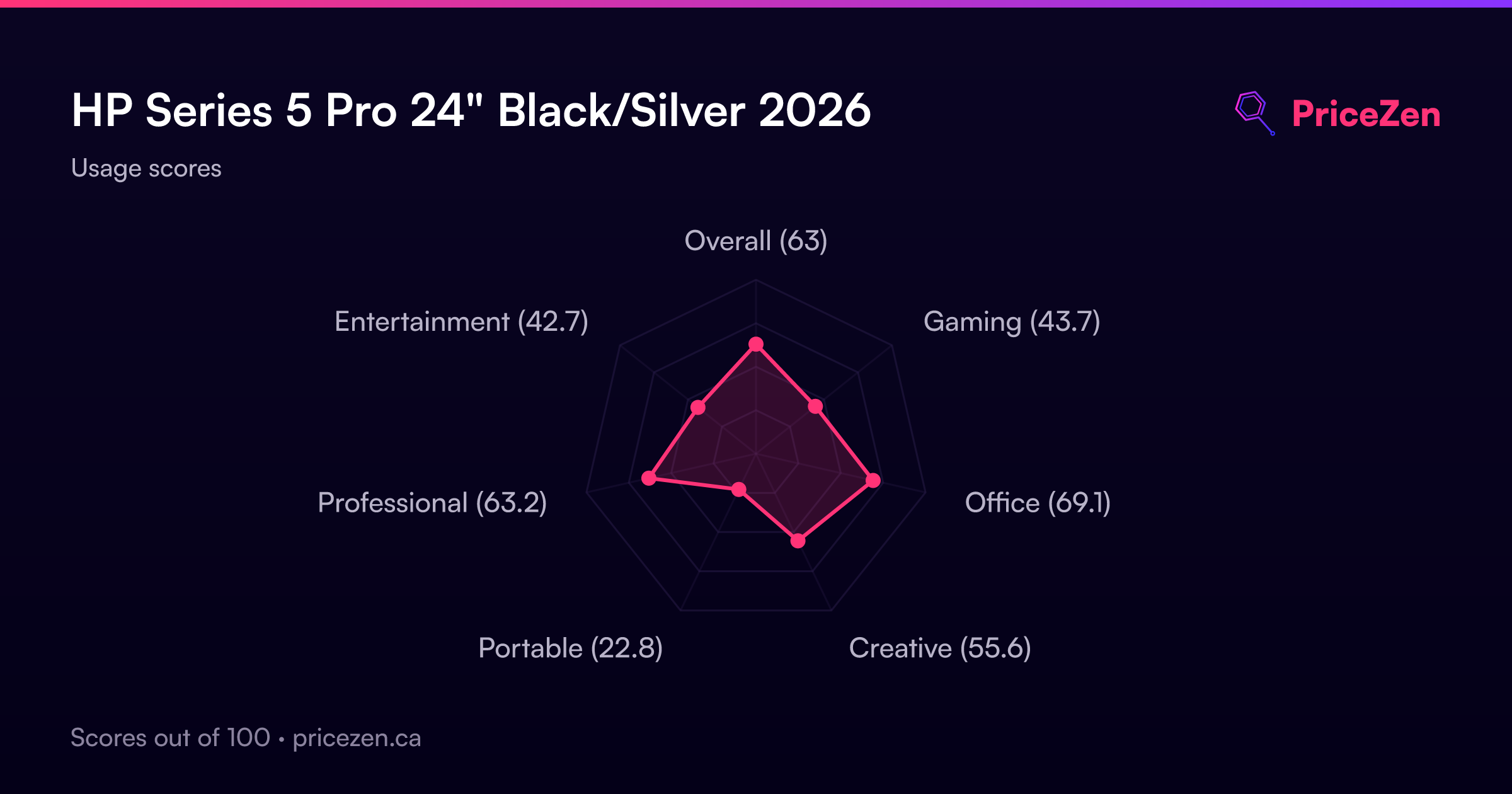
Connectivity lands in the 97th percentile for this HP Series 5 Pro 24", and that's the headline. You get HDMI, DisplayPort, two USB-C ports, Thunderbolt, four USB Type-A ports, a USB Type-B port and a headphone jack on a 24" 1920 x 1080 IPS panel. Our scoring model puts it at 63/100 overall, with office use its strongest fit at 69.1/100 and professional work at 63.2/100.
The catch is the panel itself. 1080p across 24 inches ranks below most monitors we track, and the 100Hz refresh rate with a 5ms response time sits right around the middle of the pack. So this is a well-connected desk monitor with an ordinary screen, not a display you buy for the picture. Listings run from USD 130 to USD 1,125 across 10 US offers, which tells you bundles are doing a lot of the pricing work here.
Common Questions
Q: Is 100Hz with a 5ms response time enough for gaming?
For casual play, sure, and 100Hz is smoother than a basic office panel. But performance scores 48/100 in our ranking, which is about average, and 5ms isn't competitive-grade. If gaming is the main job, the Alienware AW2523HF 24.5" or LG UltraGear 27G810A-B 27" are worth cross-shopping.
Q: Can it run a laptop over one cable?
It has two USB-C ports plus Thunderbolt alongside HDMI and DisplayPort, and connectivity ranks in the 97th percentile, among the best we track. Add four USB Type-A ports and a headphone jack and it works well as a desk hub. Power draw for the monitor itself is a modest 22W.
Q: Is the color accuracy good enough for photo or design work?
It covers 100% sRGB at 350 nits, which is solid for web and office content, and color scores 69/100. But it's a 6-bit panel using FRC to reach 8-bit, and the professional score is 63.2/100. For serious color work we'd point you toward the MSI MAG 274QP QD-OLED X24 26.5" instead.
Who Should Skip This
Skip this if the screen is the point. A display score of 37/100 means 1920 x 1080 on 24 inches falls behind most of what we track, and 6-bit-plus-FRC color won't satisfy anyone doing critical grading. Gamers should skip it too: 100Hz and 5ms land at 48/100 for performance, squarely average. And if you need something to move around, the portable score of 22.8/100 at 6600g says it all. This thing lives on a desk and stays there.
Verdict
We'd recommend this for office work and not much else. The 69.1/100 office score is backed by real specs: 97-ranked connectivity, 91-ranked ergonomics, 100% sRGB at 350 nits, flicker-free and low blue light for long days, and 22W of power draw. At the USD 130 end of the range it's a lot of monitor for the money. Just go in knowing the 1080p panel ranks 37/100 for display and performance is average at 48/100. Buy it as a workhorse, not as a showpiece.
Usage Scores
- Overall63
- Gaming43.7
- Office69.1
- Creative55.6
- Portable22.8
- Professional63.2
- Entertainment42.7