Alogic Edge 34C2KPD 34" Silver
The 97% DCI-P3 coverage and 3440x1440 IPS panel with a machined aluminum and tempered glass build stand out for color-critical work. Its integrated USB-C hub with 90W power delivery and RJ45 Ethernet simplifies desktop connectivity into a single cable. This monitor is best for designers and photographers who need wide-gamut accuracy in a premium, ultrawide form factor but do not require high refresh rates for gaming.



Snapshot
The 30-Second Version
The Alogic Edge 34C2KPDSGR nails connectivity and color, landing in the 97th and 85th percentiles respectively, with a 34-inch ultrawide IPS panel and a USB-C hub that includes RJ45 Ethernet. But the 14ms response time puts it in the 9th percentile for performance, which is rough for anything involving fast motion. It's a great Mac-companion monitor for creative and office work, just don't expect it to handle gaming or fast video editing.
Pros & Cons
Pros
- 97th percentile connectivity with USB-C hub, RJ45 Ethernet, and three USB-C ports 97th
- 97% DCI-P3 and 99% sRGB color coverage puts it in the 85th percentile for color 87th
- 3440x1440 ultrawide resolution gives plenty of room for side-by-side apps 81st
- 400 nits brightness and 178-degree viewing angles make it usable in bright rooms 67th
- Aluminum and tempered glass build matches Mac aesthetics without the Apple price
Cons
- 14ms response time lands in the 9th percentile for performance
- 100Hz refresh rate is fine for office work but underwhelming for gaming
- 1000:1 contrast ratio is standard IPS, no HDR wow factor despite the HDR label
- Weighs nearly 15kg, which is heavy for a monitor this size
- No height adjust mentioned despite the ergonomic claims
What owners think
The Word on the Street
How owner sentiment changed over time
ExclusiveBased on when customers actually wrote their reviews - so you can see whether early praise held up.
1 written review, Aug 2025: 1 without stars
Each dot is one written review, in the month it was written. Happy = 4-5★, mixed = 3★, unhappy = 1-2★.
The proof
Performance
Let's talk about the elephant in the room first: 14ms response time. That's the number that drags this monitor down to the 9th percentile for performance in our database. For context, most modern monitors in this price range sit between 1ms and 5ms. The 100Hz refresh rate is a nice step up from 60Hz and makes everyday scrolling feel smoother, but it can't compensate for a panel that takes 14 milliseconds to change pixels. You'll see smearing in fast-moving content, and if you're a gamer, this is a hard pass.
Where the Edge does shine is in the display department. The 3440x1440 resolution on a 34-inch ultrawide gives you roughly 110 pixels per inch, which is sharp enough for text and detailed creative work. The IPS panel delivers 178-degree viewing angles both horizontally and vertically, so colors stay consistent even when you're not dead-center. The 1000:1 contrast ratio is standard for IPS, nothing to write home about, but the 400 nits of brightness means you can use this in a well-lit room without squinting. The display overall ranks in the 81st percentile, which is solid. It's just a shame the response time holds back what could have been a genuinely great panel.
Specifications
Full Specifications
Display
| Size | 34" |
| Resolution | 3440x1440 |
| Panel Type | IPS |
| Aspect Ratio | 21:9 |
| Curved | No |
| Screen Finish | matte |
Performance
| Refresh Rate | 100 Hz |
| Response Time | 14 |
| Adaptive Sync | Adaptive-Sync |
Color & HDR
| Brightness | 400 nits |
| Color Gamut | 89% NTSC, 94% Adobe RGB, 97% DCI-P3, 99% sRGB |
| Color Depth | 8-bit |
| HDR | HDR10 |
| HDR Support | HDR |
Connectivity
| HDMI Ports | 1 |
| DisplayPort | 1 |
| USB-C | 3 |
| Speakers | Yes |
| Headphone Jack | Yes |
Ergonomics
| Height Adjustable | Yes |
| Tilt | No |
| Swivel | No |
| Pivot | No |
| VESA Mount | 100x100 |
Features
| Webcam | No |
| Touchscreen | No |
| PIP/PBP | No |
| Power | 180 |
| Weight | 10.0 kg / 22.0 lbs |
vs Competition
Stacked against the competition, the Alogic Edge occupies a weird niche. The LG UltraGear 45GX950A-B and ASUS ROG Strix XG27UCDMG are gaming-focused panels with response times in the 1ms range and refresh rates well above 100Hz. They'll run circles around the Edge in motion handling, but they're also smaller or more expensive, and they don't have the same USB-C hub flexibility. The MSI MAG 271QPX QD-OLED E2 brings OLED contrast and color that makes the Edge's IPS panel look flat, but again, it's a 27-inch 16:9 display, not an ultrawide. The Alienware AW3425DW is probably the closest direct competitor, another 34-inch ultrawide, but with a 175Hz refresh rate and much faster response time. The trade-off is price and connectivity. The Samsung Odyssey G60SD sits in a similar space, offering better gaming performance but without the Edge's aluminum build and Mac-friendly aesthetic. If you're a creative professional who wants the ultrawide real estate and the USB-C hub, the Edge holds its own. If you're a gamer or video editor who needs fast motion, every single one of these competitors beats it.
| Spec | Alogic Edge 34C2KPD 34" | LG UltraGear 45GX950A-B 45" | ASUS ROG Strix XG27UCDMG 27" | Dell UltraSharp U4025QW 39.7" | MSI MAG 271QPX QD-OLED E2 27" | Alienware AW-Series AW3425DW 34" |
|---|---|---|---|---|---|---|
| Screen Size | 34 | 45 | 27 | 39.70000076293945 | 27 | 34 |
| Resolution | 3440 x 1440 | 5120 x 2160 | 3840 x 2160 | 5120 x 2160 | 2560 x 1440 | 3440 x 1440 |
| Panel Type | IPS | OLED | OLED | IPS | QD-OLED | QD-OLED |
| Refresh Rate | 100 | 330 | 240 | 120 | 240 | 240 |
| Response Time Ms | 14 | 0.029999999329447746 | 0.029999999329447746 | 5 | 0.029999999329447746 | 0.029999999329447746 |
| Adaptive Sync | Adaptive-Sync | FreeSync Premium Pro | FreeSync Premium Pro | Adaptive-Sync | FreeSync Premium Pro | FreeSync Premium Pro |
| Hdr | HDR10 | DisplayHDR True Black 400 | DisplayHDR True Black 400 | DisplayHDR 600 | DisplayHDR True Black 400 | DisplayHDR 400 True Black |
| Compare | Compare | Compare | Compare | Compare |
| Product | Color | Portability | Display | Feature | Ergonomic | Performance | Connectivity |
|---|---|---|---|---|---|---|---|
| Alogic Edge 34C2KPD 34" | 87.2 | 63 | 81.3 | 66.9 | 62.3 | 8.8 | 97 |
| LG UltraGear 45GX950A-B 45" Compare | 99.4 | 76.5 | 99.7 | 95.7 | 90.8 | 99.4 | 97 |
| ASUS ROG Strix XG27UCDMG 27" Compare | 96.1 | 57.5 | 97.9 | 83.7 | 90.8 | 98 | 81.3 |
| Dell UltraSharp U4025QW 39.7" Compare | 98.2 | 76.5 | 98.7 | 95.7 | 90.8 | 56.1 | 99.3 |
| MSI MAG 271QPX QD-OLED E2 27" Compare | 99.1 | 57.5 | 77.3 | 83.7 | 90.8 | 98 | 81.3 |
| Alienware AW-Series AW3425DW 34" Compare | 99 | 73.9 | 85.7 | 89.7 | 90.8 | 98 | 95.5 |
Price
Value & Pricing
Pricing on the Alogic Edge is all over the place depending on where you shop. In the US, we're seeing listings from USD 796 to USD 1,000 across three vendors. That's a USD 204 spread, which is significant. At the low end, you're getting a color-accurate ultrawide with best-in-class connectivity for under USD 800, which is genuinely compelling for creative professionals. At the high end, you're paying a premium for the aluminum and glass aesthetic, and that's harder to justify when the performance numbers are so weak. If you're shopping in Canada, expect to pay between CAD 1,239 and CAD 1,359. The value proposition really depends on what you prioritize. If you want a beautiful Mac-matching display with a killer USB-C hub and you don't care about response time, the lower-priced listings are a solid deal. If you're paying full price and hoping for a do-everything monitor, you'll be disappointed.
Amazon 1 offer From CA$1,239
Price history
Read more
Overview
The Alogic Edge 34C2KPDSGR gets a lot right on paper. You're looking at a 34-inch ultrawide IPS panel with a 3440x1440 resolution, 400 nits of brightness, and color coverage that hits 97% DCI-P3 and 99% sRGB. That puts it in the 85th percentile for color in our database, which is genuinely impressive for a monitor in this price bracket. The connectivity story is even better, landing in the 97th percentile thanks to a USB-C hub with three USB-C ports, HDMI, DisplayPort, and even RJ45 Ethernet. For a MacBook user who wants a single-cable setup, this thing is practically begging to be your desk's centerpiece.
But then you hit the performance numbers and the whole picture shifts. The 14ms response time lands this monitor in the 9th percentile for performance. That's not just mediocre, it's near the bottom of the barrel. The 100Hz refresh rate helps with smooth scrolling, but that response time means ghosting and motion blur are going to be noticeable if you're doing anything faster than spreadsheet work. For creative and office use, the Edge makes a strong case. For gaming or fast-paced video work, you'll feel that sluggishness immediately.
Common Questions
Q: Is the Alogic Edge 34C2KPDSGR good for gaming?
Not really. The 14ms response time puts it in the 9th percentile for performance in our database, which means you'll see noticeable ghosting and motion blur in fast-paced games. The 100Hz refresh rate is better than 60Hz, but it can't make up for the slow pixel response. If gaming is a priority, look at the Alienware AW3425DW or Samsung Odyssey G60SD instead.
Q: Can this monitor charge my laptop over USB-C?
Yes, that's one of its biggest strengths. The Edge has a built-in USB-C hub with three USB-C ports, and the monitor draws 180W of power, which is enough to charge most laptops while also driving the display. The connectivity overall ranks in the 97th percentile, so you're getting one of the best hub setups available in a monitor right now.
Q: How accurate are the colors on this monitor?
Very accurate for the price. It covers 97% DCI-P3, 99% sRGB, and 94% Adobe RGB, which puts it in the 85th percentile for color in our database. That's strong enough for professional photo and video editing, though the 8-bit panel means you won't get the same gradient smoothness as a 10-bit display.
Who Should Skip This
Skip this monitor if you're a gamer, a video editor working with fast-moving footage, or anyone who's sensitive to motion blur. The 14ms response time is in the 9th percentile for performance, and that's going to be visible every time something moves quickly on screen. The 100Hz refresh rate doesn't save it. You should also skip it if you're expecting real HDR performance. The 400 nits brightness and 1000:1 contrast ratio are standard IPS specs, and the HDR label is more marketing than meaningful. And if you're paying the full USD 1,000 price, you're overpaying for what you get. At that price point, the Alienware AW3425DW or Samsung Odyssey G60SD offer dramatically better performance for similar or less money.
Verdict
The Alogic Edge 34C2KPDSGR is a monitor with a very specific audience in mind. If you're a Mac user who wants a color-accurate ultrawide with a single-cable USB-C setup and you don't play games or edit fast-moving video, this is one of the best options out there. The 97th percentile connectivity and 85th percentile color coverage are genuinely impressive, and the aluminum and glass build looks fantastic on a desk. But that 14ms response time is a dealbreaker for a huge chunk of potential buyers. At USD 796, it's a reasonable buy for the right person. At USD 1,000, you're paying a lot for aesthetics and a hub, and you could get a faster, more versatile monitor for less. Know what you're buying, and know what you're giving up.
Usage Scores
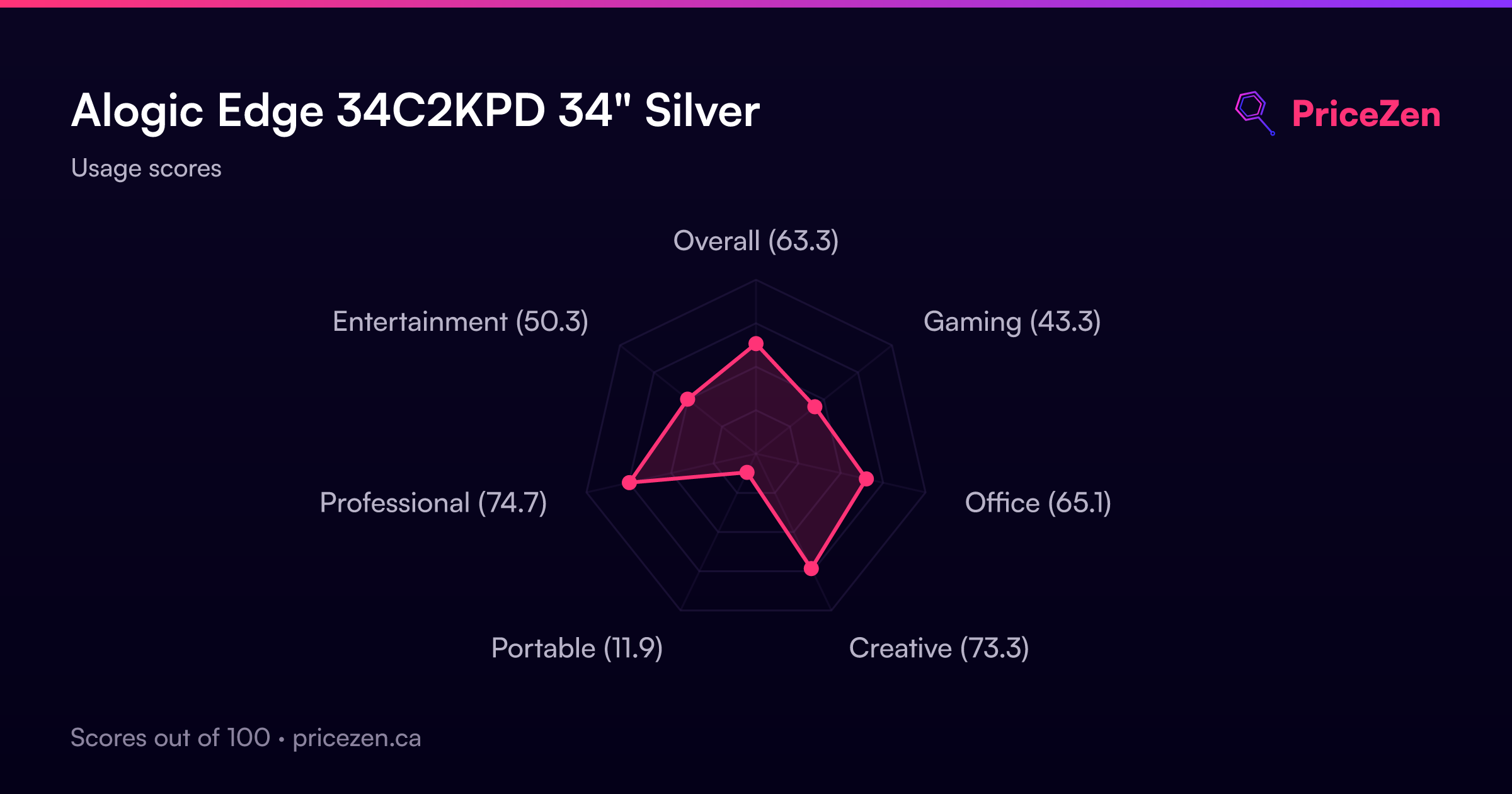
- Overall63.3
- Gaming43.7
- Office65.3
- Creative76.8
- Portable11.8
- Professional73.9
- Entertainment50.6