Samsung CR50 C32R500 31.5" Dark Blue Gray 2020
The 1500R curved VA panel and 75Hz refresh rate with FreeSync create an immersive, tear-free experience that stands out for its price. Its 3-side bezel-less design and eye comfort technology make it a sleek, practical choice for long work sessions. This monitor is best for students and home office users who want a large, engaging display for productivity and casual media consumption.

No current retailer price
Where we saw it before. Check the store for today's price.


Snapshot
The 30-Second Version
The Samsung C32R500 is a 32-inch curved monitor that nails the basics at a great price. Owners love the picture quality and immersive curve, and the 3000:1 contrast ratio is a real highlight. It's not a gaming powerhouse, but for everyday work and casual play, it's an easy recommendation.
Pros & Cons
Pros
- The 1500R curve is genuinely immersive for a monitor at this price 96th
- 3000:1 contrast ratio delivers deep blacks and punchy whites 92nd
- Owners rave about picture quality and value for money
- Slim bezels and a simple stand look clean on any desk
Cons
- 1080p on a 32-inch screen means visible pixels up close
- Only one HDMI port, no DisplayPort
- No built-in speakers, so budget for external audio
- The menu joystick is fiddly and brightness controls are buried
What owners think
The Word on the Street
How owner sentiment changed over time
ExclusiveBased on when customers actually wrote their reviews - so you can see whether early praise held up.
13 written reviews, Jan 2020 – Jan 2026: 13 happy
Across all 2,838 store ratings: 4.6★. Most owners rate without writing a review. The chart counts the 13 written reviews.
Each dot is one written review, in the month it was written. Happy = 4-5★, mixed = 3★, unhappy = 1-2★.
The proof
Performance
The 75Hz refresh rate and 4ms response time put this monitor right around the middle of the pack in our database, which is fine for a budget curved display. FreeSync keeps things smooth in lighter games, and the 3000:1 contrast ratio gives you those deep blacks VA panels are known for. But don't expect miracles. The 300 nits brightness is average, and the 72% NTSC color coverage lands in the lower half of our rankings. It's a solid everyday performer, not a competitive gaming rig.
Specifications
Full Specifications
Display
| Size | 31.5" |
| Resolution | 1920x1080 (Full HD) |
| Panel Type | VA |
| Aspect Ratio | 16:9 |
| Curved | Yes |
| Curvature | 1500 |
| Screen Finish | matte |
Performance
| Refresh Rate | 75 Hz |
| Response Time | 4 |
| Adaptive Sync | FreeSync |
Color & HDR
| Brightness | 300 nits |
| Color Gamut | 72% NTSC 1976 |
| Color Depth | 16.7 million |
Connectivity
| HDMI Ports | 1 |
| DisplayPort | 0 |
| USB-C | 0 |
| Speakers | No |
| Headphone Jack | Yes |
Ergonomics
| Height Adjustable | No |
| Tilt | Yes |
| Swivel | No |
| Pivot | No |
| VESA Mount | 75x75 |
Features
| Webcam | No |
| Touchscreen | No |
| PIP/PBP | No |
| Power | 48 |
| Weight | 5.9 kg / 13.0 lbs |
vs Competition
Stacked against the ASUS ROG Strix XG27AQDPG or the MSI MAG 271QPX QD-OLED E2, the C32R500 looks like a different species entirely. Those are high-refresh QD-OLED gaming monitors with 240Hz+ panels and price tags to match. The Samsung isn't trying to compete there. Where it does compete is against other budget curved displays, and it holds its own with the 1500R curve and strong contrast. If you want OLED blacks and 240Hz, spend the extra cash. If you want a big immersive screen for work and light gaming, this Samsung is the smarter buy.
| Spec | Samsung CR50 C32R500 31.5" | ASUS ROG Strix XG27UCDMG 27" | LG UltraGear 45GX950A-B 45" | Dell UltraSharp U4025QW 39.7" | Alienware AW-Series AW3425DW 34" | MSI MAG 271QPX QD-OLED E2 27" |
|---|---|---|---|---|---|---|
| Screen Size | 31.5 | 27 | 45 | 39.7 | 34 | 27 |
| Resolution | 1920 x 1080 | 3840 x 2160 | 5120 x 2160 | 5120 x 2160 | 3440 x 1440 | 2560 x 1440 |
| Panel Type | VA | OLED | OLED | IPS | QD-OLED | QD-OLED |
| Refresh Rate | 75 | 240 | 330 | 120 | 240 | 240 |
| Response Time Ms | 4 | 0.03 | 0.03 | 5 | 0.03 | 0.03 |
| Adaptive Sync | FreeSync | FreeSync Premium Pro | FreeSync Premium Pro | Adaptive-Sync | FreeSync Premium Pro | FreeSync Premium Pro |
| Hdr | - | DisplayHDR True Black 400 | DisplayHDR True Black 400 | HDR600 | HDR400 | DisplayHDR True Black 400 |
| Compare | Compare | Compare | Compare | Compare |
| Product | Color | Portability | Display | Feature | User Sentiment | Ergonomic | Performance | Connectivity | Social Proof |
|---|---|---|---|---|---|---|---|---|---|
| Samsung CR50 C32R500 31.5" | 41.9 | 3.7 | 43.6 | 47.5 | 95.7 | 47.2 | 50.3 | 20.6 | 92 |
| ASUS ROG Strix XG27UCDMG 27" Compare | 96.5 | 57.4 | 97.7 | 85 | 99.3 | 90.7 | 97.9 | 81.1 | 98.9 |
| LG UltraGear 45GX950A-B 45" Compare | 99.4 | 76.5 | 99.7 | 96.3 | 76.5 | 90.7 | 99.4 | 96.9 | 92 |
| Dell UltraSharp U4025QW 39.7" Compare | 97.9 | 76.5 | 98.6 | 96.3 | 85.5 | 90.7 | 56.1 | 99.3 | 96.8 |
| Alienware AW-Series AW3425DW 34" Compare | 98.9 | 73.9 | 84.1 | 96.3 | 95.7 | 90.7 | 97.9 | 95.4 | 96.8 |
| MSI MAG 271QPX QD-OLED E2 27" Compare | 99.2 | 57.4 | 73.5 | 85 | 95.7 | 90.7 | 97.9 | 81.1 | 98.9 |
Price
Value & Pricing
At $249 USD, this monitor is a steal for what it offers. Owners consistently mention value for money as a top reason they bought it, and the 4.6-star rating across nearly 3,000 reviews backs that up. You're getting a big curved screen with solid contrast and FreeSync for less than most 27-inch flat panels. The trade-off is connectivity and resolution, but if you can live with 1080p and one HDMI port, this is hard to beat.
We started tracking prices for this product on Jun 3, 2026. The chart appears once we have more data.
Read more
Overview
The Samsung C32R500 is a 32-inch curved VA panel that nails the basics without pretending to be something it's not. You get a 1500R curve, 75Hz refresh rate, and FreeSync for around $249 USD. It's not going to blow anyone's socks off on paper, but owners seem genuinely happy with it, and that counts for a lot.
This is a monitor for people who want a big, immersive screen for everyday work and casual gaming. The 1080p resolution on a 32-inch panel means pixels are visible if you sit close, but the curve and contrast ratio do a lot of heavy lifting. It's thin, it's simple, and it just works.
Common Questions
Q: Is 1080p on a 32-inch screen too low resolution?
It depends on how close you sit. At a normal desk distance, text and images look fine, but if you lean in or do pixel-peeping work, you'll notice the lower pixel density. For everyday use and casual gaming, most owners don't mind it.
Q: Does this monitor work well for gaming?
Yes, for casual gaming. The 75Hz refresh rate and FreeSync keep things smooth, and the 4ms response time is fine for most games. But if you play fast-paced competitive shooters, you'll want something with a higher refresh rate.
Q: Can I mount this monitor on a wall or arm?
Yes, it has a standard VESA 75x75 mount, so you can attach it to most monitor arms or wall mounts. The included stand only tilts, so a mount is the way to go if you need height adjustment.
Who Should Skip This
Skip this if you need high refresh rates for competitive gaming, want crisp text for detailed design work, or need multiple inputs. The 75Hz panel and single HDMI port are limiting, and 1080p on a 32-inch screen won't satisfy pixel-perfect workflows. If you're a serious gamer, look at the ASUS ROG Strix XG27AQDPG or MSI MAG 271QPX QD-OLED E2 instead.
Verdict
Buy this if you want a large, immersive curved monitor for everyday use and casual gaming without spending a fortune. It's perfect for office work, watching videos, and slower-paced games where the curve and contrast shine. The 75Hz refresh rate is fine for most people, and FreeSync smooths things out when you do game. Just don't expect it to replace a high-refresh gaming monitor.
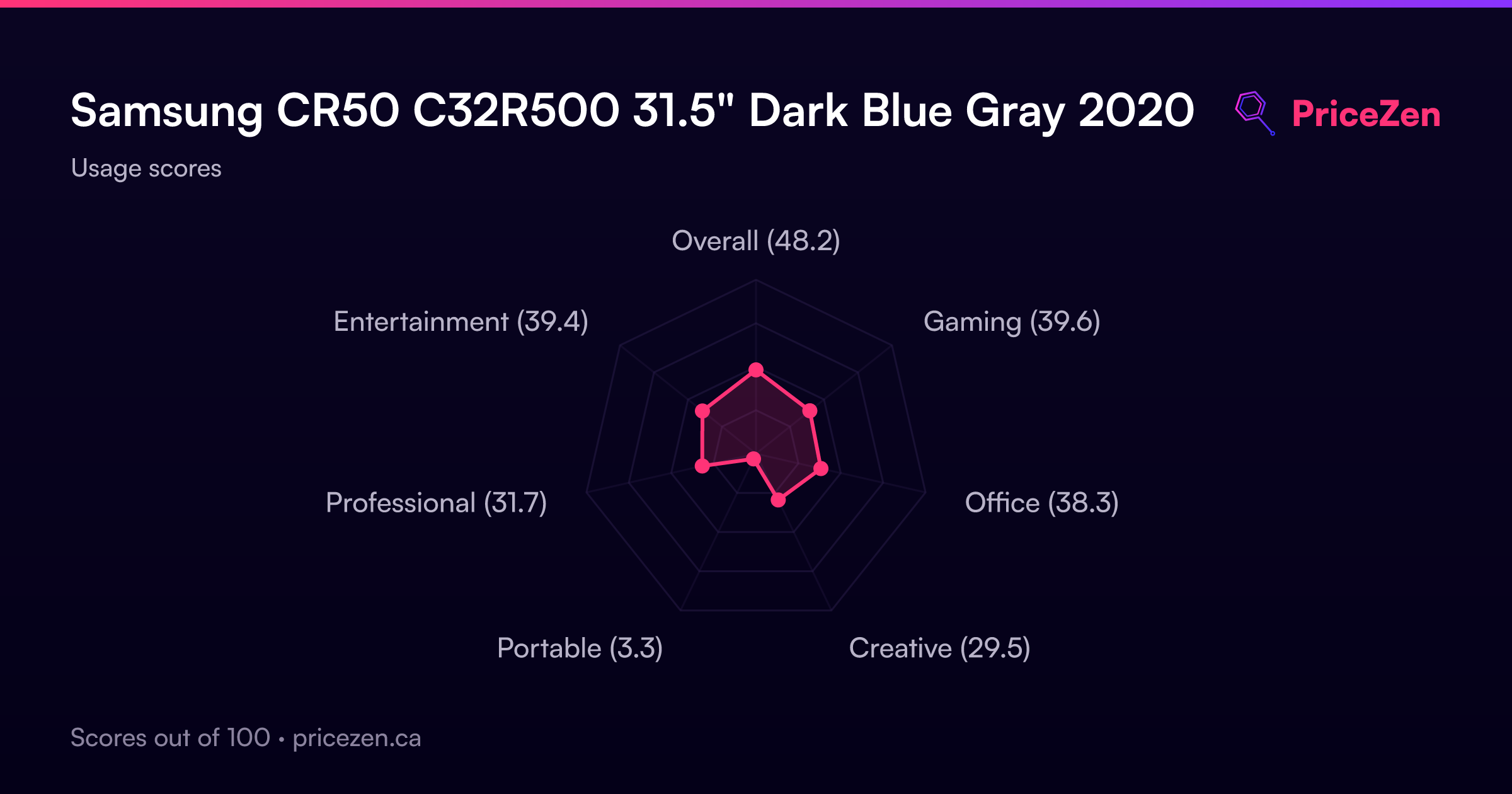
Usage Scores
- Overall48.2
- Gaming39.6
- Office38.3
- Creative29.5
- Portable3.3
- Professional31.7
- Entertainment39.4