LG UltraWide 34WP85CN-B 34" Black 2022
The 34-inch IPS curved panel delivers 3440 x 1440 resolution with DCI-P3 95% color coverage and HDR10 support, making it a solid choice for color-sensitive work. Its USB-C port with DisplayPort Alt Mode and 75Hz FreeSync add flexibility for modern laptops and light gaming. Best for office users who want a wide, color-accurate screen for spreadsheets and multitasking without breaking the bank.





Snapshot
The 30-Second Version
The LG 34WP85CN-B is a color-accurate ultrawide built for work, not play. Its 95% DCI-P3 coverage and USB-C docking are the standout features, while the 75Hz refresh rate is the main limitation. Worth buying if you need a productivity ultrawide, but skip it if you want smooth gaming.
Pros & Cons
Pros
- USB-C with DP Alt Mode means one cable for video, data, and charging. 96th
- 95% DCI-P3 color coverage makes it great for photo and video work. 88th
- Height adjust and tilt give you real ergonomic flexibility. 79th
- PIP/PBP lets you run two sources side by side. 75th
Cons
- 75Hz is not enough for serious gaming.
- 300 nits is mediocre for HDR content.
- No built-in KVM switch despite the USB hub.
- Social proof is thin, with only 7 reviews in our database.
The proof
Performance
The 75Hz refresh rate and 5ms response time are fine for productivity and casual games, but anyone expecting smooth competitive play will feel the ceiling fast. The IPS panel hits 300 nits, which is bright enough for most offices but not exactly HDR fireworks despite the HDR10 badge. Color coverage is the real highlight here, with 95% DCI-P3 and 1.07 billion colors, so photos and video look rich out of the box. Our database puts the display quality well above average, and the feature set near the top of the charts. But raw performance lands in the middle of the pack, which tells you exactly who this is for.
Specifications
Full Specifications
Display
| Size | 34" |
| Resolution | 3440x1440 |
| Panel Type | IPS |
| Aspect Ratio | 21:9 |
| Curved | Yes |
| Curvature | 1900 |
| Screen Finish | matte |
Performance
| Refresh Rate | 75 Hz |
| Response Time | 5 |
| Adaptive Sync | FreeSync |
Color & HDR
| Brightness | 300 nits |
| Color Gamut | DCI-P3 95% |
| Color Depth | 1.07B |
| HDR | HDR10 |
| HDR Support | HDR10 |
Connectivity
| HDMI Ports | 2 |
| DisplayPort | 1 |
| USB-C | 1 |
| Speakers | Yes |
| Headphone Jack | Yes |
Ergonomics
| Height Adjustable | Yes |
| Tilt | Yes |
| Swivel | No |
| Pivot | No |
| VESA Mount | 100x100 |
Features
| PIP/PBP | Yes |
| Power | 42 |
| Weight | 8.2 kg / 18.1 lbs |
vs Competition
Against the Alienware AW3425DW, the LG gets smoked on refresh rate and HDR, but it costs a lot less and has better color coverage for work. The ASUS ROG Strix XG27UCDMG and MSI MAG 271QPX QD-OLED E2 are 27-inch 4K gaming panels, so they're sharper and faster but give up the ultrawide aspect ratio and USB-C convenience. The Samsung Odyssey G60SD and Gigabyte MO27U2 SA are also gaming-first OLEDs. If you want immersive gaming, any of those beat the LG. If you want a workhorse ultrawide with good color and laptop docking, the LG is the more sensible pick.
| Spec | LG UltraWide 34WP85CN-B 34" | ASUS ROG Strix XG27UCDMG 27" | Dell UltraSharp U4025QW 39.7" | Alienware AW-Series AW3425DW 34" | MSI MAG 271QPX QD-OLED E2 27" | Samsung Odyssey G80SH 32" |
|---|---|---|---|---|---|---|
| Screen Size | 34 | 27 | 39.70000076293945 | 34 | 27 | 32 |
| Resolution | 3440 x 1440 | 3840 x 2160 | 5120 x 2160 | 3440 x 1440 | 2560 x 1440 | 3840 x 2160 |
| Panel Type | IPS | OLED | IPS | QD-OLED | QD-OLED | OLED |
| Refresh Rate | 75 | 240 | 120 | 240 | 240 | 240 |
| Response Time Ms | 5 | 0.029999999329447746 | 5 | 0.029999999329447746 | 0.029999999329447746 | 0.029999999329447746 |
| Adaptive Sync | FreeSync | FreeSync Premium Pro | Adaptive-Sync | FreeSync Premium Pro | FreeSync Premium Pro | FreeSync Premium Pro |
| Hdr | HDR10 | DisplayHDR True Black 400 | HDR600 | HDR400 | DisplayHDR True Black 400 | HDR10+ |
| Compare | Compare | Compare | Compare | Compare |
| Product | Color | Portability | Display | Feature | Ergonomic | Performance | Connectivity |
|---|---|---|---|---|---|---|---|
| LG UltraWide 34WP85CN-B 34" | 74.8 | 62.9 | 78.8 | 96.3 | 66.9 | 44.2 | 87.5 |
| ASUS ROG Strix XG27UCDMG 27" Compare | 96.5 | 57.4 | 97.7 | 85.1 | 90.8 | 97.9 | 81.1 |
| Dell UltraSharp U4025QW 39.7" Compare | 97.9 | 76.6 | 98.6 | 96.3 | 90.8 | 56.1 | 99.3 |
| Alienware AW-Series AW3425DW 34" Compare | 98.9 | 74 | 84.1 | 96.3 | 90.8 | 97.9 | 95.4 |
| MSI MAG 271QPX QD-OLED E2 27" Compare | 99.2 | 57.4 | 73.5 | 85.1 | 90.8 | 97.9 | 81.1 |
| Samsung Odyssey G80SH 32" Compare | 94.4 | 49.4 | 99 | 70.2 | 90.8 | 97.9 | 81.1 |
Price
Value & Pricing
Pricing is all over the place. US listings range from USD 715 to USD 886, which is a USD 171 spread for the same panel. That's a big enough gap that you should shop around before clicking buy. At the low end, this is a reasonable deal for a color-accurate ultrawide with USB-C. At the high end, you're creeping into OLED territory, and that's a much harder sell. If you're in the US, the cheaper listing is the one to chase.
Amazon 1 offer From CA$1,050
Price history
Read more
Overview
The LG UltraWide 34WP85CN-B is a 34-inch curved IPS panel aimed squarely at desk workers who want a ton of horizontal space without going full dual-monitor. It runs 3440 x 1440 at 75Hz, covers 95% of DCI-P3, and throws in USB-C with power delivery, which makes it a clean one-cable setup for a laptop. It's not a gaming monitor, and it doesn't pretend to be.
Common Questions
Q: Can I charge my laptop through the USB-C port?
Yes, the USB-C port supports DP Alt Mode and power delivery, so you can run video, data, and charging over a single cable. Check your laptop's power requirements to make sure the wattage is sufficient.
Q: Is this monitor good for gaming?
It's okay for casual games thanks to FreeSync and a 75Hz refresh rate, but competitive gamers will want something faster. The 5ms response time and 75Hz ceiling are the main bottlenecks.
Q: Does the PIP/PBP mode work with two different inputs?
Yes, you can display two sources side by side or picture-in-picture using the HDMI, DisplayPort, and USB-C inputs. It's handy for running a work laptop and a personal PC on one screen.
Who Should Skip This
Skip this if you play fast-paced shooters or racing games, because 75Hz and 5ms will feel sluggish compared to even budget 144Hz panels. Also skip it if you need true HDR brightness, since 300 nits won't do HDR10 justice. And if you're on a tight budget, there are cheaper 34-inch ultrawides that give up some color accuracy but cost a lot less.
Verdict
Buy this if you spend your day in spreadsheets, code editors, or creative apps and want one big curved canvas with USB-C docking. It's a productivity monitor first, an entertainment screen second, and a gaming monitor a distant third. The color accuracy and connectivity are the reasons to buy. The 75Hz refresh rate is the reason to think twice if you game at all.
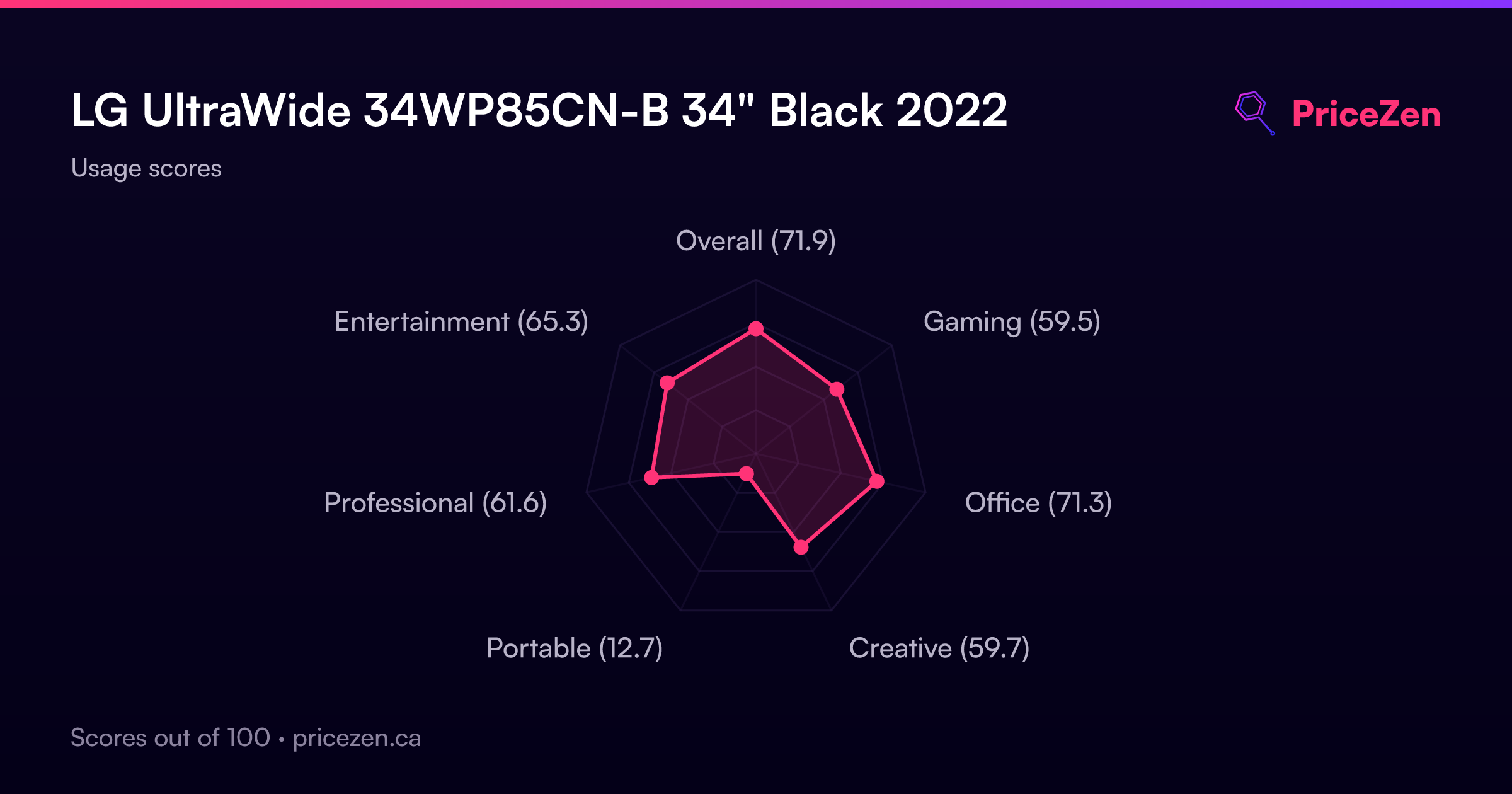
Usage Scores
- Overall71.9
- Gaming59.5
- Office71.4
- Creative59.6
- Portable12.7
- Professional61.6
- Entertainment65.3