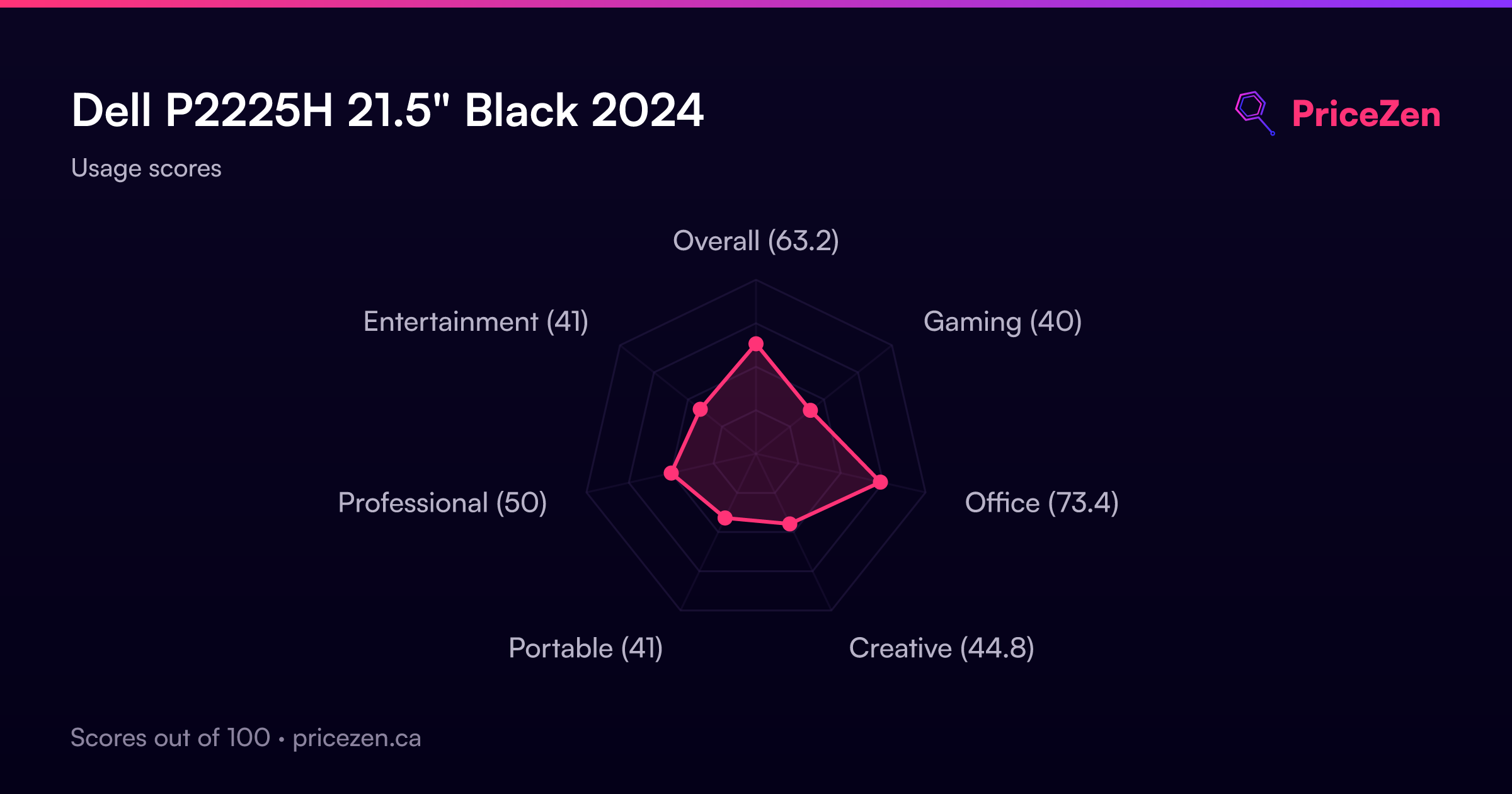
Dell P2225H 21.5" Black 2024
The 100Hz refresh rate on its 21.5-inch IPS panel provides noticeably smoother scrolling than standard 60Hz office displays, while 99% sRGB coverage ensures accurate color for basic design tasks. Its full ergonomic stand with height, tilt, swivel, and pivot adjustment is a rare find in this compact size class, complemented by a built-in USB-C hub for single-cable connectivity. This monitor is best for office workers in multi-monitor setups who need a flicker-free, space-efficient display for all-day productivity.












Snapshot
The 30-Second Version
The Dell P2225H is a compact 21.5-inch office monitor with a great ergonomic stand and a smooth 100Hz refresh rate. It's perfect as a secondary display or for small desks, but the 250-nit brightness and cramped screen size hold it back for entertainment. Buy it if you find it under $150, but skip it if you need a primary screen for gaming or creative work.
Pros & Cons
Pros
- Excellent ergonomic stand with height, tilt, swivel, and pivot 92nd
- 100Hz refresh rate is a real step up from typical 60Hz office panels 91st
- 99% sRGB coverage delivers accurate, pleasant color for general use 85th
- Good port selection with HDMI, DisplayPort, USB-C, and VGA 67th
- VESA mount compatible if you want to ditch the stand
Cons
- 250 nits brightness can feel dim in well-lit rooms
- 21.5-inch screen feels cramped for multitasking
- 5ms response time is just average, not great for fast gaming
- No AdobeRGB or DCI-P3 coverage for color-critical work
- Price can swing wildly depending on the seller
What owners think
The Word on the Street
How owner sentiment changed over time
ExclusiveBased on when customers actually wrote their reviews - so you can see whether early praise held up.
Owners are as happy as early on: 100% lately, 100% in Jul 2022 – Jun 2025
Across all 345 store ratings: 4.6★. Most owners rate without writing a review. The chart counts the 25 written reviews with stars and their own date.
5 reviews from months with approximate dates (the day we first saw a review) are left out of the trend.
3 written reviews without stars are left out of the trend.
Show the numbers
| Period | Reviews | Happy | Mixed | Unhappy | Happy share |
|---|---|---|---|---|---|
| Jul 2022 – Jun 2025 | 13 | 13 | 0 | 0 | 100% |
| Jul 2025 – Jun 2026 | 12 | 12 | 0 | 0 | 100% |
- Jan – Mar 20265 of 5 happy
All four reviews are positive, praising the monitor's display quality, ergonomics, and ease of setup. No negative feedback was mentioned.
- Crisp views from any angle, perfect view, and great display quality.
- Easy setup and works as expected with laptop.
- Tilts, swivels, rotates, and has outstanding adjustments.
- Easy to find On-Off button and great connectivity.
- Oct – Dec 20254 of 4 happy · 3 without stars
Buyers in this period praised the monitor as a great value for spreadsheets and Zoom calls, noting it's a significant upgrade from older, smaller displays.
- Monitor is a great buy for the price, suitable for productivity tasks like spreadsheets and video calls.
- Upgrade from older, smaller monitor (18" 12-year-old) to 22" is a notable improvement.
Each column joins calendar quarters until it holds at least 10 reviews with stars and their own date. Happy = 4-5★, mixed = 3★, unhappy = 1-2★. Period summaries are in English.
The proof
Performance
The 100Hz refresh rate makes scrolling through documents and web pages feel noticeably smoother than a standard 60Hz office monitor. It's not a gaming panel by any stretch, but that extra headroom is a genuine quality-of-life upgrade for all-day productivity. The 5ms gray-to-gray response time in Fast mode is about average for an IPS office display. You won't see distracting ghosting in Excel, but fast-paced games will look a little soft. Brightness tops out at 250 nits, which is fine for a controlled indoor environment but can feel a bit dim if you're sitting near a sunny window. In our database, the overall performance lands right at the 50th percentile, which is exactly what you'd expect, a solid middle-of-the-pack showing for a work-focused monitor.
Specifications
Full Specifications
Display
| Size | 21.5" |
| Resolution | 1920x1080 (Full HD) |
| Panel Type | IPS |
| Aspect Ratio | 16:9 |
| Curved | No |
| Screen Finish | matte |
Performance
| Refresh Rate | 100 Hz |
| Response Time | 5 |
Color & HDR
| Brightness | 250 nits |
| Color Gamut | 99% sRGB |
| Color Depth | 8-bit |
| HDR | No |
Connectivity
| HDMI Ports | 1 |
| DisplayPort | 1 |
| USB-C | 1 |
| Speakers | No |
| Headphone Jack | No |
Ergonomics
| Height Adjustable | Yes |
| Tilt | Yes |
| Swivel | Yes |
| Pivot | Yes |
| VESA Mount | 100x100 |
Features
| Webcam | No |
| Touchscreen | No |
| PIP/PBP | No |
| Power | 60 |
| Weight | 2.6 kg / 5.7 lbs |
vs Competition
Stacked against something like the ASUS TUF Gaming VG27AQL5A, the Dell looks like a completely different species. The ASUS is a 27-inch 1440p high-refresh-rate gaming beast, while the Dell is a compact office companion. If you need screen real estate and speed for gaming, the ASUS or the Acer Nitro XV272U are far better picks. The HP OMEN 27qs G2 also runs circles around the P2225H for entertainment, but it'll cost you more and take up a lot more desk space. Where the Dell wins is in pure, focused productivity. Its 21.5-inch size and 1080p resolution are perfect for a secondary monitor in a dual-screen setup or for smaller desks where a 27-inch panel would feel overwhelming. The LG UltraGear 27GX790A-B is another high-performance competitor, but it's aimed at a completely different buyer who prioritizes speed over sensible ergonomics and a compact footprint.
| Spec | Dell P2225H 21.5" | MSI MAG 271QP QD-OLED X28 27" | LG UltraGear 27G810A-B 27" | ASUS ROG Strix XG27JCG 27" | BenQ MA Series MA270U 27" | HP OMEN 27QS G2 27" |
|---|---|---|---|---|---|---|
| Screen Size | 21.5 | 27 | 27 | 27 | 27 | 27 |
| Resolution | 1920 x 1080 | 2560 x 1440 | 3840 x 2160 | 5120 x 2880 | 3840 x 2160 | 2560 x 1440 |
| Panel Type | IPS | QD-OLED | IPS | IPS | IPS | IPS |
| Refresh Rate | 100 | 280 | 180 | 330 | 60 | 280 |
| Response Time Ms | 5 | 0.029999999329447746 | 1 | 0.30000001192092896 | 5 | 1 |
| Adaptive Sync | - | FreeSync Premium Pro | FreeSync Premium | FreeSync Premium Pro | - | G-Sync Compatible |
| Hdr | No | DisplayHDR True Black 400 | DisplayHDR 400 | DisplayHDR 600 | HDR10 | DisplayHDR 400 |
| Compare | Compare | Compare | Compare | Compare |
| Product | Color | Portability | Display | User Sentiment | Performance | Connectivity | Social Proof |
|---|---|---|---|---|---|---|---|
| Dell P2225H 21.5" | 36.1 | 85.2 | 21.4 | 48.1 | 48 | 62.6 | 92.1 |
| MSI MAG 271QP QD-OLED X28 27" Compare | 79.4 | 57.5 | 77.3 | 95.7 | 99.2 | 81.2 | 92.1 |
| LG UltraGear 27G810A-B 27" Compare | 94.8 | 68 | 88.4 | 76.4 | 81.8 | 98.2 | 67.2 |
| ASUS ROG Strix XG27JCG 27" Compare | 93.1 | 68 | 99.5 | 0 | 95.6 | 81.2 | 84.1 |
| BenQ MA Series MA270U 27" Compare | 91.9 | 83.8 | 88.4 | 95.7 | 22.4 | 97.9 | 84.1 |
| HP OMEN 27QS G2 27" Compare | 75.3 | 81.3 | 70.5 | 95.7 | 89.5 | 97 | 98.9 |
Price
Value & Pricing
Pricing on this monitor is all over the map. We've seen it listed anywhere from $120 to over $3,000 across different vendors, which is frankly absurd. At the low end, around that $120 to $150 mark, the P2225H is a steal for a height-adjustable IPS panel with a USB-C connection. But if you're seeing it for anything north of $200, you should probably look elsewhere. For context, you can often find a solid 24-inch 1080p IPS monitor with similar ergonomics for around $150 to $180. The best deal we've spotted is on Amazon, where bundles with cables and cleaning kits sometimes pop up at reasonable prices. Just don't overpay for the convenience.
Amazon 1 offer From CA$220
Price history
Read more
Overview
The Dell P2225H is a 21.5-inch 1080p IPS monitor built for the desk, not the gaming den. If you're hunting for a compact, no-nonsense display for spreadsheets, email, and the occasional YouTube video, this one lands squarely on the shortlist. It covers 99% of the sRGB color space and pushes a 100Hz refresh rate, which is a nice step up from the 60Hz panels still haunting most office cubicles. The stand is a real highlight here, offering height, tilt, swivel, and pivot adjustments that you usually only find on pricier screens.
Common Questions
Q: Is the Dell P2225H good for gaming?
It's okay for casual gaming thanks to the 100Hz refresh rate, but the 5ms response time and lack of adaptive sync mean it's not ideal for fast-paced competitive titles.
Q: Does the Dell P2225H have built-in speakers?
No, the Dell P2225H does not include built-in speakers, so you'll need external speakers or headphones for audio.
Q: Can I mount the Dell P2225H on a monitor arm?
Yes, it has a standard VESA 100x100 mount on the back, so it's compatible with most third-party monitor arms and wall mounts.
Q: Is the Dell P2225H bright enough for a bright room?
With a peak brightness of 250 nits, it's best suited for rooms with controlled lighting and might look a bit washed out in direct sunlight.
Who Should Skip This
Gamers and creative pros should steer clear. If you're looking for a high-refresh-rate panel for competitive shooters, the 5ms response time and 100Hz cap will leave you wanting more. Something from the ASUS TUF Gaming line or a Gigabyte M Series would be a much better fit. Photographers and video editors will also find the lack of DCI-P3 or AdobeRGB coverage limiting. And if you're someone who likes to have a dozen windows open at once, the 21.5-inch screen will feel claustrophobic. You'd be happier with a larger 24-inch or 27-inch 1440p monitor for multitasking.
Verdict
The Dell P2225H is a purpose-built office monitor that knows exactly what it is. It's not trying to be a gaming display or a creative professional's dream screen. It's a compact, ergonomically excellent panel that makes your 9-to-5 more comfortable. The 100Hz refresh rate is a genuine perk, and the color accuracy is good enough for most business tasks. If you're setting up a home office with limited space or need a reliable second screen for your laptop, this is a very solid choice, provided you find it at a sane price. Just keep your expectations in check. This isn't a multimedia powerhouse, and the small screen size will frustrate anyone who regularly juggles multiple windows.
Usage Scores
- Overall63.2
- Gaming40
- Office73.4
- Creative44.8
- Portable41
- Professional50
- Entertainment41