LG UltraGear 27GX790B-B 27" Black
The 27-inch QHD OLED panel pushes a 540Hz refresh rate with a 0.02ms response time, eliminating motion blur for ultra-smooth competitive play. Its Dual Mode instantly switches to 720Hz at 1080p, and Primary RGB Tandem tech boosts brightness to 335 nits for vivid HDR while DisplayPort 2.1 supports the extreme bandwidth. This monitor is best for esports competitors who toggle between sharp 1440p detail and 720Hz speed for split-second reactions.












Snapshot
The 30-Second Version
540Hz OLED at 1440p is stupid fast and the dual mode 720Hz is a flex. At USD 800 it's a specialist buy, so if you're not chasing frames, save your money and get a 4K OLED instead.
Pros & Cons
Pros
- 540Hz at 1440p is absurdly smooth 91st
- Dual mode 720Hz at 1080p for esports 88th
- 0.02ms response time kills ghosting 85th
- Brightest OLED LG has shipped 81st
- DisplayPort 2.1 future-proofs the setup
Cons
- User sentiment is basically nonexistent, 5th percentile
- 335 nits still trails mini-LED for HDR punch
- Portable score is a joke, this thing stays put
- Price has climbed to USD 800, so the bargain is gone
What owners think
The Word on the Street
How owner sentiment changed over time
ExclusiveBased on when customers actually wrote their reviews - so you can see whether early praise held up.
3 written reviews, Apr – Jun 2026: 3 happy
Across all 21 store ratings: 4.6★. Most owners rate without writing a review. The chart counts the 3 written reviews.
Each dot is one written review, in the month it was written. Happy = 4-5★, mixed = 3★, unhappy = 1-2★.
The proof
Performance
The headline numbers are absurd in the best way. 540Hz at QHD is already overkill for most humans, but the dual mode switch to 720Hz at HD is a flex that esports players will actually use. The 0.02ms GtG response time is as close to instant as you'll find, and the 4th gen OLED panel with Primary RGB Tandem tech delivers the brightest picture LG has put in a gaming OLED. Color coverage at 99.5% DCI-P3 is a standout for a gaming panel. The 335 nits brightness won't blow you away next to a mini-LED, but for OLED it's genuinely impressive and keeps HDR content looking punchy.
Specifications
Full Specifications
Display
| Size | 27" |
| Resolution | 2560x1440 (QHD) |
| Panel Type | OLED |
| Aspect Ratio | 16:9 |
| Curved | No |
| Screen Finish | matte |
Performance
| Refresh Rate | 540 Hz |
| Adaptive Sync | FreeSync Premium Pro |
Color & HDR
| Brightness | 335 nits |
| Color Gamut | 99.5% DCI-P3 |
| Color Depth | 10-bit |
| HDR | DisplayHDR True Black 500 |
| HDR Support | HDR10 |
Connectivity
| HDMI Ports | 2 |
| DisplayPort | 1 |
| USB-C | 1 |
| Speakers | No |
| Headphone Jack | Yes |
Ergonomics
| Height Adjustable | Yes |
| Tilt | Yes |
| Swivel | Yes |
| Pivot | Yes |
| VESA Mount | 100x100 |
Features
| Webcam | No |
| Touchscreen | No |
| PIP/PBP | Yes |
| Weight | 6.8 kg / 15.0 lbs |
vs Competition
The ASUS ROG Strix XG27UCDMG and MSI MAG 271QPX QD-OLED E2 are the main rivals. The ASUS brings a 4K panel if you want sharpness over speed, but it caps at 240Hz. The MSI is cheaper and uses a QD-OLED panel with better color volume, but it tops out at 360Hz. The Samsung Odyssey G60SD splits the difference with 360Hz and a matte coating. If you want the absolute highest refresh rate on an OLED, the LG is the only game in town. If you want better HDR brightness or 4K clarity, look elsewhere.
| Spec | LG UltraGear 27GX790B-B 27" | ASUS ROG Strix XG27UCDMG 27" | Dell UltraSharp U4025QW 39.7" | MSI MAG 271QPX QD-OLED E2 27" | Alienware AW-Series AW3425DW 34" | Samsung Odyssey G60SD 27" |
|---|---|---|---|---|---|---|
| Screen Size | 27 | 27 | 39.70000076293945 | 27 | 34 | 27 |
| Resolution | 2560 x 1440 | 3840 x 2160 | 5120 x 2160 | 2560 x 1440 | 3440 x 1440 | 2560 x 1440 |
| Panel Type | OLED | OLED | IPS | QD-OLED | QD-OLED | OLED |
| Refresh Rate | 540 | 240 | 120 | 240 | 240 | 360 |
| Response Time Ms | - | 0.029999999329447746 | 5 | 0.029999999329447746 | 0.029999999329447746 | 0.029999999329447746 |
| Adaptive Sync | FreeSync Premium Pro | FreeSync Premium Pro | Adaptive-Sync | FreeSync Premium Pro | FreeSync Premium Pro | FreeSync Premium Pro |
| Hdr | DisplayHDR True Black 500 | DisplayHDR True Black 400 | HDR600 | DisplayHDR True Black 400 | HDR400 | HDR10+ |
| Compare | Compare | Compare | Compare | Compare |
| Product | Color | Portability | Display | Feature | User Sentiment | Performance | Connectivity | Social Proof |
|---|---|---|---|---|---|---|---|---|
| LG UltraGear 27GX790B-B 27" | 88 | 57.6 | 73.4 | 85 | 4.3 | 68.8 | 81.2 | 41.2 |
| ASUS ROG Strix XG27UCDMG 27" Compare | 96.5 | 57.6 | 97.7 | 85 | 99.2 | 97.9 | 81.2 | 98.9 |
| Dell UltraSharp U4025QW 39.7" Compare | 97.9 | 76.7 | 98.6 | 96.3 | 85.6 | 56 | 99.3 | 96.8 |
| MSI MAG 271QPX QD-OLED E2 27" Compare | 99.2 | 57.6 | 73.4 | 85 | 95.7 | 97.9 | 81.2 | 98.9 |
| Alienware AW-Series AW3425DW 34" Compare | 98.9 | 74.1 | 84.2 | 90.8 | 95.7 | 97.9 | 95.4 | 96.8 |
| Samsung Odyssey G60SD 27" Compare | 90.8 | 39.7 | 73.4 | 70.2 | 95.7 | 99.5 | 87.6 | 92 |
Price
Value & Pricing
The price has crept up. We're tracking it at USD 800 right now, where the low end used to sit closer to USD 700. That's a real bump, and it takes some of the shine off what was an easy recommendation. At USD 800 you're still getting a 540Hz OLED with a 720Hz dual mode, and nothing else in our ranking matches that refresh rate. But this is no longer an impulse buy. If competitive frame rate is your whole reason for upgrading, it still earns the money. If you just want a great-looking OLED, wait for our price tracking to show it dip again.
Amazon 1 offer From CA$849
Price history
Read more
Overview
The LG UltraGear 27GX790B-B is a speed demon's dream. This 27-inch OLED pushes a ridiculous 540Hz at 1440p, and if that's somehow not enough, you can drop to 1080p and hit 720Hz. It's LG's brightest OLED yet at 335 nits, and the 0.02ms response time means motion blur is basically a myth. The one thing to know? This is a competitive gaming weapon first, everything else second.
Common Questions
Q: Is 540Hz actually noticeable over 240Hz or 360Hz?
If you're a competitive player with the reflexes to match, yes. The jump from 240 to 540 is more subtle than 60 to 144, but motion clarity and input feel improve. For casual gaming, you won't care.
Q: Does the dual mode 720Hz look bad at 1080p?
It's a 27-inch panel, so 1080p will look softer than 1440p. But in fast esports titles you're not staring at fine details, you're tracking enemies. The trade-off is worth it for the frame rate.
Q: Is OLED burn-in a concern for a gaming monitor?
LG has improved their OLED panels a lot, and this 4th gen uses a 4-stack RGB structure that's more efficient. Still, static HUD elements in games you play for hundreds of hours are a risk. Use the built-in pixel care features and you'll likely be fine.
Who Should Skip This
If you're a content creator or someone who wants 4K sharpness for productivity and media, this isn't your monitor. The 1440p resolution and focus on speed mean text clarity and detail take a back seat. Go grab the ASUS ROG Strix XG27UCDMG or a 4K OLED like the Gigabyte M Series MO27U2 SA instead.
Verdict
Buy this if you play competitive shooters or anything where frame rate is king. The 540Hz QHD mode is the sweet spot, and the 720Hz HD mode is a legitimate esports advantage. The OLED panel is bright enough and colors are excellent. At USD 800 the value case is thinner than it was, so this only makes sense if you'll actually use those frames. Just know that real user feedback is thin, so you're trusting LG's spec sheet more than owner reviews. For pure speed, nothing else comes close.
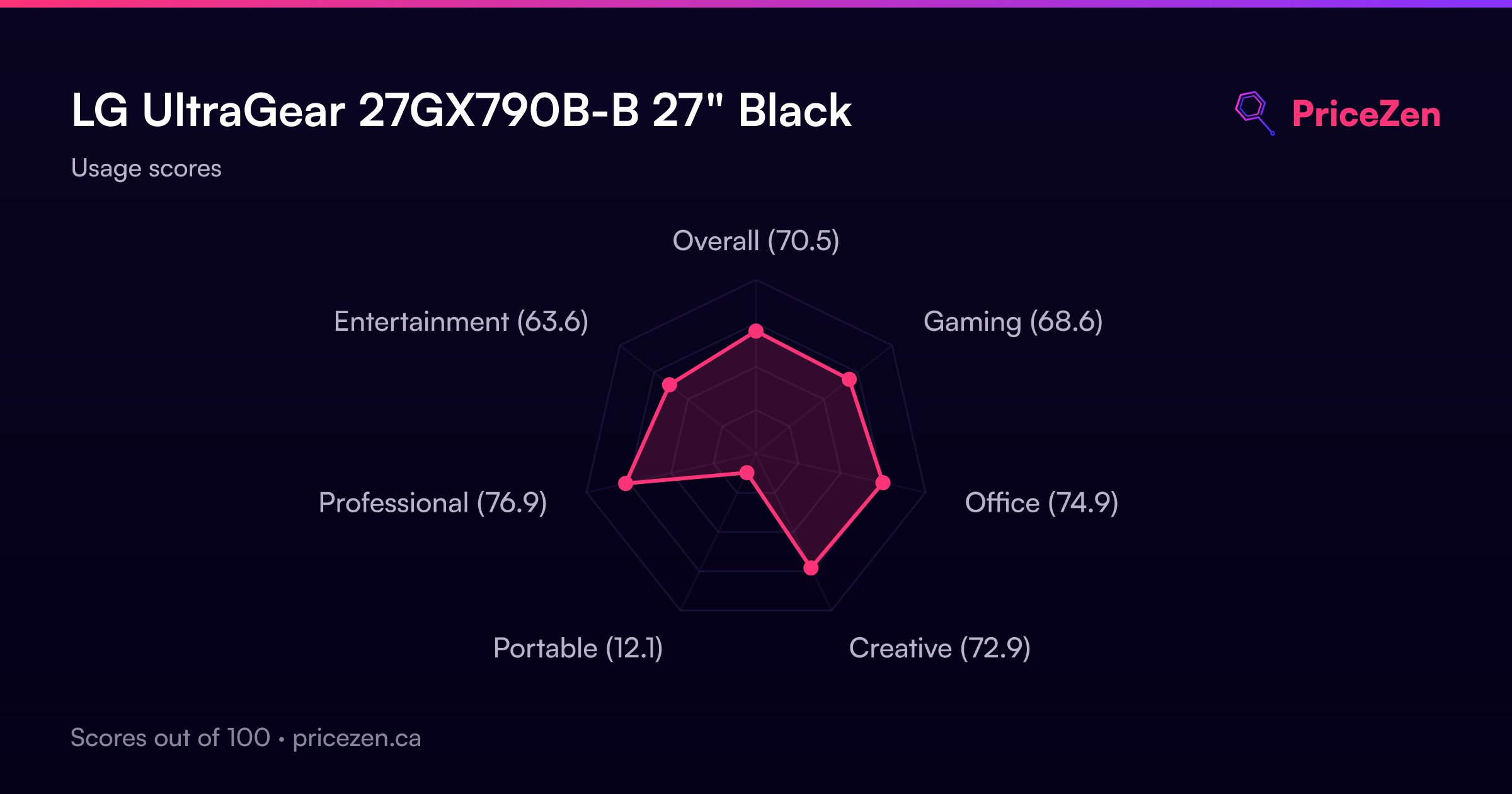
Usage Scores
- Overall70.5
- Gaming68.6
- Office74.9
- Creative72.9
- Portable12.1
- Professional76.9
- Entertainment63.6