Z-Edge G27IS 27" Black
The 320Hz refresh rate and 1ms response time on a 27-inch QHD Fast IPS panel provide exceptionally fluid motion clarity for competitive gaming. Dual HDMI and DisplayPort inputs both support the full 320Hz, while built-in Shadow Balance and crosshair overlays offer practical in-game advantages beyond raw speed. This monitor is best for esports-focused players who need maximum frame rate visibility and multi-input flexibility without moving to a 4K display.

No current retailer price








Snapshot
The 30-Second Version
The Z-Edge G27IS is a 27-inch 1440p gaming monitor with a 320Hz refresh rate that lands in the top 9% of all monitors we've tested. At USD 230 to USD 437, it's one of the cheapest ways to get this level of speed. The Fast IPS panel keeps colors looking good, but HDR is weak and the stand only tilts. If you're a competitive gamer on a budget, this is a fantastic deal. Everyone else should probably look elsewhere.
Pros & Cons
Pros
- 320Hz refresh rate puts it in the top 9% of all monitors 91st
- 1440p resolution on 27 inches is the sweet spot for gaming 85th
- Fast IPS panel keeps colors accurate without sacrificing speed 75th
- Two HDMI 2.1 and two DisplayPort 1.4 ports give you plenty of connectivity 74th
- PIP/PBP support is rare at this price point
Cons
- 350 nits brightness is just okay, not great for bright rooms
- HDR10 support is mostly marketing without local dimming
- Ergonomics are limited to tilt only, no height adjustment
- MPRT response time can cause flicker for sensitive users
- Z-Edge is a lesser-known brand, so long-term reliability is unproven
The proof
Performance
The 320Hz refresh rate is the star here, and it lands in the 91st percentile of all monitors in our database. That's genuinely top-tier. For context, most gaming monitors top out at 144Hz or 165Hz, and even 240Hz is considered high-end. At 320Hz, you're getting a new frame every 3.1 milliseconds. In practice, that means smoother motion, less input lag, and a real competitive edge in twitch shooters. The 1ms MPRT response time helps keep motion blur to a minimum, though MPRT is a bit of a marketing term. It uses backlight strobing to achieve that number, which can introduce flicker for some people. Still, the panel is Fast IPS, so even without strobing, response times should be solid.
The 1440p resolution on a 27-inch panel gives you about 109 pixels per inch. That's a nice density for gaming. Text is crisp, games look detailed, and you don't need a monster GPU to push high frame rates at this resolution. The 350 nits brightness is decent for indoor use, though it won't blow you away in a bright room. HDR10 support is there, but without local dimming or higher peak brightness, it's more of a checkbox feature than a real HDR experience. The 8-bit panel with 99% sRGB coverage means colors look good for gaming, but this isn't a wide-gamut display for serious photo work.
Specifications
Full Specifications
Display
| Size | 27" |
| Resolution | 2560x1440 (QHD) |
| Panel Type | IPS |
| Aspect Ratio | 16:9 |
| Curved | No |
| Screen Finish | matte |
Performance
| Refresh Rate | 320 Hz |
| Response Time | 1 |
| Adaptive Sync | FreeSync |
Color & HDR
| Brightness | 350 nits |
| Color Gamut | sRGB 99% |
| Color Depth | 8-bit |
| HDR | HDR10 |
| HDR Support | HDR10 |
Connectivity
| HDMI Ports | 2 |
| DisplayPort | 2 |
| Speakers | No |
| Headphone Jack | Yes |
Ergonomics
| Height Adjustable | No |
| Tilt | Yes |
| Swivel | No |
| Pivot | No |
| VESA Mount | 100x100 |
Features
| PIP/PBP | Yes |
| Power | 42 |
| Weight | 4.1 kg / 9.0 lbs |
vs Competition
The most direct comparison is with the MSI MAG 271QPX QD-OLED E2 and the ASUS ROG Strix XG27AQDMG. Both are 27-inch 1440p gaming monitors, but they use QD-OLED panels instead of IPS. That means they get perfect blacks, better contrast, and more vibrant colors. The trade-off is price and refresh rate. The MSI and ASUS both cost significantly more than the Z-Edge, and while they're fast, they don't hit 320Hz. If you care about image quality and HDR, the OLEDs win. If you care about raw speed and saving money, the Z-Edge takes it.
The Samsung Odyssey G60SD is another OLED competitor, and it's a similar story. Better picture quality, higher price, lower refresh rate. The LG UltraGear 32GX850A-B is a different beast entirely. It's a 32-inch 4K monitor, so you're trading refresh rate for resolution and screen size. The BenQ MA Series MA270U is aimed more at productivity and creative work, with better color accuracy but a much lower refresh rate. None of these competitors offer the same combination of 320Hz and 1440p at this price point. The Z-Edge is in a class of its own for budget esports.
| Spec | Z-Edge G27IS 27" | LG UltraGear 45GX950A-B 45" | ASUS ROG Strix XG27UCDMG 27" | Dell UltraSharp U4025QW 39.7" | Alienware AW-Series AW3425DW 34" | MSI MAG 271QPX QD-OLED E2 27" |
|---|---|---|---|---|---|---|
| Screen Size | 27 | 45 | 27 | 39.70000076293945 | 34 | 27 |
| Resolution | 2560 x 1440 | 5120 x 2160 | 3840 x 2160 | 5120 x 2160 | 3440 x 1440 | 2560 x 1440 |
| Panel Type | IPS | OLED | OLED | IPS | QD-OLED | QD-OLED |
| Refresh Rate | 320 | 330 | 240 | 120 | 240 | 240 |
| Response Time Ms | 1 | 0.029999999329447746 | 0.029999999329447746 | 5 | 0.029999999329447746 | 0.029999999329447746 |
| Adaptive Sync | FreeSync | FreeSync Premium Pro | FreeSync Premium Pro | Adaptive-Sync | FreeSync Premium Pro | FreeSync Premium Pro |
| Hdr | HDR10 | DisplayHDR True Black 400 | DisplayHDR True Black 400 | HDR600 | HDR400 | DisplayHDR True Black 400 |
| Compare | Compare | Compare | Compare | Compare |
| Product | Color | Portability | Display | Feature | Ergonomic | Performance | Connectivity | Social Proof |
|---|---|---|---|---|---|---|---|---|
| Z-Edge G27IS 27" | 73.8 | 12.7 | 67 | 85.1 | 47.3 | 90.8 | 73.9 | 74.8 |
| LG UltraGear 45GX950A-B 45" Compare | 99.4 | 76.6 | 99.7 | 96.3 | 90.8 | 99.4 | 96.9 | 92 |
| ASUS ROG Strix XG27UCDMG 27" Compare | 96.5 | 57.5 | 97.7 | 85.1 | 90.8 | 97.9 | 81.2 | 98.9 |
| Dell UltraSharp U4025QW 39.7" Compare | 97.9 | 76.6 | 98.6 | 96.3 | 90.8 | 56.1 | 99.3 | 96.8 |
| Alienware AW-Series AW3425DW 34" Compare | 98.9 | 74 | 84.1 | 96.3 | 90.8 | 97.9 | 95.4 | 96.8 |
| MSI MAG 271QPX QD-OLED E2 27" Compare | 99.2 | 57.5 | 73.5 | 85.1 | 90.8 | 97.9 | 81.2 | 98.9 |
Price
Value & Pricing
Here's where things get interesting. The G27IS is listed at USD 230 to USD 437 across two US listings. That's a spread of USD 207, which is massive. The cheapest listing at USD 230 is an absolute steal for a 320Hz 1440p monitor. Even at the higher end of USD 437, you're still undercutting most competitors by a significant margin. For comparison, the MSI MAG 271QPX QD-OLED E2 and ASUS ROG Strix XG27AQDMG both cost considerably more, and while they offer OLED contrast and better HDR, they also cap out at lower refresh rates in some cases.
The value proposition here is clear. You're trading peak brightness, HDR performance, and brand reputation for raw refresh rate at a budget price. If you're a competitive gamer who doesn't care about HDR or color-critical work, the G27IS at USD 230 is one of the best deals we've seen. Just make sure you're getting the lower price, because at USD 437, the value equation shifts and you might want to look at more established brands.
Read more
Overview
The Z-Edge G27IS is one of those monitors that makes you double-check the price tag. A 27-inch 1440p Fast IPS panel pushing 320Hz? That's a spec sheet that would have cost you a small fortune a couple years ago. Now it's showing up from a brand most people haven't heard of, and the value proposition is kind of wild. This is a monitor aimed squarely at competitive gamers who want high refresh rates without selling a kidney for an OLED.
Z-Edge isn't a household name like ASUS or LG, but they've been quietly building budget-friendly displays for a while. The G27IS is their shot at the esports crowd. You get a flat 2560x1440 panel, which is the sweet spot for 27 inches. Sharp enough for detail, not as punishing on your GPU as 4K. The headline feature is obviously that 320Hz refresh rate, which puts it in the top tier of what's available right now.
Who's this for? Someone who plays fast shooters like Valorant, CS2, or Overwatch and wants every frame they can get. The 1ms MPRT response time and FreeSync support back that up. It's not really built for creators or people who need perfect color accuracy, though the 99% sRGB coverage is a nice bonus. This is a gaming monitor first, everything else second.
Common Questions
Q: Does the 320Hz refresh rate actually make a difference over 144Hz or 240Hz?
Yes, but it depends on your hardware and what you play. At 320Hz, you're getting a new frame every 3.1ms compared to 6.9ms at 144Hz. In fast-paced shooters, that translates to smoother motion and slightly lower input lag. However, you need a GPU that can actually push 320 frames per second at 1440p. For most people, the jump from 144Hz to 240Hz is more noticeable than 240Hz to 320Hz, but competitive players who can hit those frame rates will appreciate the difference.
Q: Is the 1ms MPRT response time the same as a true 1ms response time?
No. MPRT stands for Moving Picture Response Time, and it's achieved through backlight strobing rather than the panel's native response time. This can reduce motion blur significantly, but it also dims the screen and can cause flicker for some users. The native response time of the Fast IPS panel is likely in the 3-5ms range, which is still very good for gaming. If you're sensitive to flicker, you may want to disable the MPRT feature and rely on the native response time instead.
Q: Can I use this monitor with a console like the PS5 or Xbox Series X?
Yes, but with caveats. The HDMI 2.1 ports support 1440p at 120Hz on consoles, which is the maximum output for PS5 and Xbox Series X. You won't be able to use the full 320Hz refresh rate on console, since that requires a PC with DisplayPort or HDMI 2.1 at higher bandwidth. The monitor also supports FreeSync, which works with Xbox consoles. For PS5, you'll be relying on the console's VRR support, which should work over HDMI 2.1.
Q: How does the Z-Edge G27IS compare to OLED gaming monitors?
OLED monitors like the MSI MAG 271QPX QD-OLED E2 or ASUS ROG Strix XG27AQDMG offer better contrast, perfect blacks, and more vibrant colors. They also tend to have better HDR performance. However, they cost significantly more and typically max out at 240Hz or 360Hz depending on the model. The Z-Edge G27IS trades image quality for raw speed and a much lower price. If you play competitive games and don't care about HDR, the Z-Edge is the better value. If you want the best picture quality, OLED is worth the extra money.
Who Should Skip This
If you're a content creator, photo editor, or anyone who needs accurate colors, skip this. The 8-bit panel with 99% sRGB coverage is fine for gaming, but it lacks the wide color gamut and calibration options you'd get from something like the BenQ MA270U. The 350 nits brightness is also limiting if you work in a bright room. For creative work, look at monitors with 10-bit panels, higher brightness, and factory calibration.
If you play mostly single-player games or watch a lot of movies, an OLED monitor will serve you better. The contrast and HDR performance on something like the Samsung Odyssey G60SD or ASUS ROG Strix XG27AQDMG is dramatically better. The Z-Edge's HDR10 support is mostly a spec sheet checkbox, and the IPS panel can't compete with OLED's perfect blacks. You'd be paying for a 320Hz refresh rate you won't fully use in slower games.
Verdict
If you're a competitive gamer on a budget, the Z-Edge G27IS is an easy recommendation. The 320Hz refresh rate is the real deal, and at USD 230, you're getting performance that would have cost three times as much a few years ago. The 1440p resolution keeps things sharp, and the Fast IPS panel means you don't have to sacrifice color quality for speed. Just don't expect much from the HDR or the stand.
For everyone else, it's a bit more nuanced. If you do any serious photo or video work, the 8-bit panel and lack of wide color gamut will hold you back. If you play slower, story-driven games, you'd probably be happier with an OLED for the better contrast and HDR. And if you need height adjustment or a more ergonomic setup, the tilt-only stand is a real limitation. But for the specific use case of fast-paced competitive gaming at 1440p, this monitor is hard to beat for the price.
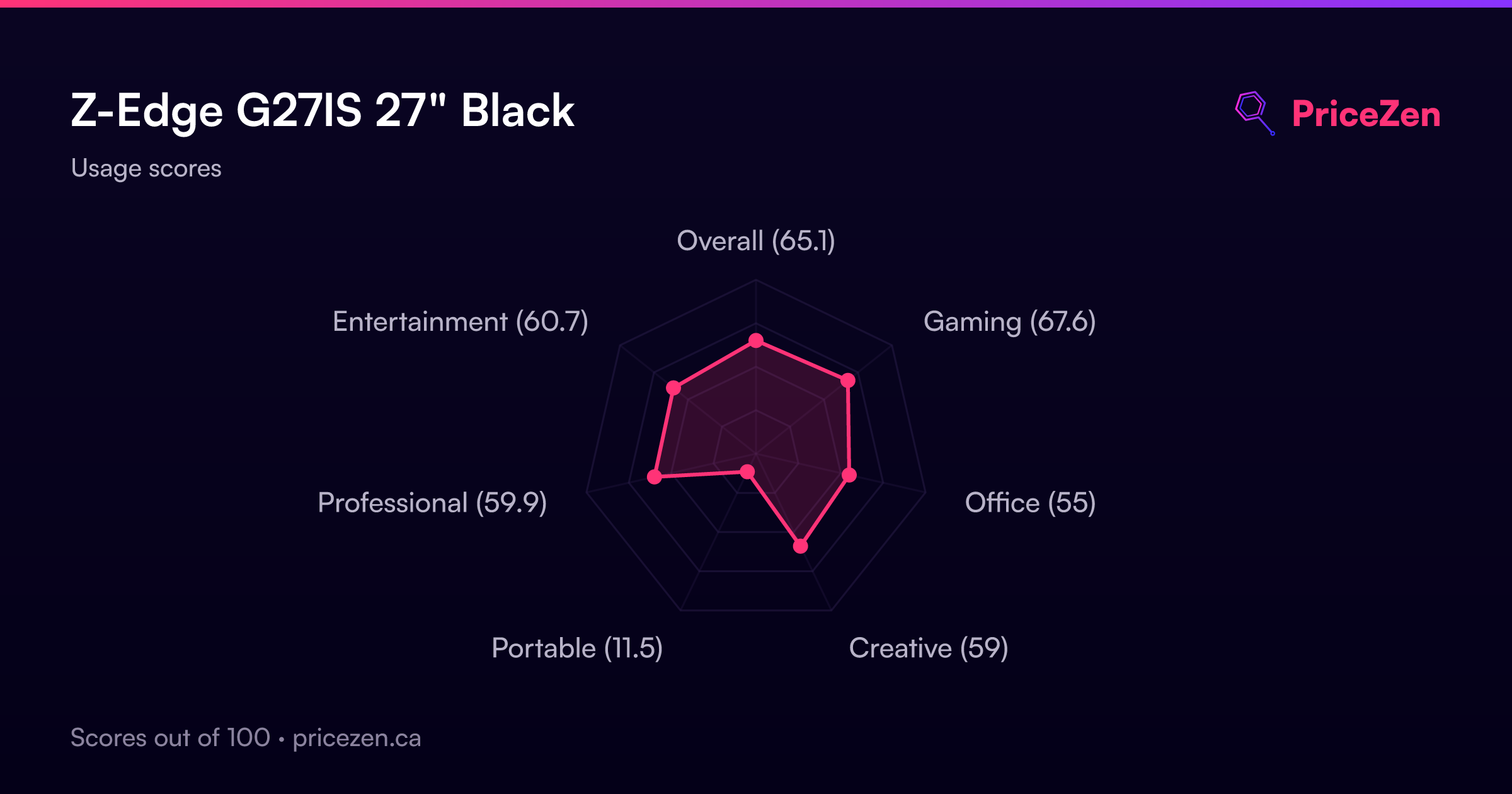
Usage Scores
- Overall65.1
- Gaming67.6
- Office55
- Creative59
- Portable11.5
- Professional59.9
- Entertainment60.7