Dell UltraSharp U2412M 24" Black

Tall enough for pivot, smooth enough for swivel verified Nov 28
53/100 overall score 4.5 average from 2,375 owner ratings
- Screen
- 24"
- Resolution
- 1920 x 1200
- Panel
- IPS
- Refresh
- 60 Hz
- Response time
- 8 ms
Compare prices at 1 store
Cheapest first. New, refurbished and bundled offers are kept apart, so you compare like with like.
| Store | Sold by | Colour and condition | Price | vs lowest | Last checked | Link |
|---|---|---|---|---|---|---|
| New1 offerSingle unit | ||||||
| Out of stock when last checked | ||||||
| Amazon | Not known | Not listed | No price | Out of stock | 2 days ago | Go to store |
 Source: PriceZen, checked Nov 26, 2026
A price counts as current when we checked it in the last 7 days. “Marketplace seller” means a third-party seller on that store, not the store itself.
Price history
No offers of this kind in this period.
Checked that dayNot checked that day, still on offer
Source: PriceZen, checked Feb 10, 2026











Snapshot
The 30-Second Version
The Dell UltraSharp U2412M is a 24-inch 16:10 IPS monitor that's still worth buying for office work if you can find it cheap. The extra vertical space is great for documents and spreadsheets, and the ergonomics are excellent. Just know you're getting a 60Hz panel with no HDMI and limited color gamut, so it's not for gaming or photo editing.
Pros & Cons
Pros
- 16:10 aspect ratio gives you real extra vertical space 91st
- Excellent ergonomics with height, tilt, swivel, and pivot 84th
- Matte anti-glare coating works great in bright rooms 77th
- Accurate colors after calibration
- Rock-solid build quality that outlasts newer budget monitors
Cons
- No HDMI port, which is annoying in 2024
- 60Hz refresh rate rules out serious gaming
- 6-bit panel with dithering, not true 8-bit color
- Minor backlight bleed on many units
- 82% color gamut is too limited for professional photo work
What owners think
The Word on the Street
- Buyers consistently praise the 16:10 aspect ratio for giving them extra vertical space when working with documents and web pages.
- Multiple owners report that the stand is a standout feature, with smooth height adjustment and easy pivot to portrait mode.
- A common complaint is minor backlight bleed around the edges, especially noticeable in dark rooms.
- Several buyers mention the lack of HDMI as a real inconvenience, requiring adapters for modern devices.
How owner sentiment changed over time
ExclusiveBased on when customers actually wrote their reviews - so you can see whether early praise held up.
9 written reviews, May 2013 – Feb 2026: 8 happy, 1 unhappy
Across all 2,375 store ratings: 4.5★. Most owners rate without writing a review. The chart counts the 9 written reviews.
Each dot is one written review, in the month it was written. Happy = 4-5★, mixed = 3★, unhappy = 1-2★.
The proof
Performance
Let's be honest about what this monitor is and isn't. The U2412M runs at 60Hz, which is fine for office work but a non-starter for competitive gaming. The 8ms response time (typical for this panel) means you'll see some ghosting in fast-paced games. If you're looking for a gaming monitor, this isn't it. The ASUS TUF Gaming VG27AQL5A or Acer Nitro XV272U will run circles around it for that use case.
Where the U2412M still holds its own is in everyday productivity. The IPS panel delivers accurate colors after calibration, and the matte anti-glare coating does a great job of cutting reflections in bright offices. The 300 nits brightness is about average for this class, and our color score puts it right in the middle of the pack at the 53rd percentile. The 6-bit panel with dithering means you might notice slight banding in gradients, but for text and spreadsheets, it's a non-issue. The ergonomics are where this thing shines. Height adjust, tilt, swivel, and pivot are all here, and our data puts it in the 92nd percentile for ergonomics. That's genuinely impressive for a monitor this old.
Specifications
Full Specifications
Display
| Size | 24" |
| Resolution | 1920x1200 (Full HD) |
| Panel Type | IPS |
| Aspect Ratio | 16:10 |
| Curved | No |
| Screen Finish | matte |
Performance
| Refresh Rate | 60 Hz |
| Response Time | 8 |
Color & HDR
| Brightness | 300 nits |
| Color Gamut | 82% (typical) |
Connectivity
| HDMI Ports | 0 |
| DisplayPort | 1 |
| USB-C | 0 |
| Thunderbolt | N/A |
| Speakers | No |
Ergonomics
| Height Adjustable | Yes |
| Tilt | Yes |
| Swivel | Yes |
| Pivot | Yes |
| VESA Mount | 100x100 |
Features
| Webcam | No |
| Power | 38 |
| Weight | 7.3 kg / 16.1 lbs |
vs Competition
If you're cross-shopping, the ASUS TUF Gaming VG27AQL5A is a completely different animal. It's a 27-inch 1440p gaming monitor with a high refresh rate, and it costs significantly more. If you need one monitor for both work and gaming, the ASUS is the better pick, but you lose the 16:10 aspect ratio. The Acer Nitro XV272U is similar, a 1440p gaming panel that trades the U2412M's ergonomics and aspect ratio for speed and resolution.
The Lenovo Legion R27qc-30 and Samsung Odyssey LS27BG402ENXGO are both curved gaming monitors, which makes them a weird comparison for an office monitor. They're bigger, faster, and more immersive for games, but they're also more expensive and worse for document work. The Alienware AW3225DM is in a totally different price class. If you're looking at the U2412M, you're probably not cross-shopping a $1,000+ gaming monitor. The honest take: the U2412M's real competition is other used 16:10 monitors, and there aren't many of those around. That scarcity is part of why people still seek this thing out.
| Spec | Dell UltraSharp U2412M 24" | LG UltraGear 45GX950A-B 45" | ASUS ROG Strix XG27UCDMG 27" | Alienware AW-Series AW3425DW 34" | MSI MAG 271QPX QD-OLED E2 27" | Samsung Odyssey G60SD 27" |
|---|---|---|---|---|---|---|
| Screen Size | 24 | 45 | 27 | 34 | 27 | 27 |
| Resolution | 1920 x 1200 | 5120 x 2160 | 3840 x 2160 | 3440 x 1440 | 2560 x 1440 | 2560 x 1440 |
| Panel Type | IPS | OLED | QD-OLED | QD-OLED | QD-OLED | OLED |
| Refresh Rate | 60 | 330 | 240 | 240 | 240 | 360 |
| Response Time Ms | 8 | 0.03 | 0.03 | 0.03 | 0.03 | 0.03 |
| Adaptive Sync | - | FreeSync Premium Pro | FreeSync Premium Pro | FreeSync Premium Pro | FreeSync Premium Pro | FreeSync Premium Pro |
| Hdr | - | DisplayHDR True Black 400 | DisplayHDR True Black 400 | HDR400 | DisplayHDR True Black 400 | HDR10+ |
| Compare | Compare | Compare | Compare | Compare |
| Product | Color | Portability | Display | Feature | User Sentiment | Performance | Connectivity | Social Proof |
|---|---|---|---|---|---|---|---|---|
| Dell UltraSharp U2412M 24" | 41.8 | 57.3 | 46.3 | 21.1 | 76.6 | 6.3 | 53 | 83.9 |
| LG UltraGear 45GX950A-B 45" Compare | 99.4 | 76.5 | 99.7 | 96.3 | 76.6 | 99.4 | 96.9 | 91.9 |
| ASUS ROG Strix XG27UCDMG 27" Compare | 96.5 | 57.3 | 97.7 | 85 | 99.3 | 97.9 | 81 | 98.9 |
| Alienware AW-Series AW3425DW 34" Compare | 98.9 | 73.9 | 84 | 96.3 | 95.7 | 97.9 | 95.4 | 96.8 |
| MSI MAG 271QPX QD-OLED E2 27" Compare | 99.2 | 57.3 | 73.4 | 85 | 95.7 | 97.9 | 81 | 98.9 |
| Samsung Odyssey G60SD 27" Compare | 90.7 | 39.3 | 73.4 | 70 | 95.7 | 99.5 | 87.4 | 91.9 |
Price
Value & Pricing
Here's where things get interesting. The U2412M is listed anywhere from $80 to over $17,000 depending on the vendor, which is frankly absurd. The $17,000 listings are clearly placeholder or scalper nonsense. The real value is in the refurbished market, where you can find these for $80 to $150. At that price, a 16:10 IPS monitor with this level of ergonomics is a steal. Newegg has refurbished units with fast shipping and decent customer service ratings. If you're paying more than $200 for one of these, you're overpaying. For comparison, a new 24-inch 16:10 monitor from a modern brand will run you $250 to $400, and honestly, the U2412M at $100 does 90% of what those do for office work.
Read more
Overview
The Dell UltraSharp U2412M is one of those monitors that refuses to die, and for a specific group of people, that's a good thing. It's a 24-inch IPS display with a 1920 x 1200 resolution, which gives you that extra vertical space you just don't get on standard 1080p panels. If you spend your days in spreadsheets, writing code, or reading long documents, that 16:10 aspect ratio is a genuine productivity boost. It's an older design at this point, but the build quality and ergonomics hold up better than most budget monitors released in the last five years.
Dell aimed this squarely at office and professional use, and our scoring backs that up. It scores a 65.9 out of 100 for office work, which is solid, but only 55.9 for professional color work. The 82% color gamut coverage tells you this isn't a monitor for serious photo or video editing. But for text clarity, document work, and general multitasking, it's still a comfortable screen to sit in front of all day.
One thing to know before you buy: this monitor is old enough that it lacks HDMI. You get DisplayPort, DVI-D, and VGA. That's fine for older desktops and some laptops, but if you're planning to plug in a modern gaming console or a newer MacBook without an adapter, you'll need a dongle. The price range across vendors is wild, from $80 to over $17,000, so you really need to shop around. The $80 refurbished units are where the value is, assuming you get one in good shape.
Common Questions
Q: Is the Dell U2412M good for gaming?
No, the U2412M is not a good gaming monitor. It runs at 60Hz with an 8ms response time, which means you'll see ghosting in fast-paced games. If you want a gaming display, look at something like the ASUS TUF Gaming VG27AQL5A instead.
Q: Does the Dell U2412M have HDMI?
No, the U2412M does not have an HDMI port. It comes with DisplayPort, DVI-D, and VGA. You'll need an adapter if you want to connect a device that only outputs HDMI.
Q: Is the Dell U2412M good for photo editing?
It's okay for casual photo editing, but not for professional color work. The 82% color gamut and 6-bit panel with dithering mean you won't get the color accuracy or smooth gradients that serious photo editors need.
Q: Can the Dell U2412M be mounted on a monitor arm?
Yes, the U2412M has a standard VESA 100x100 mount, so it works with most monitor arms and wall mounts. The included stand is already very adjustable, but a monitor arm frees up desk space.
Who Should Skip This
Skip the U2412M if you're a gamer, a photo or video editor, or anyone who needs modern connectivity. The 60Hz refresh rate and slow response time make it a poor choice for gaming, and the 82% color gamut won't cut it for professional creative work. If you need HDMI without adapters, or you want a monitor that works seamlessly with a modern laptop, look at newer options. The ASUS TUF Gaming VG27AQL5A is a better all-rounder if you can stretch your budget, and the Acer Nitro XV272U is a solid 1440p alternative. If you're set on 16:10, you might need to hunt for a newer Dell UltraSharp model, but expect to pay more.
Verdict
Should you buy the Dell UltraSharp U2412M in 2024? If you can find a clean refurbished unit for under $150 and you want a 16:10 monitor for office work, yes. It's one of the few affordable ways to get that extra vertical space, and the ergonomics are genuinely better than most modern budget monitors. The lack of HDMI is annoying, but a $10 DisplayPort to HDMI adapter solves that for most people.
But if you need a monitor for gaming, color-critical work, or anything involving high refresh rates, look elsewhere. The 60Hz panel, 6-bit color, and limited gamut are real limitations. This is a purpose-built office monitor, and it's still great at that job. Just don't expect it to be something it isn't.
Usage Scores
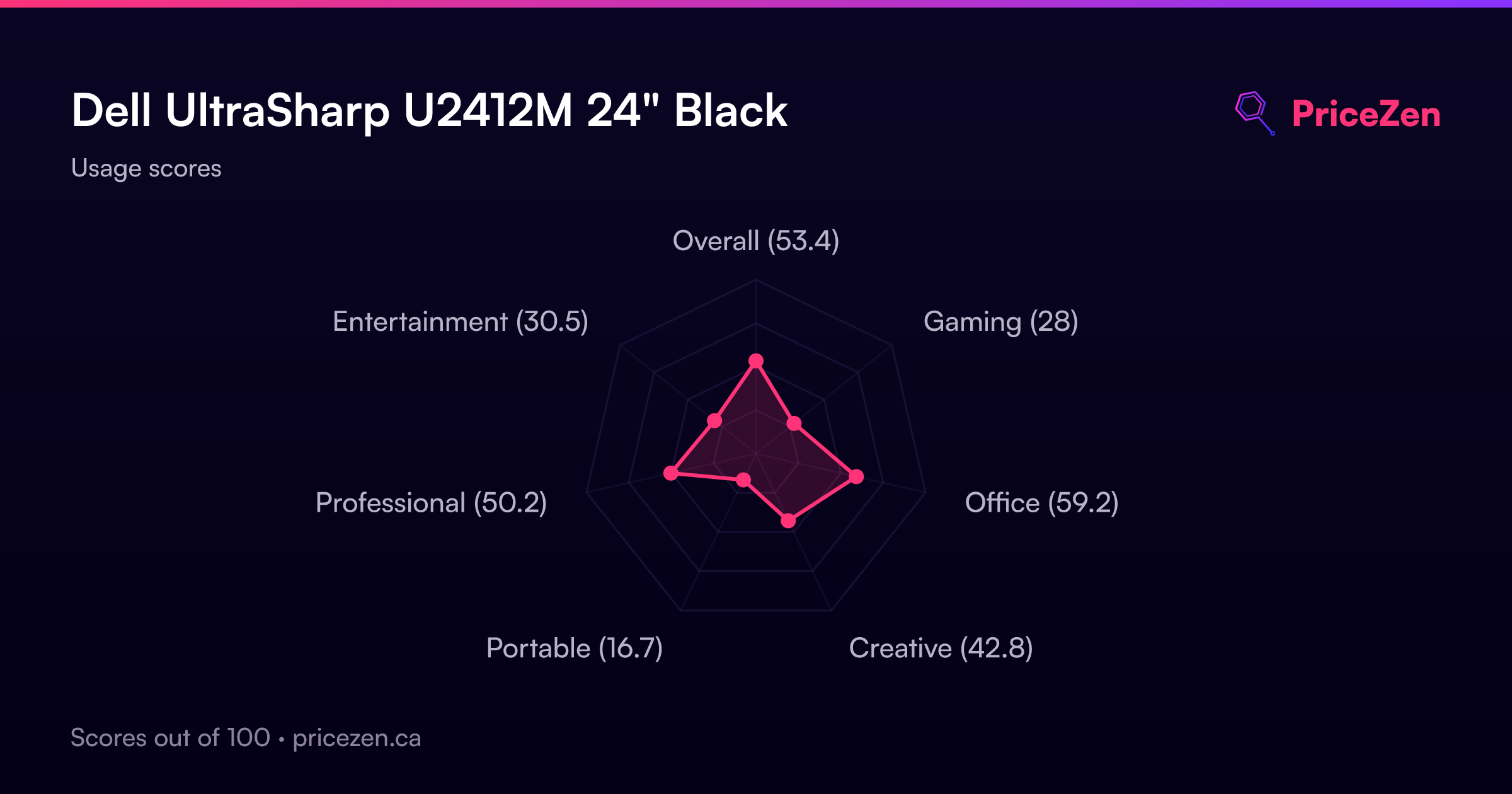
- Overall53.4
- Gaming28
- Office59.2
- Creative42.8
- Portable16.7
- Professional50.2
- Entertainment30.5