Dell Pro P P2426H 24" Black
The 100Hz refresh rate and Adaptive-Sync on a 24-inch IPS panel make daily productivity feel noticeably smoother than standard 60Hz office displays. Its fully adjustable ergonomic stand, integrated USB hub, and three-sided thin bezel design create a clean, comfortable, and efficient multi-monitor workspace. This monitor is best for office administrators and data analysts who spend long hours with spreadsheets and need flicker-free, color-accurate sRGB coverage in a TAA-compliant package.

No current retailer price
Where we saw it before. Check the store for today's price.


Snapshot
The 30-Second Version
The Dell Pro P P2426H is a 24-inch 1080p office monitor with a rare 120Hz refresh rate, full ergonomic adjustments, and USB-C connectivity. Prices have dropped at the low end, so it's a great value near $165 and a terrible one near $2,000. Shop carefully. The bundled soundbar is a nice bonus for desk setups. Buy it for office work, skip it for gaming or color-critical tasks.
Pros & Cons
Pros
- 120Hz refresh rate is rare for an office monitor and makes everything feel smoother 91st
- Ergonomics are excellent with height, tilt, swivel, and pivot adjustments 87th
- USB-C connectivity with a 15W downstream port adds real convenience 79th
- 1500:1 contrast ratio beats many IPS competitors in this class 70th
- Bundled slim soundbar saves desk space and eliminates cable clutter
Cons
- 1080p resolution on a 24-inch panel feels dated when 1440p and 4K options are getting cheaper
- 300 nits brightness is just average and struggles in bright rooms
- 5ms response time is fine for work but not great for fast-paced gaming
- Color performance is middle of the pack at 58th percentile
- Price varies wildly across vendors, from $165 to $2,000, which makes shopping confusing
What owners think
The Word on the Street
How owner sentiment changed over time
ExclusiveBased on when customers actually wrote their reviews - so you can see whether early praise held up.
4 written reviews, Sep 2025 – May 2026: 4 without stars
Across all 4 store ratings: 4.5★. The chart counts the 4 written reviews.
Each dot is one written review, in the month it was written. Happy = 4-5★, mixed = 3★, unhappy = 1-2★.
The proof
Performance
The 120Hz refresh rate is the headline spec here, and it genuinely changes how the monitor feels. Scrolling through long documents or web pages is noticeably smoother than on a 60Hz panel, and even moving your cursor around feels more responsive. The 5ms gray-to-gray response time is fine for office work, though it's not going to impress anyone who's used to a gaming monitor. There's also Adaptive-Sync support, which helps if you occasionally fire up a casual game or want tear-free video playback.
Brightness sits at 300 nits, which is about average for this class of display. In a typical office with controlled lighting, that's plenty. But if your desk is near a big window with direct sunlight, you might find yourself wishing for a bit more punch. The 1500:1 contrast ratio is actually better than many IPS panels in this price range, which helps text look crisp and blacks look a little deeper than you'd expect. Color coverage at 99% sRGB means documents, web pages, and presentations will look accurate without any calibration fuss.
Specifications
Full Specifications
Display
| Size | 24" |
| Resolution | 1920x1080 (Full HD) |
| Panel Type | IPS |
| Aspect Ratio | 16:9 |
| Curved | No |
| Screen Finish | matte |
Performance
| Refresh Rate | 120 Hz |
| Response Time | 5 |
| Adaptive Sync | Adaptive-Sync |
Color & HDR
| Brightness | 300 nits |
| Color Gamut | 99% sRGB |
| Color Depth | 8-bit |
| HDR | HDR10 |
Connectivity
| HDMI Ports | 1 |
| DisplayPort | 1 |
| USB-C | 2 |
| Speakers | No |
| Headphone Jack | No |
Ergonomics
| Height Adjustable | Yes |
| Tilt | Yes |
| Swivel | Yes |
| Pivot | Yes |
| VESA Mount | 100x100 |
Features
| Webcam | No |
| Touchscreen | No |
| PIP/PBP | No |
| Power | 12 |
| Weight | 4.9 kg / 10.7 lbs |
vs Competition
The current crop of top-ranked alternatives looks quite different from the office-focused panels the Dell usually gets stacked against. The LG UltraGear 27G810A-B 27", ASUS ROG Strix XG27JCG 27", Gigabyte M Series OLED MO27Q28G 27", and HP OMEN 27qs G2 27" are all 27-inch displays aimed at people who care about motion and image quality first. Our scoring model, built from specs and external benchmarks, ranks them ahead of the Dell, and that's not surprising given what they're built for.
What that means in practice is a trade-off rather than a straight upgrade. The Dell counters with a 120Hz refresh rate on a compact 24-inch 1080p IPS panel, a 1500:1 static contrast ratio, 99% sRGB coverage, and a stand that adjusts every which way. Its color performance sits at the 58th percentile in our data, which is middling, and its 5ms gray-to-gray response time is tuned for documents rather than fast action. If your day is email, spreadsheets, and video calls, none of those gaming-oriented panels will make your work meaningfully better, and the Dell's USB-C ports and bundled soundbar are the more useful extras.
If you do split your time between work and play, though, any of those four is the stronger buy, and our ranking backs that up. The Dell wins on footprint, ergonomics, and price at the low end of its range. It loses on raw performance, and it isn't pretending otherwise.
| Spec | Dell Pro P P2426H 24" | ASUS ROG Strix XG27AQDPG 27" | Alienware AW-Series AW3425DW 34" | MSI MAG 271QPX QD-OLED E2 27" | Samsung Odyssey G60SD 27" | LG UltraGear 32GX850A-B 32" |
|---|---|---|---|---|---|---|
| Screen Size | 24 | 27 | 34 | 27 | 27 | 32 |
| Resolution | 1920 x 1080 | 2560 x 1440 | 3440 x 1440 | 2560 x 1440 | 2560 x 1440 | 3840 x 2160 |
| Panel Type | IPS | QD-OLED | QD-OLED | QD-OLED | OLED | OLED |
| Refresh Rate | 120 | 500 | 240 | 240 | 360 | 165 |
| Response Time Ms | 5 | 0.03 | 0.03 | 0.03 | 0.03 | 0.03 |
| Adaptive Sync | Adaptive-Sync | G-Sync | FreeSync Premium Pro | FreeSync Premium Pro | FreeSync Premium Pro | FreeSync Premium Pro |
| Hdr | HDR10 | HDR500 | HDR400 | DisplayHDR True Black 400 | HDR10+ | DisplayHDR True Black 400 |
| Compare | Compare | Compare | Compare | Compare |
| Product | Color | Portability | Display | Feature | Performance | Connectivity | Social Proof |
|---|---|---|---|---|---|---|---|
| Dell Pro P P2426H 24" | 67.7 | 79.4 | 37.5 | 70.1 | 56.1 | 87.4 | 16.8 |
| ASUS ROG Strix XG27AQDPG 27" Compare | 99.2 | 57.3 | 73.4 | 70.1 | 99.9 | 93 | 99.8 |
| Alienware AW-Series AW3425DW 34" Compare | 98.9 | 73.9 | 84.1 | 96.3 | 97.9 | 95.3 | 96.8 |
| MSI MAG 271QPX QD-OLED E2 27" Compare | 99.2 | 57.3 | 73.4 | 85 | 97.9 | 81 | 98.9 |
| Samsung Odyssey G60SD 27" Compare | 90.7 | 39.3 | 73.4 | 70.1 | 99.5 | 87.4 | 92 |
| LG UltraGear 32GX850A-B 32" Compare | 79.4 | 49.3 | 99 | 70.1 | 96.2 | 98.2 | 74.8 |
Price
Value & Pricing
Here's where things get interesting. The Dell Pro P P2426H now shows up in our price tracking anywhere from $165 all the way up to $2,000 across six US listings. That low end has come down since we last looked at it, and it changes the math in the Dell's favor. At $165 you're getting a 120Hz office panel with USB-C, full ergonomic adjustments, and a bundled slim soundbar, which is a lot of practical hardware for the money. We track prices over time, partly through our community browser extension, so we can see that dip rather than guess at it.
The spread itself is still the thing to watch. A gap that wide usually means different configurations or bundles are being lumped together under one product name, possibly including the soundbar kit or multi-unit packs. If you're looking at a listing near the $2,000 end, stop and reconsider, because that kind of money buys a completely different class of display. Our ranking puts the Dell well behind the panels sitting at that price point for color, contrast, and gaming performance. So shop carefully, compare what's actually in the box, and aim for the bottom of that range. Down there, this is one of the better value picks in its category.
Price history
Read more
Overview
The Dell Pro P P2426H is one of those monitors that doesn't try to be flashy. It's a 24-inch 1080p IPS panel aimed squarely at office desks, cubicles, and home setups where you need something reliable that won't break the bank or your eyes. Dell has been making these Pro-series displays for ages, and this one comes with a twist: a 120Hz refresh rate, which is unusual for a productivity monitor. Most office panels sit at 60Hz or 75Hz, so seeing 120Hz here is a nice surprise for smoother scrolling and less eye strain during long workdays.
The kit we're looking at also bundles Dell's slim soundbar, which is a thoughtful addition if your desk is tight on space or you just don't want to deal with separate speakers. The monitor itself has a 1500:1 static contrast ratio, 300 nits of brightness, and covers 99% of the sRGB color space. Those are solid numbers for office work, spreadsheets, and the occasional YouTube video. It's not going to wow you with HDR or deep blacks, but that's not really the point.
Who's this for? Someone who spends eight hours a day in front of a screen and wants a comfortable, adjustable display with modern connectivity. The USB-C ports are a big deal here, especially the 15W downstream port for charging accessories or keeping a phone topped up. If you're a gamer or a creative professional, you'll probably want to look elsewhere. But for the daily grind, this thing checks a lot of boxes.
Common Questions
Q: Is the 120Hz refresh rate actually useful for office work?
Yes, more than you might think. The higher refresh rate makes scrolling through documents, moving windows, and even just moving your cursor feel noticeably smoother. It also reduces eye strain during long sessions because there's less motion blur. You won't get the same benefit as a gamer chasing high frame rates, but for daily productivity it's a genuine quality-of-life upgrade over a 60Hz panel.
Q: Can this monitor charge my laptop over USB-C?
The USB-C ports on this monitor include a 15W downstream port, which is meant for charging accessories like phones or powering small peripherals. It's not designed to deliver enough power to charge a laptop. If you need a monitor that can power your laptop over a single cable, you'll want to look for something with USB-C Power Delivery of 65W or higher, which this model doesn't offer.
Q: How does the bundled soundbar compare to built-in monitor speakers?
The slim soundbar is a step up from the tiny built-in speakers most monitors have. It attaches cleanly to the bottom of the display and saves desk space compared to separate speakers. For video calls, YouTube, and casual music, it's perfectly adequate. If you care about audio quality for music or movies, you'll still want dedicated speakers or headphones, but for office use it's a nice convenience.
Q: Is this monitor good for photo editing or design work?
It's okay but not ideal. The 99% sRGB coverage means colors will look accurate for web content and basic design work, but there's no wide gamut support for DCI-P3 or Adobe RGB. The 1080p resolution also limits how much detail you can see when working with high-resolution images. If color accuracy is critical, you'd be better off with a monitor that covers 95% or more of DCI-P3 and offers higher resolution.
Who Should Skip This
Gamers should skip this one. The 5ms response time and lack of high refresh rate gaming features mean it won't keep up with fast-paced titles, and the gaming-focused panels in our comparison will serve you far better. Creative professionals who need accurate color should also look elsewhere. The 99% sRGB coverage is fine for office documents, but it won't cut it for print work or video editing where DCI-P3 or Adobe RGB coverage matters, and the Dell's color performance lands at the 58th percentile in our data.
If you're someone who wants maximum screen real estate for multitasking, a larger 1440p or 4K monitor will give you far more usable space. The LG UltraGear 27G810A-B 27" and HP OMEN 27qs G2 27" both rank above the Dell in our scoring, and the ASUS ROG Strix XG27JCG 27" and Gigabyte M Series OLED MO27Q28G 27" are the picks if image quality and gaming performance matter more than desk practicality. The Dell is best for people who prioritize ergonomics, connectivity, and a smooth office experience over raw specs.
Verdict
For a pure office workhorse, the Dell Pro P P2426H is a solid pick, and the recent drop at the low end of its price range makes it easier to recommend. Near $165 it's a genuinely good buy. The 120Hz refresh rate makes daily use feel more pleasant than a typical 60Hz office monitor, and the ergonomic stand means you can dial in a comfortable viewing position without buying extra accessories. The USB-C ports are genuinely useful if you have a modern laptop, and the bundled soundbar is a nice touch for video calls.
But if you're a creative professional who needs accurate color or a gamer who wants fast response times, this isn't your monitor. The color performance is average, the resolution is starting to feel dated, and the 5ms response time won't keep up with fast-paced games. In those cases, the higher-ranked 27-inch options in our comparison are worth the stretch. For everyone else, the Dell gets the job done without drama, as long as you avoid the listings at the top of that price spread.
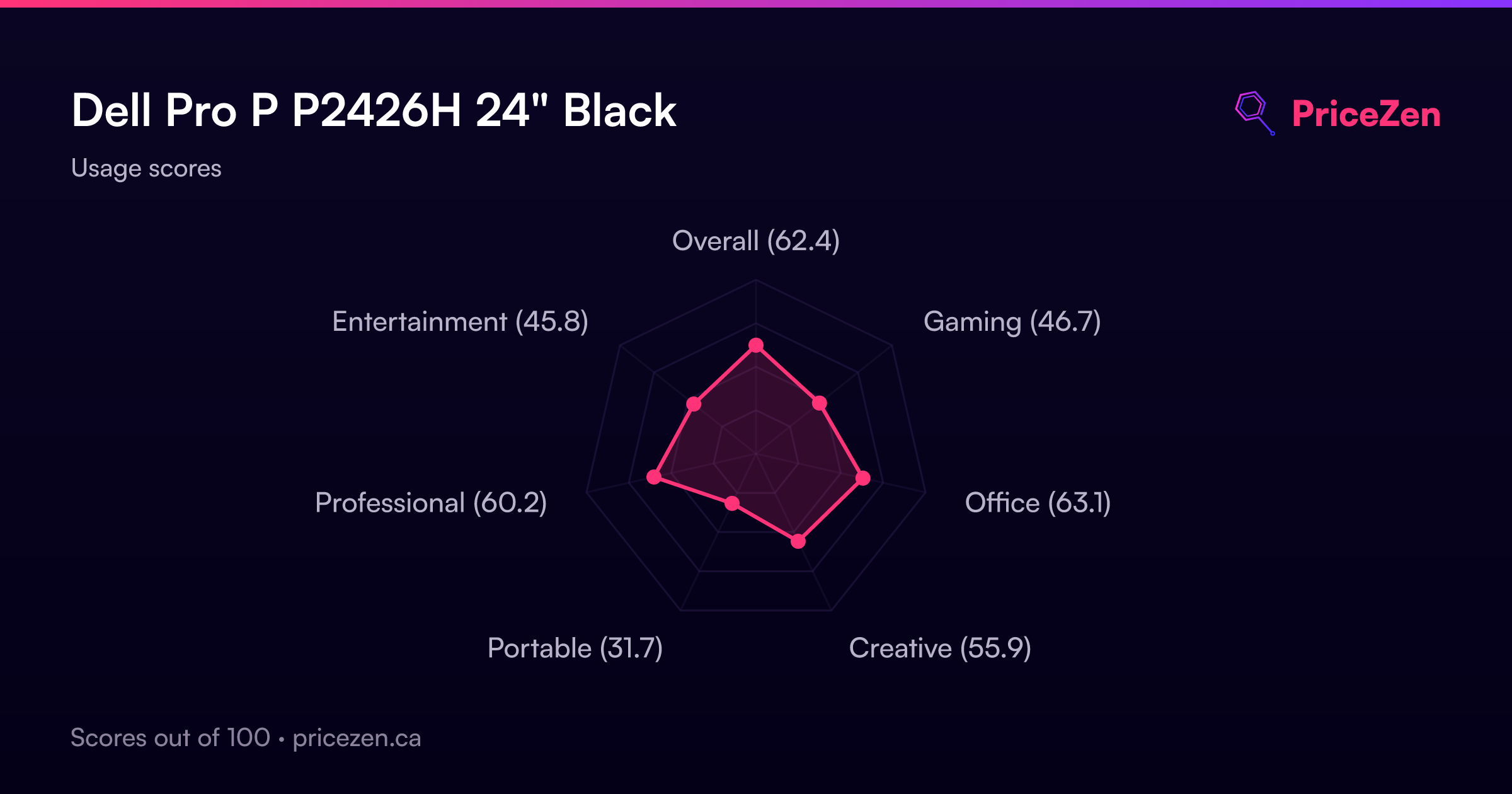
Usage Scores
- Overall62.4
- Gaming46.7
- Office63.1
- Creative55.9
- Portable31.7
- Professional60.2
- Entertainment45.8