Dell UltraSharp U5226KW 52" Platinum Silver 2026
The 52.3-inch 6016 x 2520 curved IPS Black panel delivers a bezel-free 21:9 workspace with DisplayHDR 600 contrast, ideal for multitasking across multiple windows. Thunderbolt 5 docking with 140W power delivery and Smart KVM let you control two systems with one keyboard and mouse, while RJ45 Ethernet keeps wired networking stable. Best for office professionals managing data-heavy workflows who need a single-cable docking solution and a vast, high-resolution canvas.

No current retailer price
Snapshot
The 30-Second Version
A 52-inch 6K curved productivity monster that replaces your entire multi-monitor setup. It's expensive and 60Hz, but for serious work, it's the best single-panel solution we've seen.
Pros & Cons
Pros
- Massive 52.3-inch 6K canvas kills the multi-monitor bezel gap for good 100th
- Thunderbolt 5 with 140W PD means one cable runs your entire desk 91st
- IPS Black panel delivers noticeably better contrast than standard IPS 67th
- Smart KVM lets you control two PCs with one keyboard and mouse
Cons
- 60Hz refresh rate is a non-starter for gamers
- At $3,299, it costs more than most people's entire setup
- DisplayHDR 600 is fine, not spectacular for media consumption
- You need a serious desk. This thing is huge
What owners think
The Word on the Street
The proof
Performance
The 60Hz refresh rate is the headline spec that'll make gamers scroll past, but for office work, it's perfectly fine. What surprised us is how well the IPS Black panel handles contrast. Dell's IPS Black tech genuinely delivers deeper blacks than typical IPS panels, which makes text pop and dark mode actually look good. The DisplayHDR 600 certification means brightness is solid for a productivity display, though it's not going to blow anyone away for HDR movie watching. The real performance story here is the Thunderbolt 5 docking with 140W power delivery. One cable handles video, data, ethernet, and charges your laptop. That's the kind of quality-of-life upgrade you feel every single day.
Specifications
Full Specifications
Display
| Size | 52" |
| Resolution | 6016x2520 |
| Panel Type | IPS |
| Aspect Ratio | 21:9 |
| Curved | Yes |
Performance
| Refresh Rate | 60 Hz |
Color & HDR
| HDR | HDR600 |
| HDR Support | HDR600 |
Connectivity
| Thunderbolt | Thunderbolt 5 |
| Speakers | Yes |
Ergonomics
| Height Adjustable | Yes |
| Tilt | Yes |
| Swivel | Yes |
vs Competition
The obvious comparison is the Apple Studio Display, but that's a 27-inch 5K panel. You'd need two of those to match the Dell's real estate, and you'd still have a bezel down the middle. The LG UltraGear 45GX950A-B is a curved ultrawide too, but it's built for gaming with a high refresh rate and OLED panel. If you want one monitor for work and play, the LG is more flexible. But for pure productivity, the Dell's 6K resolution and Thunderbolt 5 docking put it in a class of its own. The ASUS ROG Strix XG27UCDMG and MSI QD-OLED options are gaming monitors first, and they're not even playing the same game as this Dell.
| Spec | Dell UltraSharp U5226KW 52" | ASUS ROG Strix XG27UCDMG 27" | LG UltraGear 45GX950A-B 45" | Alienware AW-Series AW3425DW 34" | MSI MAG 271QPX QD-OLED E2 27" | Samsung Odyssey G80SH 32" |
|---|---|---|---|---|---|---|
| Screen Size | 52 | 27 | 45 | 34 | 27 | 32 |
| Resolution | 6016 x 2520 | 3840 x 2160 | 5120 x 2160 | 3440 x 1440 | 2560 x 1440 | 3840 x 2160 |
| Panel Type | IPS | OLED | OLED | QD-OLED | QD-OLED | OLED |
| Refresh Rate | 60 | 240 | 330 | 240 | 240 | 240 |
| Response Time Ms | - | 0.029999999329447746 | 0.029999999329447746 | 0.029999999329447746 | 0.029999999329447746 | 0.029999999329447746 |
| Adaptive Sync | - | FreeSync Premium Pro | FreeSync Premium Pro | FreeSync Premium Pro | FreeSync Premium Pro | FreeSync Premium Pro |
| Hdr | HDR600 | DisplayHDR True Black 400 | DisplayHDR True Black 400 | HDR400 | DisplayHDR True Black 400 | HDR10+ |
| Compare | Compare | Compare | Compare | Compare |
| Product | Color | Portability | Display | Feature | Ergonomic | Performance | Connectivity |
|---|---|---|---|---|---|---|---|
| Dell UltraSharp U5226KW 52" | 31.3 | 43.4 | 99.8 | 90.8 | 67 | 22.4 | 38.9 |
| ASUS ROG Strix XG27UCDMG 27" Compare | 96.5 | 57.5 | 97.7 | 85.1 | 90.8 | 97.9 | 81.2 |
| LG UltraGear 45GX950A-B 45" Compare | 99.4 | 76.6 | 99.7 | 96.3 | 90.8 | 99.4 | 96.9 |
| Alienware AW-Series AW3425DW 34" Compare | 98.9 | 74 | 84.1 | 96.3 | 90.8 | 97.9 | 95.4 |
| MSI MAG 271QPX QD-OLED E2 27" Compare | 99.2 | 57.5 | 73.5 | 85.1 | 90.8 | 97.9 | 81.2 |
| Samsung Odyssey G80SH 32" Compare | 94.4 | 49.5 | 99 | 70.2 | 90.8 | 97.9 | 81.2 |
Price
Value & Pricing
At $3,299, this is not an impulse buy. But if you're a professional who currently runs two or three monitors and a docking station, the math starts to make sense. You're consolidating hardware, eliminating bezels, and getting a cleaner setup. The Thunderbolt 5 docking alone replaces a $200-300 dock. It's a premium price for a premium tool, and for the right buyer, it earns its keep.
Read more
Overview
The Dell UltraSharp U5226KW is a statement piece. It's a 52.3-inch curved 6K monster that basically replaces a multi-monitor setup with one seamless panel. The one thing to know? This is a productivity beast built for professionals who live in spreadsheets, code, and timelines, not for gamers chasing high refresh rates. At 60Hz, it's not pretending to be anything else. The 6016 x 2520 resolution gives you a ridiculous amount of horizontal real estate, and the 21:9 aspect ratio means no bezels breaking up your workflow. It's expensive, sure, but if you're the target buyer, you already know a tool this size costs real money.
Common Questions
Q: Is this monitor good for gaming?
Nope. At 60Hz, it's built for work, not play. If you want a curved ultrawide for gaming, check out the LG UltraGear 45GX950A-B instead.
Q: Can this replace my dual monitor setup?
Easily. The 21:9 aspect ratio at 6016 x 2520 gives you the equivalent of two 27-inch monitors side by side, minus the bezel in the middle. Plus the Smart KVM means you can run two computers on it at once.
Q: Does the Thunderbolt 5 port charge my laptop?
Yes, and it's one of the best parts. It delivers up to 140W of power delivery, so it'll charge most laptops while handling video, data, and ethernet through the same cable.
Who Should Skip This
If you're a gamer looking for a big curved display, this isn't it. The 60Hz refresh rate will feel sluggish the second you load up anything faster than a spreadsheet. Go grab the LG UltraGear 45GX950A-B or a high-refresh OLED instead. Also, if you don't have a deep desk or a serious monitor arm, this 52-inch panel will eat your workspace alive.
Verdict
The Dell UltraSharp U5226KW is the monitor you buy when you're done messing around with multi-monitor arms and cable spaghetti. It's a single, massive, gorgeous canvas that makes work feel less like work. The 60Hz cap and $3,299 price tag mean it's not for everyone, but for the professional who spends eight hours a day in front of a screen, this is a legitimate endgame display. Buy it if you can afford it and you value your desk setup as much as your actual computer.
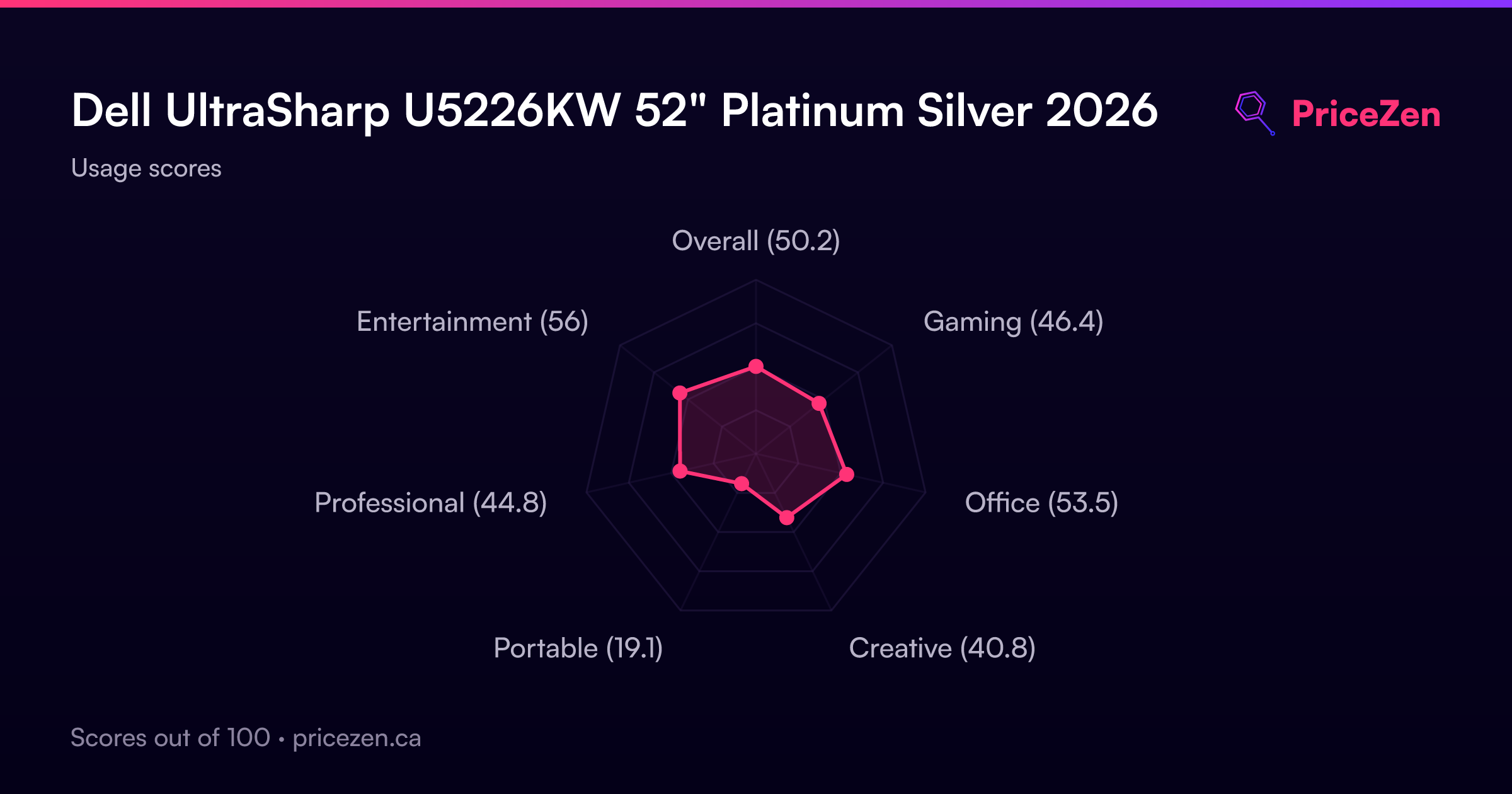
Usage Scores
- Overall50.2
- Gaming46.4
- Office53.5
- Creative40.8
- Portable19.1
- Professional44.8
- Entertainment56