Dell P2725H 27" Black 2024
The 100Hz refresh rate and ComfortView Plus low blue light technology set this 27-inch IPS panel apart for all-day office use, delivering smoother motion than standard 60Hz displays. Its integrated USB-C hub with 3 additional USB-A ports and a fully adjustable stand with pivot function provide a clutter-free, ergonomic workspace. This monitor is best for office workers and data analysts who need a flicker-free, easy-to-read display for extended productivity sessions.












Snapshot
The 30-Second Version
The Dell P2725H is a dependable 27-inch 1080p office monitor with a standout 100Hz refresh rate and an excellent adjustable stand. Connectivity is a strong point, with USB-C, HDMI, DisplayPort, and even VGA. Just make sure you're paying the low end of its wildly variable price range, ideally around $319 USD. It's a great office workhorse, but creative pros and gamers should look elsewhere.
Pros & Cons
Pros
- 100Hz refresh rate makes everyday scrolling feel smoother than typical 60Hz office monitors 92nd
- Excellent stand with height, tilt, swivel, and pivot adjustments 91st
- Strong connectivity including USB-C and even legacy VGA 91st
- IPS panel offers good viewing angles for shared or multi-monitor setups 74th
- High customer satisfaction with a 4.6/5 rating across 339 reviews
Cons
- 1080p resolution on a 27-inch panel means text isn't as sharp as higher-res options
- 300 nits brightness is just average and may struggle in bright rooms
- Color performance is middle of the pack, not suitable for color-critical work
- Feature set is thin compared to similarly priced competitors
- Price varies wildly across vendors, from $319 to $1,900 USD
What owners think
The Word on the Street
How owner sentiment changed over time
ExclusiveBased on when customers actually wrote their reviews - so you can see whether early praise held up.
Happy owners: 100% lately, 100% in Jul 2022 – Mar 2025
Too few reviews to call that a change.
Across all 343 store ratings: 4.6★. Most owners rate without writing a review. The chart counts the 32 written reviews with stars and their own date.
1 written review without stars is left out of the trend.
Show the numbers
| Period | Reviews | Happy | Mixed | Unhappy | Happy share |
|---|---|---|---|---|---|
| Jul 2022 – Mar 2025 | 10 | 10 | 0 | 0 | 100% |
| Apr – Dec 2025 | 11 | 10 | 0 | 1 | 91% |
| Jan – May 2026 | 11 | 11 | 0 | 0 | 100% |
- Apr – Jun 20263 of 3 happy
Buyers in this period praised the monitor for its crisp, clear display, easy setup, solid quality, and good value for the price.
- Crisp and clear display quality mentioned in all reviews.
- Easy connection and setup highlighted in one review.
- Good value for the price noted in one review.
- Solid build quality and appropriate size appreciated.
- Jan – Mar 20268 of 8 happy
Buyers praised the monitor for office use, color accuracy, and easy setup. Ports were seen as useful, though one wished for DVI instead of VGA.
- Great for office use, looks nice on desk, easy to set up, good picture quality.
- Color quality matches well between units, satisfying picky users.
- Easy to assemble and works well, with useful ports (DisplayPort, HDMI, VGA, USB).
- Port selection is useful but missing DVI; VGA less preferred.
- Jan – Mar 20253 of 3 happy
Buyers in this period praised the Dell P2725H for its eye comfort, display quality, and energy efficiency, with one user upgrading from dual 24-inch monitors and buying a second unit. Overall, reviews were highly positive.
- Users appreciate the monitor's eye comfort features, which help reduce strain during extended use.
- The display quality is described as stunning, with excellent performance for both intensive and everyday tasks.
- The monitor is noted for its energy efficiency, contributing to its value.
- Users find the monitor a great fit for dual setups, with one buying a second unit to recreate their dual-monitor configuration.
Each column joins calendar quarters until it holds at least 10 reviews with stars and their own date. Happy = 4-5★, mixed = 3★, unhappy = 1-2★. Period summaries are in English.
The proof
Performance
The 100Hz refresh rate is the headline spec here, and it's a genuine step up from the 60Hz panels most office workers have been staring at for a decade. Scrolling through long documents feels noticeably smoother, and the 5ms GtG response time is fine for productivity work. You won't confuse this with a 240Hz gaming monitor, but for the target audience, it's more than enough.
Brightness comes in at 300 nits, which is about average for this class. In a typical office with fluorescent lighting, that's perfectly usable. If you're sitting next to a big sunny window, you might find yourself wishing for a bit more punch. Color coverage is 99% sRGB on an 8-bit panel, which lands it right in the middle of the pack for color performance. It's fine for documents and web browsing, but anyone doing serious photo or video work will want to look elsewhere.
Specifications
Full Specifications
Display
| Size | 27" |
| Resolution | 1920x1080 (Full HD) |
| Panel Type | IPS |
| Aspect Ratio | 16:9 |
| Curved | No |
| Screen Finish | matte |
Performance
| Refresh Rate | 100 Hz |
| Response Time | 5 |
Color & HDR
| Brightness | 300 nits |
| Color Gamut | 99% sRGB |
| Color Depth | 8-bit |
Connectivity
| HDMI Ports | 1 |
| DisplayPort | 1 |
| USB-C | 1 |
| Thunderbolt | N/A |
| Speakers | No |
| Headphone Jack | No |
Ergonomics
| Height Adjustable | Yes |
| Tilt | Yes |
| Swivel | Yes |
| Pivot | Yes |
| VESA Mount | 100x100 |
Features
| Webcam | No |
| Touchscreen | No |
| PIP/PBP | No |
| Power | 74 |
| Weight | 4.0 kg / 8.9 lbs |
vs Competition
The competitors listed in our database are mostly gaming-focused OLED and high-refresh displays like the ASUS ROG Strix XG27AQDPG and the MSI MAG 271QPX QD-OLED E2. Those are completely different animals, with 1440p or 4K resolutions, much higher refresh rates, and OLED panels that cost significantly more. Comparing the P2725H to those is like comparing a reliable sedan to a sports car. The Dell isn't trying to compete on raw performance, and it shouldn't be judged that way.
Where the P2725H actually competes is against other 27-inch 1080p office monitors from the usual suspects. Against those, it holds up well thanks to the 100Hz refresh rate and the excellent stand. The LG 27BA45U-B mentioned in the retailer notes is a 4K alternative that would give you much sharper text, but you'd likely pay more for it. The trade-off is simple: the Dell gives you a smoother refresh rate and better ergonomics at a lower price, while higher-resolution options give you more screen real estate and sharper text at the cost of some smoothness and usually a higher price tag.
| Spec | Dell P2725H 27" | ASUS ROG Strix XG27AQDPG 27" | MSI MAG 271QPX QD-OLED E2 27" | Samsung Odyssey G60SD 27" | LG UltraGear 27G810A-B 27" | BenQ MA Series MA270U 27" |
|---|---|---|---|---|---|---|
| Screen Size | 27 | 27 | 27 | 27 | 27 | 27 |
| Resolution | 1920 x 1080 | 2560 x 1440 | 2560 x 1440 | 2560 x 1440 | 3840 x 2160 | 3840 x 2160 |
| Panel Type | IPS | QD-OLED | QD-OLED | OLED | IPS | IPS |
| Refresh Rate | 100 | 500 | 240 | 360 | 180 | 60 |
| Response Time Ms | 5 | 0.029999999329447746 | 0.029999999329447746 | 0.029999999329447746 | 1 | 5 |
| Adaptive Sync | - | G-Sync | FreeSync Premium Pro | FreeSync Premium Pro | FreeSync Premium | - |
| Hdr | - | HDR500 | DisplayHDR True Black 400 | HDR10+ | HDR400 | HDR10 |
| Compare | Compare | Compare | Compare | Compare |
| Product | Color | Portability | Display | Feature | User Sentiment | Performance | Connectivity | Social Proof |
|---|---|---|---|---|---|---|---|---|
| Dell P2725H 27" | 53.7 | 74.1 | 50.7 | 21.3 | 61 | 47.9 | 91.1 | 92 |
| ASUS ROG Strix XG27AQDPG 27" Compare | 99.2 | 57.6 | 73.4 | 70.2 | 95.7 | 99.9 | 93.2 | 99.8 |
| MSI MAG 271QPX QD-OLED E2 27" Compare | 99.2 | 57.6 | 73.4 | 85 | 95.7 | 97.9 | 81.2 | 98.9 |
| Samsung Odyssey G60SD 27" Compare | 90.8 | 39.7 | 73.4 | 70.2 | 95.7 | 99.5 | 87.6 | 92 |
| LG UltraGear 27G810A-B 27" Compare | 93.8 | 68.1 | 87.1 | 70.2 | 76.4 | 81.7 | 98.2 | 67.2 |
| BenQ MA Series MA270U 27" Compare | 92.4 | 84 | 87.1 | 70.2 | 95.7 | 22.3 | 97.8 | 84 |
Price
Value & Pricing
Here's where things get a little weird. The Dell P2725H is listed at prices ranging from $319 to $1,900 USD across just two US listings. That's a $1,581 spread, which is frankly absurd for a 1080p office monitor. The CAD listings are even wilder, spanning $246 to $2,664. If you're paying anywhere near the top of that range, you're getting fleeced. At the lower end, around $319 USD or $246 CAD, this is a reasonable deal for a well-built office monitor with a good stand and solid connectivity.
The best deal in the US appears to be at the lower end of that range, and honestly, that's the only price point where this monitor makes sense. Once you start creeping toward $500 or $600, you're in territory where 1440p and even 4K office monitors start showing up, and those will give you noticeably sharper text and more screen real estate. The value proposition here is entirely dependent on finding it at the budget end of its price range.
Newegg 1 offer From CA$270
Amazon 1 offer From CA$350
Price history
Read more
Overview
The Dell P2725H is a 27-inch 1080p IPS monitor aimed squarely at offices, cubicles, and anyone who needs a dependable screen for spreadsheets, email, and the occasional YouTube break. It's not trying to be a gaming monitor or a color-critical display, and that's fine. What it does try to do is be a comfortable, well-connected, no-drama daily driver, and for the most part it nails that brief.
Dell has been making office monitors forever, and the P-series has always been their workhorse line. This one adds a 100Hz refresh rate to the standard 1080p formula, which is a nice little upgrade over the 60Hz panels most offices are still stuck with. Even just moving your cursor around feels smoother, and if you sneak in a lunchtime game of something light, it won't feel like a slideshow.
It also comes with a surprisingly good stand for the price. Height adjust, tilt, swivel, pivot, and VESA mounting are all here. That's the kind of ergonomic flexibility that usually gets cut first on budget monitors, so credit to Dell for keeping it. The connectivity story is solid too, with HDMI, DisplayPort, USB-C, and even VGA for that one ancient office PC nobody wants to retire.
Common Questions
Q: Is 1080p sharp enough on a 27-inch monitor?
It depends on what you're used to and how close you sit. At 27 inches, 1080p works out to about 82 pixels per inch, which is fine for general office work but noticeably less sharp than a 1440p or 4K display. If you do a lot of reading or work with small text, you might notice slightly soft edges. For spreadsheets, email, and web browsing at a normal viewing distance, most people find it perfectly acceptable.
Q: Can I use this monitor with a Mac?
Yes, and several reviewers specifically mention using it as a replacement for Apple displays. The USB-C connection makes it easy to plug into modern MacBooks, and the HDMI port works with older Macs or adapters. Just keep in mind that macOS handles 1080p scaling differently than Windows, so text rendering may look a bit different than you're used to on a Retina display.
Q: Does the 100Hz refresh rate make a difference for office work?
It's subtle but noticeable. Moving your cursor, scrolling through documents, and switching between windows all feel smoother than on a standard 60Hz office monitor. It's not a night-and-day difference like going from 60Hz to 144Hz on a gaming monitor, but once you've used 100Hz for a while, going back to 60Hz feels a little sluggish.
Q: Is this monitor good for gaming?
For casual or light gaming, it's fine. The 100Hz refresh rate and 5ms response time are better than a typical office monitor, and the IPS panel gives you good colors and viewing angles. But serious gamers will want something with a higher refresh rate, faster response time, and adaptive sync support. This is an office monitor first, and it shows in the feature set.
Who Should Skip This
If you're a photographer, video editor, or graphic designer, skip this one. The color performance is middle of the pack, and 1080p on a 27-inch panel doesn't give you the pixel density you need for detailed work. Look at a 1440p or 4K IPS panel with better color coverage instead. The LG 27BA45U-B mentioned in the retailer notes is a 4K alternative worth considering if sharpness matters more than refresh rate.
Gamers should also look elsewhere. The 100Hz refresh rate is nice for office work, but it's well below what modern gaming monitors offer, and there's no mention of adaptive sync or other gaming features. If you want a smooth gaming experience, the ASUS ROG Strix XG27AQDPG or MSI MAG 271QPX QD-OLED E2 are in a completely different league, though they'll cost you significantly more.
Verdict
For a standard office deployment, the Dell P2725H is a solid choice. The 100Hz refresh rate is a nice quality-of-life upgrade, the stand is genuinely good, and the connectivity options mean it'll work with just about any PC you throw at it. If you're outfitting a whole office or just want a dependable second monitor for your home desk, this will do the job without complaint.
But if you're a creative professional, a serious gamer, or someone who stares at text all day and wants maximum sharpness, this isn't your monitor. The 1080p resolution on a 27-inch panel is the biggest limitation. At that size, individual pixels are visible if you look closely, and text isn't as crisp as it would be on a 1440p or 4K display. For those users, stepping up to a higher-resolution panel is worth the extra money.
Usage Scores
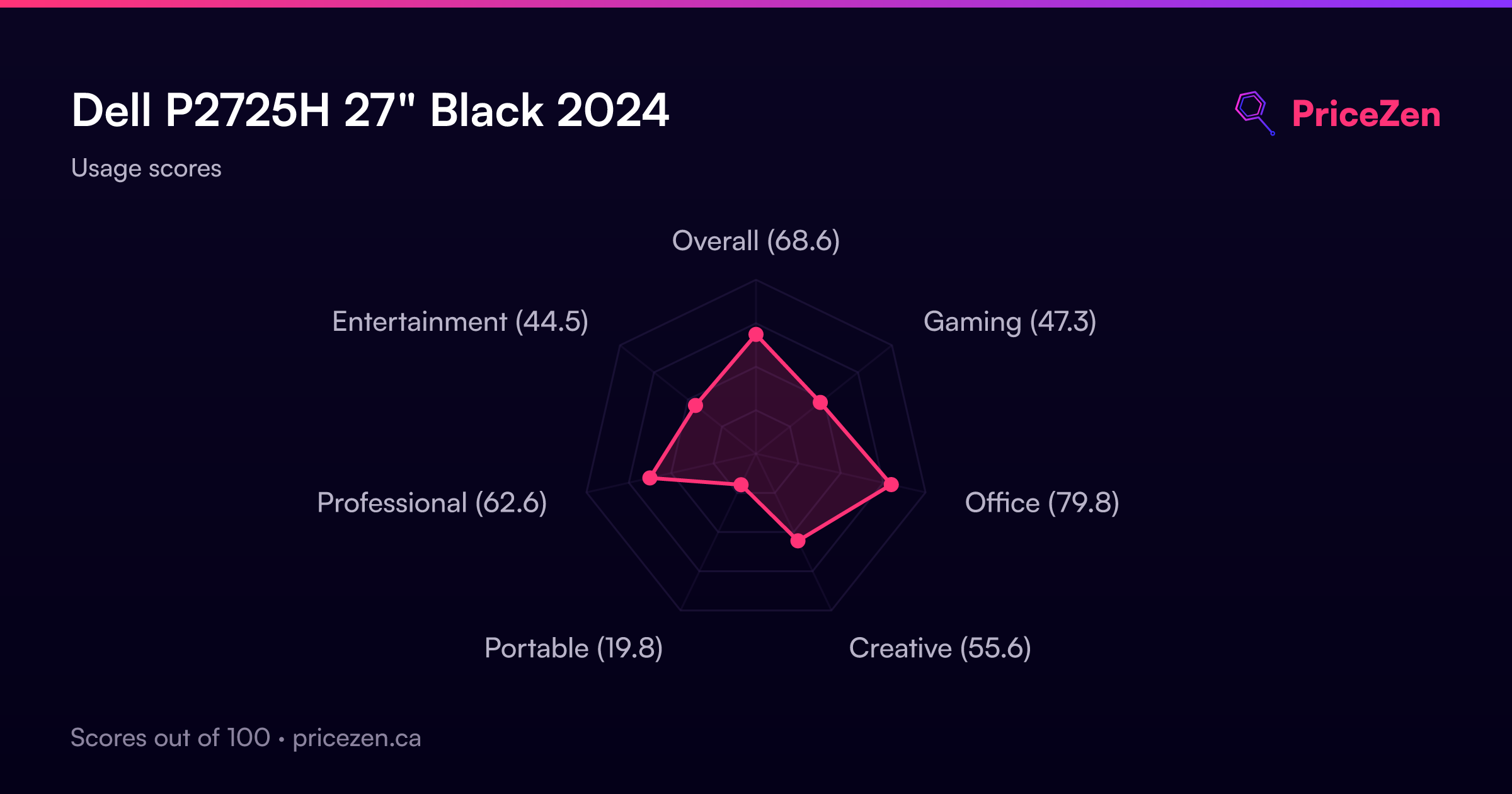
- Overall68.6
- Gaming47.4
- Office79.8
- Creative55.6
- Portable19.8
- Professional62.6
- Entertainment44.5