LG UltraWide 34WR55QK-B 34" Black 2026
The 1800R curved VA panel with 3440x1440 resolution and a built-in KVM switch streamlines multitasking across two devices. USB-C with 65W power delivery and a 100Hz refresh rate add smooth visuals and single-cable convenience at a competitive price. This monitor is best for office professionals and data analysts who need expansive screen real estate and seamless peripheral sharing.












Snapshot
The 30-Second Version
A gorgeous 34-inch curved workhorse that's dirt cheap at around $262, but USB-C gremlins keep it from an unconditional recommendation.
Pros & Cons
Pros
- Crisp 3440x1440 resolution gives you a desktop that feels endless 96th
- 1800R curve and matte coating make all-day staring way easier on the eyes 84th
- Built-in KVM switch and good port selection (USB-C, DP, dual HDMI) 81st
- Absolutely steals the show at its lowest vendor price of $262 76th
Cons
- USB-C connectivity is a dice roll, auto-input switching routinely fumbles
- User satisfaction lags behind specs, with multiple reports of frozen USB hub devices
- Picture-by-picture settings are buried in the menu like an afterthought
- Mediocre HDR brightness and color volume can't touch OLED competitors
What owners think
The Word on the Street
How owner sentiment changed over time
ExclusiveBased on when customers actually wrote their reviews - so you can see whether early praise held up.
Happy owners: 82% lately, 100% in Oct 2024 – Mar 2025
Too few reviews to call that a change.
Across all 233 store ratings: 4.5★. Most owners rate without writing a review. The chart counts the 47 written reviews with stars and their own date.
4 written reviews without stars are left out of the trend.
Show the numbers
| Period | Reviews | Happy | Mixed | Unhappy | Happy share |
|---|---|---|---|---|---|
| Oct 2024 – Mar 2025 | 14 | 14 | 0 | 0 | 100% |
| Apr – Sep 2025 | 10 | 10 | 0 | 0 | 100% |
| Oct – Dec 2025 | 12 | 12 | 0 | 0 | 100% |
| Jan – Jul 2026 | 11 | 9 | 0 | 2 | 82% |
- Jan – Mar 20265 of 7 happy
One buyer praised display quality and USB-C connectivity, another found gaming graphics underwhelming, and a third received a defective, previously assembled unit with stripped screw holes and misaligned brackets.
- Defective unit with stripped screw holes, dust, misaligned bracket, and signs of prior assembly.
- Great display quality, fast and responsive, with convenient USB-C connectivity for laptops.
- Gaming graphics performance did not meet expectations.
- Oct – Dec 202512 of 12 happy · 2 without stars
Buyers praised the monitor's ultrawide screen, multitasking features, and picture-by-picture for dual computers. A few noted a USB hub bug and USB-C compatibility issues.
- Excellent screen quality, vibrant colors, and crisp text praised by multiple buyers.
- Ultrawide and curved design enhance multitasking and reduce neck strain for work.
- Picture-by-picture and multiple inputs allow seamless switching between computers.
- USB hub bug causes keyboard/mouse freeze when auto-input switch is enabled; workaround needed.
- Jul – Sep 20254 of 4 happy
Buyers in this period praised the monitor's image quality, easy setup, and adjustable stand, with one noting a dead cable and another mentioning slight delay and resolution limits.
- Image quality and resolution praised as high and good for office work.
- Easy setup and configuration, including with MacBooks, noted by multiple buyers.
- Adjustable stand and ergonomic features appreciated for workday comfort.
- One cable dead on arrival; another noted slight delay and lower resolution.
- Apr – Jun 20256 of 6 happy
Buyers in this period praised the monitor's display quality, productivity benefits, and ergonomic curve. One open-box unit was seen as great value, and long-term reliability was noted.
- Display quality praised as gorgeous, great, or awesome across multiple reviews.
- Monitor enhances productivity and multitasking for work, mentioned by several buyers.
- Curved design reduces eye strain and neck strain, appreciated by one reviewer.
- Long-term reliability noted by a reviewer who has used it for three years.
- Jan – Mar 20257 of 7 happy
Buyers praise the 34-inch curved UltraWide monitor for productivity, picture quality, and easy setup. USB-C convenience and Mac compatibility are highlights, with one minor Xbox aspect ratio issue.
- Plenty of screen real estate and WQHD resolution boost multitasking and productivity for work and games.
- USB-C charging and included cables simplify setup, reducing clutter and eliminating separate power cords.
- Works well with Macs (MacBook Pro, MacBook Air, Mac Studio) and pairs easily with monitor arms.
- Xbox doesn't support ultra-wide, but a 16:9 setting fixes it; minor con for console users.
- Oct – Dec 20247 of 7 happy · 1 without stars
Buyers praised the ultrawide curved display for productivity and video work, with easy setup and good connectivity. Minor issues included Mac color/brightness adjustments and off-angle color shift.
- Ultrawide 21:9 screen enhances productivity by replacing multi-monitor setups and improving video editing workflows.
- USB-C with 65W power delivery and multiple ports (HDMI, DP, USB-A) were valued for connecting laptops and peripherals.
- Easy assembly, lightweight design, and adjustable stand were noted as convenient and sturdy.
- Mac compatibility required manual color profile and resolution adjustments; initial pixelation and brightness control issues were reported.
Each column joins calendar quarters until it holds at least 10 reviews with stars and their own date. Happy = 4-5★, mixed = 3★, unhappy = 1-2★. Period summaries are in English.
The proof
Performance
The 100Hz refresh rate and 5ms response time aren't going to wow gamers, but for spreadsheets, coding, and running six documents side-by-side, it's buttery smooth. What surprised us wasn't the speed, it was how middling the user sentiment turned out to be (landing in the bottom 40% for this category) despite every spec looking solid on paper. Owners keep mentioning auto-input switch failures and USB hub devices freezing, which drag real-world performance way below what the hardware can deliver. When it works, it's snappy and responsive. When it doesn't, you'll be unplugging and replugging like it's 2005.
Specifications
Full Specifications
Display
| Size | 34" |
| Resolution | 3440x1440 |
| Panel Type | VA |
| Aspect Ratio | 21:9 |
| Curved | Yes |
| Curvature | 1800 |
| Screen Finish | glossy |
Performance
| Refresh Rate | 100 Hz |
| Response Time | 5 |
| Adaptive Sync | FreeSync |
Color & HDR
| Brightness | 300 nits |
| Color Gamut | 99% sRGB |
| Color Depth | 16.7M |
| HDR | HDR10 |
| HDR Support | HDR10 |
Connectivity
| HDMI Ports | 2 |
| DisplayPort | 1 |
| USB-C | 1 |
| Speakers | No |
| Headphone Jack | Yes |
Ergonomics
| Height Adjustable | Yes |
| Tilt | Yes |
| Swivel | No |
| Pivot | No |
| VESA Mount | 100x100 |
Features
| Webcam | No |
| Touchscreen | No |
| PIP/PBP | Yes |
| Power | 38 |
| Weight | 6.9 kg / 15.2 lbs |
vs Competition
The obvious OLED elephant in the room is the Alienware AW3423DW, a 34-inch QD-OLED curved monitor that destroys the LG in contrast and HDR. But it costs nearly three times as much and doesn't include a KVM. If you're editing HDR video or gaming, that Alienware or Samsung's Odyssey OLED G6 are better investments. For pure productivity, though, the LG's VA panel text clarity and lower price make it a smarter buy than those flashy OLEDs. New challengers like the MSI MPG 272URX QD-OLED and the massive Samsung Odyssey Neo G9 LS57CG952NNXZA have entered the ring, but they're in a different weight class entirely on price and size. The 27-inch 4K competitors like the ASUS ROG Strix XG27AQDMG pack more pixels but lose the ultrawide real estate. If you want a productivity-first ultrawide that doesn't require selling a kidney, the LG still holds its ground. Pick the LG if your day is documents, dashboards, and virtual desktops. Skip it if you can't tolerate a flaky USB-C implementation.
| Spec | LG UltraWide 34WR55QK-B 34" | ASUS ROG Strix XG27UCDMG 27" | Dell UltraSharp U4025QW 39.7" | Alienware AW-Series AW3425DW 34" | MSI MAG 271QPX QD-OLED E2 27" | Samsung Odyssey G80SH 32" |
|---|---|---|---|---|---|---|
| Screen Size | 34 | 27 | 39.70000076293945 | 34 | 27 | 32 |
| Resolution | 3440 x 1440 | 3840 x 2160 | 5120 x 2160 | 3440 x 1440 | 2560 x 1440 | 3840 x 2160 |
| Panel Type | VA | OLED | IPS | QD-OLED | QD-OLED | OLED |
| Refresh Rate | 100 | 240 | 120 | 240 | 240 | 240 |
| Response Time Ms | 5 | 0.029999999329447746 | 5 | 0.029999999329447746 | 0.029999999329447746 | 0.029999999329447746 |
| Adaptive Sync | FreeSync | FreeSync Premium Pro | Adaptive-Sync | FreeSync Premium Pro | FreeSync Premium Pro | FreeSync Premium Pro |
| Hdr | HDR10 | DisplayHDR True Black 400 | HDR600 | HDR400 | DisplayHDR True Black 400 | HDR10+ |
| Compare | Compare | Compare | Compare | Compare |
| Product | Color | Portability | Display | Feature | User Sentiment | Ergonomic | Performance | Connectivity | Social Proof |
|---|---|---|---|---|---|---|---|---|---|
| LG UltraWide 34WR55QK-B 34" | 67.8 | 57.4 | 76.1 | 96.3 | 48 | 66.9 | 52.7 | 81.1 | 84 |
| ASUS ROG Strix XG27UCDMG 27" Compare | 96.5 | 57.4 | 97.7 | 85.1 | 99.3 | 90.8 | 97.9 | 81.1 | 98.9 |
| Dell UltraSharp U4025QW 39.7" Compare | 97.9 | 76.6 | 98.6 | 96.3 | 85.5 | 90.8 | 56.1 | 99.3 | 96.8 |
| Alienware AW-Series AW3425DW 34" Compare | 98.9 | 74 | 84.1 | 96.3 | 95.7 | 90.8 | 97.9 | 95.4 | 96.8 |
| MSI MAG 271QPX QD-OLED E2 27" Compare | 99.2 | 57.4 | 73.5 | 85.1 | 95.7 | 90.8 | 97.9 | 81.1 | 98.9 |
| Samsung Odyssey G80SH 32" Compare | 94.4 | 49.4 | 99 | 70.2 | 89.1 | 90.8 | 97.9 | 81.1 | 96.8 |
Price
Value & Pricing
Pricing on this thing is bizarre. We've seen listings from $262 up to an absurd $55,980 (probably a typo, but still). At that $262 mark, this monitor is a steal for a 34-inch ultrawide with height adjustment and USB-C. At its more common price around $400-500, the value proposition softens, especially when you compare it to the reliability of Dell's ultrawide offerings. The sweet spot is grabbing it from a vendor with a solid return policy so you can test the USB-C before committing.
Amazon 1 offer From CA$665
Price history
Read more
Overview
The LG UltraWide 34WR55QK-B hits that sweet spot for productivity junkies who crave screen real estate without going broke. Its 34-inch VA panel with 1800R curve and 3440x1440 resolution makes multitasking a joy, and the built-in KVM is a nice touch for juggling multiple devices. But here's the thing: the user love isn't as universal as the spec sheet suggests. A handful of ugly connectivity bugs, especially around USB-C, keep it from being a no-brainer. If you get a bug-free unit, you'll adore it. If you don't, you'll be elbow-deep in menu settings and wondering why your peripherals froze again.
Common Questions
Q: Does the USB-C port work for charging and video with a MacBook?
Sort of. It supports DisplayPort Alt-mode and 65W power delivery, so a single cable to a MacBook Air or 13-inch Pro generally works. But some users report their USB hub peripherals freeze, and one unit even shipped without the USB-C port at all. Test it thoroughly before your return window closes.
Q: Can I use this monitor for gaming with Adaptive-Sync?
You can, but don't expect miracles. The 100Hz panel and Adaptive-Sync combat screen tearing in casual games, but 5ms response times and VA black smearing will annoy serious competitive players. It's fine for sims, RPGs, or console gaming, not for fast-paced shooters.
Q: How easy is it to mount on a monitor arm?
Dead simple. It has a standard VESA 100x100 pattern, and the stand comes off with a quick release. The monitor weighs about 15 pounds without the stand, so most gas-spring arms handle it easily.
Who Should Skip This
If you need a rock-solid single-cable USB-C docking solution for your laptop, this isn't it—the recurring input switch bugs and USB hub freezes are too risky. Grab a Dell U3423WE or an LG 34WN80C instead; they cost a bit more but won't leave you troubleshooting when you should be working. Also skip if picture-by-picture is a daily essential; the settings are frustratingly buried here.
Verdict
The LG 34WR55QK-B is a spectacular productivity monitor with a frustrating asterisk. The display quality, the curve, and the KVM are all winners, and at its lowest vendor price, it's an absolute steal. But the recurring USB-C and auto-input bugs are more than just teething issues—they're enough to sour the experience for anyone who relies on a single-cable dock setup. If you live near a retailer with a solid return policy and you're willing to gamble on getting a good unit, go for it. Otherwise, wait for LG to iron out the firmware kinks, or pay a bit more for a Dell with unflappable connectivity.
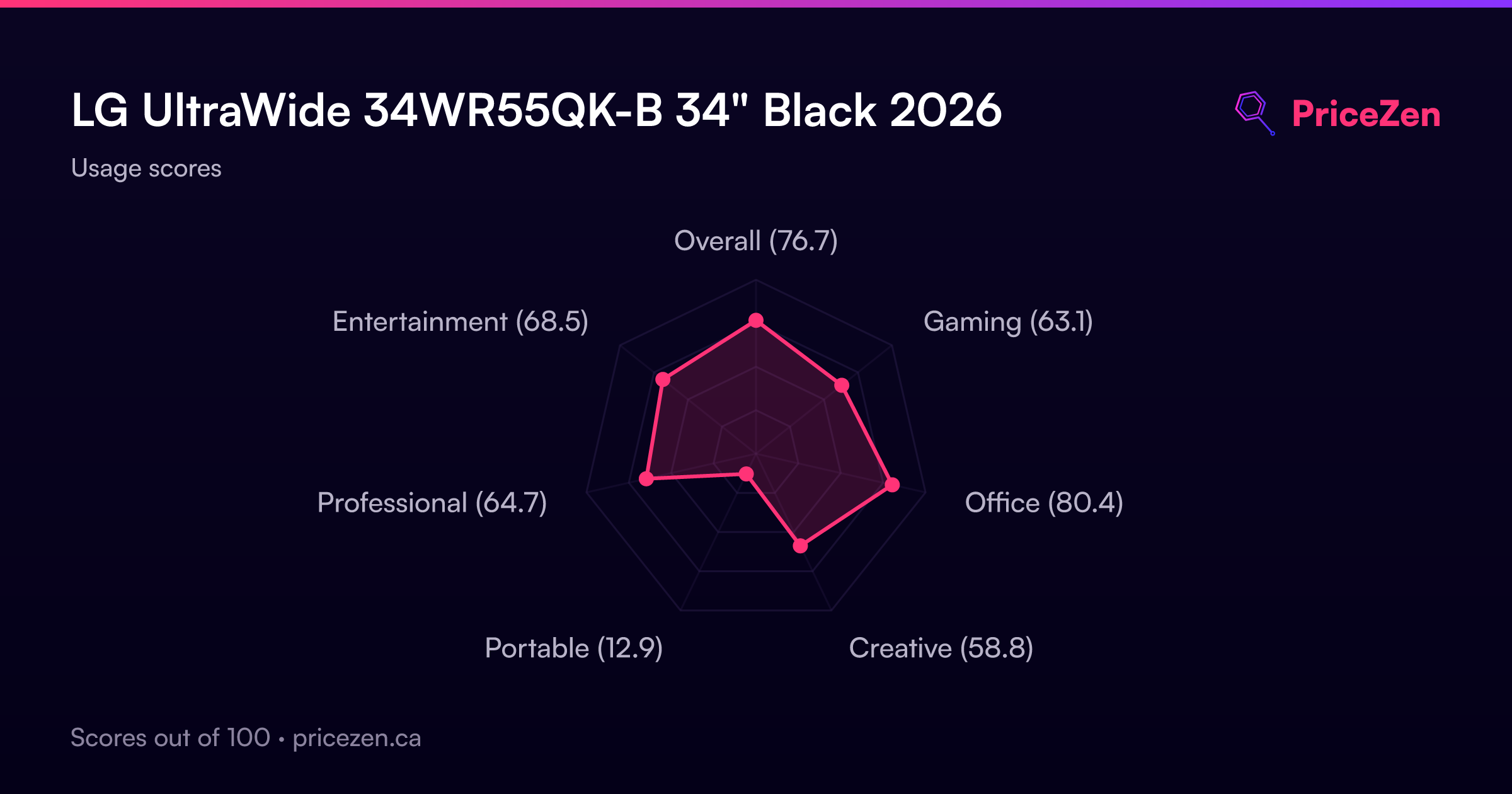
Usage Scores
- Overall76.7
- Gaming63.1
- Office80.4
- Creative58.8
- Portable12.9
- Professional64.7
- Entertainment68.5