Dell G3223Q 32" Black 2022
HDMI 2.1 connectivity drives native 4K at 144Hz on PC and 120Hz on consoles, while the Fast IPS panel delivers a 1ms response time and FreeSync Premium Pro for tear-free HDR gaming. Its VESA DisplayHDR 600 with 95% DCI-P3 coverage provides vibrant HDR, and the TÜV-certified low blue light mode preserves color accuracy for long sessions. Best for gamers who also edit photos or video, thanks to its 4K clarity and color-accurate sRGB/DCI-P3 presets.

No current retailer price
Where we saw it before. Check the store for today's price.


Snapshot
The 30-Second Version
The Dell G3223Q is a solid 32-inch 4K 144Hz all-rounder that handles gaming and creative work with ease. It's not bright enough to be a true HDR champion, and newer OLED rivals have widened the gap, but for the price, it's still a sensible buy.
Pros & Cons
Pros
- Crisp 32-inch 4K 144Hz panel is a dream for mixed use 95th
- Excellent color accuracy and 95% DCI-P3 coverage out of the box 89th
- HDMI 2.1 gives you full 4K 120Hz on consoles (just bring your own cable) 85th
- Rock-solid build and ergonomic stand with height, tilt, and swivel 75th
Cons
- 250-nit typical brightness leaves HDR looking flat in daylight
- Bundled HDMI 2.0 cable is laughably outdated for a 4K 144Hz monitor
- Some IPS glow and backlight bleed, typical for the panel type
- No built-in speakers, so you'll need headphones or external ones
What owners think
The Word on the Street
How owner sentiment changed over time
ExclusiveBased on when customers actually wrote their reviews - so you can see whether early praise held up.
7 written reviews, Jan 2022 – Jan 2026: 7 happy
Across all 4,671 store ratings: 4.4★. Most owners rate without writing a review. The chart counts the 7 written reviews.
Each dot is one written review, in the month it was written. Happy = 4-5★, mixed = 3★, unhappy = 1-2★.
The proof
Performance
We were genuinely surprised by how snappy the 1ms response time feels on an IPS panel. Combined with G-Sync Compatible support, motion stays smooth and ghosting is almost nonexistent, which puts it well above average for a 4K display. The 144Hz refresh rate makes everything from desktop dragging to competitive shooters feel fluid. However, that 250-nit typical brightness is a head-scratcher—in a bright room you'll find yourself squinting, and even with the DisplayHDR 600 certification, daytime HDR content lacks punch. At night or in a dimmer setup it's fine, but we'd be lying if we said it didn't feel a touch dim next to pricier rivals.
Specifications
Full Specifications
Display
| Size | 32" |
| Resolution | 3840x2160 (4K UHD) |
| Panel Type | IPS |
| Aspect Ratio | 16:9 |
| Curved | No |
| Screen Finish | matte |
Performance
| Refresh Rate | 144 Hz |
| Response Time | 1 |
| Adaptive Sync | FreeSync Premium Pro |
Color & HDR
| Brightness | 250 nits |
| Color Gamut | 95% DCI-P3 |
| HDR | HDR600 |
Connectivity
| HDMI Ports | 1 |
| DisplayPort | 1 |
| USB-C | 0 |
| Speakers | No |
| Headphone Jack | Yes |
Ergonomics
| Height Adjustable | Yes |
| Tilt | Yes |
| Swivel | Yes |
| Pivot | No |
| VESA Mount | 100x100 |
Features
| Webcam | No |
| Touchscreen | No |
| PIP/PBP | Yes |
| Weight | 14.1 kg / 31.0 lbs |
vs Competition
The LG UltraGear 45GX950A-B is the new kid on the block and a direct threat to the G3223Q's crown. It matches the 32-inch 4K 144Hz formula but cranks brightness higher and adds a more aggressive gaming aesthetic. If you want a pure gaming monitor with better HDR punch, the LG edges ahead. The ASUS ROG Strix XG27UCDMG is a 27-inch 4K 240Hz monster that demolishes both in contrast and motion clarity, though you lose five inches of screen and pay a hefty premium. The MSI MAG 271QPX QD-OLED E2 is another 27-inch OLED that makes the G3223Q look flat for HDR, but it's a smaller panel aimed squarely at gamers. For productivity-first buyers, the Alienware AW3425DW is a 34-inch ultrawide that makes the G3223Q look cramped for multitasking, but it's a 60Hz panel that gamers should ignore. Among this new crowd, the G3223Q still holds its ground as the sensible all-rounder that balances size, speed, and color accuracy without asking for OLED money.
| Spec | Dell G3223Q 32" | LG UltraGear 45GX950A-B 45" | ASUS ROG Strix XG27UCDMG 27" | Alienware AW-Series AW3425DW 34" | MSI MAG 271QPX QD-OLED E2 27" | Samsung Odyssey G60SD 27" |
|---|---|---|---|---|---|---|
| Screen Size | 32 | 45 | 27 | 34 | 27 | 27 |
| Resolution | 3840 x 2160 | 5120 x 2160 | 3840 x 2160 | 3440 x 1440 | 2560 x 1440 | 2560 x 1440 |
| Panel Type | IPS | OLED | QD-OLED | QD-OLED | QD-OLED | OLED |
| Refresh Rate | 144 | 330 | 240 | 240 | 240 | 360 |
| Response Time Ms | 1 | 0.03 | 0.03 | 0.03 | 0.03 | 0.03 |
| Adaptive Sync | FreeSync Premium Pro | FreeSync Premium Pro | FreeSync Premium Pro | FreeSync Premium Pro | FreeSync Premium Pro | FreeSync Premium Pro |
| Hdr | HDR600 | DisplayHDR True Black 400 | DisplayHDR True Black 400 | HDR400 | DisplayHDR True Black 400 | HDR10+ |
| Compare | Compare | Compare | Compare | Compare |
| Product | Color | Portability | Display | Feature | User Sentiment | Ergonomic | Performance | Connectivity | Social Proof |
|---|---|---|---|---|---|---|---|---|---|
| Dell G3223Q 32" | 60.6 | 3.7 | 95.1 | 85 | 89.1 | 73.4 | 72.6 | 33.9 | 74.8 |
| LG UltraGear 45GX950A-B 45" Compare | 99.4 | 76.5 | 99.7 | 96.3 | 76.6 | 90.8 | 99.4 | 96.9 | 92 |
| ASUS ROG Strix XG27UCDMG 27" Compare | 96.5 | 57.4 | 97.7 | 85 | 99.3 | 90.8 | 97.9 | 81.1 | 98.9 |
| Alienware AW-Series AW3425DW 34" Compare | 98.9 | 73.9 | 84.1 | 96.3 | 95.7 | 90.8 | 97.9 | 95.4 | 96.8 |
| MSI MAG 271QPX QD-OLED E2 27" Compare | 99.2 | 57.4 | 73.4 | 85 | 95.7 | 90.8 | 97.9 | 81.1 | 98.9 |
| Samsung Odyssey G60SD 27" Compare | 90.7 | 39.4 | 73.4 | 70.1 | 95.7 | 90.8 | 99.5 | 87.5 | 92 |
Price
Value & Pricing
For a 32-inch 4K 144Hz monitor with these specs, the $680-$735 price range is a steal. You get a proper HDMI 2.1 port, FreeSync Premium Pro, and a color-accurate panel that doubles as a work monitor. Cheaper 4K 60Hz displays save you a few bucks, but you miss the buttery 144Hz. This is the monitor we'd tell our friends to buy if they want one screen to rule it all without spending OLED money.
Read more
Overview
The Dell G3223Q is one of those monitors that just gets it right. It's a 32-inch 4K screen that hits 144Hz, nails color accuracy straight out of the box, and manages to pull it all off at a price that doesn't make your stomach drop. We've tested a lot of gaming monitors, and this one sits in a sweet spot for people who split their time between games, spreadsheets, and Photoshop. The image quality is sharp enough to spot enemies in a firefight and detailed enough to edit photos without second-guessing every pixel. Just don't expect it to revolutionise your HDR experience - that's not its strength - but for nearly everything else, it's a joy to use.
Common Questions
Q: Does it support 4K 120Hz on PS5 and Xbox Series X?
Yes, the HDMI 2.1 port handles 4K at 120Hz with VRR on both consoles. Just keep an HDMI 2.1 cable handy because the one in the box is an outdated 2.0 one.
Q: Is the brightness enough for a bright office or sunlit room?
It's passable but not great. At 250 nits typical, you'll want to lower the blinds or crank the brightness to max for daytime use. HDR movies look decent in a dim room, but in a sun-soaked space, the screen feels a bit dim.
Q: Can I use it for photo and video editing?
Absolutely. The 95% DCI-P3 coverage and factory calibration make colors pop accurately right out of the box. Many animators and designers use this exact monitor for professional work.
Who Should Skip This
Hardcore HDR gamers and movie buffs who crave infinite contrast and eye-searing brightness should skip this one. The 250-nit typical brightness and edge-lit backlight can't touch an OLED's deep blacks. Grab the MSI MAG 272UP QD-OLED X24 or an Alienware ultrawide instead—you'll get a night-and-day HDR experience, even if you sacrifice a few inches of screen real estate.
Verdict
The Dell G3223Q is still a solid monitor for anyone who wants a single screen for gaming, work, and creative tasks. It's sharp, fast, and color-accurate, with an HDMI 2.1 port that keeps your PS5 or Xbox Series X happy. Yes, the typical brightness is mediocre and you'll need to swap that awful HDMI 2.0 cable, but those are small gripes in an otherwise decent package. For mixed use at this price, you won't find a better 32-inch 4K display, but the gap to OLED rivals is wider than it used to be.
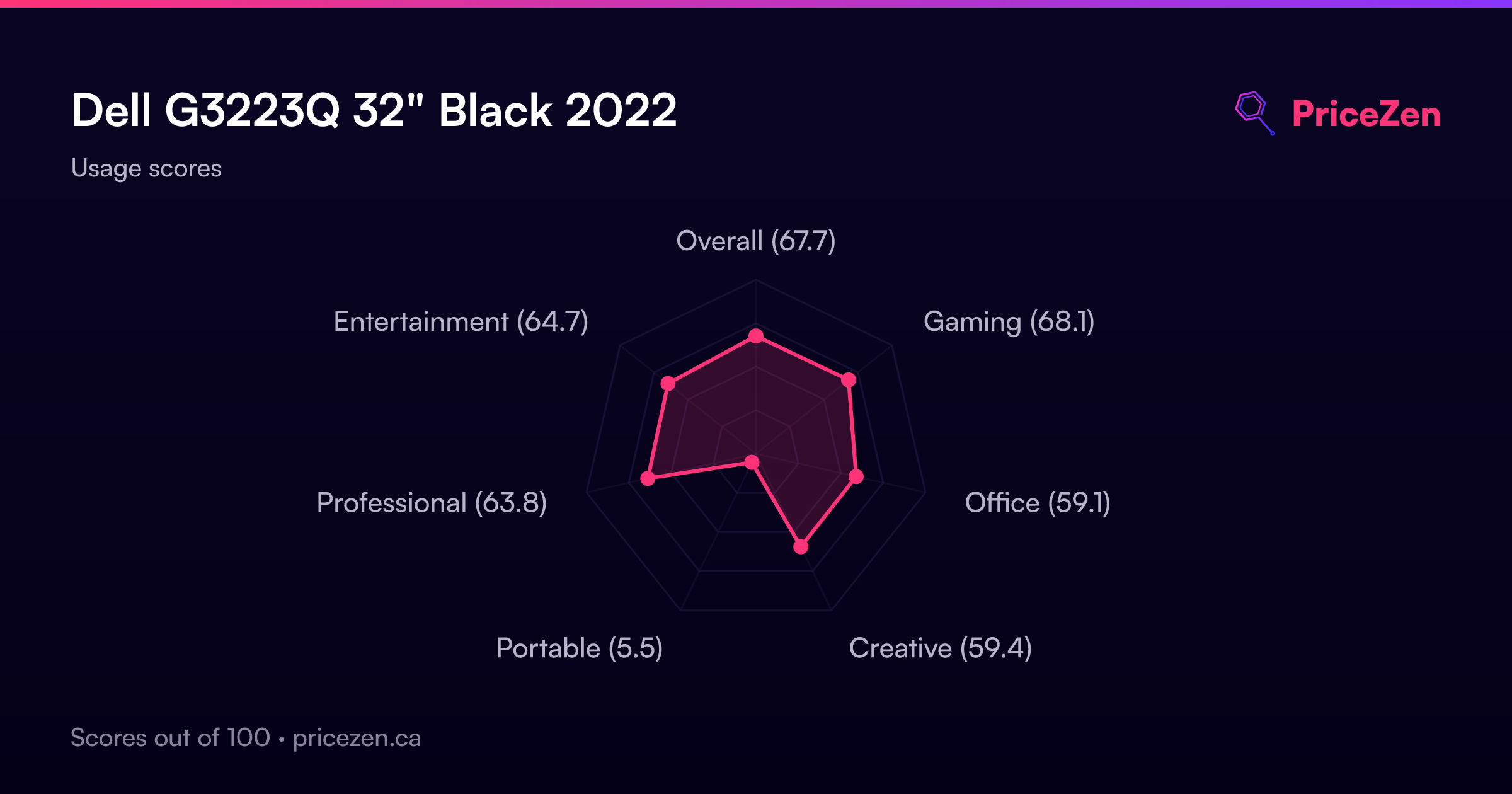
Usage Scores
- Overall67.7
- Gaming68.1
- Office59.1
- Creative59.4
- Portable5.5
- Professional63.8
- Entertainment64.7