Dell 24" Ash White
The 100Hz refresh rate on its 24-inch IPS panel provides visibly smoother motion than standard 60Hz office displays, while the 99% sRGB coverage and 1500:1 contrast ratio ensure accurate, vibrant color for everyday tasks. Its integrated dual 5W speakers with preset audio profiles and the clean, ash-white design with ultra-thin bezels eliminate desk clutter by removing the need for external peripherals. This monitor is best for home-office workers and students who want a single, aesthetically clean display for productivity, streaming, and casual entertainment.

No current retailer price
Where we saw it before. Check the store for today's price.






Snapshot
The 30-Second Version
Dell's 24" IPS monitor is a solid everyday screen with a smooth 100Hz refresh rate and accurate 99% sRGB colors. The built-in speakers are a nice bonus, and the Ash White design looks sharp. Just don't expect gaming performance or a bright panel, and make sure the price is right before you buy.
Pros & Cons
Pros
- 100Hz refresh rate makes everyday use feel noticeably smoother than 60Hz
- 99% sRGB coverage means colors look accurate out of the box
- Dual 5W speakers are actually usable, with six audio presets to pick from
- Clean Ash White design with thin bezels and decent cable management
Cons
- 250 nits brightness is dim for bright rooms or window-facing desks
- Only tilt adjustment, no height or swivel on the stand
- HDMI 1.4 ports limit you to 1080p, no DisplayPort option
- 4ms response time won't satisfy competitive gamers
The proof
Performance
The 100Hz refresh rate is the headline feature here, and it genuinely makes scrolling and window dragging feel smoother than a standard 60Hz panel. The 99% sRGB coverage means colors look accurate enough for office work and casual photo browsing, though the 250 nits brightness means you'll want to keep it away from direct sunlight. The 4ms response time in Extreme mode is fine for casual gaming, but fast-paced shooters will show some ghosting. In our database, performance lands at the 55th percentile, which is about average for this class of monitor. The 1500:1 contrast ratio is actually a bit better than typical IPS panels, so blacks look deeper than you'd expect at this price.
Specifications
Full Specifications
Display
| Size | 24" |
| Resolution | 1920x1080 (Full HD) |
| Panel Type | IPS |
| Aspect Ratio | 16:9 |
| Curved | No |
| Screen Finish | matte |
Performance
| Refresh Rate | 100 Hz |
| Response Time | 4 |
Color & HDR
| Brightness | 250 nits |
| Color Gamut | 99% sRGB |
Connectivity
| HDMI Ports | 2 |
| Speakers | Yes |
| Headphone Jack | No |
Ergonomics
| Height Adjustable | No |
| Tilt | Yes |
| Swivel | No |
| Pivot | No |
| VESA Mount | 100x100 |
Features
| Webcam | No |
| Touchscreen | No |
vs Competition
Stacked against the LG UltraGear 45GX950A-B or the ASUS ROG Strix XG27UCDMG, this Dell is not even playing the same sport. Those are high-refresh OLED gaming panels with HDR and color performance that would embarrass this little 1080p screen. But that's not a fair fight. The more realistic comparison is against other budget 24" office monitors, where the Dell holds its own with the 100Hz refresh rate and 99% sRGB. The Samsung Odyssey OLED G6 G60SF and MSI MPG 271QR are also in a different league entirely. If you're cross-shopping those, you're looking at the wrong monitor.
| Spec | Dell 24" | ASUS ROG Strix XG27UCDMG 27" | LG UltraGear 45GX950A-B 45" | Alienware AW-Series AW3425DW 34" | MSI MAG 271QPX QD-OLED E2 27" | Samsung Odyssey G80SH 32" |
|---|---|---|---|---|---|---|
| Screen Size | 24 | 27 | 45 | 34 | 27 | 32 |
| Resolution | 1920 x 1080 | 3840 x 2160 | 5120 x 2160 | 3440 x 1440 | 2560 x 1440 | 3840 x 2160 |
| Panel Type | IPS | OLED | OLED | QD-OLED | QD-OLED | QD-OLED |
| Refresh Rate | 100 | 240 | 330 | 240 | 240 | 240 |
| Response Time Ms | 4 | 0.03 | 0.03 | 0.03 | 0.03 | 0.03 |
| Adaptive Sync | - | FreeSync Premium Pro | FreeSync Premium Pro | FreeSync Premium Pro | FreeSync Premium Pro | FreeSync Premium Pro |
| Hdr | - | DisplayHDR True Black 400 | DisplayHDR True Black 400 | HDR400 | DisplayHDR True Black 400 | HDR10+ |
| Compare | Compare | Compare | Compare | Compare |
| Product | Color | Portability | Display | Feature | Ergonomic | Performance | Connectivity | Social Proof |
|---|---|---|---|---|---|---|---|---|
| Dell 24" | 35.9 | 43.4 | 37.5 | 21.2 | 47.2 | 54.9 | 38.8 | 33.4 |
| ASUS ROG Strix XG27UCDMG 27" Compare | 96.5 | 57.4 | 97.7 | 85 | 90.7 | 97.9 | 81.1 | 98.9 |
| LG UltraGear 45GX950A-B 45" Compare | 99.4 | 76.5 | 99.7 | 96.3 | 90.7 | 99.4 | 96.9 | 92 |
| Alienware AW-Series AW3425DW 34" Compare | 98.9 | 73.9 | 84.1 | 96.3 | 90.7 | 97.9 | 95.4 | 96.8 |
| MSI MAG 271QPX QD-OLED E2 27" Compare | 99.2 | 57.4 | 73.5 | 85 | 90.7 | 97.9 | 81.1 | 98.9 |
| Samsung Odyssey G80SH 32" Compare | 94.4 | 49.4 | 99 | 70.1 | 90.7 | 97.9 | 81.1 | 96.8 |
Price
Value & Pricing
Pricing on this one is a bit of a wildcard since we don't have a firm number, but Dell's budget monitors typically sit in the affordable range. For what you get, a 100Hz IPS panel with 99% sRGB and speakers that don't make you wince, it's a reasonable deal if you can find it under $150. Above that, you start bumping into monitors with height-adjustable stands and higher brightness. The value proposition really depends on how much you care about the aesthetics and the integrated audio, because those are the two things that set it apart from cheaper options.
Read more
Overview
Dell's 24" IPS monitor is a straightforward 1080p panel aimed at people who want a clean desk setup without spending a fortune. It runs at 100Hz, which is a nice step up from the 60Hz screens most offices still hand out. The Ash White finish and thin bezels give it a surprisingly modern look for what is essentially a budget productivity display.
But let's be real about what this is. At 250 nits brightness and with a 4ms response time, this is not a gaming monitor, and it's not trying to compete with the OLED monsters in our database. It's a solid everyday screen with decent color coverage and built-in speakers that don't sound like a tin can.
Common Questions
Q: Is this monitor good for gaming?
It's fine for casual gaming thanks to the 100Hz refresh rate, but the 4ms response time and lack of adaptive sync mean competitive players should look elsewhere. A dedicated gaming monitor with 144Hz or higher and 1ms response time would serve you much better.
Q: Can I mount this monitor on a wall or monitor arm?
Yes, it has a standard 100mm x 100mm VESA mount pattern on the back. The included stand only tilts, so a monitor arm is a good upgrade if you want height adjustment.
Q: How are the built-in speakers?
The dual 5W speakers are better than most monitor audio, with six preset profiles for different content types. They're fine for video calls and casual YouTube watching, but you'll still want dedicated speakers or headphones for music or movies.
Who Should Skip This
Skip this if you need a bright display for a sunlit room, since 250 nits will struggle against glare. Also skip it if you want ergonomic flexibility, the tilt-only stand means you'll need to buy a VESA arm for height adjustment. And if you're a gamer who plays fast-paced shooters, the 4ms response time and lack of adaptive sync will frustrate you. This is an office monitor with a slight gaming twist, not the other way around.
Verdict
This is a monitor for someone who wants a clean, modern-looking display for everyday work, web browsing, and maybe some light gaming. The 100Hz refresh rate and accurate colors make it a pleasant daily driver, and the built-in speakers mean you can skip the desk clutter of external audio. It's not for serious gamers, photo editors who need brightness and color precision, or anyone who wants ergonomic flexibility beyond a simple tilt.
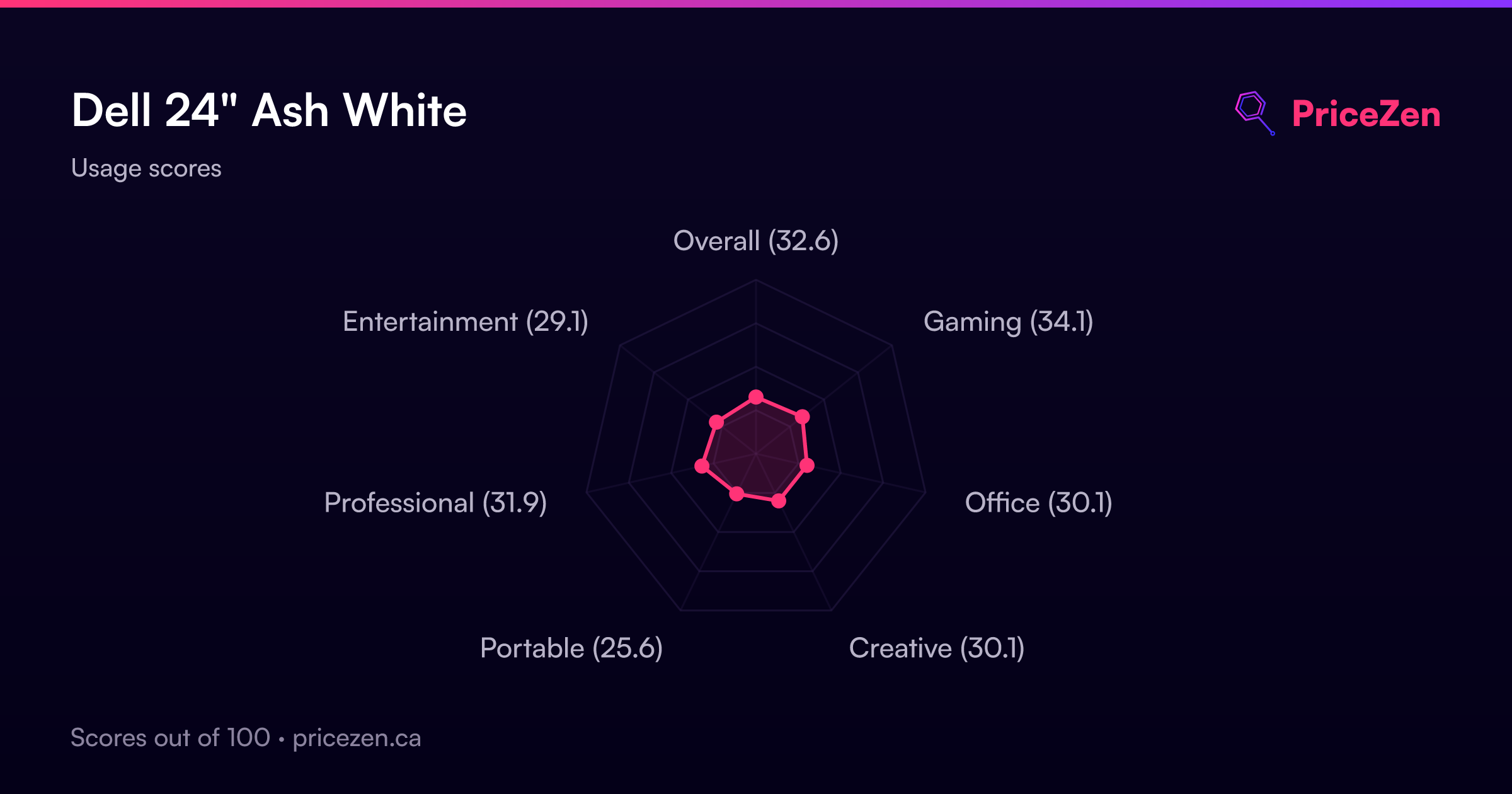
Usage Scores
- Overall32.6
- Gaming34.1
- Office30.1
- Creative30.1
- Portable25.6
- Professional31.9
- Entertainment29.1