ASUS ProArt PA24ACRV 24" Black 2025
Factory-calibrated to Delta E < 2 with 95% DCI-P3 coverage, this display delivers color-critical accuracy right out of the box. The compact chassis is 30% slimmer than its predecessor and includes a USB-C port with 96W power delivery for a streamlined, single-cable workspace. It’s best for graphic designers and video editors who need a space-efficient, color-accurate 1440p monitor for SDR and basic HDR grading.

No current retailer price









Snapshot
The 30-Second Version
The ASUS ProArt PA24ACRV is a color-accurate 24-inch QHD monitor with factory calibration and 96W USB-C power delivery. It's not fast or flashy, but it nails the basics for professional color work. Worth buying if you edit video or design for a living.
Pros & Cons
Pros
- Factory calibrated with Delta E < 2, so colors are accurate out of the box 91st
- USB-C with 96W power delivery handles laptop charging and video over one cable 90th
- Excellent ergonomics with height, tilt, swivel, and pivot adjustments 85th
- 95% DCI-P3 and 100% sRGB coverage for serious color work 84th
Cons
- 75Hz refresh rate feels sluggish if you're used to anything faster
- DisplayHDR 400 is basically a sticker, not real HDR
- 350 nits brightness can be limiting in bright rooms
- Social proof is thin, only 4 reviews in our database
The proof
Performance
The 75Hz refresh rate and 5ms response time are fine for everyday work but won't impress anyone coming from a high-refresh panel. Our database puts performance at the 41st percentile, so it's about average for this category. The real story here is color. 95% DCI-P3 and 100% sRGB coverage with factory calibration under Delta E 2 means you can trust what you see without buying a colorimeter. DisplayHDR 400 is more of a checkbox than a feature, so don't expect meaningful HDR punch. The 350 nits brightness is solid for indoor work but will struggle near bright windows.
Specifications
Full Specifications
Display
| Size | 24" |
| Resolution | 2560x1440 (QHD) |
| Panel Type | IPS |
| Aspect Ratio | 16:9 |
| Curved | No |
| Screen Finish | matte |
Performance
| Refresh Rate | 75 Hz |
| Response Time | 5 |
| Adaptive Sync | Adaptive-Sync |
Color & HDR
| Brightness | 350 nits |
| Color Gamut | 100% sRGB, 95% DCI-P3 |
| Color Depth | 8-bit |
| HDR | HDR400 |
| HDR Support | HDR10 |
Connectivity
| HDMI Ports | 1 |
| DisplayPort | 2 |
| USB-C | 1 |
| Speakers | Yes |
| Headphone Jack | Yes |
Ergonomics
| Height Adjustable | Yes |
| Tilt | Yes |
| Swivel | Yes |
| Pivot | Yes |
| VESA Mount | 100x100 |
Features
| PIP/PBP | Yes |
| Power | 14 |
| Weight | 5.6 kg / 12.4 lbs |
vs Competition
Our ranking puts the Alienware AW-Series AW3425DW 34", LG UltraGear 32GX850A-B 32", and Gigabyte AORUS FO32U2 32" ahead of it in the top five. Those are gaming-first panels, and they beat the PA24ACRV on speed and contrast. They're also much bigger screens built for a different buyer. The ProArt's case is color: 95% DCI-P3, 100% sRGB, and factory calibration under Delta E 2, which gaming panels don't prioritize. If your day job is grading footage or matching brand colors, the PA24ACRV gives you out-of-box confidence those three aren't chasing.
| Spec | ASUS ProArt PA24ACRV 24" | LG UltraGear 45GX950A-B 45" | Dell UltraSharp U4025QW 39.7" | Alienware AW-Series AW3425DW 34" | MSI MAG 271QPX QD-OLED E2 27" | Samsung Odyssey G60SD 27" |
|---|---|---|---|---|---|---|
| Screen Size | 24 | 45 | 39.70000076293945 | 34 | 27 | 27 |
| Resolution | 2560 x 1440 | 5120 x 2160 | 5120 x 2160 | 3440 x 1440 | 2560 x 1440 | 2560 x 1440 |
| Panel Type | IPS | OLED | IPS | QD-OLED | QD-OLED | OLED |
| Refresh Rate | 75 | 330 | 120 | 240 | 240 | 360 |
| Response Time Ms | 5 | 0.029999999329447746 | 5 | 0.029999999329447746 | 0.029999999329447746 | 0.029999999329447746 |
| Adaptive Sync | Adaptive-Sync | FreeSync Premium Pro | Adaptive-Sync | FreeSync Premium Pro | FreeSync Premium Pro | FreeSync Premium Pro |
| Hdr | HDR400 | DisplayHDR True Black 400 | HDR600 | HDR400 | DisplayHDR True Black 400 | HDR10+ |
| Compare | Compare | Compare | Compare | Compare |
| Product | Color | Portability | Display | Feature | Performance | Connectivity |
|---|---|---|---|---|---|---|
| ASUS ProArt PA24ACRV 24" | 80.6 | 83.9 | 60 | 85.1 | 44.2 | 89.6 |
| LG UltraGear 45GX950A-B 45" Compare | 99.4 | 76.6 | 99.7 | 96.3 | 99.4 | 96.9 |
| Dell UltraSharp U4025QW 39.7" Compare | 97.9 | 76.6 | 98.6 | 96.3 | 56.1 | 99.3 |
| Alienware AW-Series AW3425DW 34" Compare | 98.9 | 74 | 84.1 | 96.3 | 97.9 | 95.4 |
| MSI MAG 271QPX QD-OLED E2 27" Compare | 99.2 | 57.5 | 73.5 | 85.1 | 97.9 | 81.2 |
| Samsung Odyssey G60SD 27" Compare | 90.8 | 39.5 | 73.5 | 70.2 | 99.5 | 87.6 |
Price
Value & Pricing
The main listing sits at USD 345-989 depending on the seller, so it pays to check who's actually stocking it. For a factory-calibrated QHD monitor with 96W USB-C power delivery and this level of color accuracy, that's reasonable. You're paying for the ProArt name and the calibration guarantee. If you don't need the color accuracy, you can find cheaper QHD panels. But if you're editing video or doing design work, the time saved not fighting color drift is worth the premium.
Price history
Read more
Overview
The ASUS ProArt PA24ACRV is a 24-inch QHD monitor aimed squarely at video editors and designers who care about color more than refresh rates. It's factory calibrated with Delta E < 2 accuracy, covers 95% DCI-P3, and comes Calman Verified, which is a fancy way of saying the colors won't lie to you out of the box. The USB-C port pushes 96W of power delivery, so one cable can charge your laptop and drive the display at the same time.
It's not a gaming monitor. 75Hz and 5ms response time put it in the middle of the pack for performance. But for color work at this size and price, it's a strong pick. The stand is excellent, the connectivity is generous, and the ambient light sensor is a nice touch if your room lighting shifts throughout the day.
Common Questions
Q: Can this monitor charge my laptop while displaying video?
Yes. The USB-C port supports DisplayPort over USB-C and delivers up to 96W of power, so a single cable can handle video, data, and charging for most laptops.
Q: Is the factory calibration good enough for professional color work?
Yes. It's Calman Verified and factory calibrated to Delta E < 2, which means color accuracy is excellent out of the box. You can trust it for video editing and design without needing to recalibrate immediately.
Q: Does this monitor work well for gaming?
Not really. The 75Hz refresh rate and 5ms response time are fine for casual use, but competitive gamers will want something faster. This is a color-focused monitor, not a gaming panel.
Who Should Skip This
Skip this if you're a gamer who wants high refresh rates or fast response times. The 75Hz panel will feel sluggish compared to even budget gaming monitors. Also skip it if you work in a very bright room, since 350 nits won't fight off glare well. And if you don't do color-critical work, you're paying extra for calibration you'll never notice.
Verdict
This monitor is for video editors, photographers, and designers who need accurate color without spending a fortune on calibration gear. The 24-inch size keeps it compact on a desk, and the USB-C power delivery makes it a clean single-cable setup for laptops. If you're a gamer or just want a general-purpose display, look elsewhere. But for color-critical work at this price, the PA24ACRV is a solid, dependable choice.
Usage Scores
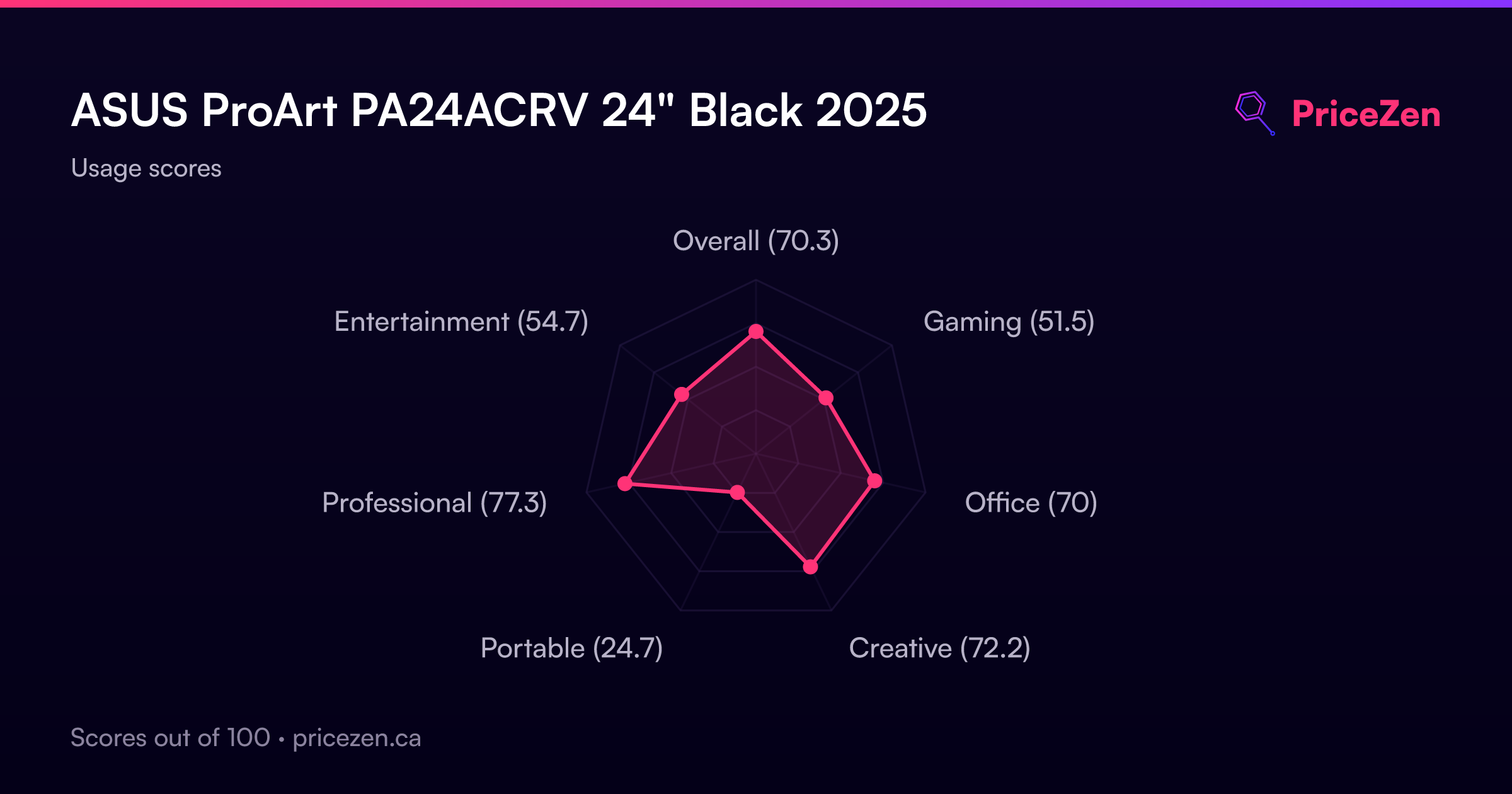
- Overall70.1
- Gaming51.5
- Office70.1
- Creative72.2
- Portable24.7
- Professional77.3
- Entertainment54.7