Acer HC5 32HC5QR Zbmiiphx 31.5" Black 2021
The 31.5-inch VA panel combines a 240Hz refresh rate and 1ms response time with Adaptive-Sync for smooth, tear-free competitive gaming. Its curved screen and wide 178° viewing angles, paired with full ergonomic adjustability including 150mm height and swivel, offer a comfortable shared viewing experience. This monitor is best for budget-conscious esports gamers who prioritize high speed and screen size over pixel density.












Snapshot
The 30-Second Version
The Acer HC5 32HC5QR is a 31.5-inch curved VA monitor with a 240Hz refresh rate and 1ms response time, making it a strong budget pick for fast gaming. The 1080p resolution is soft on a screen this big, and color performance is weak, so it's not great for work or media. At $399 in the US, it undercuts OLED competitors significantly, but you give up image quality. Buy it for competitive gaming on a big curved screen, skip it for anything else.
Pros & Cons
Pros
- 240Hz refresh rate with 1ms response time is excellent for fast gaming 87th
- 31.5-inch curved VA panel gives an immersive feel for the price
- Adaptive-Sync support works with both AMD and NVIDIA GPUs
- Decent connectivity with two HDMI ports and a DisplayPort
- Built-in speakers mean you can skip external audio for casual use
Cons
- 1080p resolution on a 31.5-inch screen looks soft up close
- Color performance is weak, landing in the 17th percentile
- Only tilt adjustment, no height or swivel options
- Bulky at nearly 4kg, and not compact by any measure
- Entertainment score of 41.2 means movies and media are just okay
The proof
Performance
The performance story here is all about that 240Hz refresh rate and 1ms response time. In our database, this monitor sits in the 88th percentile for performance, which means it's genuinely one of the better options on the market for motion handling. For fast shooters, racing games, or anything where frames win matches, this panel will feel responsive. The Adaptive-Sync support helps too, keeping things smooth whether you're on an AMD or NVIDIA card.
But the 1080p resolution on a 31.5-inch screen is the trade-off. Text and fine details won't look as sharp as they would on a 27-inch 1440p panel, and if you sit close, you'll notice it. The VA panel helps with contrast and deep blacks, which is nice for darker games and movies, but the color performance is a weak spot. It lands in the 17th percentile for color, which means this is not the monitor for photo editing or anything where accuracy matters. For gaming speed, it's a standout. For image quality, it's a compromise.
Specifications
Full Specifications
Display
| Size | 31.5" |
| Resolution | 1920x1080 (Full HD) |
| Panel Type | VA |
| Aspect Ratio | 16:9 |
| Curved | Yes |
| Curvature | 1500 |
Performance
| Refresh Rate | 240 Hz |
| Response Time | 1 |
| Adaptive Sync | Adaptive-Sync |
Color & HDR
| Color Depth | 8-bit |
Connectivity
| HDMI Ports | 2 |
| DisplayPort | 1 |
| Speakers | Yes |
| Headphone Jack | No |
Ergonomics
| Height Adjustable | No |
| Tilt | Yes |
| Swivel | No |
| Pivot | No |
Features
| Webcam | No |
| Touchscreen | No |
| PIP/PBP | No |
| Weight | 4.0 kg / 8.8 lbs |
vs Competition
The competitive field here is stacked with OLED and QD-OLED options that cost significantly more. The ASUS ROG Strix XG27UCDMG, MSI MAG 271QPX QD-OLED E2, LG UltraGear 27GX790A-B, Samsung Odyssey G60SD, and Gigabyte MO27U2 SA all bring 1440p or 4K resolutions with OLED-level color and contrast. Those panels will absolutely destroy this Acer in image quality, and they're all 27-inch flat screens with higher pixel density. But they also cost a lot more, and not everyone needs or wants to pay for OLED.
Where the Acer makes its case is size and refresh rate for the money. A 31.5-inch curved panel at 240Hz for around $399 is a combination none of those OLED competitors touch at this price. The trade-off is resolution and color. If you're a competitive gamer who wants a big screen and doesn't care about 4K or perfect color, this Acer is a budget-friendly alternative. If you want the best picture quality, any of those OLEDs will run circles around it, but your wallet will feel the difference.
| Spec | Acer HC5 32HC5QR Zbmiiphx 31.5" | LG UltraGear 45GX950A-B 45" | ASUS ROG Strix XG27UCDMG 27" | Dell UltraSharp U4025QW 39.7" | Alienware AW-Series AW3425DW 34" | MSI MAG 271QPX QD-OLED E2 27" |
|---|---|---|---|---|---|---|
| Screen Size | 31.5 | 45 | 27 | 39.70000076293945 | 34 | 27 |
| Resolution | 1920 x 1080 | 5120 x 2160 | 3840 x 2160 | 5120 x 2160 | 3440 x 1440 | 2560 x 1440 |
| Panel Type | VA | OLED | OLED | IPS | QD-OLED | QD-OLED |
| Refresh Rate | 240 | 330 | 240 | 120 | 240 | 240 |
| Response Time Ms | 1 | 0.029999999329447746 | 0.029999999329447746 | 5 | 0.029999999329447746 | 0.029999999329447746 |
| Adaptive Sync | Adaptive-Sync | FreeSync Premium Pro | FreeSync Premium Pro | Adaptive-Sync | FreeSync Premium Pro | FreeSync Premium Pro |
| Hdr | - | DisplayHDR True Black 400 | DisplayHDR True Black 400 | HDR600 | HDR400 | DisplayHDR True Black 400 |
| Compare | Compare | Compare | Compare | Compare |
| Product | Color | Portability | Display | Feature | Ergonomic | Performance | Connectivity |
|---|---|---|---|---|---|---|---|
| Acer HC5 32HC5QR Zbmiiphx 31.5" | 15.5 | 20.7 | 43.6 | 47.6 | 21.7 | 87.2 | 62.3 |
| LG UltraGear 45GX950A-B 45" Compare | 99.4 | 76.6 | 99.7 | 96.3 | 90.8 | 99.4 | 97 |
| ASUS ROG Strix XG27UCDMG 27" Compare | 96.5 | 57.4 | 97.7 | 85.1 | 90.8 | 97.9 | 81.1 |
| Dell UltraSharp U4025QW 39.7" Compare | 97.9 | 76.6 | 98.6 | 96.3 | 90.8 | 56.1 | 99.3 |
| Alienware AW-Series AW3425DW 34" Compare | 98.9 | 74 | 84.1 | 96.3 | 90.8 | 97.9 | 95.4 |
| MSI MAG 271QPX QD-OLED E2 27" Compare | 99.2 | 57.4 | 73.5 | 85.1 | 90.8 | 97.9 | 81.1 |
Price
Value & Pricing
Pricing is a bit scattered depending on where you look. In the US, we're seeing it listed at $399, while Japan shows 126,480 JPY and Mexico lists 11,424 MXN. Those amounts aren't directly comparable across currencies, but the US price gives us a decent anchor. For $399, you're getting a 31.5-inch curved screen with a 240Hz refresh rate, which is a solid deal if speed and size are your priorities.
The value question really comes down to what you're willing to give up. At this price, you could also find 27-inch 1440p monitors with better color and sharper text, but they won't be as big or as fast. If you want a large curved display for gaming and don't mind 1080p, this Acer undercuts a lot of the competition. If you care about image quality or productivity, the value proposition gets shakier.
Amazon 1 offer From CA$994
Price history
Read more
Overview
The Acer HC5 32HC5QR is a 31.5-inch curved VA panel that tries to split the difference between a big, immersive screen and a serious gaming display. It runs at 1920 x 1080, which on a panel this size means pixel density takes a back seat to raw speed and size. The headline number is 240Hz with a 1ms response time, and that's what Acer is really selling here. If you want a big curved screen that can keep up with fast-paced games without costing OLED money, this is aimed squarely at you.
Acer pitches it as a flexible option for both office work and gaming, and the spec sheet backs up part of that story. You get Adaptive-Sync, two HDMI ports, a DisplayPort, and even built-in speakers. The curve is there to pull you into games and movies, and the VA panel promises better contrast than a typical IPS at this price. But there are compromises, and we'll get into those.
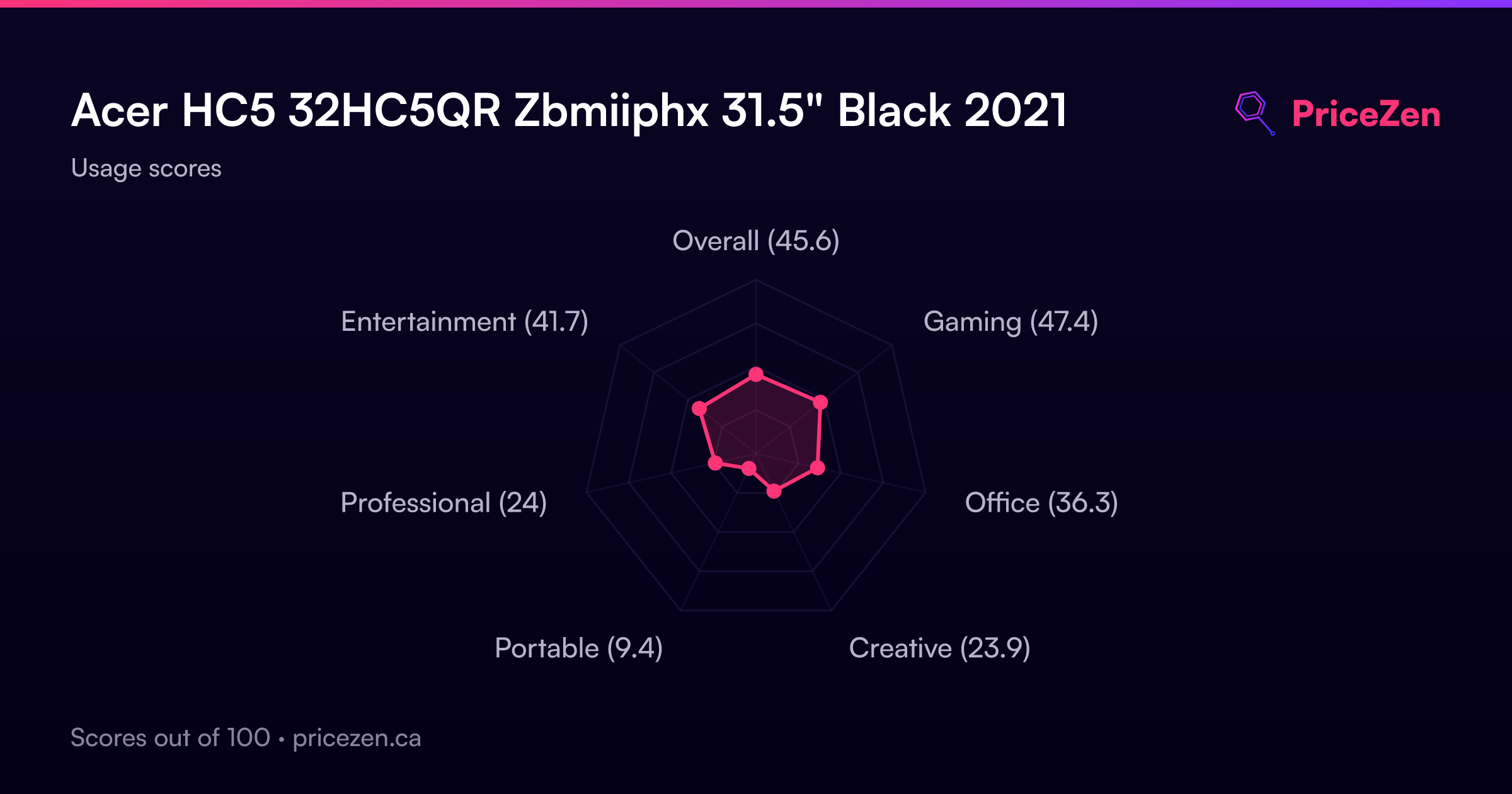
In our database, this monitor lands at 43.5 out of 100 overall, with gaming being its strongest suit at 47.9. That's not a chart-topping score, but context matters. This is a budget-friendly big screen with a high refresh rate, and for the right buyer, that combo still makes sense. Just don't expect it to punch above its weight in color or ergonomics.
Common Questions
Q: Is 1080p on a 31.5-inch monitor too blurry?
It depends on how close you sit. At a normal desk distance, you'll likely notice softer text and less sharp details compared to a 1440p or 4K panel. For gaming, especially fast-paced titles, the lower resolution is less noticeable and helps you hit higher frame rates. If you do a lot of reading or productivity work, you'll probably find it limiting.
Q: Does this monitor work with both AMD and NVIDIA graphics cards?
Yes. It supports Adaptive-Sync, which covers both AMD FreeSync and NVIDIA G-Sync compatible setups. You'll get smooth, tear-free gameplay as long as your GPU supports adaptive sync over DisplayPort or HDMI.
Q: Is the stand adjustable?
Only for tilt. There's no height adjustment, swivel, or pivot, which is a common cost-cutting measure on budget monitors. If you need more ergonomic flexibility, you'll want to budget for a VESA mount or a monitor arm.
Q: How is this monitor for watching movies?
The curved VA panel gives you good contrast and deep blacks, which helps in dark scenes. But the 1080p resolution and weak color performance hold it back. Our database scores it 41.2 out of 100 for entertainment, so it's fine for casual viewing but not a home theater replacement.
Who Should Skip This
If you do any kind of color-sensitive work, skip this. The 17th percentile color performance means photo editing, video grading, or even casual design work will be frustrating. You'd be better off with an IPS or OLED panel that prioritizes color accuracy, even if it means a smaller screen or lower refresh rate.
Office workers and heavy readers should also look elsewhere. The 1080p resolution stretched across 31.5 inches makes text noticeably soft, and the tilt-only stand limits ergonomic adjustments. A 27-inch 1440p monitor with a better stand will be far more comfortable for all-day productivity. And if you want a monitor for movies and media first, the weak color and average entertainment score mean you'd be happier with a 4K TV or a higher-resolution monitor with better color coverage.
Verdict
For competitive gamers on a budget who want a big curved screen, the Acer HC5 32HC5QR makes a lot of sense. The 240Hz refresh rate and 1ms response time are the real deal, and the 31.5-inch curve adds immersion that a flat 27-inch panel can't match. If you mostly play fast-paced games and don't sit close enough to notice the pixel density, you'll be happy with this.
For everyone else, it's a harder sell. Office workers will find the 1080p resolution limiting for text-heavy work, and the weak color performance rules it out for any creative tasks. Movie watchers get a big screen with good contrast, but the entertainment score of 41.2 tells you it's not a home theater star. If you want a do-everything monitor, save up for a 1440p or OLED option. If you want speed and size on a budget, this Acer delivers.
Usage Scores
- Overall45.6
- Gaming47.4
- Office36.3
- Creative23.9
- Portable9.4
- Professional24
- Entertainment41.7