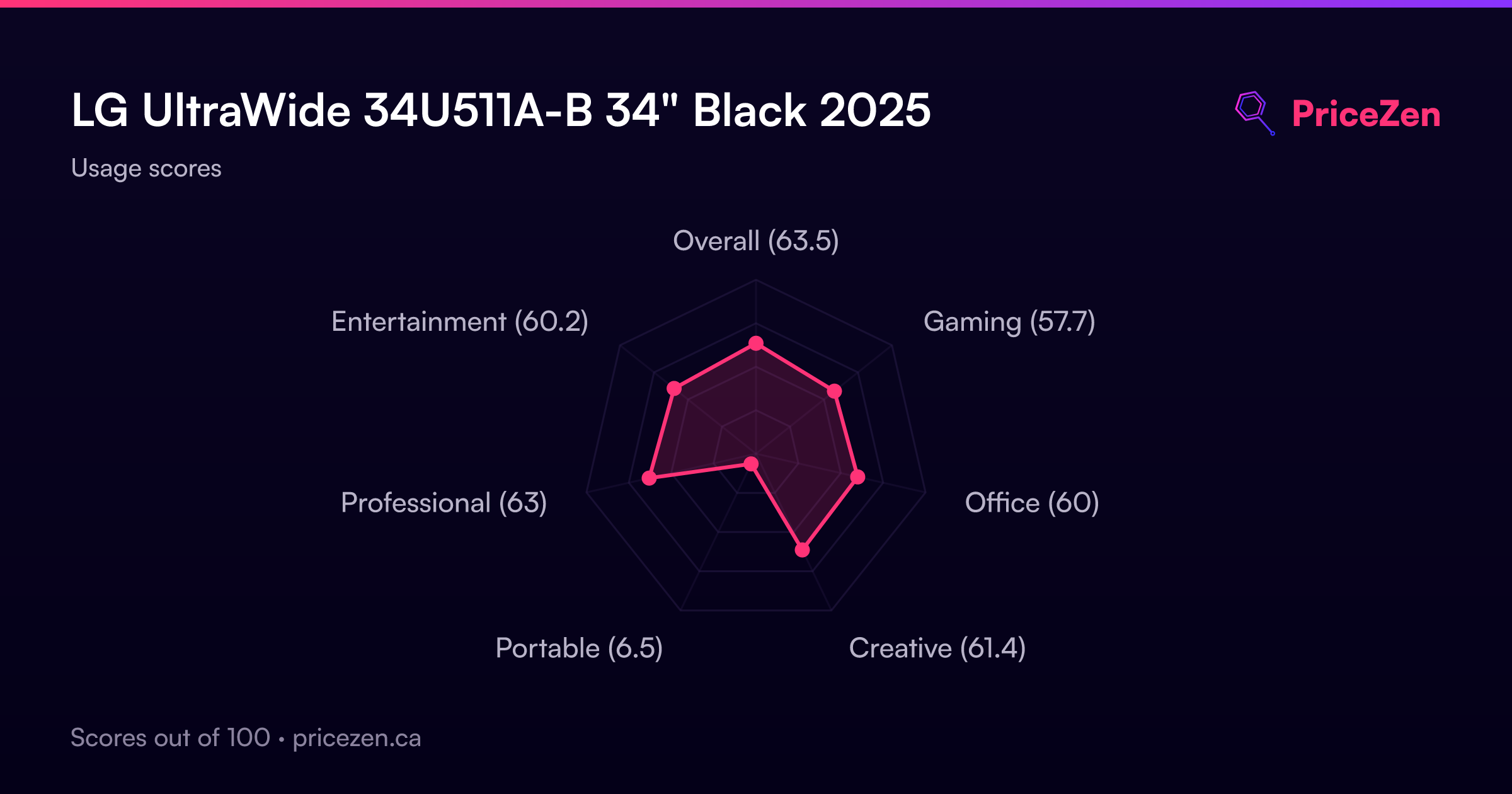
LG UltraWide 34U511A-B 34" Black 2025
The 34-inch 2560 x 1080 IPS panel with a 21:9 aspect ratio delivers a panoramic workspace, while the 100Hz refresh rate and AMD FreeSync keep motion smooth and tear-free. Its 400 nits brightness and 99% sRGB coverage provide accurate colors, and the DisplayHDR 400 certification adds contrast for HDR content. This monitor suits multitasking professionals and gamers who want an ultrawide view without a high price tag, though its 7620g weight limits portability.












Snapshot
The 30-Second Version
The LG UltraWide 34U511A-B is a 34-inch 1080p ultrawide with a 100Hz refresh rate and excellent 99% sRGB color coverage. It's a multitasking beast at a budget price, especially if you can find it near the USD 181 low end. The 1080p resolution is the main compromise, and it's not for pixel-density purists. If you want a big, wide workspace without spending a lot, this is a solid buy.
Pros & Cons
Pros
- 99% sRGB coverage puts it in the 83rd percentile for color, which is excellent for a budget ultrawide 92nd
- 100Hz refresh rate with FreeSync makes for smooth, tear-free gaming and scrolling 81st
- 34-inch 21:9 panel gives you tons of horizontal space for multitasking 67th
- IPS panel offers wide viewing angles and good color consistency
- VESA mount support and tilt adjustment give you some flexibility in setup
Cons
- 2560 x 1080 resolution on a 34-inch panel means low pixel density and visible pixelation up close
- Connectivity is limited to one HDMI and one DisplayPort, landing in the 35th percentile
- No height adjustment or swivel, only tilt, which limits ergonomic options
- DisplayHDR 400 is the bare minimum for HDR and won't impress anyone
- At 7.6kg and 34 inches wide, it's a desk hog that's hard to move around
What owners think
The Word on the Street
How owner sentiment changed over time
ExclusiveBased on when customers actually wrote their reviews - so you can see whether early praise held up.
Happy owners: 94% lately, 89% in Oct – Dec 2025
Too few reviews to call that a change.
Across all 191 store ratings: 4.6★. The chart counts the 98 written reviews with stars and their own date.
Show the numbers
| Period | Reviews | Happy | Mixed | Unhappy | Happy share |
|---|---|---|---|---|---|
| Oct – Dec 2025 | 28 | 25 | 3 | 0 | 89% |
| Jan – Mar 2026 | 52 | 46 | 3 | 3 | 88% |
| Apr – Nov 2026 | 18 | 17 | 1 | 0 | 94% |
- Apr – Jun 20269 of 9 happy
Buyers praised the monitor for its large flat screen, productivity boost, and value. Common themes included ease of multitasking, good image quality, and smooth 100Hz refresh rate.
- Large flat screen ideal for multitasking without curve.
- Improves productivity and workflow efficiency.
- Good value for price at around $200.
- No physical buttons or remote for screen control.
- Jan – Mar 202646 of 52 happy
Reviews praise the monitor's excellent picture quality, vibrant colors, and ultrawide screen for multitasking. A few report early hardware failure or desire for curve/speakers/height adjustment.
- Large ultrawide screen with vibrant colors, clear text, and great for multitasking/work.
- One confirmed early hardware failure (black screen, beeping) after a week; possible power supply issue.
- Some users desire a curved version, built-in speakers, or height-adjustable stand.
- A few reviews note image fuzziness or resolution loss on the large screen, affecting productivity.
- Oct – Dec 202525 of 28 happy
Buyers praised the ultrawide screen for productivity and multitasking, with good out-of-box colors. Some noted lower resolution softness, weak speakers, and non-adjustable stand.
- Great for productivity and multitasking with ample screen real estate.
- FHD resolution on 34-inch results in softer text and lower pixel density.
- Good out-of-box color accuracy and IPS panel quality.
- No height adjustment, no USB-C, and included accessories are limited.
Each column joins calendar quarters until it holds at least 10 reviews with stars and their own date. Happy = 4-5★, mixed = 3★, unhappy = 1-2★. Period summaries are in English.
The proof
Performance
The headline spec here is the 100Hz refresh rate with a 5ms response time. For a monitor in this price range, that's solid. It's not going to blow away a 240Hz esports panel, but it's a meaningful step up from the 60Hz monitors most people are still using. The 100Hz refresh rate makes everyday scrolling feel smoother and gives you a bit more headroom in fast-paced games. The 5ms response time is fine for an IPS panel, though competitive gamers will notice some ghosting in high-contrast scenes.
Color performance is where this monitor actually punches above its weight. The 99% sRGB coverage puts it in the 83rd percentile of all monitors we track, which means it's better than most of what's out there. The 400 nits of brightness and DisplayHDR 400 certification are nice on paper, but don't expect real HDR performance. DisplayHDR 400 is the entry-level tier, and without local dimming or a wider color gamut, HDR content will look only marginally better than SDR. The 8-bit panel handles gradients reasonably well, but you might see some banding in very smooth color transitions. For the price, though, the color accuracy is a genuine highlight.
Specifications
Full Specifications
Display
| Size | 34" |
| Resolution | 2560x1080 (QHD) |
| Panel Type | IPS |
| Aspect Ratio | 21:9 |
| Curved | No |
| Screen Finish | matte |
Performance
| Refresh Rate | 100 Hz |
| Response Time | 5 |
| Adaptive Sync | G-Sync |
Color & HDR
| Brightness | 400 nits |
| Color Gamut | 90% sRGB |
| Color Depth | 8-bit |
| HDR | DisplayHDR 400 |
| HDR Support | HDR10 |
Connectivity
| HDMI Ports | 1 |
| DisplayPort | 1 |
| USB-C | 0 |
| Speakers | No |
| Headphone Jack | Yes |
Ergonomics
| Height Adjustable | No |
| Tilt | Yes |
| Swivel | No |
| Pivot | No |
| VESA Mount | 100x100 |
Features
| Webcam | No |
| Touchscreen | No |
| PIP/PBP | No |
| Power | 32 |
| Weight | 7.6 kg / 16.8 lbs |
vs Competition
When you stack this against the competition, the picture gets interesting. The MSI MAG 271QPX QD-OLED E2 and ASUS ROG Strix XG27AQDMG are both OLED panels with far better contrast, faster response times, and higher refresh rates. But they're also significantly more expensive and smaller at 27 inches. If you're a gamer who prioritizes image quality and speed over screen size, those are better choices. The LG's advantage is raw horizontal space and a much lower price.
The BenQ MA270U and Dell S2725QC are both 27-inch 4K monitors aimed at productivity users. They offer much sharper text and better pixel density, which matters if you spend all day reading documents or editing photos. But they're 16:9, so you lose the dual-window workflow that the LG's 21:9 aspect ratio enables. The Samsung ViewFinity LS34C650UANXGO is the closest direct competitor, another 34-inch ultrawide, but it typically runs at a higher resolution and a higher price. If you want the ultrawide form factor with sharper text, the Samsung is worth a look. If you want the cheapest way into a 34-inch ultrawide, the LG wins.
| Spec | LG UltraWide 34U511A-B 34" | ASUS ROG Strix XG27UCDMG 27" | MSI MAG 271QPX QD-OLED E2 27" | Alienware AW-Series AW3425DW 34" | Samsung Odyssey G60SD 27" | Gigabyte AORUS FO32U2 32" |
|---|---|---|---|---|---|---|
| Screen Size | 34 | 27 | 27 | 34 | 27 | 32 |
| Resolution | 2560 x 1080 | 3840 x 2160 | 2560 x 1440 | 3440 x 1440 | 2560 x 1440 | 3840 x 2160 |
| Panel Type | IPS | OLED | QD-OLED | QD-OLED | OLED | OLED |
| Refresh Rate | 100 | 240 | 240 | 240 | 360 | 240 |
| Response Time Ms | 5 | 0.029999999329447746 | 0.029999999329447746 | 0.029999999329447746 | 0.029999999329447746 | 0.029999999329447746 |
| Adaptive Sync | G-Sync | FreeSync Premium Pro | FreeSync Premium Pro | FreeSync Premium Pro | FreeSync Premium Pro | FreeSync Premium Pro |
| Hdr | DisplayHDR 400 | DisplayHDR True Black 400 | DisplayHDR True Black 400 | DisplayHDR 400 True Black | HDR10+ | DisplayHDR True Black 400 |
| Compare | Compare | Compare | Compare | Compare |
| Product | Color | Portability | Display | Feature | Ergonomic | Performance | Connectivity | Social Proof |
|---|---|---|---|---|---|---|---|---|
| LG UltraWide 34U511A-B 34" | 80.7 | 12.9 | 63.4 | 66.9 | 47.6 | 52.6 | 34.3 | 92.1 |
| ASUS ROG Strix XG27UCDMG 27" Compare | 96.1 | 57.5 | 97.9 | 83.7 | 90.8 | 98 | 81.3 | 98.9 |
| MSI MAG 271QPX QD-OLED E2 27" Compare | 99.1 | 57.5 | 77.3 | 83.7 | 90.8 | 98 | 81.3 | 98.9 |
| Alienware AW-Series AW3425DW 34" Compare | 99 | 73.9 | 85.7 | 89.7 | 90.8 | 98 | 95.5 | 96.9 |
| Samsung Odyssey G60SD 27" Compare | 90.3 | 39.6 | 77.3 | 66.9 | 90.8 | 99.5 | 87.6 | 92.1 |
| Gigabyte AORUS FO32U2 32" Compare | 79.4 | 63 | 99.1 | 83.7 | 90.8 | 98 | 87.6 | 92.1 |
Price
Value & Pricing
Pricing on this monitor is all over the place, which is worth paying attention to. In the US, we're seeing listings from USD 181 to USD 300 across 12 different vendors. That's a USD 119 spread, which is huge for a monitor in this class. If you're shopping in the US, it pays to shop around. The lowest price we're seeing is USD 181, and at that price, this monitor is an absolute steal. At USD 300, it's a harder sell, especially when you consider what else is available.
In Canada, the spread is smaller but still notable, ranging from CAD 220 to CAD 289 across two listings. That's a CAD 69 difference, and again, the lower end of that range is where this monitor makes the most sense. The value proposition here is simple: you're getting a 34-inch IPS ultrawide with strong color performance and a 100Hz refresh rate for less than many 27-inch 1440p monitors. The trade-off is the 1080p resolution, which some people will find unacceptable at this size. But if you're okay with that, the price-to-performance ratio is hard to beat.
Visions Electronics 1 offer From CA$359
Price history
Read more
Overview
The LG UltraWide 34U511A-B is a 34-inch IPS panel with a 21:9 aspect ratio and a 2560 x 1080 resolution. That's a lot of horizontal space for not a lot of vertical pixels, which is the first thing you need to understand about this monitor. It's not a 4K panel. It's not even a 1440p ultrawide. It's a 1080p ultrawide, stretched across 34 inches. For some people, that's a dealbreaker. For others, it's exactly what they want at a price that's hard to argue with.
Who is this for? Honestly, it's for people who want a big, wide workspace without spending a fortune. The 21:9 format means you can have two full-size windows side by side without a bezel down the middle. It's also a decent entry point for ultrawide gaming, thanks to the 100Hz refresh rate and AMD FreeSync support. Creators who work in sRGB will appreciate the 99% coverage, though the resolution might leave them wanting more sharpness for detailed photo or video work.
What makes this interesting is the value proposition. In our database, this monitor sits at the 83rd percentile for color, which is genuinely strong for a budget ultrawide. But it's at the 13th percentile for compactness, which is no surprise given the 34-inch footprint and 7.6kg weight. You're trading desk space and pixel density for screen real estate and a low price. That's a trade a lot of people are happy to make, but you should know what you're getting into.
Common Questions
Q: What is the refresh rate on this monitor?
The LG UltraWide 34U511A-B runs at 100Hz, which is a solid step up from standard 60Hz panels. It's not the fastest gaming monitor out there, but it makes everyday scrolling and casual gaming feel noticeably smoother. The 5ms response time is typical for an IPS panel at this price point.
Q: Does this monitor have a headphone jack?
Yes, it does. There's a headphone jack built into the monitor, which is handy if you're connecting a console or a device that doesn't have its own audio output. Just keep in mind that the monitor's built-in audio passthrough is basic, so don't expect anything fancy.
Q: Is the screen curved?
No, this is a flat IPS panel, not a curved one. Some people prefer curved ultrawides for a more immersive feel, but a flat panel is actually better for productivity work since straight lines don't appear distorted. At 34 inches, the edges of a flat panel can feel a bit far away, but it's not a dealbreaker for most people.
Q: Is the 1080p resolution sharp enough for a 34-inch monitor?
That depends on how close you sit and what you're doing. At 2560 x 1080 on a 34-inch panel, the pixel density is around 82 pixels per inch, which is lower than a 27-inch 1440p monitor. Text won't be as crisp, and you might notice some pixelation if you sit close. For gaming and video, it's less noticeable. If you do a lot of reading or detailed photo work, you might want to look at a higher-resolution ultrawide instead.
Who Should Skip This
If you're a photographer, video editor, or anyone who needs pixel-perfect sharpness, this monitor is not for you. The 1080p resolution on a 34-inch panel means text and fine details will look soft compared to a 1440p or 4K display. You'd be better off with something like the BenQ MA270U or Dell S2725QC, both of which offer 4K resolution in a smaller, sharper package.
Competitive gamers should also look elsewhere. The 100Hz refresh rate and 5ms response time are fine for casual play, but if you're playing fast-paced shooters or fighting games, you'll want something with a higher refresh rate and faster response. The ASUS ROG Strix XG27AQDMG or MSI MAG 271QPX QD-OLED E2 are much better suited for that, though they cost more and are smaller. And if you're tight on desk space, the 34-inch width and 7.6kg weight make this a poor fit for small setups.
Verdict
For multitaskers on a budget, this monitor is a strong pick. The 21:9 aspect ratio genuinely changes how you work, letting you keep a browser and a document open side by side without squinting. The color performance is better than you'd expect at this price, and the 100Hz refresh rate makes everything feel a bit more responsive. If you're coming from a 24-inch 1080p monitor, this will feel like a massive upgrade in screen real estate.
For gamers, it's a mixed bag. The 100Hz refresh rate and FreeSync support are nice, and the ultrawide aspect ratio is genuinely immersive in games that support it. But the 1080p resolution means you're not getting the sharpest image, and the 5ms response time isn't going to satisfy competitive players. If you're a casual gamer who wants a big, wide screen for both work and play, this works. If you're serious about gaming, save up for something with a higher resolution or faster panel.
Usage Scores
- Overall64.3
- Gaming59.3
- Office60.9
- Creative67
- Portable6.6
- Professional64.5
- Entertainment61.7