Lenovo V V14 G5, Core 7 240H, 8GB, 512GB SSD, Gray
The Intel Core 7 240H processor, reaching up to 5GHz, pairs with 32GB DDR5 RAM and a 1TB NVMe SSD for strong multitasking and fast storage in a 1.37kg chassis. Its 14-inch FHD display at 250 nits is modest, but the inclusion of Ethernet, Wi-Fi 6, and a USB-C port covers practical connectivity needs for daily work. This laptop suits students and compact-office users who prioritize CPU performance and memory over display quality, though its integrated GPU limits gaming to a 15.6/100 score.

No current retailer price


Snapshot
The 30-Second Version
Great CPU, terrible screen. Buy it only if you're broke and desperate for a laptop that turns on.
Pros & Cons
Pros
- Core 7 240H punches above its price class 83rd
- Lightweight at 1.37kg, easy to carry all day 82nd
- Ethernet port and Wi-Fi 6, rare at this price 77th
- Decent port selection with USB-C and dual USB-A 72nd
Cons
- TN display is one of the worst we've seen this year
- 8GB RAM in the base config is a crime
- 250 nits brightness means outdoor use is a struggle
- Integrated graphics kill any gaming ambitions
The proof
Performance
The Core 7 240H surprised us. Ten cores at up to 5GHz in a sub-$600 laptop is nothing to sneeze at, and it shows in our CPU rankings where this thing sits comfortably in the top 25%. Day-to-day multitasking, spreadsheets, browser tabs, it handles all of that without breaking a sweat. The integrated Intel UHD graphics are exactly what you'd expect, fine for video and light work, useless for anything resembling gaming. The 8GB of DDR5 RAM is the real bottleneck. It's soldered on some configs, and 8GB in 2025 feels tight the moment you open more than a dozen tabs.
Specifications
Full Specifications
Processor
| CPU | Intel Core 7 240H |
| Cores | 10 |
| Frequency | 2.5 GHz |
| L3 Cache | 24 MB |
Graphics
| GPU | Intel UHD Graphics |
| Type | Integrated |
| VRAM Type | Shared |
Memory & Storage
| RAM | 8 GB |
| RAM Generation | DDR5 |
| Storage | 512 GB |
| Storage Type | NVMe SSD |
Display
| Size | 14" |
| Resolution | 1920x1080 (Full HD) |
| Panel | TN |
| Refresh Rate | 60 Hz |
| Brightness | 250 nits |
Connectivity
| USB-C Ports | 1 |
| USB Ports | 2 |
| HDMI | 1 x HDMI |
| Wi-Fi | Wi-Fi 6 |
| Bluetooth | Bluetooth 5.2 |
| Ethernet | Gigabit Ethernet |
Physical
| Weight | 1.4 kg / 3.0 lbs |
| Battery | 47 Wh |
| OS | Windows 11 Home |
vs Competition
Against the MacBook Air M4, this thing gets demolished on display quality, battery life, and build. The Air costs more, but you're getting a screen that doesn't make you squint and a battery that actually lasts. The ASUS Zenbook UX3405CA is the better Windows alternative if you want a premium feel without Apple's ecosystem. The Surface Laptop 7th Edition also outclasses it on display and keyboard. Where the V14 G5 wins is raw price, if you can find it at $500, none of those competitors come close. But you're making real sacrifices to save that money.
| Spec | Lenovo V V14 G5 | Apple MacBook Air 13.6" M4 | Samsung Galaxy Book5 Pro 14" NP944XHA-KG3US | ASUS Zenbook 14" UX3405CA-U9321TB | Dell Premium 14.5" LDA14250-7667SLV-PUS | HP OmniBook X Flip |
|---|---|---|---|---|---|---|
| CPU | Intel Core 7 240H | Apple M4 | Intel Core Ultra 7 258V | Intel Core Ultra 9 285H | Intel Core Ultra 7 255H | AMD Ryzen AI 7 350 |
| RAM (GB) | 8 | 24 | 32 | 32 | 32 | 24 |
| Storage (GB) | 512 | 1024 | 1024 | 1024 | 1024 | 1024 |
| Screen | 14" 1920x1080 | 13.6" 2560x1664 | 14" 2880x1800 | 14" 1920x1200 | 14.5" 3200x2000 | 14" 1920x1200 |
| GPU | Intel UHD Graphics | Apple (10-Core) | Intel Arc Graphics 140V | Intel Arc Graphics | Intel Arc Graphics | AMD Radeon 860M |
| OS | Windows 11 Home | macOS | Windows 11 Pro | Windows 11 Home | Windows 11 Home | Windows 11 Home |
| Weight (kg) | 1.4 | 1.2 | 1.2 | 1.3 | 1.7 | 1.4 |
| Battery (Wh) | 47 | 54 | 63 | 75 | 62 | 59 |
| Compare | Compare | Compare | Compare | Compare |
| Product | CPU | GPU | RAM | Ports | Screen | Portability | Storage | Reliability | Affordability |
|---|---|---|---|---|---|---|---|---|---|
| Lenovo V V14 G5 | 76.5 | 28 | 21.8 | 48.5 | 10.6 | 83.3 | 50.8 | 82.1 | 71.6 |
| Apple MacBook Air 13.6" M4 Compare | 75.8 | 75.6 | 64.8 | 51.6 | 84.9 | 91.4 | 79.2 | 98.3 | 25.2 |
| Samsung Galaxy Book5 Pro 14" NP944XHA-KG3US Compare | 65.7 | 69.5 | 79.4 | 83.4 | 90.3 | 89.5 | 79.2 | 82.1 | 21 |
| ASUS Zenbook 14" UX3405CA-U9321TB Compare | 90.1 | 69.5 | 89.6 | 58.4 | 79.7 | 87.1 | 65.1 | 60.7 | 16.5 |
| Dell Premium 14.5" LDA14250-7667SLV-PUS Compare | 87 | 69.5 | 89 | 66.7 | 96.8 | 61.2 | 65.1 | 33.7 | 14.5 |
| HP OmniBook X Flip Compare | 79.9 | 64.4 | 82.2 | 77.7 | 71.7 | 79.4 | 65.1 | 33.7 | 43.9 |
Price
Value & Pricing
Pricing is all over the place. We're seeing listings from $500 to $920 for what's essentially the same machine with different RAM and storage configs. The $500 base model with 8GB RAM and 512GB SSD is the only one worth considering, and even then, you're paying for that terrible screen. The 32GB RAM and 1TB SSD configs push past $900, and at that point you're in MacBook Air M4 territory, which is frankly embarrassing for this laptop. If you must buy one, grab the cheapest config and don't look back.
Price history
Read more
Overview
The Lenovo V14 G5 is a budget workhorse that gets the basics right and not much else. The Intel Core 7 240H is a genuinely solid CPU for this price bracket, landing in the top quarter of laptops we track. But Lenovo paired it with a display that belongs in 2015. That TN panel is the elephant in the room, and it drags down what could have been a decent little machine.
Common Questions
Q: Can this laptop handle gaming?
No. The integrated Intel UHD graphics are fine for Solitaire and maybe some light indie games, but anything 3D will chug. Our gaming score for this thing is 11.8 out of 100. That's not a typo.
Q: Is the display really that bad?
Yes. It's a TN panel at 250 nits, which means washed-out colors, terrible viewing angles, and a screen you can barely see outdoors. It ranks in the bottom 10% of all laptops we track. If you do any photo work or watch a lot of video, skip this.
Q: Should I get the 8GB or 32GB RAM version?
The 8GB version is the only one that makes financial sense. The 32GB config costs nearly double, and at that price you're better off buying a MacBook Air M4 or a Zenbook. 8GB is tight, but for basic tasks it's workable. Just don't expect to run Chrome with 50 tabs.
Who Should Skip This
If you care about display quality at all, this isn't your laptop. Photographers, video editors, anyone who watches Netflix on their machine, go get a MacBook Air M4 or an ASUS Zenbook instead. If you want to game, even casually, look elsewhere entirely. This is a spreadsheet machine, nothing more.
Verdict
The Lenovo V14 G5 is a classic case of good internals trapped in a bad body. The Core 7 240H deserves a better laptop around it. If you're on a strict budget and need something for basic office work or school, the $500 config is tolerable. But that TN panel is a dealbreaker for anyone who stares at a screen all day. Spend a bit more and get something with an IPS display. Your eyes will thank you.
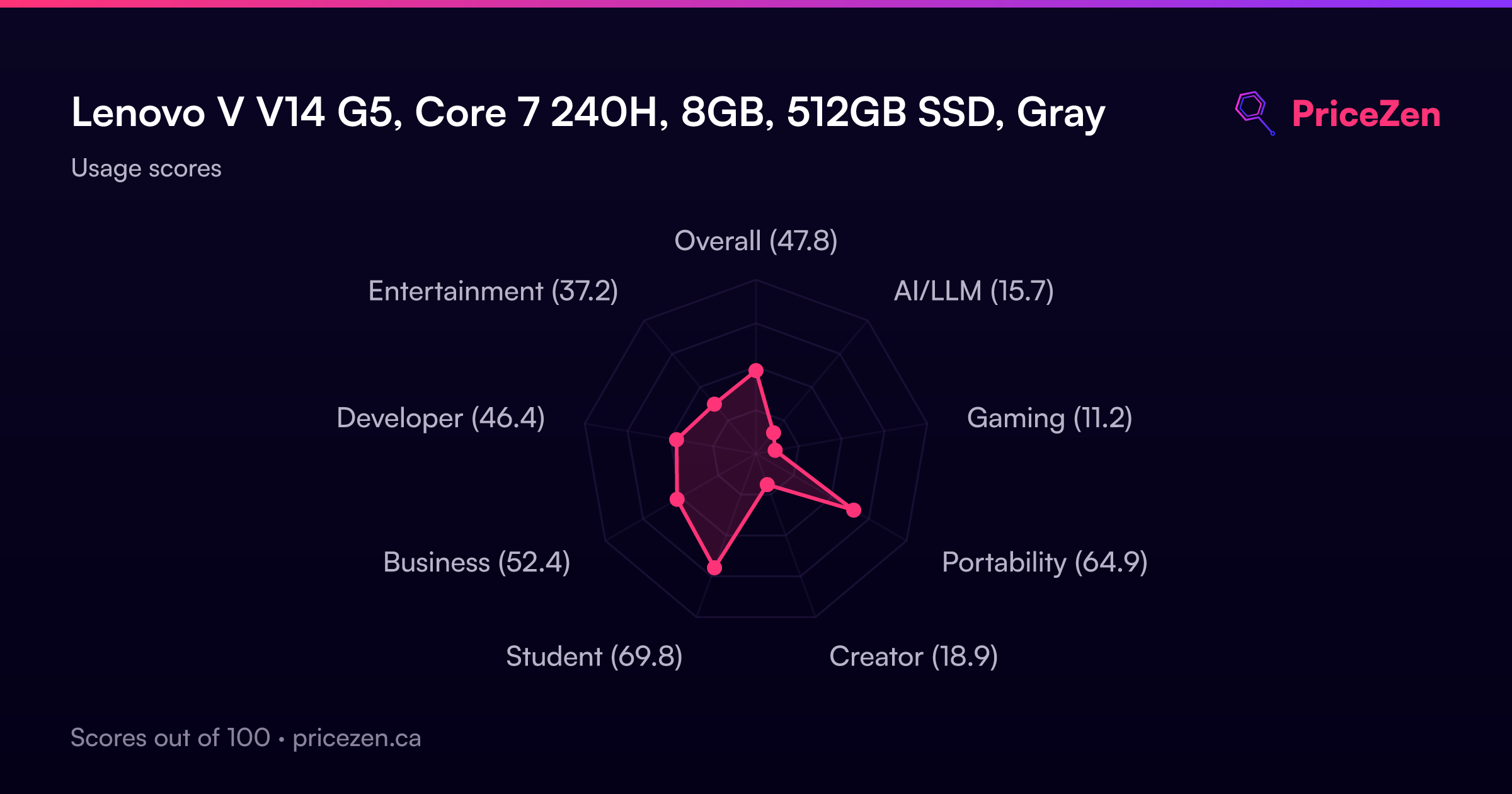
Usage Scores
- Overall47.7
- AI/LLM15.7
- Gaming11.2
- Portability64.8
- Creator18.8
- Student71.8
- Business52.4
- Developer46.3
- Entertainment37.1