ASUS Vivobook 16" X1607QA-BS51-CB, Snapdragon X X1, 16GB, 1TB SSD, Quiet Blue
The Snapdragon X X1 8-core 2.2GHz chip pairs with 16GB LPDDR5X RAM and a 1TB SSD for smooth multitasking, while the 16-inch 1920x1200 display and 50Wh battery support up to 19 hours of use. Its 1.76kg build and Wi-Fi 6E connectivity make it a portable option for daily commutes, though gaming performance is limited at 10.5/100. Best for students needing a reliable Windows 11 laptop for note-taking, research, and light productivity tasks.

No current retailer price
Snapshot
The 30-Second Version
The ASUS Vivobook X1607QA is a 16-inch ARM-powered productivity laptop with a Snapdragon X X1 CPU, 16GB RAM, and 1TB SSD for around CAD 1,000. The CPU is well above average and handles everyday multitasking with ease, but the integrated GPU is weak and gaming is basically off the table. Battery life is good but not the 19 hours ASUS claims. If you live in a browser and Office apps, this is a great value. If you want to game or run specialized x86 software, look elsewhere.
Pros & Cons
Pros
- Snapdragon X X1 CPU lands in the 80th percentile, well above average for everyday tasks 84th
- 16GB RAM and 1TB SSD at this price is a genuinely good spec combo 65th
- 16-inch 1920x1200 display gives you more vertical space than a typical 1080p panel
- Wi-Fi 6E and HDMI 2.1 keep you future-proofed for connectivity
- Social proof is strong at the 86th percentile, with a 4.7/5 rating from 20 reviews
Cons
- Integrated Adreno GPU sits in the 28th percentile, gaming score is a dismal 13.9/100
- 50Wh battery is modest for a 16-inch laptop, despite the 'up to 19 hours' marketing claim
- Screen is only 60Hz and sits in the 49th percentile, middle of the pack at best
- ARM architecture means some older Windows apps won't run natively
- 1.76kg weight puts it in the 28th percentile for compactness, it's not a light machine
What owners think
The Word on the Street
How owner sentiment changed over time
ExclusiveBased on when customers actually wrote their reviews - so you can see whether early praise held up.
6 written reviews, Mar – Jul 2026: 6 happy
Across all 26 store ratings: 4.4★. Most owners rate without writing a review. The chart counts the 6 written reviews.
Each dot is one written review, in the month it was written. Happy = 4-5★, mixed = 3★, unhappy = 1-2★.
The proof
Performance
The Snapdragon X X1 8-core chip lands in the 80th percentile for CPU performance in our database. That's well above average, and in real terms it means this laptop handles everyday multitasking without breaking a sweat. Twenty browser tabs, a Zoom call, Spotify, and a few Office docs? No problem. The 16GB of LPDDR5X RAM helps here too, keeping things snappy when you're jumping between apps.
The integrated Adreno GPU is where things get interesting, and not in a great way. It sits in the 28th percentile, which is below average even for integrated graphics. For everyday tasks like video streaming, spreadsheets, and light photo editing, you won't notice. But if you try to play anything more demanding than a casual indie game, you'll feel it immediately. The gaming score of 13.9 out of 100 tells the story. This is not a machine for gaming, period.
Specifications
Full Specifications
Processor
| CPU | Snapdragon X X126100 |
| Cores | 8 |
| Frequency | 2.2 GHz |
Graphics
| GPU | Qualcomm Adreno GPU |
| Type | Integrated |
| VRAM Type | Shared |
Memory & Storage
| RAM | 16 GB |
| RAM Generation | LPDDR5X |
| Storage | 1 TB |
| Storage Type | SSD |
Display
| Size | 16" |
| Resolution | 1920x1200 (Full HD) |
| Refresh Rate | 60 Hz |
Connectivity
| USB-C Ports | 2 |
| USB Ports | 2 |
| HDMI | HDMI 2.1 TMDS |
| Wi-Fi | Wi-Fi 6E |
| Bluetooth | Bluetooth 5.3 |
Physical
| Weight | 1.8 kg / 3.9 lbs |
| Battery | 50 Wh |
| OS | Windows 11 Home |
vs Competition
The elephant in the room is the Apple MacBook Pro M4 Pro. It's a different beast entirely, far more expensive, but it shows what ARM-based laptops can do when everything is optimized. The Vivobook isn't trying to compete with that. It's competing with mid-range Windows laptops like the MSI Prestige and Samsung Galaxy Book5 Pro. Against those, the Vivobook holds its own on CPU performance and storage, but gives up ground on screen quality and portability.
The Lenovo Legion 5i and HP OMEN Transcend are gaming-focused machines that absolutely destroy the Vivobook on graphics performance. If you want to play games, those are the obvious choices. But they're also heavier, more expensive, and their battery life is typically worse. The Vivobook is for a different person entirely, someone who values battery life and everyday responsiveness over raw GPU muscle.
| Spec | ASUS Vivobook 16" X1607QA-BS51-CB | Apple MacBook Pro 14.2" M4 Pro | Lenovo Legion Pro 7i Gen 10 16" | HP OMEN Transcend | Samsung Galaxy Book5 Pro 14" NP944XHA-KG3US | MSI Raider 16" RAIDERGE6814247 |
|---|---|---|---|---|---|---|
| CPU | Snapdragon X X126100 | Apple M4 Pro | Intel Core Ultra 9 275HX | Intel Core Ultra 9 285H | Intel Core Ultra 7 258V | Intel Core i9 14900HX |
| RAM (GB) | 16 | 48 | 32 | 32 | 32 | 32 |
| Storage (GB) | 1024 | 4096 | 1024 | 1024 | 1024 | 2048 |
| Screen | 16" 1920x1200 | 14.2" 3024x1964 | 16" 2560x1600 | 14" 2880x1800 | 14" 2880x1800 | 16" 3840x2160 |
| GPU | Qualcomm Adreno GPU | Apple (16-Core) | NVIDIA GeForce RTX 5070 Ti | NVIDIA GeForce RTX 5070 | Intel Arc Graphics 140V | NVIDIA GeForce RTX 4070 |
| OS | Windows 11 Home | macOS | Windows 11 Home | Windows 11 Home | Windows 11 Pro | Windows 11 Home |
| Weight (kg) | 1.8 | 1.6 | 2.7 | 1.6 | 1.2 | 2.7 |
| Battery (Wh) | 50 | 72 | 99 | 71 | 63 | 100 |
| Compare | Compare | Compare | Compare | Compare |
| Product | CPU | GPU | RAM | Ports | Screen | Portability | Storage | Reliability | Social Proof | Affordability |
|---|---|---|---|---|---|---|---|---|---|---|
| ASUS Vivobook 16" X1607QA-BS51-CB | 52.3 | 6.5 | 50 | 51.2 | 47.1 | 28.4 | 65.3 | 60.4 | 83.5 | 0 |
| Apple MacBook Pro 14.2" M4 Pro Compare | 92.4 | 78.9 | 90.7 | 73.3 | 99.3 | 68.9 | 98.5 | 98.1 | 99.9 | 4.2 |
| Lenovo Legion Pro 7i Gen 10 16" Compare | 97.3 | 96.7 | 89.1 | 97.2 | 95.7 | 9.5 | 79.4 | 81.8 | 99.9 | 5.4 |
| HP OMEN Transcend Compare | 90.2 | 93.6 | 89.8 | 89.3 | 96.5 | 72.3 | 65.3 | 33.5 | 97.3 | 8.3 |
| Samsung Galaxy Book5 Pro 14" NP944XHA-KG3US Compare | 65.9 | 69.8 | 79.6 | 83.2 | 91.6 | 89.4 | 79.4 | 81.8 | 98.4 | 20.1 |
| MSI Raider 16" RAIDERGE6814247 Compare | 93.2 | 95.5 | 86.4 | 98.6 | 98 | 9.3 | 94 | 60.4 | 50.2 | 10.2 |
Price
Value & Pricing
The pricing situation here is interesting. We're seeing CAD 1,000 to CAD 1,100 across two Canadian listings, so there's a CAD 100 spread depending on where you shop. That's worth paying attention to. For a 16-inch laptop with 16GB of RAM, a 1TB SSD, and a capable ARM processor, the lower end of that range feels like a genuinely good deal.
At CAD 1,100, the value proposition gets a little shakier. You're starting to brush up against laptops with better screens or more powerful graphics. But if you can snag it at CAD 1,000, you're getting a lot of machine for the money. The storage alone is a nice touch, 1TB is more than enough for most people and you won't be juggling external drives anytime soon.
Price history
Read more
Overview
The ASUS Vivobook X1607QA is one of those laptops that makes you do a double take. A 16-inch screen, 16GB of RAM, a 1TB SSD, and a Snapdragon X processor for around CAD 1,000? On paper, that's a lot of laptop for the money. It's aimed squarely at people who live in a browser, Office apps, and video calls all day, and want something that won't die by lunchtime.
This is a Copilot+ PC, which means Microsoft's AI features are front and center. The Snapdragon X X1 is an 8-core ARM chip, not your typical Intel or AMD silicon. That's the big story here. It's efficient, it's quiet, and it sips power. But it also means some older apps won't run natively, which is a trade-off you need to understand before buying.
We've seen a wave of these ARM-based Windows laptops hit the market, and they're getting better every generation. The Vivobook 16 isn't trying to be a gaming rig or a video editing monster. It's a workhorse for everyday productivity, and for that job, it's a compelling option. Just don't expect it to be something it's not.
Common Questions
Q: Can this laptop run all my existing Windows apps?
Most modern apps will run fine, either natively or through Windows emulation. But older x86 apps, especially ones with drivers or low-level system access, may have compatibility issues. Check with your software vendor before buying if you rely on specialized tools. The Snapdragon X X1 handles everyday productivity apps without any problems.
Q: Is the battery life really 19 hours?
That's ASUS's marketing claim, and it's almost certainly under ideal conditions with light usage. The 50Wh battery is actually modest for a 16-inch laptop. In real-world use, expect something closer to 8-12 hours depending on screen brightness and workload. It's good, but don't plan a full workday without a charger based on the 19-hour claim.
Q: Can I play games on this laptop?
Not really. The integrated Adreno GPU scores 13.9 out of 100 for gaming in our database, which is one of the lowest we've seen. Casual browser games and very light indie titles will run, but anything more demanding will struggle. If gaming matters to you, look at something with a dedicated GPU like the Lenovo Legion 5i or HP OMEN Transcend.
Q: Is the 16-inch screen good for work?
The 1920x1200 resolution gives you a bit more vertical space than a standard 1080p panel, which is nice for documents and web browsing. But it's a 60Hz panel and sits in the 49th percentile for screen quality in our database. It's perfectly fine for productivity, just don't expect the vibrant colors or high refresh rates you'd get on a premium laptop.
Who Should Skip This
If you're a gamer, this laptop is not for you. The gaming score of 13.9 out of 100 is one of the worst we've seen, and the integrated Adreno GPU simply can't handle modern titles. Look at the Lenovo Legion 5i or HP OMEN Transcend instead, they'll cost more but they'll actually run games.
You should also skip this if you rely on specialized x86 software that hasn't been updated for ARM. Things like older VPN clients, some antivirus tools, or niche business applications may not work properly. And if portability is a priority, the 1.76kg weight and 16-inch footprint make this a bit of a chunky travel companion. The Samsung Galaxy Book5 Pro or MSI Prestige are lighter options if you're carrying your laptop everywhere.
Verdict
If you're a student, a business user, or a developer who lives in web apps and productivity software, this laptop makes a lot of sense. The Snapdragon X X1 handles everyday workloads with ease, the 16GB of RAM gives you room to breathe, and the 1TB SSD means you won't be deleting files to make space. The 16-inch screen is comfortable for long work sessions, even if it's not the brightest or fastest panel out there.
But if you need to run specialized Windows software, especially older x86 apps, you should check compatibility first. ARM emulation has come a long way, but it's not perfect. And if you want to game, even casually, look elsewhere. The Adreno GPU just isn't up to it. For everyone else, this is a solid, well-priced productivity machine that punches above its weight.
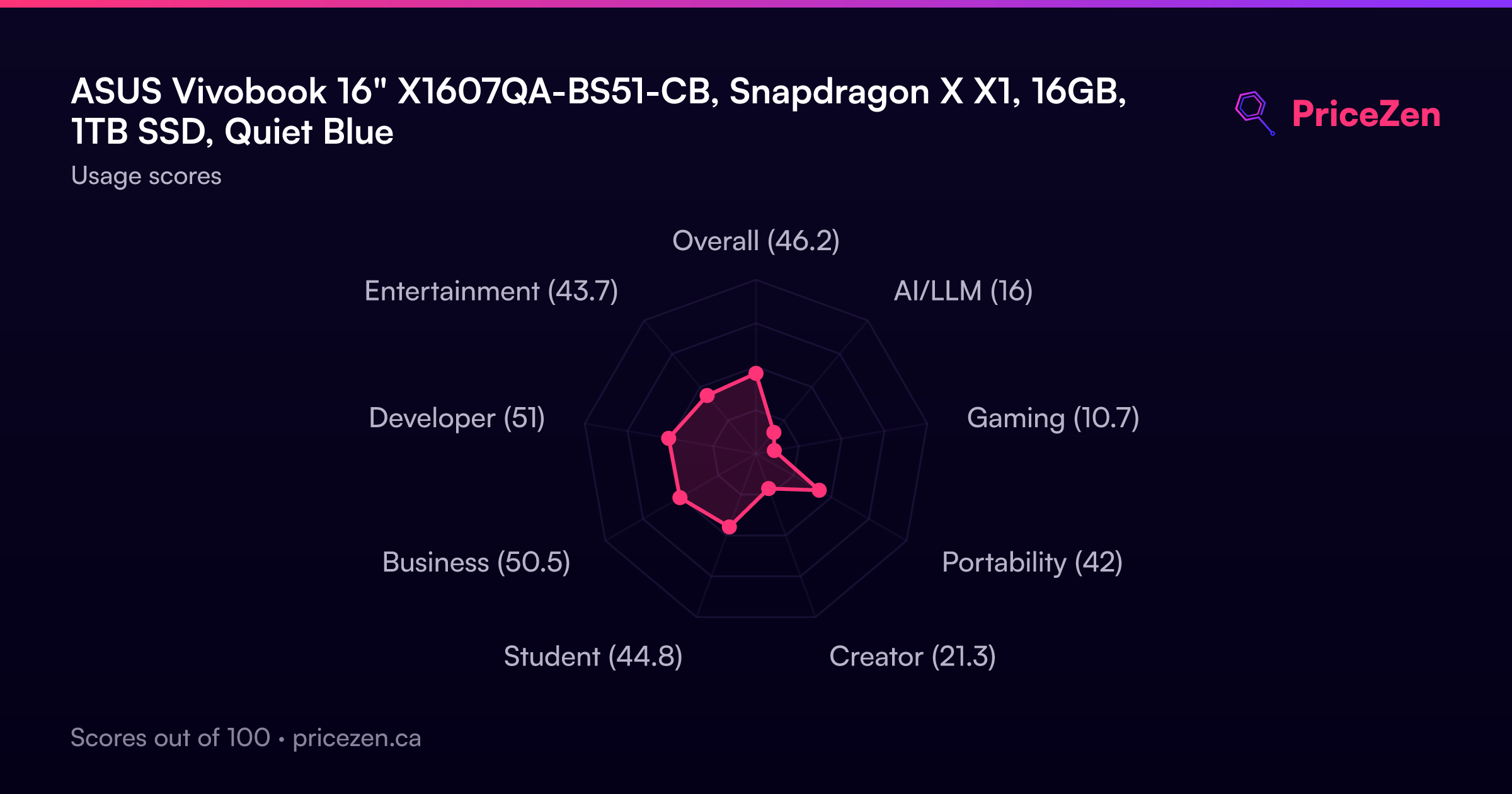
Usage Scores
- Overall46.2
- AI/LLM16
- Gaming10.7
- Portability42
- Creator21.3
- Student44.8
- Business50.5
- Developer51
- Entertainment43.7