Lenovo ThinkPad T14 Gen 6 2026, Core Ultra 5 225U, 16GB, 512GB SSD, Gray
Powered by an Intel Core Ultra 5 225U with dedicated AI engines, this 1.38kg laptop automates workflows like document summarization while its advanced thermal design sustains performance under load. The 14-inch WUXGA touchscreen with 400 nits brightness and comprehensive port selection—including Thunderbolt, Ethernet, and Wi-Fi 7—delivers flexible connectivity in a durable, customer-replaceable unit chassis. It’s best for IT-managed business users and students who need a secure, all-day productivity machine with robust remote management capabilities.






Snapshot
The 30-Second Version
The ThinkPad T14 Gen 6 is a solid business laptop with best-in-class port selection and reliable build quality. The Core Ultra 5 225U handles productivity fine, but the 512GB SSD and 45% NTSC display hold it back. US prices range from USD 1,340 to USD 1,599, so shop around. It's a great office machine, but skip it if you need color accuracy or gaming performance.
Pros & Cons
Pros
- Excellent port selection with Thunderbolt, USB-A, HDMI, and Ethernet at the 90th percentile 89th
- Lightweight at 1.38kg with a compact footprint that's easy to carry 83rd
- Bright 400-nit display that holds up in office lighting 82nd
- Strong reliability score at the 81st percentile, typical ThinkPad build quality 74th
- Wi-Fi 7 support for future-proof connectivity
Cons
- 512GB SSD is small for the price, sitting at the 37th percentile
- 45% NTSC color gamut means muted colors, bad for creative work
- 60Hz refresh rate feels dated next to modern competitors
- Integrated graphics can't handle anything beyond light workloads
- Price varies wildly between vendors, so you can overpay if you're not careful
The proof
Performance
The Core Ultra 5 225U sits at the 58th percentile for CPU performance in our database. That's solidly middle of the pack, which is exactly what you'd expect from a business-focused ultrabook. It won't crush video exports or compile massive codebases, but it handles multitasking fine. The 12 cores help with background tasks, and 16GB of DDR5 gives you enough headroom for a few dozen Chrome tabs plus Slack plus whatever else your workday throws at you.
The integrated Intel Graphics lands at the 56th percentile. That's about average for this class of machine, and it means light photo editing and casual games are fine, but anything 3D-heavy will struggle. The gaming score of 19.3/100 tells the real story. This is not a gaming laptop, and it's not pretending to be. The 512GB SSD is the weakest spec here at the 37th percentile. It's enough for business use, but you'll want to lean on cloud storage or grab an external drive if you keep a lot of local files.
Specifications
Full Specifications
Processor
| CPU | Intel Core Ultra 5 225U |
| Cores | 12 |
| Frequency | 1.5 GHz |
| L3 Cache | 12 MB |
Graphics
| GPU | Intel Graphics |
| Type | Integrated |
Memory & Storage
| RAM | 16 GB |
| RAM Generation | DDR5 |
| Storage | 512 GB |
| Storage Type | SSD |
Display
| Size | 14" |
| Resolution | 1920x1200 (Full HD) |
| Panel | IPS |
| Refresh Rate | 60 Hz |
| Brightness | 400 nits |
| Color Gamut | 45% NTSC |
Connectivity
| USB-C Ports | 2 |
| USB Ports | 2 |
| Thunderbolt | Thunderbolt 4 |
| HDMI | 1 x HDMI |
| Wi-Fi | Wi-Fi 7 |
| Bluetooth | Bluetooth 5.4 |
| Ethernet | Gigabit Ethernet |
Physical
| Weight | 1.4 kg / 3.0 lbs |
| Battery | 57 Wh |
| OS | Windows 11 Pro |
vs Competition
The ThinkPad T14 Gen 6 competes with some interesting machines. The Microsoft Surface Laptop 7th Edition is the most direct rival in the business space. It's got a nicer display and a more premium feel, but you'll give up the ThinkPad's port selection and repairability. The Surface is prettier. The ThinkPad is more practical. For IT departments, practical usually wins.
The Apple MacBook Pro M4 Pro is in a different league on performance and battery life, but it's also a different price bracket and a different ecosystem. If you're not tied to Windows, the MacBook is the better machine for creative work. The ASUS ROG Zephyrus G14 and HP OMEN Transcend 14 are gaming-focused machines that crush the ThinkPad on graphics performance, but they're heavier, run hotter, and don't have the same business credentials. The MSI Raider is even further in that direction. None of these are really direct competitors for someone who just needs a reliable work laptop, but they're worth knowing about if you want more GPU power.
| Spec | Lenovo ThinkPad T14 Gen 6 | Apple MacBook Pro 14.2" M4 Max | ASUS ROG Zephyrus 14" GA403WW-G14.R95080 | HP OMEN Transcend | Samsung Galaxy Book5 Pro 14" NP944XHA-KG3US | Dell Premium 14.5" LDA14250-7667SLV-PUS |
|---|---|---|---|---|---|---|
| CPU | Intel Core Ultra 5 225U | Apple M4 Max | AMD Ryzen AI 9 HX 370 | Intel Core Ultra 9 285H | Intel Core Ultra 7 258V | Intel Core Ultra 7 255H |
| RAM (GB) | 16 | 64 | 32 | 32 | 32 | 32 |
| Storage (GB) | 512 | 4096 | 2048 | 1024 | 1024 | 1024 |
| Screen | 14" 1920x1200 | 14.2" 3024x1964 | 14" 2880x1800 | 14" 2880x1800 | 14" 2880x1800 | 14.5" 3200x2000 |
| GPU | Intel Graphics | Apple (40-Core) | NVIDIA GeForce RTX 5080 | NVIDIA GeForce RTX 5070 | Intel Arc Graphics 140V | Intel Arc Graphics |
| OS | Windows 11 Pro | macOS | Windows 11 Home | Windows 11 Home | Windows 11 Pro | Windows 11 Home |
| Weight (kg) | 1.4 | 1.6 | 1.6 | 1.6 | 1.2 | 1.7 |
| Battery (Wh) | 57 | 72 | - | 71 | 63 | 62 |
| Compare | Compare | Compare | Compare | Compare |
| Product | CPU | GPU | RAM | Ports | Screen | Portability | Storage | Reliability | Affordability |
|---|---|---|---|---|---|---|---|---|---|
| Lenovo ThinkPad T14 Gen 6 | 60.1 | 56.9 | 59.6 | 89.2 | 74 | 82.7 | 35.7 | 82.1 | 27.3 |
| Apple MacBook Pro 14.2" M4 Max Compare | 93.7 | 91.6 | 95.7 | 73.2 | 99.3 | 68.9 | 98.5 | 98.3 | 1.7 |
| ASUS ROG Zephyrus 14" GA403WW-G14.R95080 Compare | 91.2 | 98.3 | 90.9 | 89.2 | 96.5 | 73.6 | 89.7 | 60.6 | 5.7 |
| HP OMEN Transcend Compare | 90.1 | 93.6 | 89.7 | 89.2 | 96.5 | 72.3 | 65.1 | 33.6 | 8.3 |
| Samsung Galaxy Book5 Pro 14" NP944XHA-KG3US Compare | 65.7 | 69.6 | 79.4 | 83.1 | 91.5 | 89.5 | 79.2 | 82.1 | 20.1 |
| Dell Premium 14.5" LDA14250-7667SLV-PUS Compare | 87 | 69.6 | 89 | 65.9 | 97.2 | 61.2 | 65.1 | 33.6 | 14 |
Price
Value & Pricing
Pricing on this config is all over the place. In the US, we're seeing listings from USD 1,340 to USD 1,599 across four vendors. That's a USD 259 spread for the same machine, which is frustrating. The best US deal in our data is on Amazon, where it's listed at the lower end of that range. If you're paying closer to USD 1,599, you're leaving money on the table.
For Canadian buyers, the spread is even worse. CAD 2,199 to CAD 3,019 across three listings means you could overpay by CAD 820 if you don't shop around. The CAD 2,199 price is the one to look for. At that price, this is a reasonable deal for a business laptop with this port selection and build quality. At the higher end, you're getting into territory where you should be looking at something with more storage or a better display.
Amazon 1 offer From CA$3,019
Price history
Read more
Overview
The ThinkPad T14 Gen 6 is Lenovo's corporate workhorse, and this config keeps things sensible. You get an Intel Core Ultra 5 225U, 16GB of DDR5, a 512GB SSD, and a 14-inch 1920x1200 touchscreen. It's not trying to be flashy. It's trying to be the laptop your IT department orders by the pallet and nobody complains about. And honestly, it mostly succeeds at that.
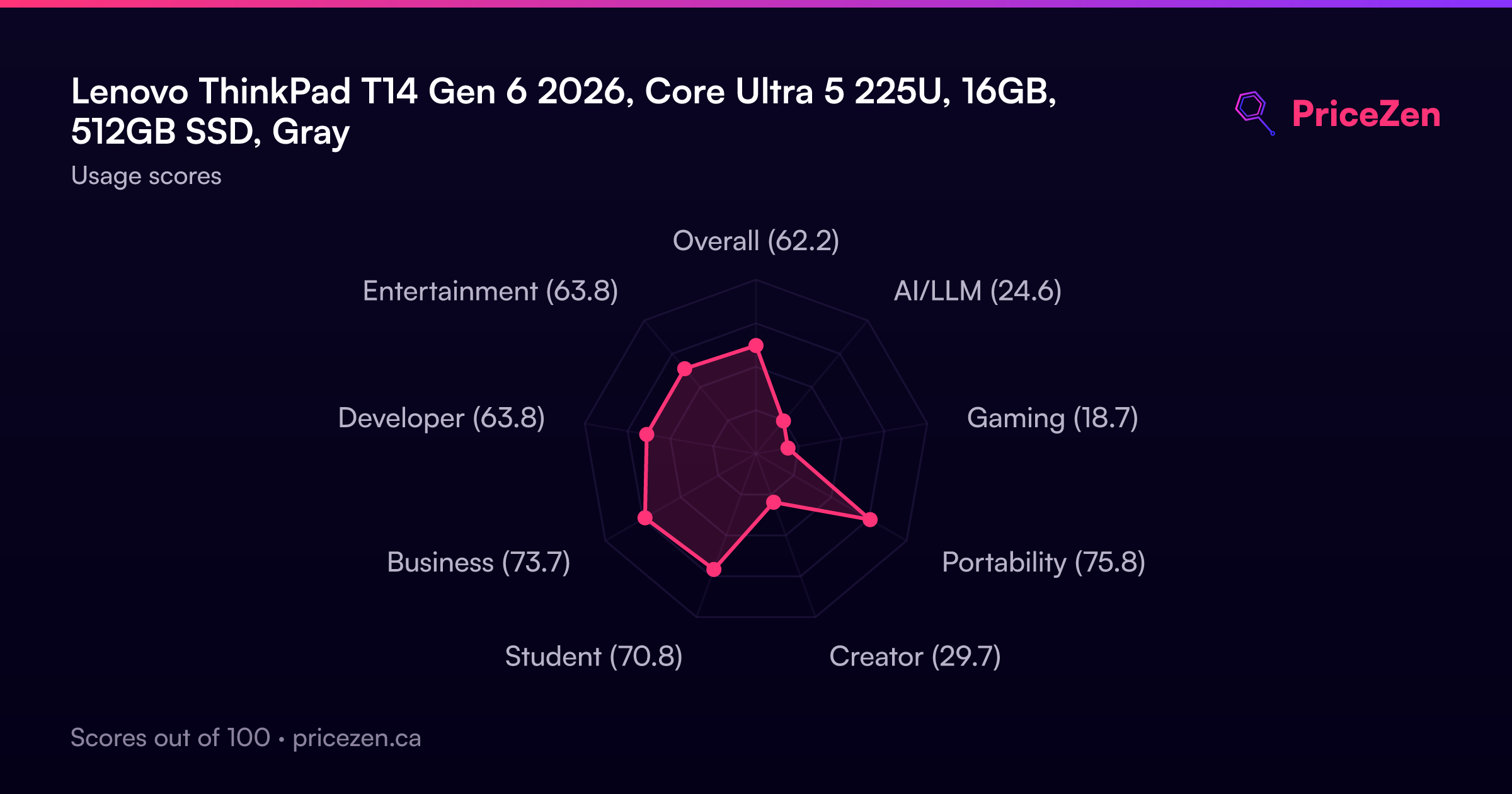
Who's this for? Business users who live in spreadsheets, email, video calls, and browser tabs. Students who want something durable that'll survive a backpack. Anyone who values ports and reliability over raw horsepower. The 79.4/100 business score in our database backs that up. It's a strong fit for productivity work, and the compact score of 77.5 reflects how easy this thing is to carry at 1.38kg.
The interesting bit here is the Intel Core Ultra 5 225U. It's a 12-core chip built for efficiency and AI-adjacent tasks like video call enhancement and document summarization. Lenovo's leaning hard into the "AI PC" marketing, but the real story is simpler: this is a well-built laptop with excellent connectivity and a screen that gets bright enough for office use. The 400 nits rating means you won't be squinting near a window.
Common Questions
Q: Does this laptop have Bluetooth?
Yes, it does. Bluetooth is standard on this config, so you can pair wireless headphones, mice, and keyboards without any dongles. It's part of the same wireless module that handles the Wi-Fi 7 support.
Q: What's the display resolution?
The display runs at 1920x1200, which is a 16:10 aspect ratio. That extra vertical space compared to a standard 1080p panel is nice for documents and web browsing. It's a touchscreen too, which is handy for scrolling and occasional taps, though the 60Hz refresh rate means it won't feel as smooth as higher-refresh displays.
Q: Can this handle gaming?
Not really. The integrated Intel Graphics are fine for casual browser games and older titles at low settings, but anything modern or 3D-heavy will struggle. Our gaming score for this config is 19.3 out of 100. If gaming matters, look at something with a dedicated GPU like the ASUS ROG Zephyrus G14 or HP OMEN Transcend 14.
Q: Is the storage upgradeable?
The 512GB SSD is on the smaller side, but ThinkPads are known for being serviceable. Lenovo lists customer replaceable units as a feature of this model, so you should be able to swap in a larger drive down the line. That said, 512GB is workable for business use if you lean on cloud storage.
Who Should Skip This
If you do any kind of visual creative work, skip this. The 45% NTSC color gamut means colors won't be accurate, and that's a dealbreaker for photo or video editing. Look at the MacBook Pro M4 Pro or a machine with a higher-quality display instead. Gamers should also look elsewhere. The integrated graphics and 60Hz screen make this a poor fit for anything beyond casual play. The ASUS ROG Zephyrus G14 or HP OMEN Transcend 14 are much better options if you want to game on a 14-inch laptop.
Also, if you need a lot of local storage, the 512GB SSD might feel cramped. You can upgrade it, but not everyone wants to crack open a new laptop. If you're storing large files locally, consider a config with 1TB or plan on an external drive.
Verdict
For business users and students, the ThinkPad T14 Gen 6 is an easy recommendation if you find it at the right price. The port selection is genuinely excellent, the build quality is what ThinkPads are known for, and the 400-nit display is bright enough for most environments. The Core Ultra 5 225U handles productivity work without breaking a sweat, and 16GB of RAM means you won't feel cramped for a few years.
But if you do any creative work, look elsewhere. The 45% NTSC color gamut means colors will look washed out compared to a proper photo-editing display. And if you want to game, even casually, the integrated graphics will frustrate you. The 512GB SSD is also tight for a machine in this price range. For pure office work, it's great. For anything beyond that, you'll feel the compromises.
Usage Scores
- Overall62.2
- AI/LLM24.6
- Gaming18.7
- Portability75.8
- Creator29.7
- Student70.8
- Business73.7
- Developer63.8
- Entertainment63.8